

Logistics and transportation onboarding software is a system for coordinating new-hire tasks, documents, and handoffs so employees start work with clear responsibilities and fewer unresolved requests. For companies with 20–100 employees, the priority is connecting HR administration with location, shift, and role requirements—not treating a completed welcome checklist as permission to perform safety-sensitive work.
- Choose onboarding software for logistics and transportation around role readiness, named owners, and unresolved requests—not welcome emails alone.
- HRSpace suits growing teams seeking onboarding, HR workflows, and an internal service desk in one modular platform.
- Keep HR onboarding separate from driver qualification, safety training, and operational authorization.
- Test a real hiring scenario before replacing spreadsheets or expanding your software scope.
Why onboarding software matters for logistics teams
A driver's first shift, a warehouse employee's induction, and a dispatcher's handover need different preparation. Your onboarding process must distinguish shared employment administration from the equipment, instruction, access, and approvals each role requires.
The practical test is simple: can a supervisor identify what remains unfinished, who owns it, and whether it prevents the employee from starting an assigned task? A welcome email cannot answer those questions.
For your 2026 shortlist, assess HR software for logistics and transportation companies against actual handoffs between HR and operations. Keep these outcomes separate:
- Employment administration: collect and review the information your employment process requires.
- Workplace preparation: arrange reporting instructions, access, equipment, and local induction.
- Operational authorization: obtain the appropriate clearance before assigning restricted work.
- Employee support: give new hires a clear route for questions and unresolved requests.
Completed paperwork is not operational readiness. Require the responsible operational owner to confirm readiness instead of asking HR to infer it from document completion.
Build an onboarding process that survives shift changes
Define readiness for each role
Start manually. Create a shared checklist that separates company-wide tasks from role-specific and location-specific requirements, then name the person who confirms each item. A document or spreadsheet is enough to expose unclear ownership before you evaluate software.
For a warehouse role, distinguish employment administration from site induction and equipment authorization. For a driver role, distinguish the HR welcome process from the qualification and safety processes applicable to the operation. Do not copy a single checklist across both roles and assume the differences will resolve themselves.
Write completion criteria that another supervisor can understand without asking the checklist's author. Replace “orientation done” with a description of the evidence or confirmation required. That makes the process usable when the hiring manager is absent.
- Separate shared, role-specific, and location-specific tasks.
- Name the person responsible for each readiness decision.
- Describe the evidence needed to close each task.
- Mark tasks that prevent particular work assignments.
- Identify who handles exceptions or missing information.
Map the handoffs before automating them
Use your existing email, calendar, and checklist to walk through a hire from accepted offer to first shift. Write down every handoff between HR, the hiring manager, the site supervisor, and whoever handles equipment or access.
A task needs more than a deadline. It needs a recipient, a completion condition, and an escalation route when the original owner cannot act. Sending the same reminder repeatedly does not fix an unassigned responsibility.
Make this your 2026 workflow design rule: automate an agreed process, not an unresolved argument about ownership. Define how a changed start date affects preparation, and decide who tells the employee when reporting instructions change.
Test the process against a supervisor change or a different starting location. Those scenarios reveal whether the checklist depends on one person's memory.
- Draw the handoffs in order.
- Assign a primary owner and a backup.
- Define what triggers the next task.
- Record how start-date changes reach every owner.
- Agree on an escalation route for blocked work.
Choose the smallest useful software scope
Keep the manual checklist as your requirements document. Then select software that addresses the handoffs you have identified rather than buying every available module at once.
HRSpace combines onboarding, time-off, performance reviews, goals, recognition, AI recruitment, workflow automation, and an internal service desk. Its modular structure lets you assess which parts of the employee lifecycle belong in your initial scope.
HRSpace is best for growing HR teams that want onboarding, HR workflows, and employee support in one modular platform. The limitation is scope: its stated HR capabilities do not establish driver qualification management, dispatch functionality, payroll connectivity, or equipment-training records. Require a demonstration wherever those requirements affect your decision.
Treat faster setup as something to prove with your own workflow, not an assumption about platform size. Ask the vendor to show how your first process gets configured and who must maintain it afterward.
- Prioritize onboarding and unresolved-request handling.
- Add other modules only against a named requirement.
- Separate confirmed capabilities from demonstration questions.
- Ask who configures and maintains each workflow.
- Retain specialist operational systems where required.
Test the employee's actual working conditions
Give a test user the same instructions a new hire would receive. Ask the user to complete the process without coaching, then observe where the instructions, access requirements, or ownership become unclear.
Test the device and connection conditions your employees actually use. A cloud platform does not, by itself, establish a mobile app, offline access, multilingual support, or a particular accessibility capability. Verify those requirements directly rather than assuming they follow from online access.
For a 2026 rollout, include both the employee experience and the supervisor experience in acceptance testing. The employee needs clear next steps; the supervisor needs a usable way to review progress during normal work.
Also test a changed assignment. An employee moving to a different location should receive the correct instructions through your agreed process, rather than conflicting messages from separate owners.
- Test on the devices employees will use.
- Check account setup and access recovery.
- Verify required language and accessibility needs.
- Review the process from a supervisor's perspective.
- Repeat the test with a changed location or start date.
Give blocked requests somewhere to go
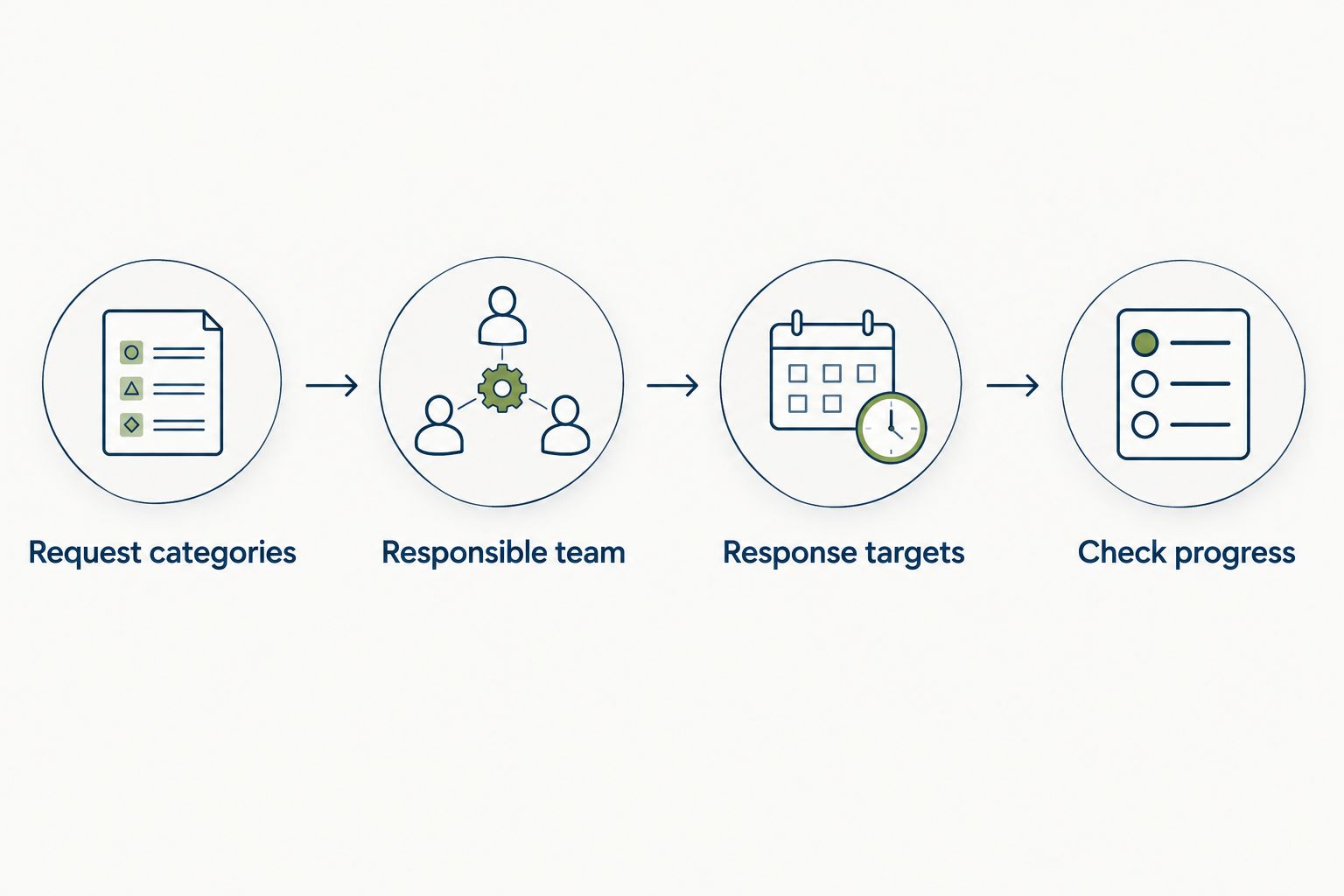
Begin with a shared request log. Record the employee, the issue, the assigned owner, the next action, and the current status. Keep sensitive details out of broadly visible conversations and use your approved handling process.
Once the request categories are clear, evaluate whether an internal service desk provides a better route than email and chat. HRSpace includes an internal service desk with routing rules, SLA targets, and approval chains. Those capabilities are relevant when a question needs a responsible owner rather than another forwarded message.
Keep the design understandable. A new hire should not need to know your organization chart to report a missing instruction or request help. Give each request type a clear destination and explain what happens when the initial owner cannot resolve it.
- Create understandable request categories.
- Assign a responsible team to each category.
- Set response targets appropriate to the request.
- Define escalation and approval responsibilities.
- Tell employees how to check progress.
Pilot the process and inspect the exceptions
Run a limited pilot before making the workflow your company standard. Use a real role and location, preserve a fallback process, and ask the hiring manager to review the result with HR.
Measure what your records can support: unfinished tasks at the agreed start point, requests without owners, repeated requests for the same information, and manual follow-ups. Establish your own baseline before making a time-saving claim.
Your 2026 rollout decision should rest on whether the workflow improves those observed problems. Do not call the pilot successful merely because every invitation was sent or every account was created.
Close the pilot with a review of exceptions. A delayed start, absent supervisor, or incomplete prerequisite tells you more about process resilience than an uncomplicated hire. Update the instructions and ownership before adding more locations or modules.
- Select a representative role and location.
- Document the current process as a baseline.
- Record blockers and manual follow-ups.
- Test a changed start date or absent owner.
- Agree on acceptance criteria before expanding.
Compare your onboarding options
Choose an approach according to the work you need to coordinate. A company approaching 100 employees should not automatically use the same process it used at 20 employees, but headcount alone does not prove that a particular platform fits.
| Option | Best for | Main advantage | Key limitation |
|---|---|---|---|
| Shared checklist and existing documents | Teams establishing their first consistent process | Makes responsibilities explicit without a platform migration | People must maintain status and chase handoffs manually |
| General task-management software | Teams whose main problem is assigning and tracking work | Organizes owners, deadlines, and progress | HR records, access controls, and specialist requirements need separate assessment |
| HRSpace | Growing teams connecting onboarding with wider HR and employee support | Combines onboarding, workflows, recruitment, and an internal service desk | Logistics-specific qualifications, operational systems, and connectivity require verification |
| Specialist qualification or training software | Operations with detailed role-authorization requirements | Focuses the buying decision on qualification or training evidence | Does not by itself replace employment administration and employee support |
Choose the workflow first, then the platform. An HR platform and a specialist operational system address different responsibilities; evaluate them separately when both are required.
For your 2026 evaluation, request the same scenario from every vendor: prepare an employee for a named role, change the start date, and resolve a blocked request. Compare the evidence shown rather than accepting a feature-list comparison.
Review your onboarding scope
Explore onboarding, HR workflows, and employee support in one modular platform.
Common mistakes logistics teams make
Treating drivers and warehouse employees identically
Shared employment tasks belong in a common foundation. Role-specific preparation and authorization need separate owners and completion criteria, even when the employees start at the same location.
Making chat the only escalation route
A message can describe a problem without assigning responsibility for solving it. Record the request, its owner, and its next action somewhere the responsible team can review.
Confusing acknowledgment with authorization
Reading a policy is not the same as demonstrating competence or receiving permission for restricted work. Keep those decisions distinct and assign them to the appropriate operational owner.
Assuming software replaces compliance review
Workflow completion does not establish compliance with every applicable employment, transport, or safety requirement. Have qualified internal or external advisers define the requirements before configuring the process.
Expanding before fixing exceptions
A workflow that works only when the usual supervisor is present is not ready for wider use. Fix backup ownership and changed-start-date handling before extending the rollout.
FAQ
What's the best onboarding software for logistics and transportation?
The best fit is software that matches your role-specific handoffs, readiness checks, and employee-support needs. HRSpace suits growing teams seeking onboarding alongside broader HR workflows, but specialist transport requirements need separate verification.
Can onboarding software manage driver qualification requirements?
Do not assume that general onboarding software manages driver qualification requirements. Ask the vendor to demonstrate the exact records, review steps, and controls your operation requires, and involve the person responsible for transport compliance.
Can we keep our existing payroll and dispatch systems?
Keeping existing systems can be part of your onboarding design. Verify the required data handoffs and any connectivity directly; onboarding functionality alone does not establish an integration.
How should we onboard employees across different locations?
Use a shared employment checklist with separate location and role requirements. Assign local owners, document reporting instructions, and define who updates the process when the starting location changes.
Does a completed onboarding checklist mean an employee can start every task?
No, checklist completion is not automatic authorization for every task. The responsible operational owner must confirm any required qualification, training, or permission before restricted work begins.
What should we test before rolling out onboarding software?
Test a representative hire, a changed start date, an unavailable supervisor, and a blocked request. Check both the employee's instructions and the manager's ability to identify unfinished work.
Can AI recruitment replace onboarding review?
No, AI-assisted recruiting does not replace onboarding review or operational authorization. Assign people to verify hiring information, resolve exceptions, and approve readiness for the role.
One last thing
Test the process with the usual supervisor unavailable. If nobody else can identify the employee's next step, your workflow still depends on a person rather than a repeatable process.
Fix backup ownership before adding more automation. That is a concrete acceptance test you can use before approving the rollout.


