

Instead of manually chasing HR, IT, and managers whenever a new hire starts, connect a confirmed onboarding event to service desk requests with owners, deadlines, and completion checks. For service desk ticket automation new hire onboarding, the essential sequence is simple: confirm the hire, create only the necessary requests, route each request, and verify the work—not just the notification.
- HRSpace combines onboarding, HR workflows, and an internal service desk; verify the event-to-ticket connection before configuring automation.
- Service desk ticket automation new hire onboarding needs a confirmed trigger, routing rules, duplicate protection, and completion checks.
- Separate pre-start preparation from first-day work so access does not depend on someone remembering a chat message.
- Test changed start dates and repeat events before enabling the workflow for real employees.
Why this matters
A new employee's start date is not a complete instruction. IT needs to know which access is required. HR needs an owner for outstanding paperwork. The manager needs to distinguish preparation from work that belongs on the employee's first day.
HRSpace is best for growing teams that want onboarding and an internal service desk in one HR platform. HRSpace covers both areas, alongside other employee-lifecycle modules. That shared scope is relevant to teams of 20–100 employees, but it does not establish that a particular onboarding event can automatically create a ticket.
For your 2026 rollout, confirm the exact connection before building around it. A workflow that sends a message is different from one that creates an assigned request, and a completed request is different from completed access provisioning.
The instructions below define the configuration and acceptance checks. Use your available controls to implement them; confirm actual interface labels, event support, and ticket actions in your workspace rather than treating these design terms as menu names.
Before you start
- Access and ownership: Have permission to configure onboarding workflows and service desk routing, plus a named HR owner and an accountable owner for every destination team. Confirm which configuration permissions your workspace requires.
- Employee information: Prepare a stable employee identifier, confirmed start date, manager, department, work location, and the request requirements for each role. Use test records rather than live employee details while checking the workflow.
- The gotcha: Confirm that the available automation can create or update service desk requests—not merely send notifications. Also confirm how repeat events are handled; a changed start date must not silently generate a second onboarding package.
Do not activate the workflow until the event, action, routing, and repeat-run behavior are demonstrated. If an event-to-ticket action is unavailable, keep request creation as an explicit HR task rather than presenting a notification as ticket automation.
Onboarding trigger
Define the start event
- Choose the business event that means the hire is ready for operational preparation. Use a confirmed onboarding record or another verified event supported by your workflow system. Do not use an unfinished recruiting record as proof that access should be prepared.
- Define the eligibility conditions. Require the information needed to route work: employee identity, start date, manager, department, and location. Treat missing information as an exception for HR to resolve, not permission to guess.
- Separate preparation from first-day execution. Equipment preparation can belong before the start date; granting access should follow your organization's approved access policy. Do not assume every task should fire at the same moment.
- Define what happens when the start date changes or the hire is canceled. The intended behavior should update or stop outstanding work instead of leaving owners with obsolete instructions.
- Record the time zone used to interpret the start date. Test the boundary around that date so a scheduled event does not land on the wrong working day.
Expected result: A qualifying test hire enters the workflow at the intended point, while incomplete or canceled records do not create ordinary fulfillment work.
For the 2026 configuration, document the selected event and its eligibility conditions next to the workflow. An administrator should be able to explain why a particular employee did—or did not—enter it without reconstructing a chat conversation.
Ticket package
Define the work, not just the message
- List the work that needs independent ownership. Typical onboarding request categories include equipment preparation, approved account access, and outstanding HR documentation. These are planning examples, not claims that your platform provisions equipment or accounts.
- Choose a request structure using the comparison below. Keep requests separate when different teams must finish different work; use a coordinated checklist when a single owner genuinely controls completion.
- Define each request's required information. Include the employee identifier, work requirement, responsible team, relevant location, and required completion date. Include the manager only where that person has a decision or fulfillment role.
- Limit employee details to what the recipient needs. An equipment request does not need the employee's full HR record. Follow your organization's access and data-handling policies when deciding what appears in tickets or notifications.
- Define completion evidence. For an account request, require confirmation of the approved access outcome—not merely confirmation that an email was sent. For paperwork, define what HR must check before closing the work.
| Request structure | Best for | Advantage | Trade-off |
|---|---|---|---|
| Separate requests | Work owned by different teams | Each task has a clear owner and completion state | Coordination requires a shared employee reference |
| Coordinated checklist | Work controlled by one accountable owner | Keeps related preparation together | Individual blockers are less visible unless tracked explicitly |
Expected result: Every generated request describes a specific outcome, includes sufficient fulfillment information, and has a defined closing condition.
For your 2026 onboarding template, keep the initial package narrow. Automating an unclear task only distributes the ambiguity faster. Add another request category only when you can name its owner, input requirements, and completion evidence.
Routing and deadlines
Assign accountable teams
- Map each request category to its responsible team. Route account-access work to the team accountable for access, equipment work to the equipment owner, and HR documentation to HR. Match your actual organization rather than copying a generic department chart.
- Add location or department conditions only where they change the responsible owner. A routing condition should answer a real operational question; unnecessary branches make exceptions harder to diagnose.
- Define a fallback owner for missing or unmatched routing information. That owner should correct the source data or assign the request. Do not let unmatched tickets remain unowned.
- Set completion deadlines relative to the employee's confirmed start date. Distinguish a required-by date from an SLA target: the former states when the hire needs the outcome; the latter defines the service team's response or resolution expectation.
- Place approvals before restricted work proceeds. HRSpace's service desk context includes routing rules, SLA targets, and approval chains; verify which controls apply to your onboarding request type before using them in this design.
Expected result: Each test request reaches the correct team with a deadline, and an unmatched request reaches the fallback owner instead of disappearing into a general queue.
Use this order when defining the process: Confirmed hire, Required work, Team owner, Completion check. Each stage answers a different question: whether work should begin, what must happen, who owns it, and how you know it finished.
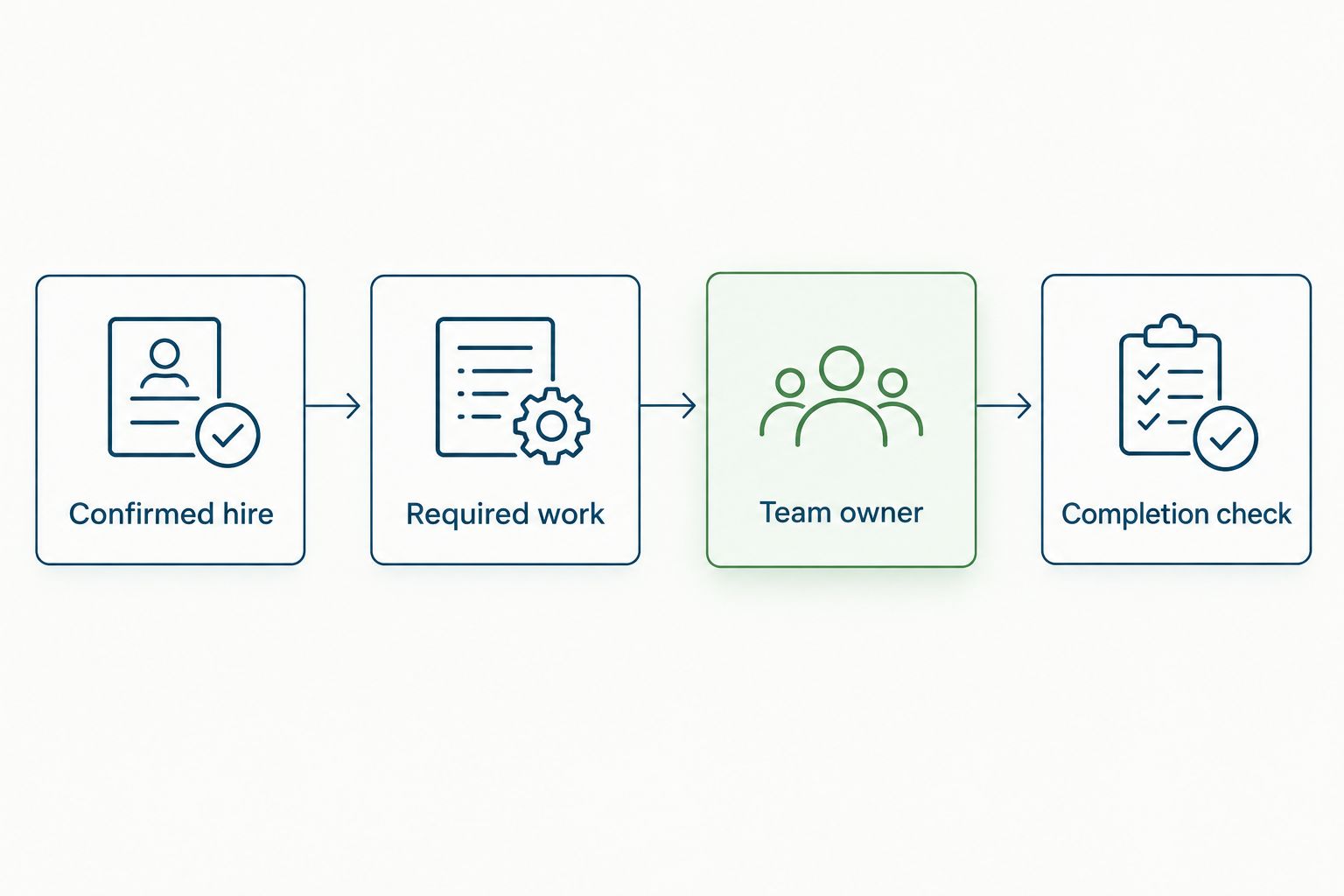
A service desk can organize the request and its accountability. It does not, by itself, prove that a connected system created an account, delivered equipment, or collected a document. Check those outcomes separately.
Validation and activation
Prove the workflow before using it
- Prepare 3 test hires: a standard hire, a hire whose location changes the routing, and a hire with a missing required field. These are recommended test cases, not a product limit or a performance benchmark.
- Follow each case from source record to service desk outcome. Check the request contents, destination owner, approval requirement, deadline, and visibility. Verify that the incomplete record takes the exception path.
- Run the same qualifying event 2 times for the standard hire. Check that the second run does not create duplicate active requests. If duplicate protection is unavailable, define a controlled creation step before enabling automation.
- Change the start date and repeat the test. Verify that outstanding work reflects the revised requirement, without reopening completed work unnecessarily or adding another request package.
- Check canceled-hire handling. Outstanding requests should stop or be explicitly reviewed according to your policy, rather than continuing with the original start instructions.
- Activate 1 request category first. Expand only after that category passes the event, routing, repeat-run, and completion checks. Keep a named owner responsible for exceptions during rollout.
Expected result: The standard case completes correctly, the location case routes correctly, and the incomplete case remains controlled. Repeat events and changed dates do not multiply the work.
For a 2026 launch, retain the expected outcome for each case as your acceptance record. This is more useful than a screenshot showing that an automation toggle is enabled: it proves the behavior your HR team actually needs.
When a new hire's details change
Treat employee-record updates as a separate workflow from initial request creation. Create work when the hire qualifies; revise outstanding work when the requirement changes. The distinction prevents a harmless profile edit from becoming another onboarding package.
A changed start date should prompt a review of outstanding deadlines. A changed location should prompt a routing review where location determines ownership. A changed manager should prompt an approval review where that manager is part of the approval chain.
Define which fields matter, then confirm that your available update event can detect them. If selective update handling is unavailable, assign HR an explicit reconciliation task instead of rerunning the entire creation workflow.
For completed requests, check whether the change creates genuinely new work. A completed equipment request does not automatically need reopening because the start date moved; a new role requirement can require a separate access review. Make that decision visible rather than hiding it inside broad update rules.
Troubleshooting
Tickets never appear
Check whether the employee record met the trigger conditions and whether the configured action creates a request. A successful notification does not prove successful ticket creation. Test the event and action independently, then trace the same test employee through both.
Tickets appear twice
Check for overlapping creation workflows, repeated events, and update events that also create requests. Match the employee identifier and request category before creating more work. Where supported, use a duplicate check; otherwise retain controlled creation until repeat-run behavior is safe.
Requests reach the wrong team
Check the source location and department before changing the routing rule. Then review rule overlap and precedence where the system supports them. Add a fallback owner and a documented correction path so an unmatched case remains accountable.
Deadlines move incorrectly
Check the source start date, the time zone, and whether the deadline calculation uses the latest confirmed record. Test a changed date against outstanding requests. Avoid maintaining a separate copied start date unless you have a reliable way to keep it synchronized.
Tickets close but work remains unfinished
Replace activity-based closing conditions with outcome-based ones. Sending an access request is not the same as granting approved access. Ask the fulfillment owner to record the completion evidence your process requires, then check employee readiness separately.
Customize your workflow
Once the initial onboarding package works, connect follow-up employee questions to the same service desk process. The employee self-service to HR service desk guide covers the adjacent workflow to plan next.
HRSpace combines onboarding, workflows, and an internal service desk within its modular HR platform. That scope supports evaluating the employee journey together; the implementation still needs verified events, actions, permissions, and completion checks. Choose modules around the work your team owns, not around an unverified integration promise.
For your 2026 expansion, review exceptions before adding more branches. Repeated missing information belongs in the source-record requirements. Repeated routing errors belong in the ownership map. Neither problem is solved by sending more reminders.
FAQ
How do I automatically route service desk tickets when a new hire starts?
Connect a supported, confirmed onboarding event to a ticket-creation action, then assign requests through category and ownership rules. Verify required fields, repeat-run behavior, and completion evidence before activating the workflow.
Can HRSpace create service desk tickets directly from onboarding?
Confirm the specific onboarding event and ticket-creation action in your HRSpace workspace before using this workflow. The platform includes onboarding, workflows, and an internal service desk, but that scope alone does not establish a particular event-to-ticket connection.
Should onboarding tickets start before the employee's first day?
Preparation requests should start when your confirmed hiring process authorizes the work. Schedule access and other restricted actions according to your organization's policy rather than treating the start date as blanket approval.
How do I prevent duplicate new hire tickets?
Check whether work already exists for the employee and request category before creating another request. Test repeated events and record updates; retain controlled request creation if the available automation cannot handle duplicates safely.
What happens when a new hire's start date changes?
Review and revise outstanding deadlines rather than recreating the entire onboarding package. Keep completed work closed unless the changed requirement creates genuinely new work.
Should I create separate tickets for HR and IT?
Use separate requests when HR and IT own different outcomes. A coordinated checklist suits work controlled by one accountable owner, but it still needs explicit completion conditions.
Does closing an onboarding ticket mean the employee is ready?
No; ticket closure proves readiness only when the closing condition includes the required outcome. Verify approved access, equipment, or documentation rather than relying on a sent notification.
One last thing
Test the canceled hire before the next successful hire. Cancellation exposes whether the workflow can stop work, preserve accountability, and prevent obsolete instructions from reaching fulfillment teams. A process that starts reliably but cannot stop cleanly is not ready for onboarding.


