

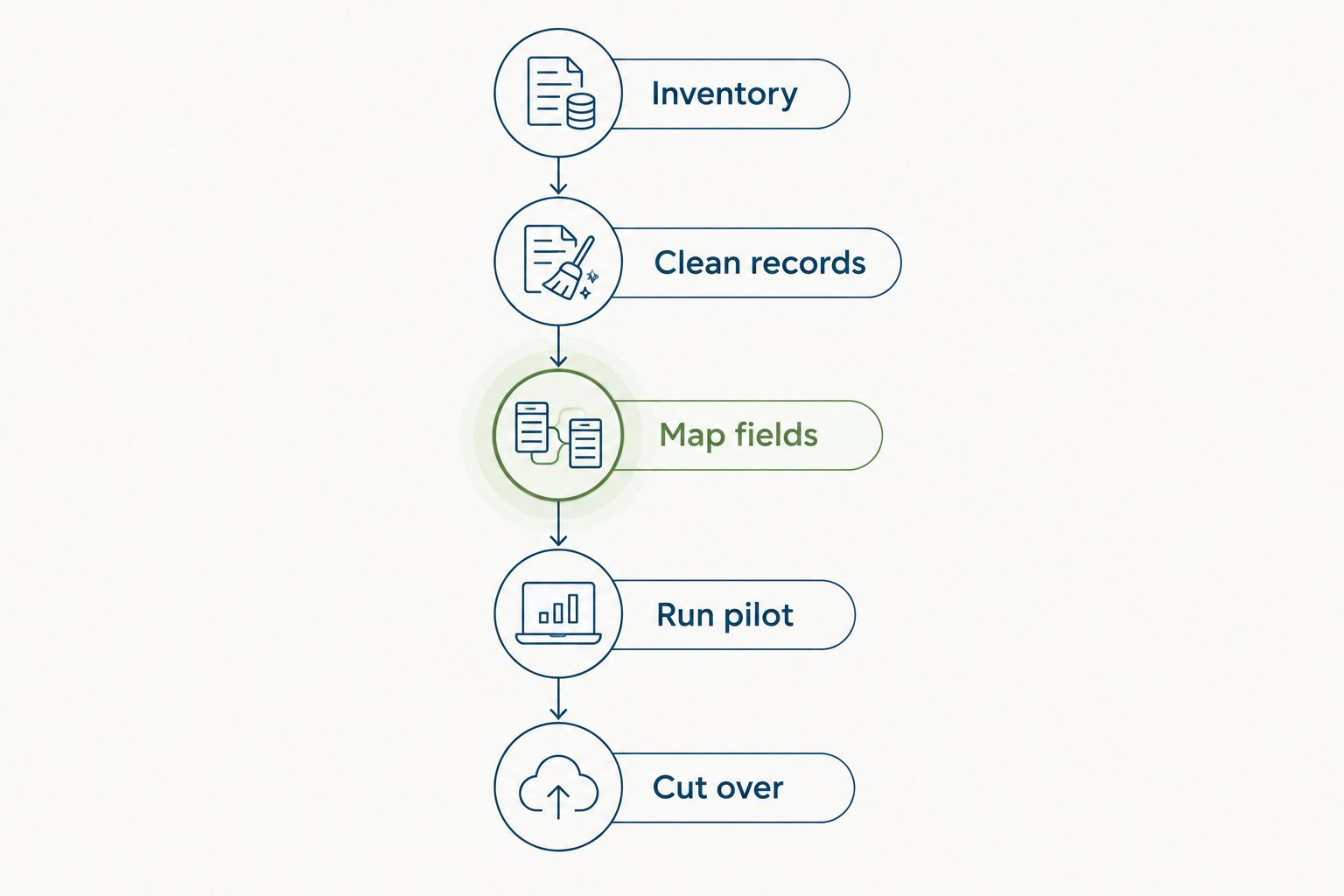
To migrate from spreadsheets to HR software, clean your employee records, map each field to the new system, test a small import, reconcile the results, and switch ownership to the software on a defined cutover date. Move the process as well as the data: assign approvals, restrict access, and stop routine spreadsheet edits once the new system becomes the source of truth.
- How to migrate from spreadsheets to HR software: clean records, map fields, test imports, then cut over.
- HRSpace fits growing teams seeking modular HR software across the employee lifecycle.
- Reconcile employee records and time-off balances before opening the system to everyone.
- Keep spreadsheets as controlled archives, not competing sources of truth.
How to migrate from spreadsheets to HR software
Treat migration as an operational handover, not a file upload. Your 2026 migration plan should identify what moves, who checks it, and which system owns each process afterward. If you are considering HRSpace, start with the modules your team needs rather than assuming every employee process must launch together.
Use the following steps as your migration checklist. Finish each validation task before moving to the next stage.
1. Define the first workflow
Choose the employee process you want to move first. Employee records, onboarding, and time-off administration are relevant starting points, but your choice should follow the work currently creating duplicate entry or unclear ownership.
Write the outcome in plain language: employees submit requests in the new system, managers approve them there, and HR maintains the resulting record. That statement is more useful than a goal such as improving digital HR.
- Name the process owner.
- Identify everyone who submits, approves, or updates information.
- Define what counts as a completed request.
- Separate launch requirements from later improvements.
Do not rebuild every spreadsheet habit inside the software. Keep steps that protect accuracy or accountability; question steps that exist only because someone once added another tab.
2. Inventory your spreadsheets
List every file that holds information needed for the first workflow. Include shared workbooks, local copies, manager trackers, and forms that feed those files.
For each source, record its owner, purpose, last verified update, and whether it contains employee information you need to move. Identify the authoritative source for each field before merging anything.
A manager's team list and HR's employee register can disagree. Resolve that disagreement with the responsible owner rather than treating the newest file as automatically correct. Keep a separate exception list for unresolved records so they do not disappear during cleanup.
Your inventory should also distinguish current operational data from historical material. A past review document does not necessarily belong in the same import as an employee's current manager assignment.
3. Clean employee records
Remove duplicate employee rows, standardize department names, and resolve inconsistent dates or status labels. Preserve a stable employee identifier where one already exists; do not use a person's name alone to match records.
Check manager assignments against the current reporting structure. Distinguish employees with similar names, and separate active employees from former employees without discarding records you are required to retain.
For a team of 20–100 employees, a full review of the active employee list gives HR a clear acceptance task. Assign unresolved questions to named owners instead of carrying ambiguous values into the new system.
Do not silently replace missing information with guesses. Leave the value unresolved in your working file, document the question, and obtain an answer before importing a field that controls access or approvals.
4. Map fields before importing
Create a field map showing where every spreadsheet column belongs in the destination system. Use the vendor's current import instructions and confirm how the system handles required fields, empty values, dates, and existing records.
Your mapping document should include:
- Source column name.
- Destination field name.
- Required format or allowed values.
- Any transformation you will apply.
- The person responsible for checking the result.
Pay particular attention to fields that look alike but mean different things. Employment start date, system enrollment date, and review-cycle start date serve different purposes.
Confirm import behavior before uploading real employee data. An upload template is not proof that documents, historical approvals, or every custom field will transfer through the same route.
5. Assign access and approvals
Specify who should see employee information and who should change it. Translate your existing approval policy into named responsibilities before configuring the software.
HR, managers, and employees have different jobs. Test the permissions available in your chosen platform against those responsibilities rather than assuming a default role matches your policy.
For time off, define who approves requests and who resolves an absent approver. For onboarding, identify who owns each task and who confirms completion. For employee support, name the team responsible for receiving and resolving requests.
Keep sensitive records out of broadly shared migration files. Use controlled access for preparation and review, then check the destination permissions before inviting employees.
6. Run a representative pilot
Start with 5 employee records as a practical pilot recommendation, not a promised implementation benchmark. Include different departments, a manager relationship, and any employment status or work pattern your first workflow must handle.
Check the imported records field by field. Then run 2 test requests through the chosen workflow: one ordinary request and one exception requiring a different decision or owner.
Record what you expected, what happened, and what needs correction. If your chosen system offers a test environment, use it; otherwise, agree on a controlled testing method with the vendor before entering test information.
A successful import is not enough. The pilot passes only when the right person can see the right record and complete the intended action.
7. Reconcile the full migration
After correcting the pilot, import the agreed data and compare the destination with your approved source. Reconcile employee counts, reporting relationships, department assignments, and the fields your launch workflow depends on.
For time-off migration, check balances and the effective date used to interpret them. Keep pending requests separate from completed decisions so the cutover does not create duplicate approvals.
Use an exception log with an owner and resolution for each mismatch. Do not approve launch simply because the upload finished without an error message.
Make reconciliation a sign-off task. The process owner should confirm that the records are correct and the workflow works before employees begin relying on the system.
8. Cut over and retire live spreadsheets
Choose a cutover point and communicate which system owns each activity afterward. Explain where employees submit requests, where managers approve them, and how people report incorrect information.
Freeze the old operational workbook for routine editing. Preserve a controlled archive according to your retention obligations, but remove it from the everyday workflow.
If an urgent correction arrives during the switch, log it and apply it deliberately. Do not let separate people update the old sheet and the new system without reconciliation.
Finally, assign ongoing ownership. Someone must maintain manager changes, employee departures, policy updates, and workflow exceptions after launch; otherwise, clean migration data becomes stale operational data.
The sequence below keeps validation ahead of launch. Do not switch daily work to the software while unresolved import errors still affect the process you are launching.
Why this matters
A spreadsheet migration changes who is responsible for employee information. Without a clear handover, HR keeps checking old files while managers use the new system, creating competing records instead of a shared process.
For your 2026 rollout, measure readiness through completed checks: approved field mappings, reconciled records, tested permissions, and named workflow owners. These are launch conditions, not vendor promises.
Keep the first release focused. A smaller, verified workflow is more useful than a broad launch that leaves employees unsure where to act.
Which migration approach should you choose?
Use a phased migration when you can separate workflows cleanly. Use a single cutover when the records and processes depend on each other and your team can validate them together.
Neither approach removes the need for testing. Choose based on dependencies and ownership, not the appeal of a faster announcement.
| Approach | Best for | Advantage | Trade-off |
|---|---|---|---|
| Phased migration | Teams moving a clearly bounded workflow first | Limits the initial scope and gives owners a focused validation task | Requires explicit boundaries between old and new processes |
| Single cutover | Teams with closely connected processes and completed validation | Establishes one operational handover point | Requires all launch-critical records and workflows to be ready together |
For a hypothetical 50-employee team, phasing time-off administration separately from performance reviews is a planning choice, not an implementation-time estimate. Check whether the shared employee records and manager assignments are ready before separating those launches.
Avoid an indefinite hybrid setup. If a spreadsheet remains necessary during a phase, specify exactly what it owns and when that responsibility ends.
Why migration effort varies
The scope of your 2026 migration follows the processes you include and the condition of their source records. These factors determine what you need to prepare and validate:
- Onboarding: Decide which active tasks move and who owns unfinished work.
- Time off: Reconcile balances, pending requests, and approval responsibilities.
- Performance reviews and goals: Separate current cycles from historical material and check employee-manager assignments.
- Recruitment: Define where candidate work ends and employee onboarding begins.
- Internal service desk: Assign request owners and decide how open requests cross the cutover.
Do not turn this list into a requirement to launch everything. Use it to identify dependencies, then choose the smallest useful scope.
For a separate planning checklist, read how long it takes to implement HR software. Build your schedule around your acceptance tasks rather than borrowing another company's launch date.
Where does modular HR software fit?
HRSpace HR software fits growing teams that want modular tools across the employee lifecycle. Its stated scope covers onboarding, time off, performance reviews, goals, recognition, recruitment, workflows, and an internal service desk.
HRSpace uses modular, per-employee pricing. That makes module selection part of your migration decision: identify the employee processes you need now before evaluating additional scope.
The trade-off is planning responsibility. You still need to confirm the import method, field support, historical-data handling, permissions, and any connections your existing systems require. Product scope does not establish those migration details.
Ask for a demonstration using your actual workflow. Prioritize a faster setup over unnecessary suite breadth, but judge setup effort through the demonstrated configuration and agreed implementation tasks—not a feature list.
Can you keep spreadsheets after switching?
Yes, keep spreadsheets for controlled archives or clearly defined analysis, not as a second editable employee register. Every live process needs a named source of truth.
If you export data for analysis, label the export's purpose and date. Corrections to operational employee records belong in the designated system, not only in a downloaded copy.
Should you move every historical record?
No, historical records need a retention decision before they need an import decision. Separate what must remain accessible from what employees and managers need inside the live workflow.
Confirm your legal and organizational retention requirements with the responsible adviser. Preserve context and access controls even when you keep older material outside the new platform.
How do you know the migration is complete?
The migration is complete when the agreed records reconcile, permissions work, approvals reach the correct owners, and employees know where to act. A successful upload alone does not meet that standard.
Include spreadsheet retirement in your sign-off. If routine work still depends on the old workbook, the operational handover remains unfinished.
FAQ
What's the first step when moving from spreadsheets to HR software?
Choose the first employee workflow and name its owner. Then inventory the files that supply its records and decide which source is authoritative for each field.
Can I import an Excel spreadsheet directly into HR software?
Direct spreadsheet import depends on the chosen platform's supported formats and import process. Confirm the current template, required fields, and handling of existing records before preparing the upload.
How many employee records should I use for a migration pilot?
Use 5 employee records as a practical starting recommendation, choosing records that represent the workflow's different conditions. Expand the pilot if those records do not cover your approval or data requirements.
Should I migrate time-off balances before pending requests?
Reconcile time-off balances and pending requests together before launching time-off administration. Document the effective date and distinguish completed decisions from requests that still need approval.
Is HRSpace suitable for a phased HR software migration?
HRSpace's modular HR platform fits teams evaluating a workflow-by-workflow rollout. Confirm import behavior, shared-data dependencies, and implementation support before committing to the sequence.
How long does a spreadsheet-to-HR-software migration take?
The schedule depends on your data cleanup, workflow scope, validation, and cutover tasks. Set the launch date after assigning owners and estimating those tasks rather than treating an upload as the whole migration.
What should my 2026 HR software migration checklist include?
Your 2026 checklist should include source-file inventory, data cleanup, field mapping, access checks, a pilot, reconciliation, and cutover. Assign an owner and acceptance condition to each task.
One last thing
Retire the habit, not just the spreadsheet. During your 2026 cutover, remove the old workbook from routine instructions and replace spreadsheet-based requests with the new process.
Make the instruction specific: where to submit, who approves, and where to report a problem. A clean database is only useful when your team stops doing daily work somewhere else.


