Instead of manually reposting praise and answering follow-up questions in chat, build a recognition feed employee self-service workflow that gives employees a place to read recognition and a separate route for HR help. Start with access, publishing rules, and request ownership—not an unverified automation connection.
- HRSpace combines recognition, HR workflows, and an internal service desk; confirm feed placement and permissions before setup.
- A recognition feed employee self-service workflow needs separate paths for public praise and private employee support.
- Start with manual publishing; automate only after confirming supported triggers, actions, and access controls.
- Test employee access, corrections, and request routing before expanding the workflow.
Why this matters
Recognition and employee support serve different purposes. Recognition makes a contribution visible; self-service gives employees a way to find information or complete an HR task without starting another chat conversation.
HRSpace is best for growing HR teams that want recognition and employee support in one HR platform. HRSpace covers recognition, onboarding, time-off, performance reviews, goals, recruitment, workflows, and an internal service desk. That scope supports evaluating the employee journey in one place, but it does not establish a specific recognition-to-portal connection.
For your 2026 rollout, define the experience before configuring the software. Employees need to know where praise belongs, who can see it, and where to send a correction or private question. A recognition post should never become the default container for sensitive employee support.
Before you start
- Access and ownership: Assign an HR administrator, a recognition owner, and a support owner. Confirm that your account includes the relevant recognition, employee-facing access, and service-desk functions before building the workflow.
- Publishing materials: Prepare a recognition policy, a sample post without sensitive information, an approved audience, and a correction process. Decide who publishes, who reviews exceptions, and who handles employee questions.
- The hidden gotcha: Recognition access and support-request access are different requirements. Verify each separately; access to a recognition feed must not be treated as permission to read another employee’s HR requests.
The instructions below describe configuration requirements and acceptance tests, not verified product menu labels. Use the controls available in your account, and confirm any missing capability before depending on it. No connector, trigger, or automatic synchronization is assumed.
Recognition rules
Start here even if your immediate goal is automation. An automatic action cannot fix an unclear audience or an unreliable employee match.
Define the publishing contract
- Choose the event that deserves recognition. Use a manager-approved contribution or another event your organization can verify; do not treat every update as a publishing instruction.
- Define the required information: recipient, contribution, author, intended audience, and publication date. Treat these as your workflow requirements, not assumed application fields.
- Write the visibility rule. State whether the post is intended for a team, a location, or the organization, then check that the platform can enforce that audience.
- Assign a correction owner. Give employees a private route to report a wrong recipient, inaccurate wording, or inappropriate disclosure.
Expected result: Your recognition owner can explain what gets published, who sees it, and how an employee gets a mistake corrected.
For a 2026 publishing policy, keep examples grounded in observable contributions. Describe the work and its effect without including medical information, disciplinary context, private review comments, or information that does not belong in a shared post.
A useful draft names the contribution clearly enough that a colleague understands it without reading a private review. If the draft needs confidential context to make sense, rewrite it before publication.
Match the employee
- Select the employee from the authoritative employee record available to your administrator.
- Compare the selected record with the intended recipient before publishing. Check more than the display name when employees share a name.
- Define what happens when a recipient changes teams or leaves the organization. Make ownership of historical corrections explicit.
- Record where the approved recognition entry lives so the team does not create competing copies.
Expected result: The recognition entry identifies the intended employee, and the owner knows which copy to correct.
Do not rely on matching display names alone. If you later add automation, require a supported, stable employee identifier and a defined response when the match fails. Hold unmatched events for review rather than publishing to the closest-looking name.
Employee access
The employee-facing experience should make recognition easy to find without turning every HR task into a feed interaction. Design the destination around what employees need to do next.
Choose the destination
- Open the recognition experience using an employee account, not only an administrator account.
- Check whether recognition is accessible from the employee-facing area in your current configuration. Confirm supported navigation or placement before promising a combined portal experience.
- If direct placement is unsupported, document the existing route employees must use. Do not substitute an unofficial connection or describe separate destinations as synchronized.
- Publish a short instruction explaining where employees read recognition and where they ask for private help.
Expected result: An employee can find the approved recognition destination without receiving administrator access or following an undocumented workaround.
For the 2026 launch, prioritize a clear route over a crowded homepage. One well-explained destination is easier to validate than several competing entry points with different audiences.
Separate praise from support
- Define the boundary: recognition is for acknowledging contributions; the support process is for questions, corrections, and individual HR issues.
- Give employees a private support route using capabilities confirmed in your account.
- Assign responsibility for recognition corrections separately from broader HR requests. The same person can own both, but the ownership must be explicit.
- Test access using another employee account. Confirm that the support route does not expose requests to unintended readers.
Expected result: Employees know how to celebrate a colleague and how to raise a private issue without mixing the two.
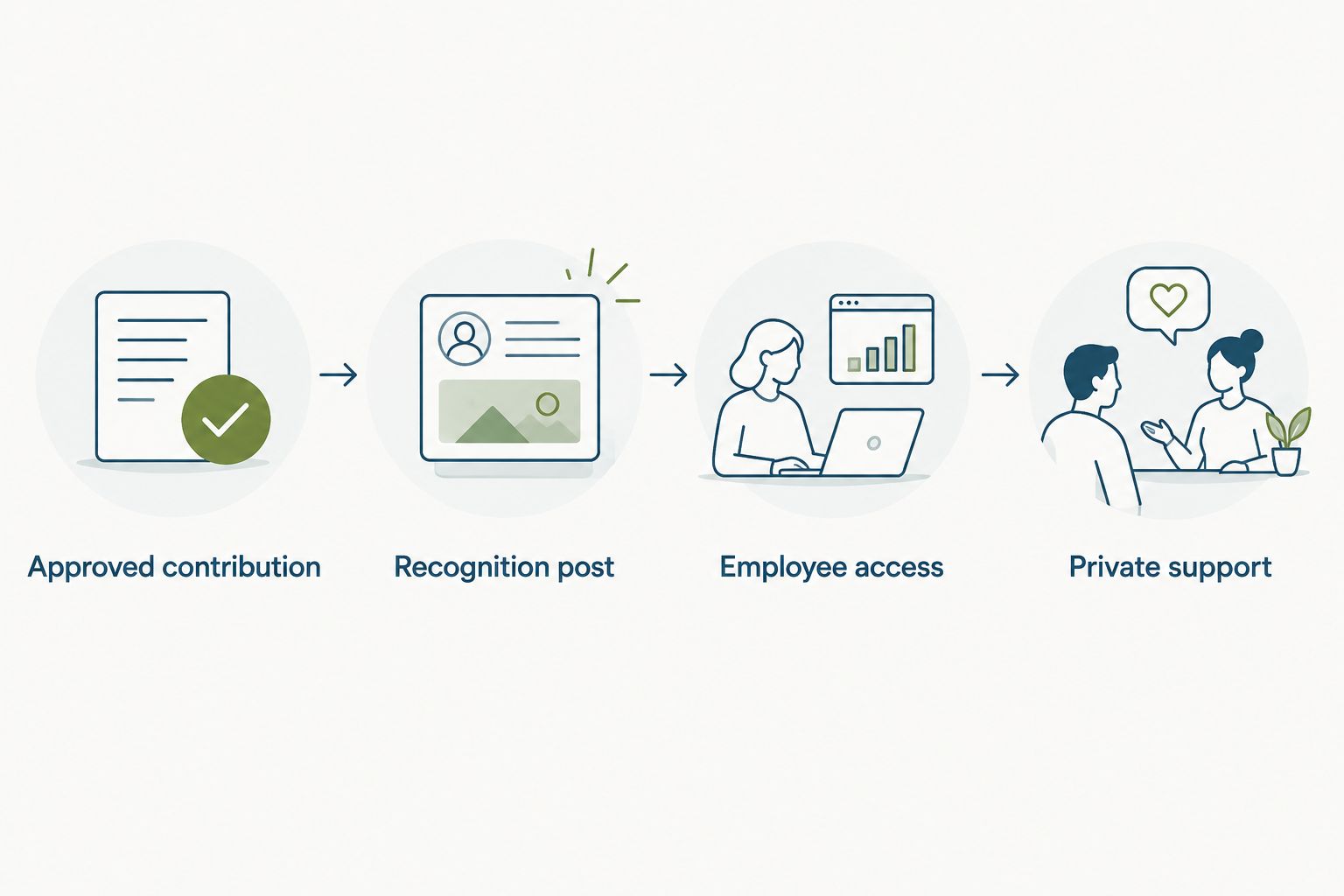
Use this sequence as the design standard: Approved contribution, Recognition post, Employee access, Private support. These are workflow stages, not claims about existing navigation labels.
Publishing and validation
Choose the publishing method based on verified capabilities, not the presence of an automation module alone. Recognition, workflows, and a service desk in the same platform do not prove that every event can trigger every action.
Choose your publishing method
| Method | Best for | Advantage | Limitation | Recommendation |
|---|---|---|---|---|
| Manual publishing | Teams establishing recognition rules | A person checks the recipient, wording, and audience | Requires someone to publish each approved entry | Start here |
| Automated publishing | Repeatable events with confirmed trigger and action support | Removes the manual publishing step after approval | Needs verified event handling, matching, and duplicate prevention | Add after validation |
- Start with a manually approved recognition entry. Prove the employee experience before connecting events.
- If automation is required, verify the exact source event, available action, employee identifier, and audience behavior with current documentation or product support.
- Define failure handling. Specify who receives an unmatched event, an unsuccessful action, or a suspected duplicate.
- Keep the manual route documented so your team can continue the process when an automated action fails.
Expected result: You have a working publishing process and a clear boundary between confirmed functionality and requested automation.
HRSpace includes workflow automation, but these inputs do not establish a recognition-posting trigger, portal widget, or automatic award action. Confirm those requirements directly before designing around them.
Run a small pilot
- Select 5 employees for a proposed pilot, including the recognition owner and employees who will use the destination normally.
- Test 2 access roles at minimum: an administrator and an employee. Add other roles when your intended audience requires them.
- Publish an approved sample, verify the recipient and audience, then submit a correction through the intended private route.
- Run the pilot for 7 days as a planning window, not a promised implementation time. Record failures and resolve them before expanding access.
Expected result: Your team has tested the complete path from approved recognition to employee access and private correction.
Your 2026 pilot record should capture the action, expected result, actual result, and owner of any fix. Do not accept an administrator screenshot as proof that an employee can complete the same task.
Also test absence: leave out required information and check what the process does. A workflow that succeeds only when every input is perfect is not ready for routine use.
Second workflow: correct existing recognition
Publishing is only half the job. Employees also need a dependable way to correct recognition that already exists, particularly when an audience, recipient, or description is wrong.
- Receive the correction privately and identify the original entry.
- Have the recognition owner verify the requested change. Separate a factual correction from a request to broaden visibility.
- Use supported editing or removal controls. If those controls are unavailable, follow the documented support process rather than creating an unexplained replacement.
- Recheck the employee-facing result and tell the requester what changed through the private support route.
Expected result: The original problem is resolved without leaving contradictory entries or exposing the employee’s support conversation.
If automated publishing exists in your environment, confirm whether edits create new events before enabling update handling. An edited post must not become a second award merely because the workflow receives another event.
For your 2026 operating procedure, name an owner for unresolved corrections. A private request with no accountable owner is still an unfinished process.
Troubleshooting
Administrators see recognition; employees cannot
Repeat the test with the affected employee account. Check access, the intended audience, and the documented navigation route separately. Do not broaden permissions across the platform just to make one recognition entry visible.
Recognition reaches the wrong employee
Stop the affected publishing process and correct the entry through supported controls. Review the employee match, especially shared names or changed records. For automation, require an unambiguous supported identifier before restarting.
A post appears more than once
Identify whether someone published manually after an automated action, retried an event, or treated an edit as a new entry. Keep one authoritative record and document the duplicate-handling rule. Verify available event identifiers before promising automatic duplicate prevention.
A private question appears in the feed
Use supported controls to restrict or remove the disclosure, then continue the conversation through the private support route. Review the submission instructions and access rules. Do not solve the problem by asking employees to include less detail in public replies.
An automatic action does not run
Check whether the configured event and action are actually supported, then inspect any available execution information. Confirm required input and employee matching. Use the documented manual process until the cause is resolved; repeated retries without checking the outcome can create duplicates.
Customize your workflow
Expand the workflow only after employees can find recognition and resolve a correction without confusion. Add one requirement at a time so you can identify which change affects access, publishing, or support ownership.
Start with the employee-support connection. The guide to connecting employee self-service to your HR service desk addresses the adjacent workflow: giving questions an accountable destination instead of leaving them in a public conversation.
Then evaluate whether you need additional publishing audiences, a review step, or a supported automation event. Treat each as a separate acceptance test. Do not add review data to recognition merely because both functions exist in the same platform.
HRSpace offers modules across the employee lifecycle. Choose the scope that supports your actual process, and confirm module requirements before committing the team to a combined experience.
FAQ
What is a recognition feed employee self-service workflow?
It is a process that lets employees find approved recognition through a defined employee-facing route and raise questions privately. The workflow needs clear publishing rules, employee matching, access controls, and correction ownership.
Can HRSpace connect recognition directly to employee self-service?
Direct recognition-to-self-service placement must be confirmed for your account. HRSpace includes recognition, HR workflows, and an internal service desk, but those capabilities alone do not establish a specific feed placement or automatic connection.
Should recognition posts automatically create HR tickets?
Not by default. Create a support request when an employee needs help or a correction, rather than turning every recognition entry into administrative work.
Is manual recognition publishing better than automation?
Manual publishing is the better starting point when your team is still defining approval, audience, and correction rules. Automation fits repeatable events only after you verify the supported trigger, action, employee match, and failure handling.
How do I keep private HR information out of recognition?
Separate public recognition from private support and review the content before publishing. Keep confidential context out of the post and verify request visibility using an employee account.
How many employees should test the workflow first?
Use a proposed pilot of 5 employees and test at least 2 access roles: administrator and employee. This is a practical starting plan, not a platform requirement or a proven implementation benchmark.
What should happen when someone edits a recognition post?
The correction should update or resolve the original entry through supported controls. If automation handles updates, verify that an edit will not produce a duplicate post or award.
One last thing
The most revealing test is a correction, not a successful post. A published entry proves that someone can share praise; a completed correction proves that employees can find help, reach an owner, and get the employee-facing record fixed.
Make that correction test your final rollout gate. If it fails, improve the support path before adding another automated publishing rule.