Instead of manually rebuilding candidate notes, onboarding tasks, and review reminders, connect AI recruitment to first performance review through a confirmed hiring decision, an owned onboarding plan, and evidence-based goals. This 2026 workflow shows you what to carry forward, what to keep separate, and where a person must approve the next step.
- HRSpace fits growing teams seeking AI recruitment, onboarding, goals, and performance reviews in one HR platform.
- Connect ai recruitment to first performance review with clear owners, confirmed start dates, and job-related evidence.
- Keep AI recruitment assessments separate from performance ratings; evaluate employees against agreed goals.
- Test handoffs manually before enabling supported workflow automation.
Why this matters
A hiring decision and a performance review answer different questions. Recruitment asks whether someone meets the role’s requirements; the first review asks how that person performed after joining, with the support and expectations you provided.
HRSpace is best for growing HR teams seeking recruitment, onboarding, goals, and performance reviews in one modular HR platform. Its scope covers these stages, plus time-off, recognition, workflows, and an internal service desk. That breadth does not, by itself, establish which events automatically connect between modules.
For your 2026 rollout, start with the employee lifecycle covered by HRSpace, then define the handoffs before configuring automation. The goal is continuity without copying every hiring note into an employee’s ongoing record.
Before you start
- Access and ownership: Arrange access to your recruitment, onboarding, goals, and review tools. Name an HR process owner and a manager responsible for each new hire’s expectations and first review.
- Source materials: Prepare the approved role requirements, hiring decision, confirmed start date, onboarding checklist, review questions, and access policy. Decide which record is authoritative for employee identity and reporting relationships.
- The gotcha: An accepted offer is not the same as a confirmed start. Define what happens when a start date changes or a hire withdraws, and verify supported triggers and permissions before depending on an automated handoff.
This is a configuration blueprint, not a click-by-click product tutorial. Use the record elements below as planning labels; match them to the controls available in your account rather than treating them as verified interface names.
Hiring decision and employee handoff
Start the workflow with a human-approved decision. AI-assisted recruitment belongs upstream of that approval, not in place of it.
- Approve the role criteria. Describe the work, essential skills, and evidence required to assess candidates. Keep those criteria consistent across applicants for the same role.
- Check AI-assisted output. Have the hiring owner review any AI-generated material used in the decision against the underlying application and interview evidence. Correct unsupported statements before moving forward.
- Record the decision separately. Document who approved the hire and which role the person will join. Do not treat an AI-generated assessment as approval.
- Confirm the handoff details. Establish the person’s identity, role, manager, start date, and onboarding owner. Resolve conflicting dates or reporting relationships before creating downstream work.
- Transfer only necessary information. Carry forward the approved role expectations and practical onboarding needs. Keep interview deliberations and candidate comparisons separate from the manager’s performance assessment.
- Check for an existing employee record. Search before creating another record, especially for returning employees or candidates whose applications used different email addresses.
Expected result: One approved hire has one authoritative employee record, a confirmed manager, and an onboarding owner. The manager receives role expectations rather than an unfiltered collection of recruitment notes.
For the earlier handoff in more detail, use the AI recruitment to first-day onboarding workflow.
Onboarding ownership and support
Build onboarding around work someone owns, not a list of reminders everyone assumes someone else will handle. For a 2026 implementation, agree on the process manually before asking software to repeat it.
- Assign an onboarding owner. Make HR accountable for checking the overall handoff. Give each task its own responsible person rather than assigning every task to the new employee.
- Separate preparation from learning. Distinguish equipment and access requests from role training, introductions, and manager conversations. A completed access request does not establish that someone understands the work.
- Set dependencies. Identify tasks that must happen before others can begin. For example, a training activity that requires an account should follow account access, not run beside it without a dependency check.
- Create a support route. Tell the employee where to raise blocked tasks and unanswered questions. If you use an internal service desk, define the receiving team and escalation owner before sending requests there.
- Define completion evidence. Require a meaningful outcome: access confirmed, training discussed, or role expectations acknowledged. Avoid closing tasks merely because a reminder was sent.
Expected result: Each onboarding task has an owner, a dependency where needed, and a clear completion condition. Unresolved requests remain visible instead of disappearing into chat.
The benefit of a shared platform is that HR can organize several lifecycle stages together. The limitation is operational: software does not decide who owns an unanswered request or whether a task is genuinely finished. Your team must define both.
Goals, check-ins, and review readiness
Use a deliberate sequence: Role expectations, Agreed goals, Check-in evidence, then First review. These are process stages, not assumed software statuses.
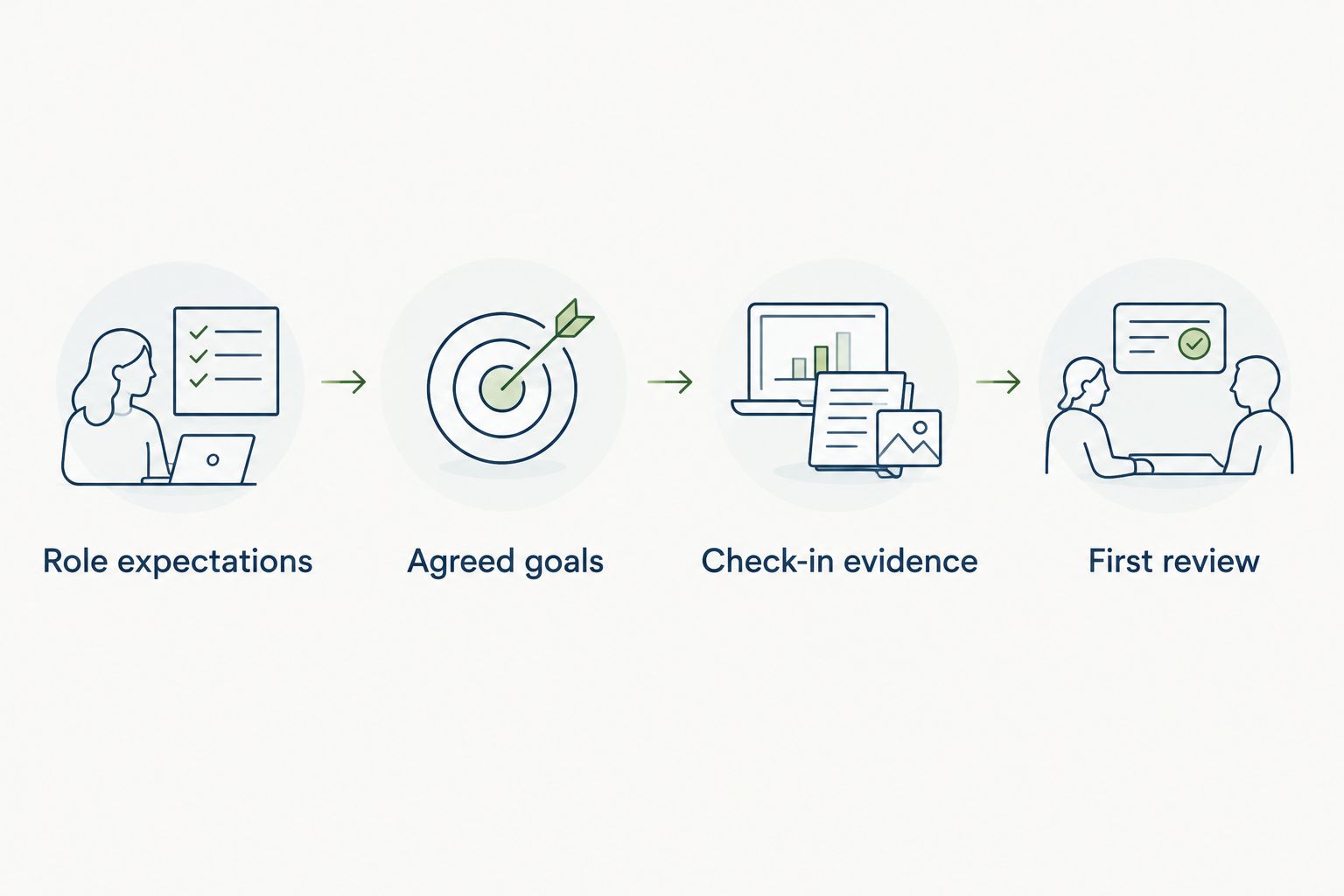
For your 2026 process, choose a review schedule that fits the role. The example below uses a 90-day first review with earlier check-ins; these are suggested planning intervals, not a product default or a universal requirement.
- Agree on 3 initial goals. Give each goal an observable outcome, a responsible employee, and a review date. Include the support or access needed to complete it, so a blocked dependency is not mistaken for poor effort.
- Schedule a 30-day check-in. Ask whether the employee understands priorities and has the tools, access, and context to act. Correct missing support before judging delivery.
- Schedule a 60-day check-in. Discuss work samples, progress, obstacles, and feedback. Change a goal when the role changes, and record why the expectation changed.
- Prepare the 90-day review. Collect the employee’s reflection and the manager’s evidence against the agreed goals. Include unresolved blockers and the support already provided.
- Hold the review conversation. Separate observed work from impressions. Discuss what met expectations, what needs development, and what the employee needs next.
- Assign follow-up actions. Give each development action an owner and a follow-up date. Close the review process only after the next steps are clear.
Expected result: The first review uses expectations the employee knew about and evidence gathered after joining. It does not recycle a candidate assessment as a performance rating.
A goal such as “learn the role” gives the manager little to assess. “Complete the assigned training and explain the process back to the manager” provides observable evidence without pretending every role needs the same numerical target.
Start manually or automate supported handoffs
Choose the operating approach before building rules. Both options require the same ownership and decision standards; they differ in who moves work between stages.
| Approach | Best for | Advantage | Limitation | Recommendation |
|---|---|---|---|---|
| Owned manual handoffs | Teams establishing their first repeatable process | Makes exceptions and unclear responsibilities visible before configuration | Depends on people checking and updating work | Start here when the process is still changing |
| Supported workflow automation | Teams with a stable process and verified trigger support | Moves defined, repeatable handoffs without a person initiating each one | Incorrect conditions repeat incorrect actions | Add after testing normal and exception cases |
Automate a stable handoff, not an unresolved decision. A confirmed start date can be an input to a rule where supported; deciding whether someone is ready for a review remains a management responsibility.
For HRSpace workflow automation, verify the exact trigger, action, condition, and access controls available in your account. Keep any unsupported connection as an assigned manual task rather than assuming an integration exists.
When a start date or manager changes
A useful second workflow updates the plan when an approved employee detail changes. Define this alongside the original handoff so the process handles real employment changes, not just the ideal path.
- Identify the authoritative change. Confirm that the revised start date or manager was approved. Do not reschedule work from an informal message alone.
- Find affected work. Check onboarding deadlines, support requests, goal dates, check-ins, and the first review appointment. Include completed work in the check so you do not recreate it unnecessarily.
- Reassign or reschedule deliberately. Move start-relative activities when the date changes. Transfer goal and review ownership when the manager changes, preserving relevant work evidence.
- Notify the people affected. Tell the employee, manager, HR owner, and task owners what changed. State which deadlines remain unchanged.
- Verify the new plan. Check for duplicate tasks and appointments, abandoned requests, and ownership left with the previous manager.
Expected result: The revised plan follows the approved change without creating a second onboarding track. If the software does not support change-triggered updates, assign this check to HR as a manual exception task.
Test before expanding
Before enabling the process for your 2026 hiring plan, run a fictional employee through the entire sequence. Use dummy information rather than a real candidate’s personal data, and prevent test messages from reaching employees.
Test an ordinary hire, a changed start date, a manager reassignment, and a withdrawn hire. Check both the work created and the work that should not be created; a withdrawn hire should not continue through an active onboarding plan.
Confirm that managers receive the information needed for goals and reviews without unnecessary access to recruitment deliberations. Inspect permissions directly rather than assuming that records in one platform share appropriate access rules.
Troubleshooting
The workflow creates duplicate employee records
Pause the creation step and identify the authoritative record. Check identity matching and whether repeating the hiring event creates another record; resolve linked tasks before removing a duplicate.
Review dates stay unchanged after a delayed start
Check whether the review date is fixed or calculated from the start date. Update dependent appointments and tasks together, then test the change-handling process again before restoring automation.
The manager cannot see goals or review materials
Check the employee’s reporting relationship and the manager’s permissions. Grant the access required for the review rather than widening access to unrelated recruitment or employee records.
AI-generated hiring language appears in the review
Remove copied candidate assessments from the performance draft. Rebuild the assessment from agreed goals, observed work, employee reflection, and documented support; hiring predictions are not evidence of job performance.
Tasks are complete, but the employee remains blocked
Inspect the completion condition. Replace “request sent” with an outcome such as access confirmed, and reopen the unresolved work with a named owner rather than marking onboarding complete.
Customize your workflow
Once the core path works, add role-specific onboarding, development actions, recognition, or employee support. Expand one handoff at a time so a failed rule has a clear owner and a traceable cause.
HRSpace covers recruitment, onboarding, goals, performance reviews, recognition, and an internal service desk in one modular HR platform. Select the scope your team can operate consistently; platform breadth is not a reason to launch every process at once.
Build your employee lifecycle workflow
Start with recruitment, onboarding, goals, and reviews; define ownership before adding automation.
FAQ
How do I connect AI recruitment to first performance review?
Connect the stages through a human-approved hiring decision, an authoritative employee record, an owned onboarding plan, and agreed goals. Build the first review from post-hire evidence rather than copying candidate assessments.
Can HRSpace cover recruitment, onboarding, and performance reviews?
HRSpace includes AI recruitment, onboarding, goals, and performance reviews within its modular HR platform. Verify the specific cross-module triggers and actions available before designing an automated handoff.
Should AI recruitment scores become performance ratings?
No. Assess performance against agreed job expectations and observed work after joining; a hiring assessment is not evidence of what an employee delivered.
When should a new employee have a first performance review?
Set the first review date according to the role, your employment policies, and the time needed to observe meaningful work. A 90-day review with 30-day and 60-day check-ins is a planning example, not a universal requirement.
What happens if a new hire changes their start date?
Update every affected onboarding deadline, check-in, support request, and review appointment from the approved change. Use a supported change-triggered workflow or assign HR a manual exception task.
Can I build this workflow without an integration?
Yes, you can operate the handoffs as assigned manual tasks. Automate only the connections your software supports, with explicit owners for the remaining steps.
What information should move from recruitment into onboarding?
Transfer the information needed to establish identity, role, manager, start date, and practical onboarding requirements. Keep candidate comparisons and unnecessary interview deliberations separate from ongoing performance assessment.
One last thing
Review readiness is not onboarding completion. A completed checklist shows that tasks were closed; it does not show that the employee had a fair opportunity to demonstrate the work.
Before the first review, ask the manager to identify any agreed goal the employee could not attempt because access, training, or direction arrived late. Resolve that distinction before assigning a rating.