

Instead of manually chasing onboarding tasks and rebuilding a new hire’s history at review time, set up an onboarding to performance review workflow that connects a start date, named owners, role goals, and scheduled check-ins. This 2026 guide shows you how to organize that process around HRSpace without treating task completion as proof of performance.
- HRSpace fits growing HR teams connecting onboarding, goals, and performance reviews in one modular platform.
- Build your onboarding to performance review workflow around ownership, role expectations, and documented evidence.
- Use 30-, 60-, and 90-day checkpoints as a proposed schedule, not a universal requirement.
- Verify scheduling and permissions before automating; keep manager judgment in the review.
Why this matters
An onboarding checklist answers whether work was completed. A performance review answers whether an employee understands expectations, demonstrates relevant skills, and needs support. Those are different questions.
HRSpace is best for growing HR teams that want onboarding, goals, and performance reviews in one modular HR platform. Its stated scope covers those parts of the employee lifecycle. Your setup still needs clear ownership, meaningful review criteria, and a process for handling changes.
For your 2026 workflow, connect the administrative record to the review process without copying every onboarding task into the performance assessment. A completed equipment request is useful context. It is not evidence that someone can perform their role.
Before you start
- Confirm access and ownership. Identify who maintains employee information, assigns onboarding work, manages goals, and conducts reviews. Give each person the access needed for their responsibilities; test access using the intended role rather than an administrator account.
- Prepare the materials. Gather the confirmed start date, reporting manager, role expectations, onboarding checklist, and review questions. Use a proposed 30-day, 60-day, and 90-day schedule if it fits your organization’s policy. These are planning intervals, not legal deadlines or performance benchmarks.
- Resolve the date gotcha first. Decide whether your intervals mean calendar days or working days, and whether the start date counts as day zero or day one. A changed start date also needs a named owner to check downstream dates. Never assume existing reminders or review assignments update automatically.
The configuration labels below are suggested labels for your planning sheet, not product button names. Match them to the fields and controls available in your account. Before enabling any automated action, verify its trigger, permissions, and behavior with a test record.
Build the workflow
Employee record
- Establish the source record. Record Employee, Start date, Role, Manager, and HR owner in your planning sheet. Keep sensitive information out of shared checklists unless the people using them have a legitimate need to see it.
- Choose the starting event. Use a confirmed start date as the operational starting point. An accepted offer can begin preparation, but it should not silently become the date used for the review schedule.
- Assign accountability. The manager owns role expectations and performance feedback. The HR owner coordinates the process. Assign separate task owners for work that belongs to another team, such as equipment preparation or access requests.
- Define the completion evidence. For each onboarding task, specify what proves completion: an acknowledgment, a delivered item, a completed training activity, or another relevant record. Avoid a checkbox that means different things to different owners.
- Create a test case. Use an approved test record or planning-sheet example. Check that the assigned manager, HR owner, and dates are correct before applying the process to an employee.
Expected result: You have one agreed starting record, a clear reporting manager, and an owner for every required handoff. Anyone reviewing the process can distinguish preparation work from the employee’s actual start.
Keep the initial record small. Adding every possible field creates more maintenance without improving the review. Add information only when someone uses it to make a decision or complete a task.
Checkpoint schedule
- Set the schedule convention. Write down your date rule before calculating checkpoints. For this proposed workflow, use elapsed calendar days from the confirmed start date unless your organization requires another convention.
- Define the 30-day checkpoint. Focus on access, role clarity, training progress, and blockers. Ask whether the employee has the information and support needed to do the work, not just whether the checklist is complete.
- Define the 60-day checkpoint. Review progress against the first role goals. Capture examples of work, feedback, unresolved dependencies, and any expectations that need clarification.
- Define the 90-day review. Bring together the employee’s reflection, the manager’s assessment, and evidence against the agreed goals. Record the next goals and support actions rather than ending with a rating alone.
- Assign each checkpoint. Put a named owner and due date against every check-in. Create the corresponding review or meeting through your available process. Verify any scheduling or reminder capability before relying on it.
- Check the dates together. Compare the onboarding tasks, meetings, and review dates in one view or planning sheet. Confirm that a review is not scheduled before the employee has had a reasonable opportunity to do the assigned work.
Expected result: Your 2026 schedule shows what each checkpoint is for, who owns it, and when it happens. The employee knows what will be discussed before the meeting arrives.
The intervals are a template, not a verdict on how quickly someone should become effective. Adjust the content to the role while keeping the date convention consistent.
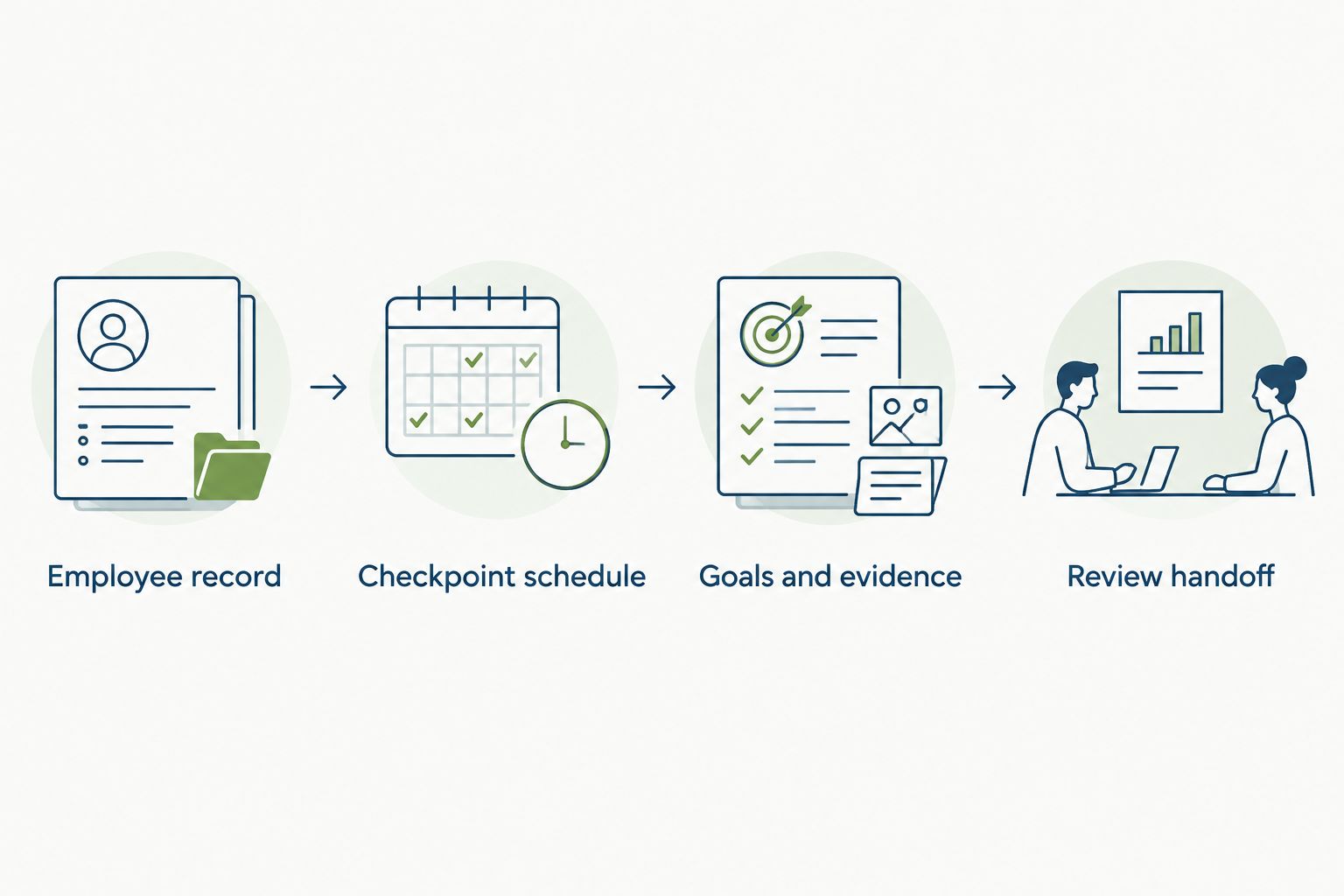
Goals and evidence
- Translate the role into observable expectations. Describe the work the employee should learn or deliver. Use outcomes that the manager and employee can discuss with examples, rather than broad labels such as attitude or potential.
- Separate learning goals from delivery goals. Learning a process and producing independent work are different expectations. Identify which applies to each goal so the review does not penalize an employee for still being in an agreed learning phase.
- Add an evidence source. For each goal, record where evidence will come from: work samples, observed practice, completed training, or relevant stakeholder feedback. Use information appropriate to the role and follow your organization’s access rules.
- Capture blockers at each checkpoint. Record missing access, unavailable training, unclear instructions, or dependencies. Assign an owner to resolve each blocker. Do not leave the employee responsible for removing a barrier controlled by another team.
- Record expectation changes. When a goal changes, note the new expectation, the reason, and the date it was discussed. Keep the earlier context available to the people responsible for the review.
- Invite the employee’s perspective. Ask what is clear, what remains difficult, and what support would help. A manager’s assessment should address that context rather than treating the employee’s reflection as a separate form nobody reads.
Expected result: Each goal has an agreed meaning and an evidence source. The review can distinguish performance concerns from onboarding gaps or changed expectations.
Automate coordination, not the assessment. Reminders and task assignments can support the process when the available controls permit them. A completed task should not automatically become a favorable performance judgment.
Review handoff
- Prepare the review packet. Bring together the current role goals, checkpoint notes, employee reflection, relevant work examples, and unresolved blockers. Include only information needed for the assessment.
- Check manager access. Confirm that the reviewing manager can see the required material and that unrelated employees cannot. Repeat this check when the reporting manager changes.
- Resolve missing evidence. If a goal has no supporting example, ask whether the work was assigned, completed, or observed. Do not replace missing evidence with a confident-sounding rating.
- Hold the conversation. Discuss progress, specific gaps, and support needs. Separate feedback on the employee’s work from problems caused by incomplete onboarding or unclear expectations.
- Record the next actions. Give every follow-up an owner and a date. Examples include clarifying a goal, arranging training, addressing an access issue, or reviewing a work sample together.
- Close the handoff. Confirm that the employee understands the next expectations and that the manager owns the follow-through. Keep any policy-specific employment decision separate from the scheduling template.
Expected result: The 90-day review ends with documented next steps, not just a completed form. The manager has enough context to explain the assessment, and the employee knows what happens next.
For your 2026 rollout, inspect the first completed handoff before extending the same template across other roles. Fix unclear ownership or questions while the process is still easy to change.
When the start date or manager changes
A date-based workflow needs a change-handling variant. Recheck future checkpoints whenever the confirmed start date or reporting manager changes. Do not rebuild completed work without a reason.
- Identify the change and confirm who approved it.
- Review future onboarding tasks, check-ins, and review assignments.
- Recalculate dates or reassign ownership where appropriate.
- Preserve completed notes and their original context.
- Tell the employee and affected owners what changed.
- Check for duplicate invitations or assignments before closing the update.
The two workflow variants solve different problems:
| Workflow | Best for | Benefit | Limitation |
|---|---|---|---|
| Start-date schedule | Planning onboarding and review checkpoints | Makes the expected sequence clear | Becomes inaccurate if future dates are not checked after a change |
| Change-handling process | Start-date moves and manager handoffs | Keeps pending work aligned with the current record | Requires a deliberate review of what should change and what should stay |
Use both. The first establishes the plan; the second maintains it. Neither proves that the employee has met the role’s expectations.
Troubleshooting
Checkpoints use the wrong dates
Review the calendar-day or working-day convention, then confirm the start date used in the calculation. Check whether the start date is day zero or day one. Correct pending assignments and tell their owners; avoid silently changing the schedule.
A manager cannot see review evidence
Check the reporting-manager assignment and access permissions. Then inspect where the evidence is stored. Give the reviewing manager appropriate access rather than moving sensitive material into a broadly shared folder.
The same checkpoint appears twice
Check whether someone created a meeting manually after another process had already created it. Also inspect whether a start-date update initiated a second assignment. Keep the correct instance, remove the duplicate through your normal process, and clarify who creates future checkpoints.
Tasks are complete, but the employee is blocked
Read the completion evidence and speak with the employee. A delivered laptop does not establish that required access works. Add the unresolved issue to the follow-up plan, with an owner outside the employee’s role when appropriate.
The review contains opinions but no examples
Return to the agreed goals and request relevant work evidence. Replace vague judgments with specific observations. If the employee never had the opportunity or support to demonstrate an expectation, document that limitation before deciding the next action.
Customize your workflow
Start with onboarding, goals, and performance reviews. HRSpace also includes time-off, recognition, recruitment, workflow automation, and an internal service desk, but adding modules should serve a defined process rather than expand the checklist for its own sake.
The benefit of a modular HR platform is related work in one platform; the trade-off is that your team still has to define ownership, access, and evidence. Product scope does not replace a review policy.
For your next 2026 iteration, choose one improvement: clearer role-specific goals, a better manager handoff, or a structured route for onboarding support requests. Define success in operational terms before changing the setup—for example, whether each open issue has an owner and a recorded next action.
Use the performance review software guide to examine the review layer separately from onboarding. Keep the distinction clear when evaluating software: organizing a review and making a sound assessment are different jobs.
FAQ
What is an onboarding to performance review workflow?
An onboarding to performance review workflow connects a new hire’s start date, onboarding responsibilities, role goals, check-ins, and formal review. It carries relevant context into the assessment without treating administrative task completion as performance evidence.
What is HRSpace best for in this workflow?
HRSpace is best for growing HR teams seeking onboarding, goals, and performance reviews within one modular HR platform. Verify the scheduling, permission, and automation behavior you need before configuring the handoffs.
Should every new employee have a 90-day review?
Use a 90-day review when it fits your organization’s policy and the role’s expectations. The proposed 30-, 60-, and 90-day schedule is a planning template, not a universal requirement or a substitute for local employment rules.
Can I automate the entire new hire review?
Keep the performance assessment with the manager rather than automating the judgment. Automate coordination only where your software supports the required trigger and action, and verify the result with a test record.
What happens if a new hire’s start date changes?
Check all future onboarding tasks, meetings, and review assignments against the revised start date. Preserve completed notes and confirm which pending dates actually need to move.
Who should own the onboarding to review handoff?
The manager should own role expectations and performance feedback, while the HR owner coordinates the process. Other teams should own the tasks and blockers they control.
What evidence belongs in a new hire’s performance review?
Use evidence tied to agreed role expectations, such as work samples, observed practice, training outcomes, and relevant feedback. Include onboarding blockers and changed goals so the assessment reflects the employee’s actual opportunity to perform.
One last thing
A finished onboarding checklist can coexist with an unfinished onboarding experience. Someone can complete every assigned task and still lack the access, direction, or practice needed to succeed.
Before closing the review, ask the employee what still prevents independent work. Turn the answer into an owned action. That question gives the checklist a useful reality check and keeps the next review from repeating an unresolved problem.


