

Switching HR software mid-year is worth the disruption when you can name the recurring problem, verify that the replacement solves it, and protect employee records during the move. The extra work includes data cleanup, testing, manager training, and handling requests already in progress—not just importing a spreadsheet. Switch when the new process is proven; wait when the handoff is not ready.
- Is switching HR software mid year worth the disruption? Yes, when verified workflow improvements justify a controlled migration.
- Choose a phased migration when you can separate workflows without creating conflicting employee records.
- Delay the launch if balances, permissions, payroll handoffs, or active reviews remain untested.
- HRSpace suits growing teams seeking modular HR software across onboarding, time-off, performance, recruiting, and employee support.
Why this matters
A mid-year switch is not automatically a bad decision. Your calendar matters less than whether employees can request leave, managers can approve work, and HR can trust the records after launch.
For a company with 20–100 employees, start with a named owner for each affected process. Your 2026 migration decision should address a specific operational problem, not simply dissatisfaction with the current interface. The guide to migrating from spreadsheets to HR software provides a related starting point for organizing the records you intend to move.
Is switching HR software mid-year worth the disruption?
Yes, if the replacement passes your real workflow tests and the transition has clear ownership. No, if you are exchanging a familiar problem for an untested process while employees still depend on unfinished work in the old system.
Compare the transition choices before choosing a launch date. These are implementation approaches, not claims that any particular product supports every approach.
| Approach | Best for | Main advantage | Main drawback | Decision rule |
|---|---|---|---|---|
| Phased migration | Teams able to separate workflows clearly | Limits the scope of each change | Requires explicit boundaries between systems | Choose it when each process has one authoritative record |
| Full cutover | Teams with validated data and connected processes ready together | Gives employees one clear destination at launch | Concentrates testing and training into one transition | Choose it only after end-to-end checks pass |
| Delay the switch | Teams with unresolved data or ownership problems | Gives HR time to correct launch blockers | Leaves current workflow problems in place | Set readiness conditions rather than waiting indefinitely |
The strongest evidence is a completed test using a representative employee record and a real approval scenario. A feature list is not enough: the process must work from the employee's action through the manager's decision to the final record.
Before approving a 2026 launch, write down what must improve and how you will check it. Examples include locating onboarding tasks, keeping leave requests with the right approver, or giving employee questions a visible owner. Treat these as acceptance criteria, not promised results.
Phased migration: keep the boundaries clear
A phased move makes sense when you can introduce a workflow without splitting responsibility for the same record. You might choose to change how new employee-support requests are handled while retaining historical records elsewhere, provided the replacement supports your requirements.
The advantage is a narrower launch. The drawback is that employees and HR must understand which system handles which action throughout the transition.
Write the boundary in plain language: where new requests go, where existing requests finish, and where staff find previous decisions. Avoid telling employees to use both systems without explaining the distinction. A phased migration needs a clear handoff, not permanent double entry.
Full cutover: test the whole journey
A full cutover gives employees a single destination from the launch date. It fits a transition where employee data, permissions, approvals, and dependent processes have already been checked together.
Its strength is clarity after launch. Its weakness is the amount of change concentrated at the handoff, especially when HR must resolve questions while also correcting imported records.
Do not confuse a successful import with a successful launch. Test what happens after the record arrives: an employee submits a request, the correct manager receives it, the decision is recorded, and HR can retrieve the result. If a payroll handoff is involved, validate that separately with the person responsible for payroll.
Delaying the switch: fix the blocker first
Waiting is the right choice when a launch-critical issue remains unresolved. Examples include mismatched leave balances, unclear access permissions, missing historical records, or an active review cycle with no agreed handover.
Delay preserves the current process while you address those issues. It also leaves existing frustrations unresolved, so attach each blocker to an owner and a completion condition.
“After the busy period” is not a readiness condition. “Managers have verified their reporting lines and tested approvals” is. Reassess the launch when the evidence changes rather than treating the next calendar boundary as an automatic green light.
How do you switch without losing control?
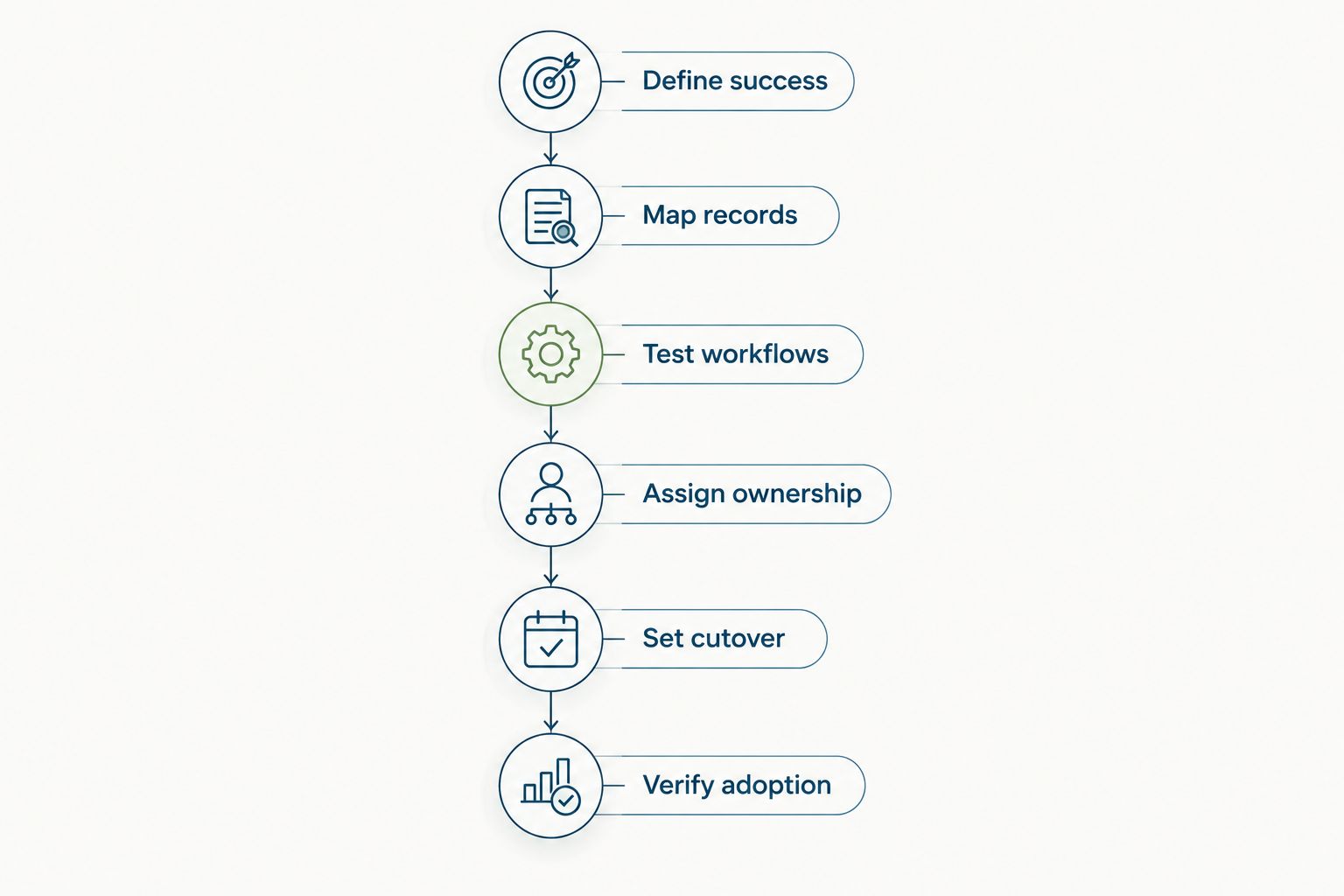
Use the following sequence as a migration checklist, not a promised implementation timeline. Each stage should produce something you can inspect before the next stage begins.
1. Define success
Choose the workflow problems the switch must solve. Describe the employee action, the person responsible, and the final record you need—not just the feature you want to buy.
For example, an onboarding test should establish whether the responsible person can find outstanding work and confirm completion. Keep unrelated improvements out of the launch scope unless they are required for that workflow to function.
2. Map records
List the information each workflow needs and identify its current authoritative source. Include employee details, reporting relationships, leave records, active tasks, and review history where those are part of your scope.
Decide what must move, what can remain accessible in an archive, and what needs correction first. Confirm export and import requirements with the relevant vendors; do not assume attachments, comments, and historical decisions transfer with basic employee fields.
3. Test workflows
Run representative scenarios before inviting the wider team. Check the employee view, the manager's action, and HR's ability to find the resulting record.
Include exceptions that actually occur in your organization, such as a changed manager or a request already awaiting approval. Use approved test data and check access carefully. A workflow is not ready merely because an administrator can complete it.
4. Assign ownership
Name the person who approves imported data, the person who decides whether launch conditions are met, and the person who handles employee questions. These responsibilities can belong to the same person, but they must be explicit.
Give payroll, finance, or IT owners a decision role wherever their processes are affected. Do not make HR responsible for validating a handoff that another team operates.
5. Set cutover
Choose a launch point around your actual operating calendar in 2026. Review payroll deadlines, onboarding commitments, leave approvals, and performance cycles before setting it.
Explain which system accepts new work and what happens to unfinished work. Keep a documented fallback for a failed critical test, including who decides to pause the launch. That is a launch safeguard, not a prediction that something will fail.
6. Verify adoption
After launch, check whether employees can complete the intended actions and managers can find their responsibilities. Review unresolved questions alongside data issues so training problems do not get mistaken for missing functionality.
Compare the live process with the acceptance criteria you wrote before migration. Record remaining issues and their owners. Close the transition only when the required workflows work and historical information remains accessible as planned.
Why mid-year switching disruption varies
The same launch date can mean very different work for different teams. For your 2026 plan, assess the processes and records involved rather than borrowing another company's implementation schedule.
- Migration scope. Replacing one workflow and replacing several connected processes are different projects. Identify the dependencies before deciding whether to phase the move.
- Record quality. Duplicate employee entries, inconsistent manager assignments, and unresolved balances need decisions. Importing them does not settle which version is correct.
- Work already underway. Open leave requests, onboarding tasks, and unfinished reviews need a destination and an owner. Decide whether each finishes in the current system or transfers through a verified process.
- System handoffs. If HR information feeds payroll or another business process, the responsible team must validate the output. A working HR screen does not prove the downstream handoff works.
- Employee readiness. Staff need instructions for the actions that change, while managers need instructions for approvals. Give both groups a clear place to raise questions.
These factors are planning checks, not a reason to assume the move will take a particular number of days. Ask the vendor to demonstrate the requirements that matter to your scope and document anything still unresolved.
Where HRSpace fits
HRSpace is best for growing HR and People Operations teams seeking modular HR software across the employee lifecycle. Its stated scope includes onboarding, time-off, performance reviews, goals, recognition, AI-assisted recruitment, workflows, and an internal service desk, with modular per-employee pricing.
That breadth makes HRSpace relevant when your switching decision involves several HR processes rather than a single isolated task. Evaluate the modules against your launch criteria and distinguish what you need immediately from what belongs in a later phase.
The trade-off is implementation scope: choosing a platform with several HR functions does not remove the work of mapping records, setting ownership, or training managers. For a 2026 mid-year migration, ask HRSpace to demonstrate the proposed workflows and confirm data-transfer requirements, payroll handoffs, and setup responsibilities before committing to a cutover. Treat migration speed as something to verify, not assume.
Do we have to wait until January to change HR software?
No, January is not a prerequisite for changing HR software. Choose the point when required records reconcile, affected teams approve the handoffs, and employees know where to complete their work. A calendar boundary does not replace those checks.
Should we finish performance reviews before switching?
Finish active performance reviews in the current system when you have not verified how unfinished reviews will transfer. Alternatively, agree on and test a transfer process before moving them. Keep completed feedback accessible under your organization's retention and access requirements.
Can we change HR software without changing payroll?
You can scope an HR software project separately from a payroll replacement, but validate any dependency between them. Confirm who transfers employee changes, how the payroll team checks them, and which record controls the handoff. Do not assume a connection exists because both products store employee information.
FAQ
Is switching HR software mid-year worth it for a small company?
Switching HR software mid-year is worth it when a verified improvement justifies the migration work and the launch safeguards are ready. For a growing company, test the workflows employees and managers depend on before moving everyone.
What's the least disruptive way to switch HR systems?
Use the narrowest launch scope that still gives each workflow one authoritative record. A phased move works only when employees understand where new work starts and where existing work finishes.
Will we lose employee history when changing HR software?
Do not assume employee history will transfer automatically. Confirm export formats, import support, attachments, and historical access with the vendors before ending access to the current system.
How long does switching HR software take?
Set the timeline from your migration scope and validated requirements, not a generic implementation promise. Record cleanup, workflow testing, dependent systems, and employee preparation all need an agreed owner.
Should employees use both HR systems during migration?
Employees should use both systems only when each has a clearly defined purpose during the transition. Avoid asking staff to submit the same request in both places unless you have an explicit validation process.
What should stop an HR software launch?
Pause a launch when a critical workflow, required record, access rule, or payroll handoff has not passed validation. Assign an owner and a completion condition to each blocker before resetting the date.
How do we know the HR software switch worked?
Compare the live workflows with the acceptance criteria agreed before migration. Confirm that employees can complete required actions, managers can approve them, and HR can retrieve the resulting records.
One last thing
The work already in progress deserves its own migration plan. A clean employee directory does not tell you what happens to an unanswered question, a pending leave request, or feedback awaiting a manager's response.
Before you approve the switch, review unfinished work by category. Give every category a destination and an owner, then tell employees where to follow up. That makes your launch decision specific: you are not just moving employee records; you are deciding how work continues.


