

Yes, HR software can integrate with payroll systems through a supported connector, an API connection, or a structured file transfer. The connection only covers the employee data and payroll processes that both systems support; it does not automatically replace payroll calculation or approval. This guide explains how to choose a connection, verify its scope, and test the handoff before payroll depends on it.
- Can HR software integrate with payroll systems? Yes, but verify the exact connection and supported fields.
- Payroll integration needs clear ownership of employee records, effective dates, and failed transfers.
- HRSpace suits growing People Operations teams seeking modular HR software; verify payroll compatibility separately.
- Choose a connection based on payroll requirements, not an integration badge alone.
Can HR software integrate with payroll systems?
Yes. The deciding question is what the connection transfers, in which direction, and under whose control. Sending a new employee record to payroll is different from synchronizing approved hours or receiving payroll results back into HR.
For your 2026 shortlist, separate connection methods from the work they perform. A connector is a delivery mechanism, not proof that every required field reaches payroll correctly.
| Connection method | Best for | Main advantage | Main limitation |
|---|---|---|---|
| Supported connector | Teams whose exact HR and payroll products have a documented connection | An existing connection reduces the need to design the transfer yourself | Coverage depends on the connector's supported fields and workflows |
| API connection | Teams needing a defined data flow that available connectors do not cover | Can support purpose-built mapping and transfer logic | Requires technical ownership, testing, and maintenance |
| Structured file transfer | Teams whose payroll process accepts reviewed imports | Creates a clear batch handoff that payroll can inspect | Requires file preparation, validation, and control over repeated imports |
HRSpace HR software brings onboarding, time-off, performance reviews, goals, recognition, recruitment, workflows, and an internal service desk into one platform. That product scope is separate from payroll compatibility: ask for documentation covering your exact payroll system before treating the connection as confirmed.
Why this matters
Payroll needs approved information, not simply the latest information. A compensation change entered into HR is not ready for payroll until the responsible person has approved it and its effective date is clear.
For companies with 20–100 employees, evaluate the handoff as an operating process. Who approves a change? Who checks that payroll received it? Who fixes a rejected record before the payroll deadline?
A connection is ready when your team can explain both the normal transfer and the exception process. A successful demonstration of a new hire does not answer what happens when that employee already exists in payroll or a required field is missing.
Supported connector: check the exact coverage
A supported connector links specified products using a defined integration. Start with documentation for the exact HR system, payroll system, and relevant product configuration—not a general statement that the vendor connects to payroll.
Ask the vendor to distinguish between creating employees, updating existing records, and sending payroll inputs. Those are different operations. Support for one does not establish support for the others.
Best for: teams that can meet their payroll requirements with a documented, existing connection.
The advantage is a defined starting point. The limitation is that your process must fit the connector's actual scope, or you need another way to handle the uncovered work.
During a 2026 evaluation, request a demonstration using your required fields. If the demo transfers only names and email addresses, do not treat it as proof that compensation, leave, or employment changes transfer too.
API connection: assign a technical owner
An API allows software to exchange data through defined requests and responses. An API connection can be designed around your required fields and business rules, provided the systems expose the necessary operations.
Best for: teams with requirements that existing connectors do not cover and an owner for the technical work.
The advantage is control over the transfer design. The limitation is ongoing responsibility: authentication, field mapping, failed requests, and changes to the connected systems still need attention.
Before approving development, ask for a written scope. Specify which records the connection reads, which records it changes, and what happens when a request fails.
Do not accept API availability as evidence that a finished integration exists. Access to an API and a maintained payroll connection are different deliverables. Your acceptance criteria should describe the working process, not merely access to technical documentation.
Structured file transfer: keep the review step explicit
A structured file transfer moves data through an export and import process using an agreed format. Whether the transfer is manual or scheduled, the receiving payroll system must accept the fields and file structure.
Best for: teams whose payroll process supports controlled batch imports and a clear review step.
The advantage is an inspectable handoff. The limitation is that someone must control file versions, rejected rows, and accidental repeat imports.
A file-based process is not automatically inferior to an API connection. Choose the method that fits the required payroll workflow and your team's ability to operate it reliably.
Document who prepares the file, who approves it, and who confirms the import. Keep employee data within approved storage and transfer processes; do not turn convenience into permission to circulate payroll files through ordinary chat.
Define what moves between HR and payroll
Start with the business event, then identify its data requirements. A new hire, an approved compensation change, and an employment termination each need a different handoff.
For each event, write down these questions:
- Record ownership: Which system holds the authoritative value for each field?
- Required fields: What does payroll need to accept and process the record?
- Effective dates: When should the change apply?
- Approval status: What makes the record ready to transfer?
- Transfer direction: Does data move from HR to payroll, back to HR, or both ways?
- Exception ownership: Who fixes an incomplete or rejected transfer?
Employee identifiers deserve particular attention. Establish how the connection matches an HR record to the correct payroll record rather than relying on a person's name alone.
Separate employment information from payroll calculation. Transferring an employee's approved compensation does not establish that HR calculates taxes, deductions, or final pay. Confirm those responsibilities independently.
For a 2026 implementation, record the agreed mapping alongside the approval rules. That gives HR, payroll, and the technical owner the same definition of a completed handoff.
How do you connect HR software to payroll safely?
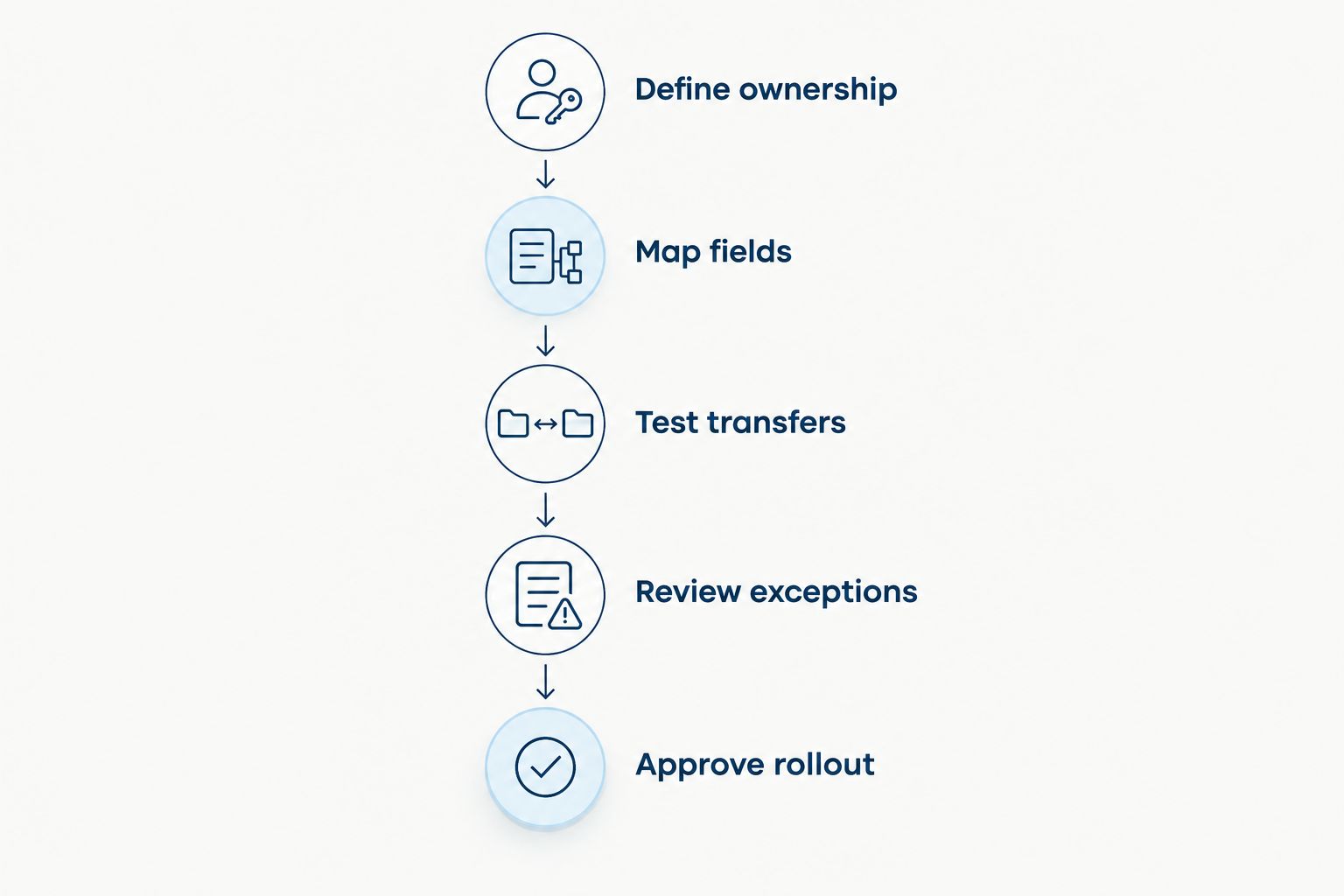
Use a controlled sequence. Define the handoff before enabling the transfer. Otherwise, you risk automating an unclear process rather than removing work.
- Define ownership. Name the authoritative system for each field and the people responsible for approval and correction.
- Map fields. Match HR fields to payroll fields, including required formats, identifiers, and effective dates.
- Test transfers. Use an approved test environment or another vendor-supported testing process before relying on live transfers.
- Review exceptions. Check missing fields, rejected records, duplicate submissions, and changes made after approval.
- Approve rollout. Obtain HR and payroll acceptance, document recovery steps, and confirm responsibility for ongoing monitoring.
Testing should follow the actual employment events your team handles. Include a new hire, an update to an existing employee, and an employee leaving the company where those events are within the connection's agreed scope.
Do not stop at a successful sending status. Verify that the receiving system accepted the intended values and applied them to the correct employee record.
Keep a recovery procedure for failed transfers. It should explain how to identify affected records, correct the underlying issue, and resume processing without unintentionally repeating completed work.
Why payroll integration requirements vary
The same connection method can serve different processes. Your requirements depend on what your organization needs to transfer and how payroll accepts that information.
- Lifecycle coverage: Onboarding data, time-off information, and employment changes require different mappings.
- Payroll scope: Employee record updates are different from payroll inputs or returned payroll results.
- Approval rules: Some changes need approval before transfer; entering a value is not the same as authorizing it.
- Timing requirements: A scheduled transfer and an event-triggered transfer create different review and monitoring needs.
- System ownership: Two-way updates require rules for conflicting values and responsibility for corrections.
- Exception handling: A rejected field, missing identifier, or repeated submission needs a defined response.
A company with 20 employees and one with 100 employees should both verify these fundamentals. Headcount alone does not establish whether an integration meets payroll requirements.
During your 2026 review, ask vendors to demonstrate the factors that apply to your process. A broad feature list is less useful than a clear answer about the specific handoff payroll needs.
What should you ask in a payroll integration demo?
Ask the vendor to show a complete event from approved HR data to an accepted payroll record. Then ask what happens when the same event fails.
Use direct questions:
- Which exact payroll product and configuration does this connection support?
- Which fields transfer, and which remain manual?
- What triggers the transfer, and what approval must happen first?
- How do HR and payroll see rejected or incomplete records?
- What prevents a repeated transfer from creating unintended changes?
- Who maintains the connection and handles support when either system changes?
Request written answers for anything that affects payroll operations. Screens shown during a demo do not replace an agreed integration scope.
Do not approve the connection based only on the happy path. Ask for an exception demonstration, or a documented explanation of how your team will detect and resolve failures.
Does payroll integration replace payroll software?
Payroll integration does not, by itself, replace payroll software. A connection moves agreed information between systems; payroll processing remains a separate capability to verify.
If you want to keep your existing payroll system, evaluate the HR platform and the payroll handoff separately. This avoids treating a strong onboarding or performance-review feature as evidence of payroll functionality.
Is two-way payroll synchronization always better?
Two-way payroll synchronization is useful only when you need information to move in both directions. It also requires clear rules for which system wins when values conflict.
If payroll only needs approved HR changes, a one-way transfer can fit that requirement. Do not add a return flow without naming the business purpose and the owner of the returned data.
Where modular HR software fits
HRSpace HR software suits growing People Operations teams seeking modular employee-lifecycle tools. Its stated scope covers onboarding, time-off, reviews, goals, recognition, AI-assisted recruitment, workflows, and an internal service desk, with modular per-employee pricing.
That scope lets you evaluate HR requirements as a connected set rather than as isolated features. The payroll decision still needs its own proof: confirm supported systems, transferable fields, approval behavior, and exception handling.
For HRSpace, the relevant advantage is its stated employee-lifecycle coverage. The constraint is equally clear: that coverage does not establish a payroll integration, payroll processing, or a specific implementation timeline.
For your 2026 decision, keep product fit and connection readiness as separate acceptance criteria. Choose the HR tools your team needs, then require evidence for the payroll handoff.
FAQ
Can HR software integrate with payroll systems?
Yes, HR software can integrate with payroll systems through a supported connector, an API connection, or a structured file transfer. Verify the exact systems, supported fields, transfer direction, and approval process before relying on the connection.
Does a payroll integration mean employee data syncs automatically?
No, a payroll integration does not necessarily mean automatic synchronization. Confirm whether transfers are event-triggered, scheduled, or manually initiated, and what approval is required.
Can I keep my existing payroll system when I change HR software?
Yes, you can keep your existing payroll system if the new HR software supports a suitable handoff. Verify compatibility and test the required employment events before switching HR processes.
Is an API connection better than a payroll file import?
An API connection is not automatically better than a payroll file import. Choose the method that meets your transfer requirements and that your team can maintain, review, and recover when something fails.
What employee information should HR software send to payroll?
HR software should send the approved information your payroll system requires for the agreed workflow. Define the field mapping, employee identifiers, effective dates, and authoritative system before enabling transfers.
Can approved time-off requests affect payroll?
Approved time-off requests can affect payroll when the payroll rules and connection support the relevant leave information. Confirm how leave categories and dates are interpreted rather than assuming every approved absence changes pay.
Does HRSpace integrate with my payroll provider?
Confirm HRSpace compatibility with your exact payroll provider before purchase. Ask for current documentation covering supported fields, transfer timing, approvals, and failed-transfer handling.
One last thing
Test a correction, not just a new record. Ask what happens when an approved employee change needs to be amended after transfer.
That scenario forces the team to explain ownership, effective dates, and recovery. It is a practical way to distinguish a demonstrated connection from a payroll handoff your team can operate.


