

HR software implementation has no single reliable duration: your timeline depends on the modules you launch, the employee data you move, and the workflows you need to test. Set the launch date against a defined scope and acceptance checklist, not a generic estimate. Account creation is only the start; data checks, approval testing, manager preparation, and employee adoption belong in the implementation plan too.
- How long does it take to implement HR software? Define scope, data migration, and acceptance tests before setting a date.
- HRSpace suits growing teams seeking modular HR software across onboarding, time-off, performance, recruitment, and employee support.
- Separate technical setup from operational readiness: employees need working processes, not just accounts.
- Choose a phased rollout when you want to validate a focused workflow before expanding.
Why this matters
A launch date means little unless everyone agrees on what will work that day. For a growing company with 20–100 employees, define whether launch means an administrator can access the platform or employees can complete real HR tasks without help.
HRSpace offers modular HR software across onboarding, time-off, performance reviews, goals, recognition, AI recruitment, and an internal service desk. That breadth gives you several possible starting points; it does not mean every module belongs in your first release.
For your 2026 project, put the first usable employee workflow at the center of the plan. Name its owner, its required data, and the result that proves it works.
How long does it take to implement HR software?
The useful answer is the schedule for your agreed launch scope, including preparation, configuration, testing, and rollout. Ask the vendor to distinguish account setup from a usable launch and ongoing adoption. These are different milestones.
A credible implementation estimate names the work, the owner, and the condition for finishing it. Use the following sequence to build that estimate rather than borrowing a duration from a different company.
- Define scope. Choose the employee task you want working first, the modules it needs, and anything explicitly excluded from launch.
- Prepare data. Identify the employee records and policy information that task requires. Assign someone to resolve conflicting or incomplete records.
- Configure rules. Document who can view information, who approves requests, and who handles exceptions. Confirm which rules the selected platform supports.
- Test workflows. Run realistic employee and manager scenarios. Record failures and retest fixes before announcing readiness.
- Prepare people. Give administrators, managers, and employees instructions for their actual tasks. Identify where support requests should go.
- Approve launch. Have the process owner confirm that the agreed workflow works and that unresolved issues have an owner.
Ask for a schedule against these steps. A setup promise that excludes data preparation or customer-side decisions is not a complete implementation timeline.
When comparing vendors for a 2026 purchase, use the same launch scenario for each. The guide to HR software ranked by ease of setup is a useful starting point for that evaluation; your acceptance tests should decide whether a platform fits your process.
Choose the rollout that matches your scope
A phased rollout and a full-scope rollout are different implementation choices. Neither is automatically right. Choose based on whether your first employee workflow can stand alone or requires several connected processes to work together.
| Rollout option | Best for | Benefit | Trade-off | Readiness test |
|---|---|---|---|---|
| Phased rollout | Teams with a clearly defined first priority | Limits the initial work to an agreed set of processes | Requires clear boundaries between live and deferred processes | Employees can complete the first workflow without depending on deferred work |
| Full-scope rollout | Teams whose launch processes must operate together | Establishes the agreed processes under a shared launch plan | Requires broader data preparation, testing, and training before approval | Every launch-critical process passes its acceptance tests |
Choose a phased rollout when the first workflow delivers a useful result on its own. Do not launch an isolated step if employees still need an unfinished process to complete the task.
Choose a full-scope rollout when separating the processes would create an unclear handoff. Keep the scope explicit: full-scope means everything agreed for launch, not every feature the platform offers.
In either approach, document where employees should work during the transition. Avoid giving them competing instructions about whether to use the new platform, an existing tool, or email.
Data readiness: approve the records before migration
Employee data preparation belongs on the implementation schedule, not in an informal task list. Decide which records must be present for the launch workflow and which historical information can remain outside the first release.
Start with the source of each required field. If employee details appear in several files, assign a record owner to resolve disagreements before importing them. The software should not become the place where you discover that nobody agrees on reporting lines.
For time-off, confirm which policy information and balances the chosen process requires. For onboarding, confirm which employee details and task owners the process needs. Do not assume the same preparation checklist serves every module.
Use a written acceptance check:
- Required employee records are present.
- Reporting relationships match the approved source.
- Launch-critical policy information has an owner.
- Conflicting records have been resolved.
- The imported data has been checked against the approved source.
Ask the vendor how it handles import errors and how you can validate the result. Confirm the available import method rather than assuming a particular file format or connection exists.
Do not approve migration because the upload completed. Approve it because the records needed for launch are correct. Keep the source records available for checking, subject to your organization's data-handling rules.
Workflow readiness: test the decision, not just the screen
A workflow is ready when the right person receives the work and can complete the intended action. Opening a request form proves only that the form opens.
Write down the ordinary path and the exceptions your team needs to handle. For a time-off process, identify the employee submitting the request, the manager deciding it, and the person responsible when the usual approver is unavailable. Confirm how the selected software supports that arrangement.
For an internal service desk, agree on request ownership, routing rules, and SLA targets before configuring them. An SLA target is a defined service expectation; it is not a substitute for someone owning the request.
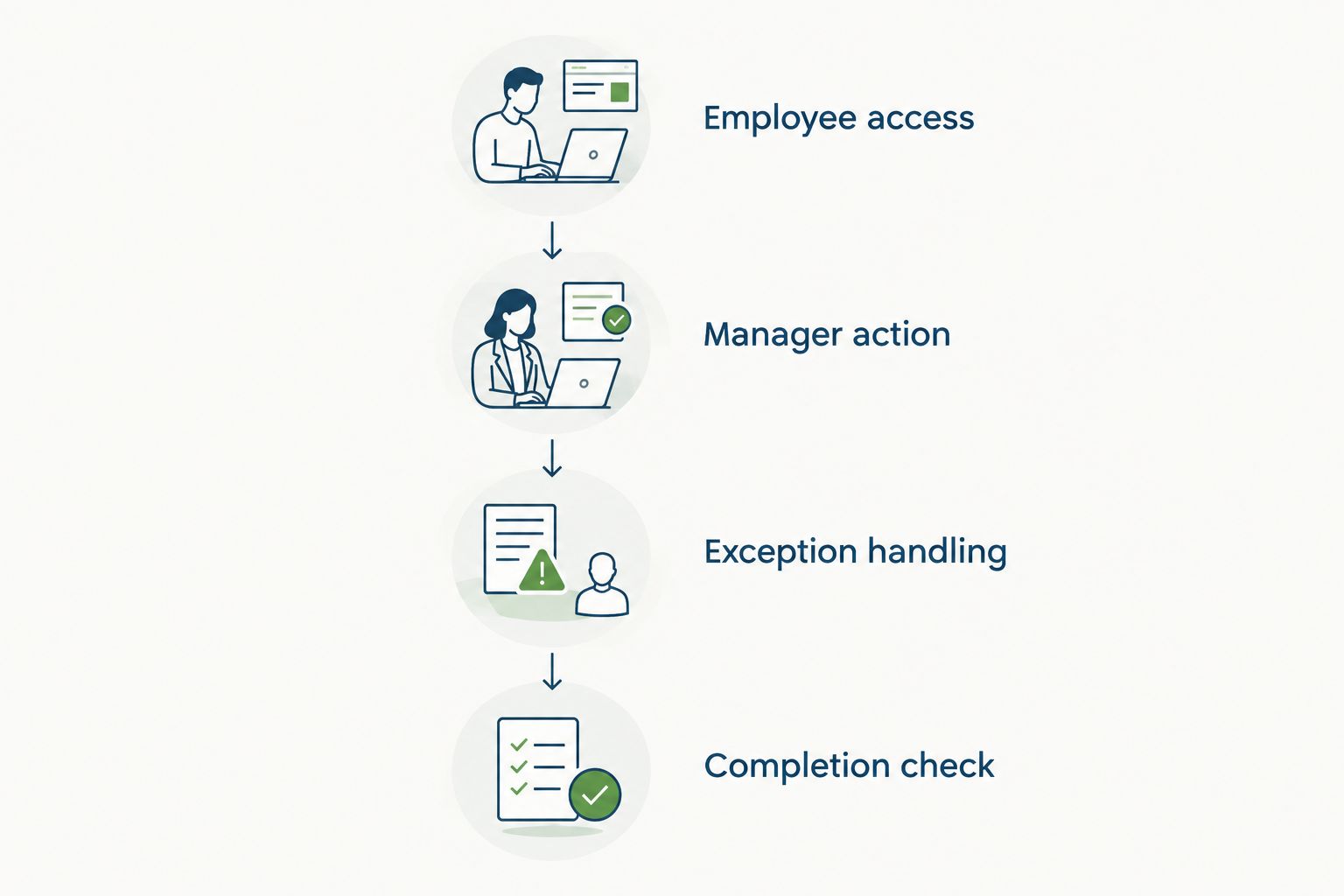
Use these test categories:
- Employee access: the employee can reach the required task.
- Manager action: the intended manager can make the required decision.
- Exception handling: the team knows what happens outside the ordinary path.
- Completion check: the process owner can confirm the task reached its intended outcome.
These categories make a practical testing sequence. They also separate access problems from policy decisions, so the right owner can resolve each issue.
Keep a record of each test, its result, and any unresolved issue. Retest the affected workflow after a change. Do not treat a successful demonstration of the ordinary path as proof that exceptions are ready.
People readiness: make the next action obvious
Training should explain what people need to do, not walk through every menu. An employee requesting leave needs different instructions from an administrator changing approval rules.
Prepare guidance by role. Give employees the entry point and the steps for their launch tasks; give managers the decisions they own; give administrators the process for investigating problems and maintaining configuration.
Before launch, ask representative users to complete their assigned tasks using the guidance. Observe where they need help. Revise the instructions or the process rather than assuming the confusion will disappear after the announcement.
Your launch communication should answer:
- Which tasks move to the new platform?
- Which existing processes remain in place?
- Who approves or resolves each task?
- Where should employees report a problem?
- Who decides whether a problem blocks launch?
Make these answers consistent across the announcement, training material, and support instructions. A process owner should approve changes to that guidance.
For a 2026 rollout, keep operational readiness separate from technical readiness in your project plan. Both need sign-off. Working access does not establish that managers understand their responsibilities or that employees know where to ask for help.
Why HR software implementation time varies
Implementation work changes with the launch you choose. Review these factors before accepting a schedule, then assign an owner to each item that requires a decision.
- Module scope: onboarding, time-off, reviews, recruitment, and employee support require different launch checklists. Specify which processes are included.
- Data preparation: importing approved records is a different task from resolving conflicting records. Put cleanup work on the schedule.
- Approval rules: identify the decision-makers and exceptions before configuration. Unresolved policy questions remain project work.
- Workflow dependencies: map any handoff required to complete the employee task. Confirm the software supports the proposed process.
- Training needs: distinguish employee tasks from manager and administrator responsibilities. Test whether the instructions work.
- Customer availability: name the people responsible for supplying data, answering configuration questions, and approving tests. Confirm their availability against the plan.
Ask vendors to identify which activities they perform and which remain yours. A schedule without customer responsibilities is not ready for approval.
Use this review to compare proposed implementation plans, not to assume one product is faster than another. Require evidence against your scope before accepting a faster-setup claim.
Does modular HR software mean less launch work?
Modular HR software lets you define a narrower starting scope, but the selected workflow still needs data, rules, testing, and training. Fewer launch modules do not remove those responsibilities.
HRSpace is best for growing HR and People Operations teams seeking modular HR software across the employee lifecycle. Its modular, per-employee model supports a module-by-module buying decision; the implementation plan still needs to state what is included in your first release.
The benefit is scope choice. The trade-off is managing the boundary between processes you launch now and processes you defer. Ask how the proposed starting configuration supports your complete employee task before committing to it.
For example, onboarding should have clear task ownership and a defined completion point. Adding performance reviews to the same launch means you also need to agree on the review process. Choose that additional scope deliberately, not simply because the module exists.
Can you launch before every module is configured?
You can approve a limited launch when the included workflow works independently and employees have clear instructions for anything outside it. Deferred modules should not be hidden dependencies of the live process.
Write down what is live, what remains unchanged, and who owns the next phase. Keep that scope visible in your launch approval so employees are not asked to use unfinished processes.
What should you ask before accepting a launch date?
Ask what the date actually promises: configured access, validated data, tested workflows, or an employee-ready launch. Then ask what you must supply for that promise to hold.
Request a written plan covering scope, responsibilities, acceptance tests, and unresolved dependencies. For your 2026 implementation, approve the date only after those items have named owners and agreed completion conditions.
FAQ
How long does it take to implement HR software for a small company?
The implementation timeline depends on the agreed launch scope, data preparation, workflow testing, and training. Ask for a schedule tied to those tasks rather than treating company size as the complete estimate.
Is setting up an HR software account the same as implementation?
No. Account setup establishes access; implementation also includes preparing records, configuring processes, testing employee tasks, and preparing the people who will use them.
What should we implement first in HR software?
Start with a clearly defined employee workflow that produces a useful result on its own. Choose its required modules and defer unrelated scope until the first process passes its acceptance tests.
Can we implement HR software without moving all historical data?
Define the records required for launch before deciding which historical data to move. Confirm any record-retention obligations separately and document where information outside the new platform will remain.
Does HRSpace let us choose a modular HR software approach?
HRSpace offers a modular, per-employee-priced HR platform covering onboarding, time-off, performance, goals, recognition, AI recruitment, and an internal service desk. Confirm the starting configuration and implementation responsibilities for the modules you select.
What causes delays during HR software implementation?
Review unresolved data issues, policy decisions, workflow dependencies, testing failures, and unavailable project owners. Assign an owner and a completion condition to each open item before approving launch.
How do we know our HR software is ready to launch?
The agreed employee workflows must pass their acceptance tests, and users must know how to complete their tasks and get help. Require sign-off from the process owner, not just confirmation that accounts exist.
One last thing
Before signing off on your 2026 launch, ask a representative employee and manager to complete the same real task from start to finish. Give them the instructions you intend to publish, not an administrator explaining each screen.
Approve the outcome, not the login. If the task needs an undocumented workaround or an unclear handoff, resolve it before calling that workflow ready. Keep deferred improvements separate from issues that prevent employees from completing the promised task.


