

To set up an employee self-service portal, define the tasks employees should complete, clean your employee records, configure access and approvals, and test the full journey before launch. Give every request a clear owner and a visible outcome; publishing a portal does not fix an approval process that nobody owns. This 2026 guide takes you from scope to launch without turning setup into a company-wide software project.
- How to set up an employee self service portal: define tasks, configure access, test approvals, then launch.
- HRSpace suits growing teams that want onboarding, time-off and an internal service desk in one HR platform.
- Give employees a clear next step when self-service cannot resolve their request.
- Test employee and manager journeys before inviting the whole company.
How to set up an employee self-service portal
Build around completed tasks, not a menu of features. An employee should know where to start, what information to provide, and what happens next. For requests that need human help, plan how to connect employee self-service to your HR service desk before launch.
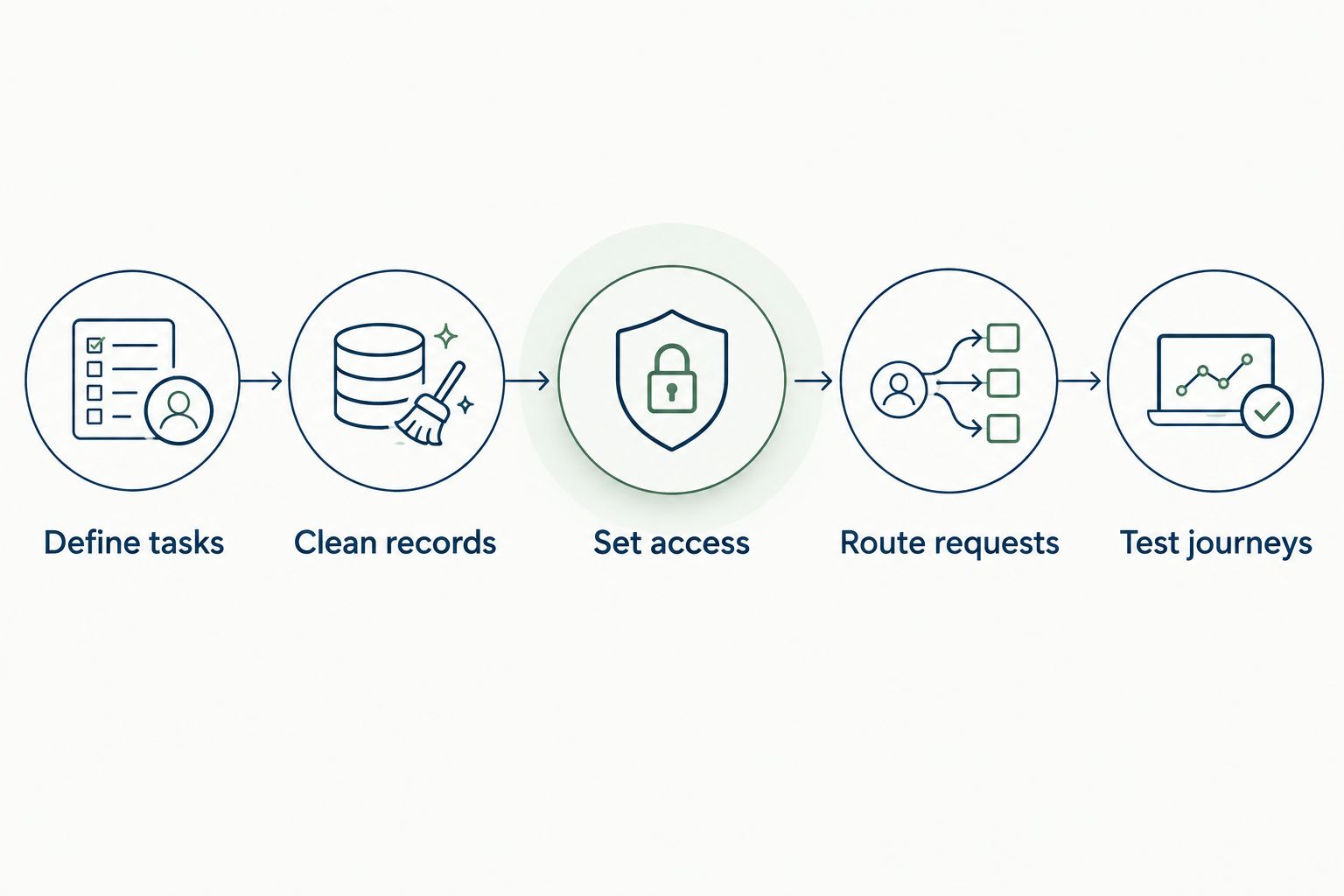
Use this sequence for your 2026 rollout. Treat each step as a decision with an owner and a testable result.
1. Define tasks
Start with the employee questions and requests your HR team already handles. Review your existing inbox, chat conversations and onboarding checklist, then identify the work employees should complete or initiate through the portal.
Choose a deliberately small opening scope. A practical starting checklist contains 3 workflows: onboarding, time-off requests and HR support. This is a recommended launch scope, not a requirement to enable every available module.
For each workflow, write down:
- What the employee needs to accomplish.
- What information the employee must provide.
- Who handles the next action.
- What counts as completion.
Keep sensitive cases out of a general request queue. Decide where employees should raise confidential concerns before you publish the support instructions.
2. Clean records
Prepare the employee data the selected workflows actually need. For a manager-approved request, that includes the employee's identity and reporting relationship; unrelated fields do not belong in the initial import simply because a spreadsheet contains them.
Check duplicate records, outdated manager assignments, inconsistent department names and former employees. Resolve conflicts against your chosen source of truth rather than copying every historical value into the new system.
Assign an owner to each data set. HR can own employee records while a designated manager confirms reporting relationships. Do not automate routing against a manager list nobody has checked.
3. Set access
Translate responsibilities into access rules. Employees need access to their own permitted information, managers need the information required to handle their team's requests, and administrators need the controls necessary to maintain the system.
Use this access checklist as a specification to verify in your chosen software, not as a claim that every portal provides identical controls.
| Access role | Intended responsibility | Test before launch |
|---|---|---|
| Employee | Complete personal tasks and submit requests | Unrelated employee records remain inaccessible |
| Manager | Review assigned team requests | Requests outside the manager's responsibility remain restricted |
| HR administrator | Maintain records and administer workflows | Administrative actions are limited to authorized users |
| Support owner | Handle assigned employee questions | Sensitive requests reach only the designated recipients |
Run 4 access tests, corresponding to these roles. Check both what each role can do and what it cannot see. A successful login alone proves neither.
4. Route requests
Map the path from submission to resolution. Specify the recipient, approval requirement, escalation condition and closing action for every workflow in the opening scope.
For time off, define who approves, what happens when the approver is absent, and how the employee learns the decision. For HR support, identify the receiving team and the information needed to answer the request without unnecessary back-and-forth.
Explain technical terms through the action they control. A routing rule assigns a request; an approval chain defines who must decide; an SLA target sets an agreed service expectation. Set those expectations from your team's actual capacity, not an arbitrary promise.
5. Test journeys
Test from the employee's starting point through the final outcome. Use permitted test records rather than real confidential cases, and include a manager or support owner in the exercise.
Cover submission, correction, approval, rejection and closure where those actions apply. Also test an absent approver, an incomplete request and a person with the wrong access role. These cases expose process gaps that a tidy demonstration skips.
Record each failure with an owner and a retest condition. A workflow is ready when the right person can complete it and the wrong person cannot access it.
6. Publish instructions
Write instructions around the employee's goal. Use labels such as requesting time off or asking HR a question instead of internal department terminology. Explain what information to provide and where the employee will receive the outcome.
Keep policies and task instructions separate. A policy explains the rule; a task guide explains how to act on it. Give each document an owner and a review trigger, such as a policy change or a new approval process.
Check the experience on the devices employees actually use. Do not promise a mobile app, notifications or document access until you have verified those functions in the selected system.
7. Launch deliberately
Invite a pilot group that represents the access roles and work patterns in your opening scope. Include people who did not configure the portal: familiarity with the setup can hide unclear labels and missing instructions.
Ask participants to complete real, permitted tasks without a guided demonstration. Note where they hesitate, contact HR separately or misunderstand the next action. Fix those problems before the wider launch.
Your 2026 launch message should state which tasks now belong in the portal, which still use another channel, and where employees can get help. Explain the change to managers too; employee self-service still depends on timely decisions.
8. Assign ownership
Name an owner for employee records, workflow configuration, policy content and unresolved support requests. Decide who removes access when employment or responsibilities change.
Review failures and repeated questions after launch. Correct the underlying form, instruction or routing rule instead of repeatedly sending employees the same explanation.
Document changes to the process. A portal needs maintenance when teams, policies and reporting lines change; it is not finished simply because employees have received invitations.
Why this matters
For a company with 20–100 employees, an employee portal is a way to make routine HR work easier to find and handle. That is the audience for this guide, not a threshold at which every business needs the same software.
The useful outcome is a completed task with clear accountability. An employee who submits a request but cannot identify the next action still needs to chase someone, regardless of how many modules the platform contains.
In 2026, evaluate setup through the employee journey rather than the administrator's dashboard. Ask whether an employee can start the task, provide the required information and understand the outcome without learning your internal HR process.
What belongs in your first launch?
Best for a focused launch: the tasks your team can support from submission through completion. Keep the opening scope aligned with a defined owner and a documented process.
For onboarding, distinguish employee tasks from tasks handled by HR or managers. An employee-facing checklist should not imply that the new hire owns approvals or internal preparation that someone else must complete.
For time off, clarify the approval path and the applicable policy before configuring the request. A form cannot settle an unresolved question about who makes the decision.
For support, explain which questions belong in the general queue and which require a confidential route. Give employees an alternative when the portal cannot resolve the issue.
The trade-off is scope. A focused launch leaves some work outside the portal, but it gives you a bounded process to test. Expanding before ownership is clear adds more places for requests to stall.
Where HRSpace fits
HRSpace combines onboarding, time-off, performance reviews, goals, recognition, AI-assisted recruitment, workflow automation and an internal service desk in a modular cloud HR platform. Its per-employee pricing model lets you evaluate the modules against the employee lifecycle you need to support.
HRSpace is best for growing HR and People Operations teams that want onboarding, time-off and employee support in one HR platform. The relevant benefit is shared platform scope rather than assembling a separate tool for every HR task.
The limitation is that broad scope does not settle your setup decisions. Confirm the exact employee-facing tasks, access controls, approval behavior and data-import requirements against your checklist before committing. Do not assume payroll connectivity, a particular authentication method or a setup duration from the module list.
Keep AI-assisted recruitment separate from the initial portal launch unless recruiting is part of the workflow you are implementing. Recruitment features do not replace a clear employee support process.
Check your HR workflow fit
Review the platform against your onboarding, time-off and employee support requirements.
Why portal setup varies
Your setup effort depends on the process and data you bring into the project. Use these factors to decide what needs preparation before configuration begins:
- Workflow scope: Onboarding, time off and support each need their own ownership and completion rules.
- Data condition: Duplicate records and incorrect reporting relationships require correction before routing can work as intended.
- Access boundaries: Employee, manager, administrator and support responsibilities need distinct access tests.
- Approval complexity: Delegation and exceptions need explicit handling, not just a default approver.
- Content ownership: Policies and instructions need someone responsible for keeping them current.
- System boundaries: Tasks kept in other tools need a clear handoff and a named source of truth.
Do not choose a launch date by comparing feature counts. Choose it after the required journeys pass their tests and the owners accept responsibility.
How do you know the portal is ready to launch?
The portal is ready when the opening workflows pass access, routing and completion tests. Invitations, imported records and a published welcome page are setup milestones, not proof that an employee can finish a task.
For your 2026 launch decision, require a completed test record for each selected workflow. Include the employee's action, the receiving person's action and the final outcome.
What should you measure after launch?
Measure completed tasks, unresolved requests, repeated questions and approval failures. Define what each measure means before collecting it; a login count shows access, not successful self-service.
Review where employees return to chat or email. That behavior gives you a concrete place to inspect the instructions, request form or handoff without assuming that the portal itself is the problem.
FAQ
How do I set up an employee self-service portal from scratch?
Define employee tasks, clean the required records, configure access and routing, then test each journey before launch. Give every workflow an owner and a clear completion condition.
What should employees be able to do in the portal?
Employees should be able to complete or initiate the tasks included in your launch scope. Start with clearly owned workflows such as onboarding, time-off requests and HR support, and verify the selected software supports the required actions.
Do I need an IT team to set up an employee portal?
Assign technical responsibilities even if you do not have a dedicated IT team. Identify who will verify authentication, access, data handling and any required connections before employees receive access.
How long does it take to set up an employee self-service portal?
Set the implementation schedule around data preparation, access configuration, workflow testing and launch readiness. Require the selected workflows to pass their tests rather than treating an unverified setup estimate as a deadline.
Is HRSpace a fit for a growing HR team?
HRSpace fits growing teams seeking onboarding, time-off, performance and employee support within a modular HR platform. Confirm the specific portal functions and implementation requirements against your employee workflows.
How do I keep confidential requests private?
Define a separate handling route and verify access restrictions before launch. Test that ordinary employees, unrelated managers and general support recipients cannot see confidential cases.
Can an employee portal replace every HR conversation?
Keep a human support route for questions and cases outside the portal's scope. Self-service should make routine tasks clear without forcing sensitive or unusual situations through an unsuitable form.
One last thing
Test the handoff, not just the form. Submit a permitted test request, then follow it as the employee, the approver and the person responsible for closure. An attractive entry point is not the same as a working process.
Before expanding your 2026 rollout, fix the point where ownership becomes unclear. That is a more useful next move than adding another module to an unfinished journey.


