

Instead of manually copying employee questions from chat into an HR queue, connect your self-service entry point to a request workflow that captures the issue, assigns an owner and returns updates to the employee. An employee self service portal service desk integration should connect the whole request lifecycle—not just create a ticket.
- HRSpace suits growing People Operations teams seeking HR workflows and an internal service desk in one platform.
- Employee self service portal service desk integration needs identity, request routing, restricted access and employee-visible updates.
- Test request creation and status updates separately before opening employee self-service to everyone.
- Keep routine HR questions separate from sensitive employee relations cases.
Why this matters
A portal gives employees somewhere to start. A service desk gives HR somewhere to manage the work. Connecting them means the employee's question arrives with enough context to act, and the employee can find out what happened without chasing someone in chat.
HRSpace is best for growing People Operations teams seeking HR workflows and an internal service desk in one platform. The HRSpace HR platform includes onboarding, time-off, performance reviews, goals, recognition, recruitment, workflow automation and an internal service desk. That scope makes it relevant when employee support belongs alongside the rest of the employee lifecycle.
This guide covers the configuration decisions and acceptance tests for a 2026 rollout. Use your system's documented controls to implement them; the field names below describe your request design, not verified product interface labels.
The goal is simple: employees submit once, HR owns the next action, and confidential information stays within the right audience.
Before you start
For your 2026 setup, bring these three things:
- Administrative access and a workflow owner. You need permission to configure the employee entry point, service desk access, routing and notifications. Name someone who can decide what happens when a request has no obvious owner.
- A request map and test identities. List the request types you will accept, their owners and their visibility rules. Prepare employee and HR test accounts with different access levels.
- A verified connection method and identity match. Confirm how your chosen systems pass requests and identify employees. A portal link is not a data connection, and permission to create requests does not automatically include permission to read their updates.
For teams with 20–100 employees, start with a narrow request category instead of launching every HR process together. That is a rollout recommendation, not a platform limit. A general policy question is a cleaner starting point than a confidential employee relations case.
HRSpace provides an internal service desk and workflow automation. Verify the exact connection method, available controls and permission behavior for your intended setup before building around them. Do not design a separate-system integration around an assumed connector.
Choose your request model
Decide where the employee submits and where the authoritative request record lives. Keep one authoritative request record; do not maintain competing versions of the same issue.
These are implementation patterns, not claims that every platform supports each option.
| Request model | Best for | Advantage | Trade-off |
|---|---|---|---|
| Same-platform workflow | Teams keeping HR processes and support together | Reduces the number of system boundaries to configure | Requires checking that the available employee entry point meets your needs |
| Separate-system connection | Teams retaining an existing portal and service desk | Preserves the tools employees and HR already use | Requires verified data transfer, identity matching and update handling |
| Portal link to a request form | Teams establishing a clear submission route first | Gives employees a defined place to submit | Does not itself synchronize employee records or request status |
HRSpace belongs in your evaluation of the same-platform approach because its stated scope includes HR workflows and an internal service desk. That is not proof of a particular portal control, connector or two-way synchronization feature.
If you are still choosing the destination for requests, use the HR service desk software guide to frame the decision before configuring the workflow.
Request intake
Build the employee submission path first. Its job is to capture the question and establish who is asking—not collect every detail HR might eventually need.
- Choose the entry point. Use the supported employee-facing submission route in your chosen system. Put the request action where employees already look for HR help, rather than introducing a separate destination without explanation.
- Define the minimum request fields. Use request category, subject and description as your starting design. Add information only when it changes how HR handles the request. These are proposed data fields, not product interface labels.
- Establish requester identity. Match the authenticated employee to the destination's employee or requester record through the documented method. Prefer a stable employee identifier when your systems support it; avoid matching people by display name alone.
- Define attachment handling. Decide whether a category needs attachments, who can view them and what employees should avoid uploading. Do not encourage employees to attach sensitive documents to a broadly accessible queue.
- Submit a sample request. Check the destination record for the correct requester, category, description and permitted attachments. Confirm that the employee receives a submission acknowledgment through a supported channel.
Expected result: One employee submission produces one usable request record with the correct identity and context. The employee knows the request was received.
Make required fields earn their place. If HR never uses a field to route, investigate or resolve the request, remove it from the initial form. A smaller intake form still needs enough detail to distinguish a policy question from a request requiring a private conversation.
Ownership and access
Configure who acts next and who can see the request. These are separate decisions. A manager's involvement in an approval does not mean the manager should see every employee question.
- Map categories to owners. Assign each request category to the responsible HR person or team. Describe ownership in operational terms: who reads the request, who responds and who can resolve it.
- Set a fallback owner. Give uncategorized requests and routing failures a named destination. A request should never depend on someone noticing an unassigned queue by chance.
- Apply visibility rules. Restrict the employee's view to their own appropriate request information. Keep sensitive categories within a designated audience. Test the actual behavior instead of relying on the permission setting's name.
- Define approvals where needed. Add an approval step only when the request requires a decision. Separate approval from fulfillment so an approved request does not disappear before someone completes the work.
- Set service expectations. Define acknowledgment and resolution expectations by category. If your system supports service-level agreement targets, configure the relevant calendar, pause conditions and escalation behavior according to its documentation.
Expected result: Every supported request category reaches an accountable owner, and each test identity sees only the information intended for it.
For your 2026 workflow, distinguish a response target from a resolution target. An acknowledgment confirms receipt; resolution means the work is complete. Do not present one as the other.
Keep internal working notes separate from employee-facing updates wherever your system supports that distinction. If it does not, use a documented restricted working process rather than putting confidential discussion into a shared response field.
Updates and launch checks
Request creation is only the first half of the connection. Employees also need a reliable way to learn whether HR is reviewing the issue, waiting for information or finished.
- Define employee-facing status meanings. Write plain-language descriptions for received, in progress, waiting for information and resolved. Map those meanings to supported destination statuses; do not assume your software uses these exact labels.
- Choose the update channel. Use a documented portal view or notification method. Decide which changes deserve an employee update and which remain internal.
- Protect internal content. Check what the update includes: subject, status, response text and attachments. Exclude confidential notes and unrelated employee information from the employee-facing payload.
- Prevent duplicate creation. Where supported, retain the destination request identifier with the source submission. Configure retries to update or recognize the existing request rather than create another record.
- Run an end-to-end test. Submit a request, assign it, ask for more information, respond and resolve it. Check the employee view after each transition, not just the HR queue.
Expected result: The employee can follow the request through completion, while HR has one authoritative record and a clear next action.
Use these checkpoints to review the whole sequence: Submit, Match identity, Assign owner, Return updates, Confirm resolution. A failure at any checkpoint is a launch blocker for that request category.
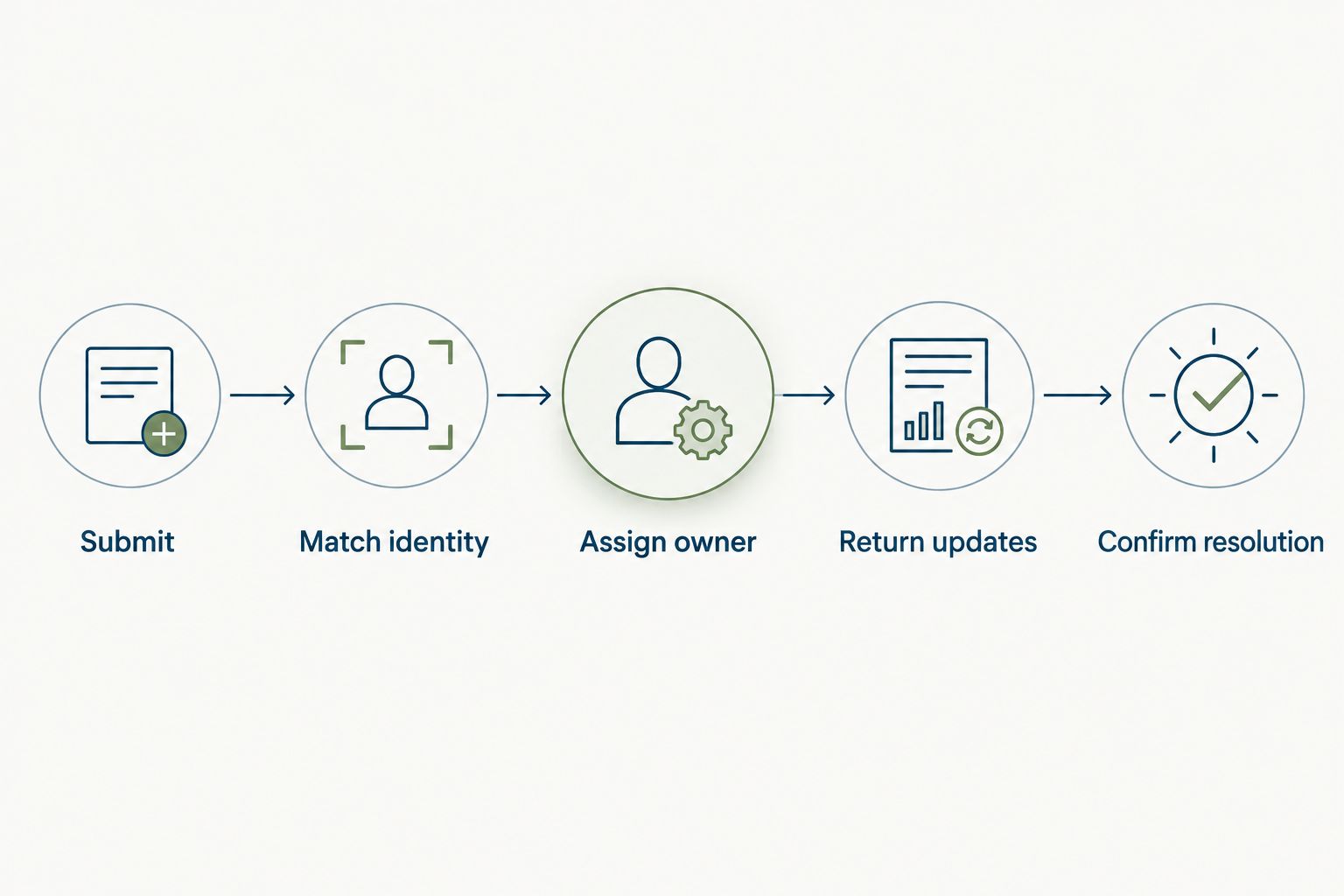
Before the 2026 launch, run at least 3 test cases: a normal policy question, an uncategorized request and a restricted request. This is a minimum testing recommendation, not a measured success threshold. Include someone without HR permissions in the access tests.
Record the expected owner, employee-visible information and final outcome for each case. A screenshot of successful submission does not prove that routing, confidentiality or resolution works.
Update the request when employees reply
A useful second workflow handles an employee adding information to an existing request. Build it only through a documented reply or update mechanism in your chosen systems.
- Identify the existing request using its supported reference or record identifier.
- Confirm that the person replying is authorized to contribute to that request.
- Add the response to the existing record rather than create a new request.
- Notify the current owner that new information needs attention.
- Apply your documented handling rule if the employee responds after resolution.
Expected result: An employee reply continues the original conversation, with its ownership and history intact.
Best for: Teams whose HR requests regularly require clarification. The benefit is a continuous request history; the trade-off is additional testing around permissions, closed requests and repeated notifications.
Keep this workflow separate from broad employee profile synchronization. A changed home address and a reply to a policy question are different events. Combining them without a clear reason creates unnecessary data movement and confusing triggers.
Troubleshooting
The employee submits, but no request appears
Check the submission record and the documented connection's execution history, where available. Verify destination permissions, required fields and routing conditions. Submit a controlled test after correcting the failure, and check for an existing record before retrying.
The request has the wrong employee attached
Inspect the identity mapping and the destination requester record. Duplicate names and changed email addresses expose weak matching rules. Replace name-based matching with a supported stable identifier, then retest the affected account.
Repeated attempts create duplicate requests
Check whether the source retains the destination request reference and whether the connection supports duplicate detection. Separate creation logic from update logic. If the connection cannot handle retries safely, establish a controlled retry process before rollout.
HR sees updates, but the employee does not
Test the employee's read permissions and the configured update channel independently. Confirm that the changed status or response is eligible for employee visibility. Do not solve a missing update by exposing internal notes or widening access to the whole queue.
Requests sit unassigned or close too early
Review category matching, fallback ownership and approval conditions. Confirm that approval completion is not being treated as fulfillment completion. Route unmatched requests to the fallback owner and require the responsible team to confirm the work is finished.
Customize your workflow
Expand by request category after the pilot passes its acceptance tests. Keep the same checkpoints, but adapt the owner, required context and access rules to each category.
- Onboarding questions: Capture the relevant onboarding task without treating the entire employee record as request content.
- Time-off questions: Separate a question about policy from a time-off submission or approval. They need different handling.
- Performance process questions: Route questions about the process without exposing review content to a general support audience.
HRSpace combines these HR process areas with workflow automation and an internal service desk. Its breadth supports evaluating one platform across the employee lifecycle; you still need to verify each intended workflow against the available product controls.
For your 2026 operating review, examine unresolved requests, repeated categories and requests employees reopen. Use those records to decide whether you need clearer guidance, different routing or a separate sensitive-request path. Do not add automation merely because a category has volume.
FAQ
What is employee self service portal service desk integration?
Employee self service portal service desk integration connects an employee submission path to the HR request lifecycle. It should cover requester identity, ownership, access and employee-facing updates, rather than only creating a request.
Is linking to an HR request form the same as integrating a portal?
No. A link gives employees a submission route, but it does not itself transfer employee context or synchronize request updates. Check the actual data flow before calling the setup an integration.
Can HRSpace handle HR workflows and an internal service desk together?
HRSpace includes workflow automation and an internal service desk within its cloud HR platform. Verify the specific employee entry point, permissions and connection method required for your workflow before configuring it.
What employee information should an HR request include?
Include the requester identity and the information needed to route and resolve that request. Avoid copying a complete employee record or collecting sensitive documents when the request does not require them.
How do I stop employee requests from getting lost?
Assign every request category an owner and define a fallback owner for unmatched submissions. Then test employee-facing updates so staff can follow the request without sending another message.
Should employee relations cases use the general HR queue?
Keep sensitive employee relations cases separate from a broadly accessible general queue. Test restricted visibility with non-HR accounts before accepting confidential submissions.
What should I test before launching the workflow in 2026?
Test request creation, identity matching, ownership, access and the return of updates to employees. Include normal, uncategorized and restricted requests, plus a reply to an existing request.
One last thing
Test as the employee, not just as the administrator. An administrator can see a request that the employee cannot find, and an HR owner can resolve work without the employee receiving a useful answer. Your final acceptance test should end with the employee finding the resolution through the intended channel.


