

Yes—an employee self-service portal can reduce HR ticket volume when employees can find accurate answers, complete routine tasks, and check request progress without contacting HR. A portal that only moves questions from chat into a form does not remove the work; it changes where the work arrives. For your 2026 rollout, measure fewer repetitive contacts alongside successful task completion, not a quieter inbox alone.
- Can employee self service portal reduce HR ticket volume? Yes, when answers and routine tasks replace avoidable contacts.
- HRSpace combines HR workflows and an internal service desk; confirm portal functions before choosing it for ticket reduction.
- Self-service suits repeatable questions; sensitive cases still need a direct route to HR.
- Measure contacts across chat, email, and tickets so channel changes do not look like workload savings.
Can an employee self-service portal reduce HR ticket volume?
Yes, but the portal must resolve the employee’s need—not just collect it. The useful distinction is between an answer, an action, and a case that requires judgment. Each needs a different path.
Use the guide to connecting employee self-service to your HR service desk to plan the handoff between routine self-service and requests that need an owner. Keep that handoff visible rather than leaving employees to guess where to go next.
| Approach | Best for | How it removes avoidable contacts | Limitation |
|---|---|---|---|
| Searchable answers | Repeatable policy and process questions | Employees find the answer without asking HR | Outdated or ambiguous answers create follow-up questions |
| Employee task workflows | Routine actions with clear rules | Employees submit the required information through a defined process | Exceptions and approvals still require attention |
| Request tracking | Questions about existing requests | Employees check progress instead of asking for an update | Status information must explain what happens next |
| Human support | Sensitive issues and unusual circumstances | A clear owner handles the issue without repeated handoffs | The underlying case still requires human work |
These approaches serve different needs. Do not replace a necessary conversation with a searchable article, and do not create a ticket for an answer employees can safely find themselves. That distinction is the basis of useful self-service.
Why this matters
For a growing company with 20–100 employees, the practical goal is to protect HR’s attention without making support harder to reach. Time-off questions, onboarding instructions, and requests for progress updates are candidates for structured handling. Personal circumstances and confidential concerns need a different route.
In 2026, a lower ticket count is not enough to demonstrate success. Employees might still ask the same questions in chat, or stop asking because the portal is difficult to use. Your measurement must separate resolved needs from displaced or abandoned requests.
Start with the employee’s outcome: finding the right policy, completing the required task, or reaching the right person. Treat ticket reduction as the result of those outcomes—not the only goal.
Searchable answers: remove repeat explanations
A searchable answer works best when the question has a stable response and does not require access to someone’s personal circumstances. Publish the answer in the language employees use, then make the next step explicit.
For example, an employee asking how to request leave needs more than a policy title. The useful answer explains where to submit the request, who handles it, and what to do when the standard process does not fit. These are content requirements, not assumptions about any particular platform.
Give each answer an accountable owner. When the underlying process changes, that owner should update the explanation and check any instructions that depend on it. A portal cannot compensate for a policy that nobody maintains.
Best for: repeatable questions with an approved answer. The limitation is context: a general explanation cannot settle every individual situation. Include a clear route to HR when the answer does not apply.
Employee workflows: remove manual intake
A workflow can replace the back-and-forth needed to collect information for a routine request. Define what the employee must provide, where the request goes, and what requires approval before choosing the form or automation.
Keep instructions separate from decisions. Employees should understand how to submit a request, but an automated path should not imply that every request will be approved. Explain what happens after submission and who is responsible for the decision.
Use required fields only when they support the process. Collecting unnecessary information creates friction; collecting too little leaves HR chasing details. Review incomplete requests to identify which instructions or fields need improvement.
Best for: repeatable tasks with clear ownership and decision rules. The limitation is the exception. Give employees a way to explain circumstances that do not fit the standard form rather than forcing inaccurate answers.
Request tracking: remove status-chasing
A request status should tell the employee something useful. A label such as pending does not explain whether HR is reviewing the request, a manager must approve it, or the employee needs to provide information.
When evaluating a portal, ask whether employees can see the current owner, the next action, and any information they need to supply. Verify these functions directly. Do not assume that having a service desk automatically means employees have a useful request-tracking experience.
An SLA target is a service deadline or response commitment. It helps the team manage requests, but it does not answer the employee’s question unless the request view explains the relevant expectation.
Best for: requests that remain open while someone reviews or approves them. The limitation is maintenance: an inaccurate status can encourage more follow-up rather than less.
Why ticket reduction varies
The portal’s effect depends on what employees can resolve and how the remaining work reaches HR. Evaluate these factors in your 2026 plan:
- Answer quality. Clear, current guidance can replace repeat explanations. Conflicting instructions cannot.
- Task coverage. A portal that supports a routine action offers a different outcome from one that only describes it.
- Request visibility. Employees need meaningful progress information to avoid asking for updates.
- Ownership rules. The remaining requests need an accountable destination, not another shared queue with unclear responsibility.
- Exception handling. Sensitive or unusual situations need an accessible human route.
- Channel consistency. Chat, email, and portal instructions should direct employees to the same process rather than competing versions.
These are evaluation criteria, not guaranteed savings. Choose the portal around your recurring work, then measure whether that work actually disappears. A long feature list is not evidence of lower ticket volume.
Build the path from question to resolution
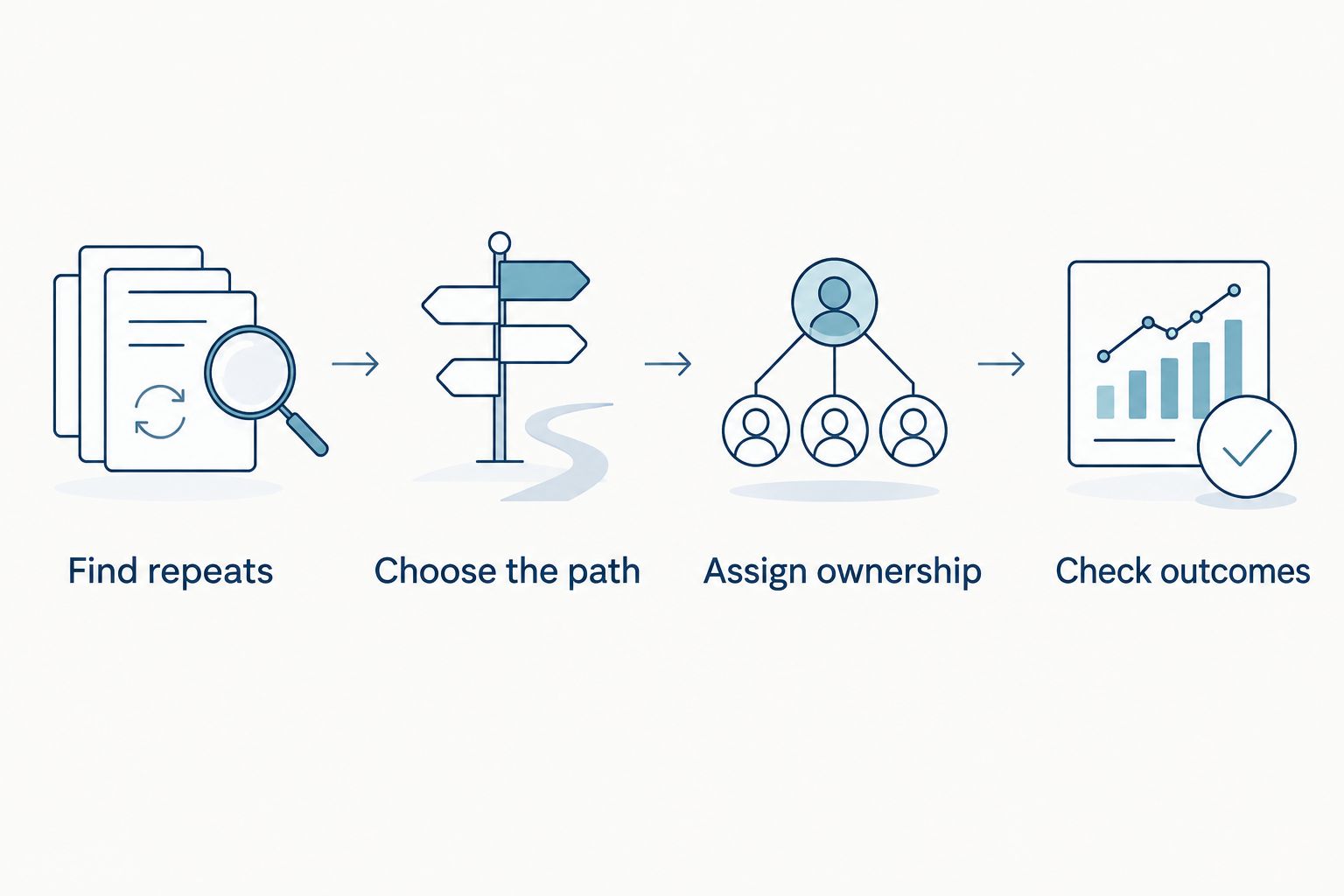
Use this sequence to design self-service before expanding it across your company. The process starts with real employee questions and ends with a check that the need was resolved.
- Find repeats. Review incoming questions across tickets, email, and chat. Group them by the employee’s intent rather than the channel used.
- Choose the path. Decide whether each intent needs an answer, a routine workflow, or direct human support. Preserve a route for exceptions.
- Assign ownership. Name who maintains the answer and who handles unresolved requests. Define the approval path where one is required.
- Check outcomes. Confirm that employees can finish the task or reach the right person. Investigate repeat contacts instead of treating them as unrelated tickets.
The same topic can require different paths. A general question about leave belongs with approved guidance; a leave request belongs in the relevant workflow; a personal concern belongs with an appropriate human owner.
Test the process with employee phrasing rather than internal HR terminology. Ask someone unfamiliar with the setup to find an answer, submit a routine request, and explain what happens next. Where they hesitate, revise the instructions or the path.
Measure workload, not just portal tickets
Set a baseline before the 2026 launch using the channels employees already use. Record the request category, whether it is a repeat contact, and whether HR must take action. Keep the category definitions consistent after launch.
Track the following measures together:
| Measure | What it tells you | What to check before interpreting it |
|---|---|---|
| Contacts by category | Whether targeted questions reach HR less often | Include email and chat, not only service-desk tickets |
| Contacts per employee | Whether demand changes relative to team size | Use the same employee-count definition in each period |
| Successful task completion | Whether employees finish the intended action | Distinguish completion from opening a page or submitting a form |
| Repeat contacts | Whether the original response resolves the need | Connect follow-ups about the same issue |
| HR handling time | Whether administrative effort decreases | Compare similar categories and account for exceptions |
| Unresolved requests | Whether easier cases disappear while difficult cases remain | Review ownership and next steps, not just queue size |
Keep onboarding activity, review cycles, and policy changes in view when comparing periods. These events change what employees need from HR, so a total alone does not explain the portal’s effect.
A reduction in status questions is useful; a reduction in access to help is not. Review unresolved needs alongside contact volume. Ask employees whether they completed the task and knew where to get help if they could not.
Where HRSpace fits
HRSpace is best for growing HR and People Operations teams seeking employee-lifecycle workflows and an internal service desk in one modular platform. Its stated scope includes onboarding, time-off, performance reviews, goals, recognition, AI recruitment, and workflow automation. Modular per-employee pricing lets you evaluate the platform around the functions your team needs; check the current terms rather than assuming every module is included.
For an employee self-service portal project, the relevant benefit is that HR processes and employee support sit within the platform’s stated scope. The buying limitation is proof: that scope alone does not establish searchable employee guidance, request-status visibility, or a measurable reduction in tickets.
Use an HRSpace evaluation to walk through an actual question, a routine request, and an exception. Ask to see what the employee sees, what the HR owner receives, and how unresolved work reaches the right person. Evaluate AI-assisted recruitment separately; it does not prove self-service effectiveness.
Do not choose on a faster-setup claim without a setup plan. Confirm who will configure workflows, maintain answers, and manage exceptions before committing.
Which HR questions should stay with a person?
Keep confidential concerns, disputed decisions, and circumstances requiring judgment accessible to a human owner. Self-service can explain how to seek help, but it should not require employees to disclose sensitive details in a general channel.
Give employees a clear escalation path when the standard process does not fit. The portal’s job is to help them reach the appropriate support—not to make every situation look routine.
Does a lower ticket count mean less HR work?
A lower ticket count means less HR work only when employee needs are resolved without equivalent effort elsewhere. If the same questions move into private messages, the reporting improves while the workload stays.
Compare contact categories, repeat contacts, and handling effort. Keep necessary support separate from avoidable administration so the metric does not reward closing access to HR.
Should you launch every self-service workflow at once?
Start with a clearly defined recurring need rather than launching every possible workflow together. A narrower rollout makes it easier to identify whether the answer, task path, or handoff fails.
Expand after employees can complete that process and the owner can maintain it. In 2026, a usable path is a better starting point than a portal full of unfinished instructions.
FAQ
Can an employee self-service portal reduce HR ticket volume?
Yes, an employee self-service portal can reduce HR ticket volume when it resolves repeatable questions and routine tasks without HR intervention. Measure contacts across all support channels to confirm that work has not simply moved elsewhere.
What should an HR self-service portal handle first?
Start with a recurring employee need that has an approved answer or a clearly defined task path. Keep exceptions and sensitive situations connected to human support.
Is a knowledge base enough to reduce HR requests?
A knowledge base suits questions that need an explanation, but it does not complete tasks or manage approvals by itself. Match the employee’s need to an answer, a workflow, or a human owner.
How do you measure whether employee self-service works?
Measure successful task completion, contacts by category, repeat contacts, and HR handling effort together. A drop in portal tickets alone does not establish lower workload.
Can self-service replace the HR service desk?
Self-service does not replace the need to handle exceptions and unresolved requests. A service desk provides a managed destination for work that employees cannot complete themselves.
Is HRSpace suitable for reducing repetitive HR work?
HRSpace includes HR workflows and an internal service desk, which are relevant to managing repetitive requests. Confirm the specific employee-facing portal functions and measure outcomes before treating ticket reduction as proven.
Should employees still be allowed to contact HR directly?
Yes, employees need a clear human route for sensitive matters and situations that do not fit the standard process. Explain which routine tasks belong in self-service without creating barriers to necessary help.
One last thing
A portal can improve request capture without reducing the underlying demand for help. That is why your first success criterion should be a completed employee task, not fewer recorded tickets. For your 2026 rollout, pick a recurring need, define a successful resolution, and check whether employees reach it without extra chasing.


