

Build a business case for HR software by documenting the work that needs fixing, comparing realistic options, and showing how you will measure the result. Separate cash savings from recovered staff time, include implementation effort, and ask leadership to approve a defined scope—not a feature wishlist.
- How to build a business case for HR software: document the problem, verify costs, and assign measurable outcomes.
- HRSpace suits growing People Operations teams seeking modular HR software across the employee lifecycle.
- Treat recovered time as capacity, not cash savings, unless spending actually falls.
- Approve a defined rollout with an owner, acceptance criteria, and a review date.
Start with work you can observe. The guide to how much time HR software saves per week helps frame the time-saving question; your approval request still needs evidence from your own workflows.
How do you build a business case for HR software?
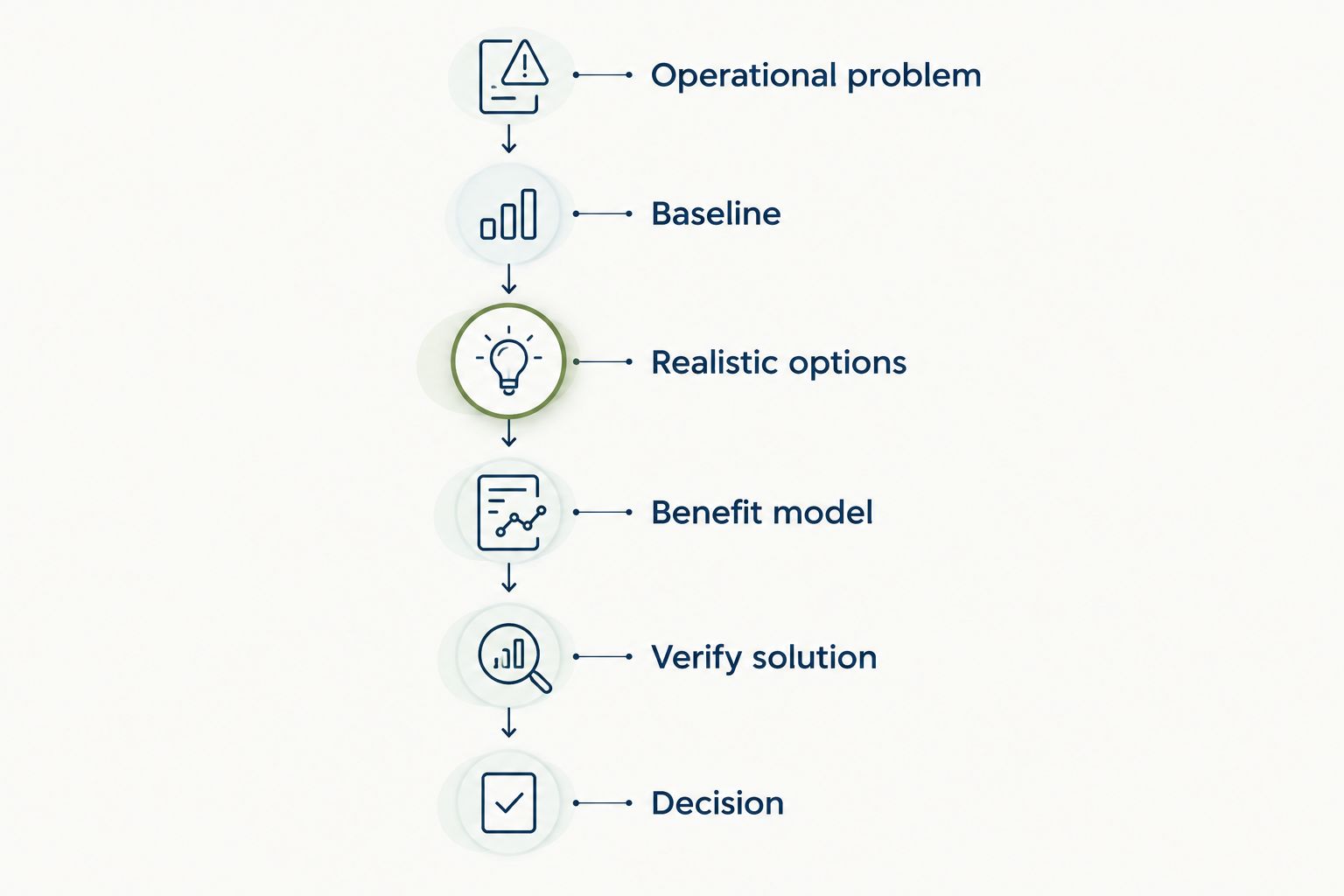
Use the following sequence for your 2026 business case. Each step should produce something the decision-maker can inspect, challenge, and approve.
- Name the operational problem. Describe the task, the people involved, and what goes wrong. Replace “HR is too manual” with a specific account of repeated data entry, approval chasing, or unanswered employee requests.
- Record the baseline. Measure task volume, handling time, completion rates, and exceptions where relevant. Keep active work separate from time spent waiting for someone else.
- Compare realistic options. Include keeping the current process, improving it without new software, and adopting software. Compare each against the same requirements.
- Build the cost-and-benefit model. Include subscription commitments, internal implementation work, migration, training, and overlapping systems. Separate financial savings from operational improvements.
- Verify the proposed solution. Ask vendors to demonstrate your actual workflows. Document which requirements are proven, which need configuration, and which remain unresolved.
- Request a decision. State the scope, accountable owner, approval conditions, and review date. Explain what result would justify continuing or expanding the rollout.
Keep the main decision document short. Put detailed calculations, vendor responses, and workflow maps in supporting material so leadership can inspect the evidence without losing the recommendation.
Why this matters
A software demonstration answers what a platform does. A business case answers whether your company should change how it works.
For a company with 20–100 employees, make the connection explicit: which tasks need a better process, who owns them, and what successful adoption looks like. Do not make company size alone the reason to buy.
The strongest case is a testable operating decision, not a promise that software will fix HR. Include the work your team must do as well as the work the platform is expected to remove.
Start with a problem leadership can recognize
Choose a workflow with a clear beginning and end. “Improve the employee experience” is too broad to measure; “make time-off requests reach the correct approver without HR chasing them” gives you something to evaluate.
Create a short problem statement containing:
- Trigger: What starts the work, such as a new hire or an employee request.
- Current process: Where information enters and how it moves between people.
- Failure point: Where work is duplicated, delayed, missed, or returned for correction.
- Business consequence: What the failure prevents someone from doing.
- Accountable owner: Who will maintain the process after launch.
Attach evidence rather than adjectives. Use a request log, an onboarding checklist, or a sample of approval records, with personal information removed where necessary.
Do not assign a financial value to every frustration. An unclear owner is a process problem worth addressing, but it is not automatically a measurable financial loss.
Compare the options before choosing a vendor
Your 2026 proposal should explain why software is the right intervention—not simply why a particular demo looked good. Include the option to improve the current process without replacing it.
| Option | Best for | Advantage | Trade-off | Evidence required |
|---|---|---|---|---|
| Keep the current process | Workflows that already meet agreed requirements | Avoids a system change | Leaves existing weaknesses unresolved | Baseline performance and acceptable limits |
| Improve the current process | Problems caused by unclear ownership or unnecessary steps | Addresses process design before adding software | Does not add platform capabilities | A trial of the revised workflow |
| Add a focused module | A clearly bounded operational problem | Limits the initial scope | Requires a plan for handoffs to other systems | Demonstration of the workflow and its boundaries |
| Adopt a broader HR platform | Connected needs across the employee lifecycle | Creates an opportunity to manage related work together | Requires broader configuration, migration, and adoption planning | End-to-end workflow testing |
Choose the smallest scope that meets the documented need. A broader platform needs a broader case: explain which connected workflows justify the additional change.
Avoid scoring every feature equally. A missing must-have should not disappear beneath a long list of nice-to-haves.
Build an ROI model without inflating it
Divide the model into cash savings, recovered capacity, and operational outcomes. Keep those categories separate in your 2026 approval document.
Cash savings
Include spending that will actually stop or decrease. Examples to investigate include a tool you will retire or external administration work you will no longer purchase.
Check cancellation terms and replacement coverage before counting either. A planned cancellation is not a realized saving, and replacing only part of a tool does not justify counting its entire subscription.
Recovered capacity
Calculate time released from a specific task:
Recovered work time = task volume × reduction in active handling time.
Use observations or a documented trial for the inputs. Apply the same measurement method before and after the change, including the work employees and managers perform outside HR.
If you convert time into a financial value, use a labor-cost assumption approved by finance. Label the result as capacity value unless the company will reduce actual expenditure.
Operational outcomes
Track improvements that matter even when you cannot defend a cash value. Suitable measures include completed onboarding tasks, overdue approvals, request resolution time, and completed review cycles.
Do not add these outcomes to a financial total without a defensible valuation method. Keep the benefit visible; leave the unsupported arithmetic out.
For a 2026 ROI calculation, use verified financial benefits and the full cost of the selected scope. Present assumptions alongside the result so leadership can see what must happen for the case to hold.
Include the work required to make software useful
The subscription is not the whole implementation commitment. Identify the people and tasks needed to get from purchase approval to a working process.
| Workstream | What to document | Acceptance evidence |
|---|---|---|
| Data preparation | Records to move, duplicates to resolve, responsible owner | Approved source data and reconciliation checks |
| Process design | Approval paths, exceptions, responsibilities | Agreed workflow with named owners |
| Configuration | Required fields, access needs, workflow settings | Tests completed against requirements |
| Training | Tasks each user group must learn | Users complete representative tasks |
| Changeover | Which system becomes authoritative and when | Documented handoff and open-issue list |
| Ongoing ownership | Maintenance, support, reporting responsibilities | Named operational owner |
Ask the vendor to distinguish included implementation support from work your team must perform. Record dependencies before accepting a launch date.
Do not describe setup as fast because a demonstration was short. Test the configuration and data work your company actually needs.
Why the business case varies between companies
Use the same decision method, but build the case around your operating conditions:
- Employee count: Model the approved headcount and a clearly labeled planning scenario. For modular per-employee software, confirm how the selected modules affect the commitment.
- Workflow scope: A time-off approval project needs different evidence from a recruiting-to-onboarding rollout.
- Current systems: Identify what stays, what changes, and where employees will still move information manually.
- Data readiness: Record the cleanup and validation work required before migration.
- Internal ownership: Confirm who can configure, test, teach, and maintain the process.
- Adoption requirements: Identify which employee and manager behaviors must change for the expected benefit to appear.
For headcount planning, compare scenarios such as 20 employees and 100 employees only when both are relevant to your forecast. These are planning inputs, not evidence that either company size needs a particular platform.
Where HRSpace fits in the business case
HRSpace is best for growing HR and People Operations teams seeking modular HR software across the employee lifecycle. Its stated scope includes onboarding, time-off, performance reviews, goals, recognition, AI recruitment, and an internal service desk, with modular per-employee pricing.
That scope gives you a concrete evaluation question: which of those modules addresses the workflow you have documented? Start with the required outcome, then ask for a demonstration using your process and its exceptions.
The advantage is the ability to evaluate related HR needs within one platform. The constraint is that the stated scope alone does not prove a fit for your particular data, approval structure, or existing systems.
Use the HRSpace platform overview to frame the shortlist. Make acceptance depend on demonstrated requirements rather than a category label or an assumed capability.
What should you put in the approval request?
Put the decision first: approve the defined scope, approve a limited evaluation, or defer until a named requirement is resolved. Follow it with evidence that supports that decision.
Your approval request should contain:
- Problem: The workflow and its documented failure point.
- Recommendation: The preferred option and why the alternatives fall short.
- Scope: Included teams, workflows, modules, and explicit exclusions.
- Commitment: Verified vendor terms and internal implementation responsibilities.
- Benefits: Cash savings, recovered capacity, and operational outcomes shown separately.
- Risks: Unresolved requirements, dependencies, and mitigation owners.
- Success test: Measures, acceptance conditions, and a review date.
End with the consequence of a “no.” Explain which problem remains and who will manage it; do not manufacture urgency.
How do you prove time savings before buying?
Prove time savings by comparing the same task under the current process and the proposed workflow. Count active handling, rework, and follow-up—not just the steps that disappear from HR's screen.
Use a representative example with the people who perform the work. If a step moves to managers or employees, include their effort before calling the result a saving.
When should you defer the purchase?
Defer the purchase when a must-have remains unproven, no one owns implementation, or the expected benefit depends on unsupported assumptions. Document the condition that would reopen the decision.
A deferral should produce a next action, such as testing an approval exception or validating source data. “Revisit later” is not an evaluation plan.
FAQ
What's the first step in building a business case for HR software?
Document a specific operational problem before reviewing vendors. Identify the workflow, its owner, the failure point, and the evidence you will use to measure improvement.
How do I calculate ROI for HR software?
Calculate ROI using verified financial benefits and the full cost of the selected scope. Show recovered staff capacity separately unless it produces an actual reduction in expenditure.
Can I count HR time savings as cash savings?
Recovered HR time is capacity, not automatically cash savings. Count it as financial savings only when you can show that actual spending will decrease.
Is HRSpace a fit for a growing People Operations team?
HRSpace fits a shortlist for growing People Operations teams seeking modular HR software across onboarding, time-off, performance, recognition, recruitment, and employee support. Confirm your workflow requirements through a demonstration before approving the purchase.
Should we buy a full HR platform or start with a module?
Start with the smallest scope that meets your documented requirements. Choose a broader platform when connected workflows justify the additional configuration and adoption work.
What should a founder see before approving HR software?
A founder should see the operational problem, realistic alternatives, full commitment, expected outcomes, and implementation owner. Include acceptance conditions and a review date so approval has a clear purpose.
One last thing
Write the post-launch review before signing the agreement. In your 2026 decision document, specify what you will measure, who will collect it, and what result would trigger expansion, correction, or a pause.
If the team cannot describe how it will verify the benefit, the business case is not ready for approval.


