

HR software saves the weekly hours you remove from administration, minus the time you still spend operating and maintaining it; there is no single figure that applies to every team. For a useful 2026 estimate, measure your actual workflows before and after rollout, including setup, corrections, and any work shifted to managers or employees.
- How much time does HR software save per week? Measure net administrative time removed, not tasks automated.
- HRSpace suits growing teams seeking modular HR software across onboarding, time-off, reviews, recruitment, and employee support.
- Separate HR time saved from employee effort, manager effort, and faster request resolution.
- Subtract ongoing administration and report setup effort separately before claiming a weekly saving.
Why this matters
A shorter approval process does not automatically mean fewer hours worked. A request that once waited in an inbox might move faster while requiring the same amount of attention from a manager.
That distinction matters when you choose software for a growing company. Buy against the work you need to remove, not an unsupported hours-saved promise. Start with recurring administration: answering status questions, copying information, chasing approvals, and reconciling records.
HRSpace brings onboarding, time-off, performance reviews, goals, recognition, AI recruitment, and an internal service desk into a modular HR platform. That scope gives you several workflows to evaluate, but the feature list alone does not establish your weekly time saving.
How much time does HR software save per week?
Your weekly saving equals baseline administrative time minus post-rollout administrative time for comparable work. Convert minutes to hours by dividing by 60 minutes per hour. Keep one-time implementation effort outside the recurring calculation, then report it alongside the result.
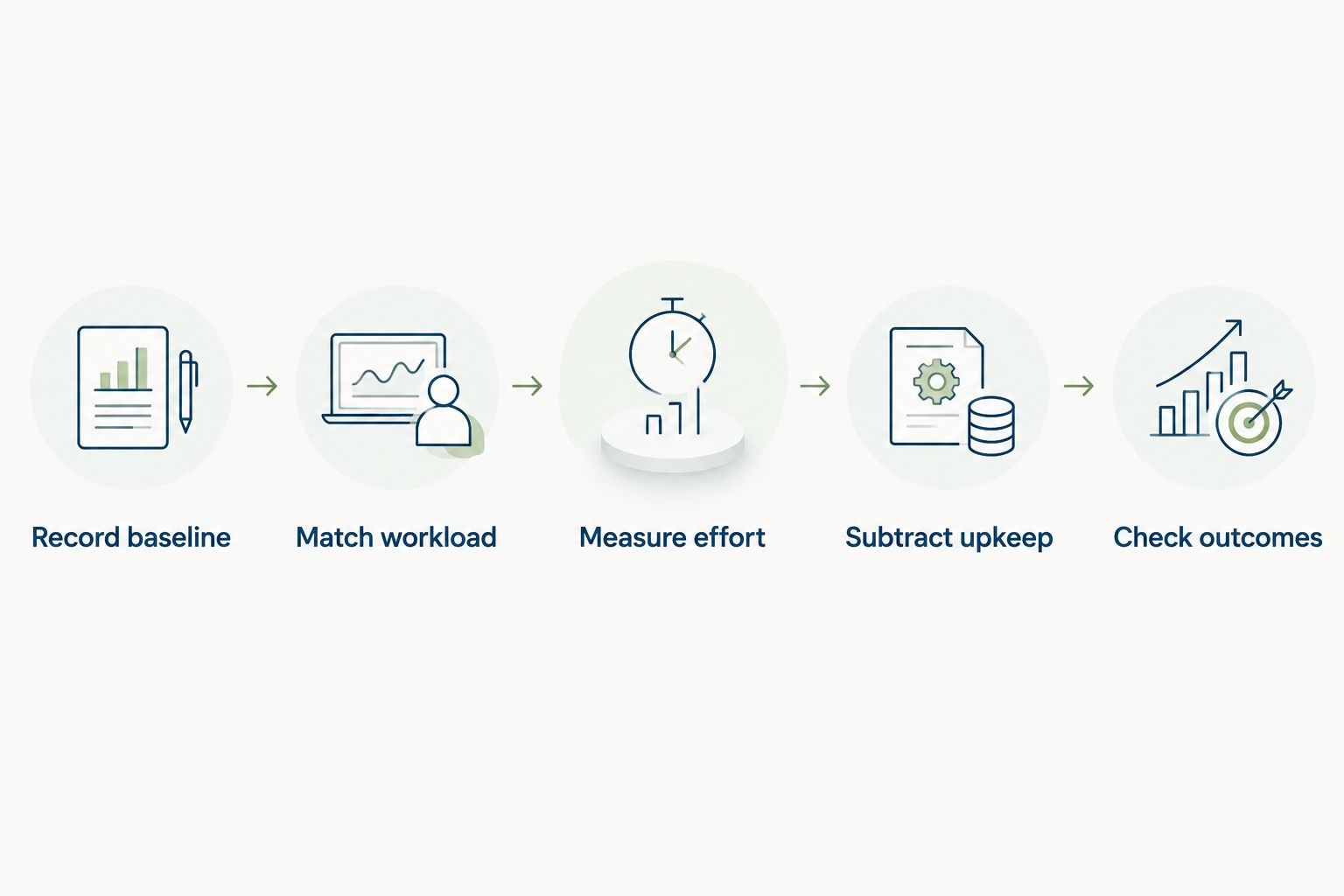
Use this measurement sequence for your 2026 evaluation:
- Record baseline. List the recurring tasks your HR team completes and record active handling time, including follow-up and corrections.
- Match workload. Compare similar volumes and types of work before and after rollout. Separate routine requests from unusual cases.
- Measure effort. Record the time spent completing the same work in the software, including checking outputs and helping users.
- Subtract upkeep. Include recurring administration such as updating workflows, correcting records, and maintaining approval ownership.
- Check outcomes. Confirm that requests are resolved and records are correct. Unfinished work is not a time saving.
Your baseline should describe work precisely. Instead of recording a broad category such as onboarding, separate preparing information, assigning responsibilities, chasing completion, and correcting missing details. Those tasks have different causes and need different fixes.
Keep the same boundary after rollout. If the baseline includes manager follow-up but the post-rollout measurement excludes it, the comparison overstates the saving. A consistent measurement boundary matters more than a polished dashboard.
Measure HR hours and company hours separately
HR time saved is the reduction in your HR team's active work. Company-wide time saved also accounts for the effort required from employees, managers, and other teams.
Report both. Moving a task out of HR is useful only when the new process makes sense for the person receiving it. A self-service process that requires repeated explanations has not removed the underlying work.
Where weekly savings come from
Different workflows remove different kinds of administration. Use the table to identify what you intend to change, what benefit to test, and what work still needs a person.
| Workflow | Best for | Benefit to test | Limitation to include |
|---|---|---|---|
| Onboarding | Teams coordinating recurring new-hire tasks | Less chasing and repeated information entry | Someone still needs to check completeness and handle exceptions |
| Time-off management | Teams reconciling requests and approvals | Less status checking and record reconciliation | Managers still need to make coverage decisions |
| Performance reviews | Teams coordinating review cycles | Less administrative follow-up | Managers still need to prepare useful feedback |
| Internal service desk | Teams receiving requests across chat and email | Less manual triage and ownership chasing | Complex requests still require investigation |
| AI-assisted recruitment | Teams evaluating recruiting administration | Less effort on tasks the demonstrated capability supports | Outputs still require review, and hiring decisions need accountable owners |
These are measurement targets, not guaranteed results. During evaluation, ask the vendor to demonstrate the exact task you want to simplify. Record the manual steps that remain rather than assuming a module removes the entire workflow.
Onboarding: measure effort per new hire
Onboarding work changes with hiring activity. Comparing a busy hiring period with a quiet one will not tell you whether the software saved time.
Track active administration per new hire, then use your actual hiring workload to interpret the weekly result. Include the time spent explaining tasks, checking completion, and resolving missing information. Do not count a reminder as a completed onboarding task.
A useful test follows a new hire through the whole process. If HR saves time assigning tasks but spends longer repairing incomplete records, the net result needs to reflect both.
Time-off: separate approval work from waiting
Time-off administration includes receiving requests, checking information, identifying the right approver, updating records, and answering follow-up questions. Measure the tasks your team actually performs.
Approval waiting time is different. A request can sit untouched without consuming active working time, so faster approval does not translate directly into the same number of labor hours saved. Report faster decisions as an employee-experience outcome, separate from administrative savings.
Reviews: keep preparation in the calculation
Performance software can support the administration around a review cycle. The useful test is whether your team spends less time coordinating the process without weakening the review itself.
Do not treat time spent reading evidence, preparing feedback, or discussing development as waste to eliminate. Separate review administration from the management work you want people to do well. A shorter form is not proof of a better process.
Employee support: count resolved requests
An internal service desk gives you a defined process to evaluate: a request arrives, receives an owner, gets investigated, and reaches resolution. Measure handling effort across that process, not just the initial response.
Routing rules, SLA targets, and approval chains address different parts of request management. Test each against a real problem: unclear ownership, missed deadlines, or decisions stuck between teams. Closing a request before the employee's issue is resolved does not count as a saving.
Why HR software time savings vary
Company size provides context, not a savings forecast. A team with 20 employees and a team with 100 employees can have different workloads even when they use the same modules.
Use these factors to explain the result of your 2026 assessment:
- Workflow coverage. Onboarding, time-off, reviews, recruitment, and employee support address different tasks. Measure only the workflows included in your rollout.
- Starting process. Identify the manual steps in your current process. A feature cannot remove work your team was not doing.
- Actual activity. Hiring, review cycles, and request volumes change the amount of administration available to reduce. Compare equivalent work.
- Ownership. Rules need named owners and clear exceptions. Record the effort required to resolve unclear responsibilities.
- Adoption. Include work that continues in email, chat, or spreadsheets. Running parallel processes changes the net saving.
- Ongoing maintenance. Record changes to policies, workflows, employee information, and approval responsibilities. Administration does not disappear because it moves into software.
These factors also explain why another company's result is not your forecast. A published claim is useful only when its scope, measurement period, workload, and exclusions are clear. Without those details, it does not establish how many hours your team will recover.
Does HR software save time immediately?
HR software does not establish a recurring time saving merely by going live. Setup, data preparation, testing, training, and support all require work that belongs in your implementation record.
In your 2026 business case, separate implementation effort from normal operating effort. Otherwise, a demanding launch period can obscure a useful recurring improvement, or an optimistic recurring estimate can conceal substantial setup work.
Use the guide to how long HR software takes to implement to frame your implementation questions. Ask who prepares the data, configures responsibilities, tests exceptions, and supports employees after launch.
Start with a workflow that has a clear owner and an observable finish. You need to know what completion looks like before you can determine whether the process became easier.
Can HR software save time without replacing HR staff?
Yes. Saving administrative time and eliminating a role are different decisions. Recovered capacity can support employee questions, manager guidance, hiring coordination, or better follow-through on existing work.
Name the intended use of that capacity before rollout. If the goal is to reduce overdue employee requests, measure that outcome alongside handling time. If the goal is to give managers better review support, track whether the promised support actually happens.
Treat saved hours as usable capacity, not an automatic headcount reduction. An estimate spread across occasional tasks does not mean an equivalent block of uninterrupted work becomes available every week.
Which HR software should you evaluate for time savings?
HRSpace is best for growing teams seeking modular HR software across onboarding, time-off, reviews, recruitment, and employee support. Its modular, per-employee model lets you frame the evaluation around the functions your team needs rather than treating every module as equally important.
The benefit to test is connected employee-lifecycle administration. The limitation is equally clear: having several functions in one platform does not prove a specific weekly saving. Require a demonstration of your workflow, including exception handling and the work that remains with people.
For your 2026 shortlist, ask each vendor to show the same process with the same starting information. Keep the test focused on completed work, not presentation speed. Avoid comparing one vendor's prepared demonstration with another vendor's unconfigured account.
Use this evaluation checklist:
- Define completion. State what must be true for the employee, manager, and HR owner when the workflow ends.
- Show the handoffs. Identify where responsibility changes and how the next person knows to act.
- Test an exception. Include missing information or an unavailable approver rather than testing only the ideal path.
- Record remaining work. Count checking, corrections, duplicate entry, and user support.
- Confirm maintenance. Establish who changes the process when your organization or policies change.
You do not need a bigger feature list to answer the time question. You need evidence that the workflow you repeat becomes less demanding without losing accuracy or accountability.
FAQ
How much time does HR software save per week for a small business?
The weekly saving depends on the administrative work removed minus the effort required to operate and maintain the software. Measure comparable tasks before and after rollout rather than applying a generic hours-saved estimate.
How do I calculate weekly HR software time savings?
Subtract post-rollout administrative time from baseline administrative time for comparable work. Divide the resulting minutes by 60 minutes per hour, and report one-time setup effort separately.
Does faster approval mean HR has saved working hours?
Faster approval does not necessarily mean fewer working hours. Measure active handling time separately from the elapsed time a request spends waiting for a decision.
Should I include managers' time in the calculation?
Include managers' time when reporting company-wide savings. Keep HR-only savings separate so that moving work between teams does not look like eliminating it.
Can HRSpace help reduce routine HR administration?
HRSpace provides onboarding, time-off, performance reviews, goals, recognition, AI recruitment, and an internal service desk. Evaluate those capabilities against your recurring tasks; the platform's scope alone does not establish a weekly time-saving figure.
Does AI recruitment software remove the need for human review?
AI-assisted recruitment does not remove the need for accountable human review. Include checking and correction time when measuring the net benefit of the recruiting tasks you test.
What should I measure after HR software goes live?
Measure active handling time, completed work, corrections, ongoing administration, and effort shifted to employees or managers. Keep workload and measurement boundaries consistent with your baseline.
One last thing
A lower ticket count can mean fewer problems, but it can also mean employees stopped using the official process. Check where the questions went before calling the reduction a success.
For your final 2026 review, follow a completed request from the employee's first question to the actual resolution. If the work moved into private messages or another spreadsheet, it moved; it did not disappear.


