

An employee self-service portal has no single standard cost: your total depends on the employees covered, the functions included, and the work required to launch it. For a 2026 purchasing decision, compare the subscription with implementation, ongoing administration, and any additional services listed in the proposal. Get an itemized quote for your actual scope—not just a headline subscription figure.
- How much does an employee self service portal cost? Compare employee coverage, modules, implementation, and ongoing administration.
- HRSpace HR software is best for growing teams seeking modular coverage across the employee lifecycle.
- Request the same employee count and workflow scope from every vendor before comparing proposals.
- Employee self-service and HR service desk requirements belong in the same purchasing brief.
Why this matters
A portal purchase should start with the work you want employees to handle themselves. Requesting time off, completing onboarding tasks, and submitting an HR question are different requirements. A proposal that covers one does not automatically cover the others.
HRSpace offers modular, per-employee HR software covering onboarding, time-off, performance reviews, goals, recognition, recruitment, workflow automation, and an internal service desk. That scope makes module selection central to the buying decision. Ask which employee-facing actions each proposed module supports before treating the platform as a match for your portal requirements.
Buy the employee journey you need, not the longest feature list. Your purchasing brief should explain what employees do, what managers approve, and what HR owns when a request needs attention.
How much does an employee self-service portal cost?
The useful answer is the total for a defined scope, not a generic average. For your 2026 comparison, ask each vendor to separate the recurring subscription, launch services, additional services, and your team's implementation responsibilities.
Keep vendor charges and internal effort separate. A proposal can describe the software clearly while leaving data preparation, process decisions, and employee communication to your team. Those responsibilities still belong in your purchasing plan, even when they are not invoice items.
| Cost component | What to establish | What belongs in the proposal |
|---|---|---|
| Subscription | Which employees and functions the agreement covers | Billing basis, included modules, contract terms |
| Implementation | Who configures the portal and prepares it for use | Included services, responsibilities, acceptance criteria |
| Data preparation | Which employee records need importing or correcting | Data requirements and ownership of cleanup |
| Workflow configuration | Which requests, approvals, and escalation paths you need | Included configuration and any separately scoped work |
| Training and support | Who helps administrators, managers, and employees | Included assistance and separately scoped services |
| Ongoing administration | Who maintains access, content, and workflow rules | Your responsibilities after launch |
This breakdown prevents unlike-for-like comparisons. One proposal might cover a narrow employee-facing function; another might include broader HR processes. Neither is automatically the better purchase.
Request a written inclusion list alongside the commercial proposal. If a capability is essential, put it in the scope and acceptance criteria rather than relying on a presentation or a general description of the platform.
Define the scope before comparing proposals
Employee self-service can sit within different purchasing scopes. Compare them by the work you need completed, not by assuming that every option includes the same features.
| Purchasing scope | Best for | Main advantage | Main limitation |
|---|---|---|---|
| Focused portal | Teams solving a specific employee task | Keeps the brief centered on that task | Does not address unrelated HR processes unless explicitly included |
| Modular HR platform | Teams connecting selected employee lifecycle processes | Lets you define a broader, module-based scope | Requires clear decisions about which modules and workflows you need |
| Broader operational suite | Teams evaluating HR alongside other operational requirements | Supports a wider purchasing brief | Introduces requirements beyond the portal itself |
These are scope choices, not a ranking of named vendors. Ask suppliers to demonstrate the same employee tasks so you can compare the actual proposed configurations.
Focused portal: keep the brief narrow
A focused portal brief starts with a specific problem. For example, your requirement might be employee access to a time-off process rather than a replacement for every HR system you use.
The advantage is clarity. You can test whether the proposed solution completes that task without evaluating unrelated functions. The limitation is equally clear: a narrow purchase leaves other employee processes outside the project unless the agreement explicitly includes them.
Best for: teams with a defined self-service gap and no requirement to change the rest of their HR setup.
Modular HR platform: connect the selected processes
A modular brief groups the employee processes you want to manage together. Specify onboarding, time-off, performance, or employee support only when each belongs in the project.
HRSpace HR software is best for growing teams seeking modular coverage across the employee lifecycle. Its stated scope includes those HR functions and an internal service desk. The purchasing task is to verify the employee-facing experience, module inclusions, and configuration responsibilities—not assume every desired portal action follows from the platform description.
Best for: teams that want selected HR processes in one platform. The trade-off is the need to define module boundaries and ownership before signing.
Broader suite: separate portal needs from wider requirements
A broader suite evaluation begins with requirements beyond employee self-service. Keep those requirements visible rather than mixing them into a single portal feature checklist.
The advantage is a wider purchasing scope. The limitation is a more involved evaluation: your team must assess the additional functions as well as the employee experience. A portal requirement alone does not establish a need to replace other systems.
Best for: teams already reviewing a wider operational stack. Do not expand the project solely because additional functions appear in a demonstration.
Why employee self-service portal costs vary
The following scope decisions explain why proposals need an itemized comparison. Confirm how each affects the agreement rather than assuming that every vendor bills the same way.
- Employee coverage: Establish who counts toward billing, including administrators, inactive employees, and other worker categories relevant to your company.
- Module selection: Separate the functions you need at launch from functions you are only considering for later.
- Workflow requirements: List the approval paths, routing rules, and escalation requirements you expect the implementation to cover.
- Data preparation: Identify which records need importing, correcting, or reorganizing and who owns that work.
- Implementation responsibility: Distinguish vendor-delivered configuration from tasks your HR or operations team must complete.
- Ongoing support: Confirm the assistance included after launch and the responsibilities that remain with your administrators.
For a 2026 purchase, put these answers in the proposal itself. A commercial comparison is only useful when you can trace each total back to the same requirements.
Build a quote your team can actually compare
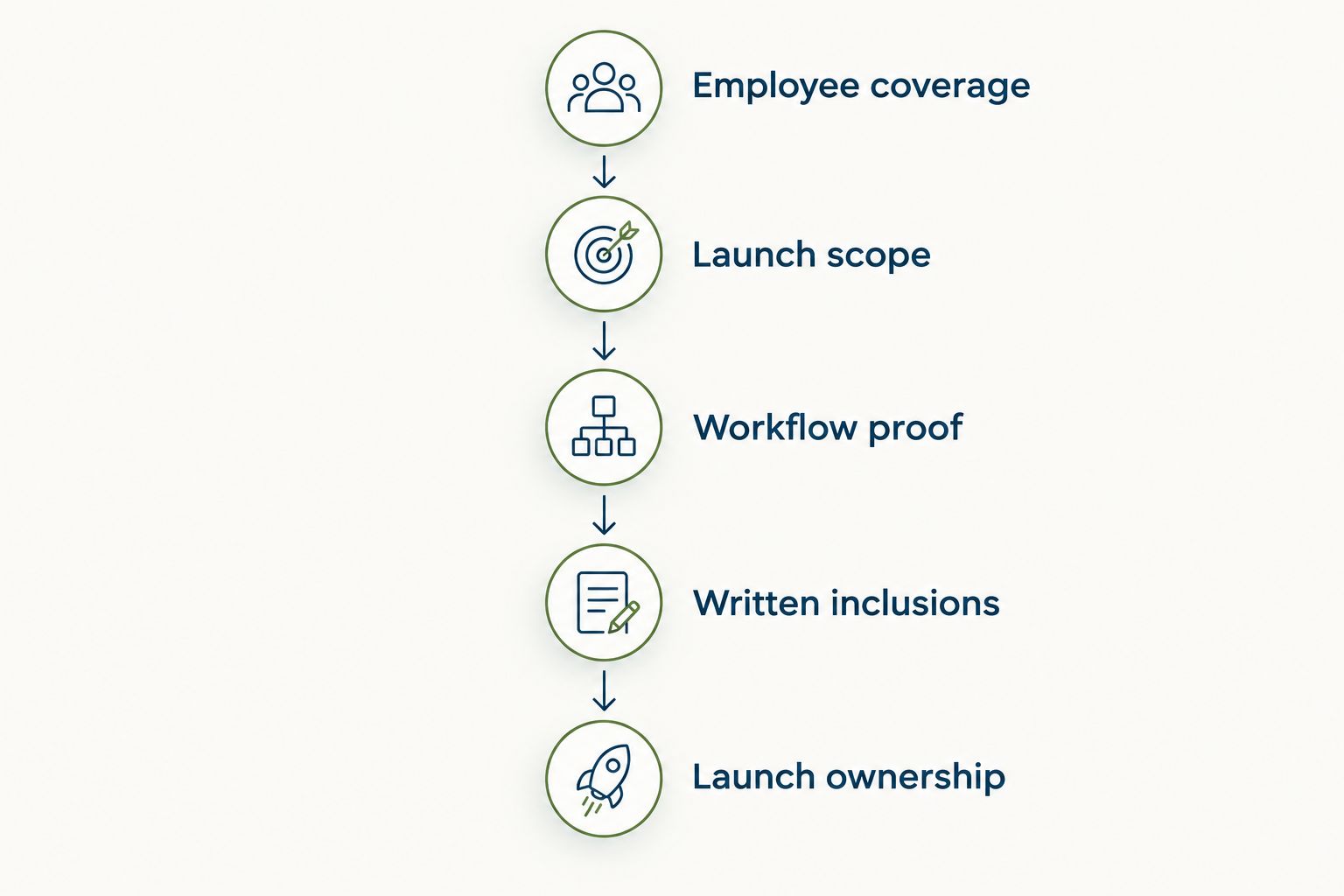
Use a short purchasing brief with a clear sequence. Your goal is to make each supplier answer the same questions, demonstrate the same work, and identify the same responsibilities.
1. Employee coverage
Start with your current employee population and distinguish it from your planning scenarios. For a growing company, you can request comparable scope at 20 employees, 50 employees, and 100 employees. These are planning scenarios, not a prediction of your growth or a claim about vendor charges.
Ask how the agreement handles changes in employee count. Keep the requested modules and services identical across scenarios so a change in scope does not get mistaken for a change caused by headcount.
2. Launch scope
List the employee actions that must work when the portal launches. Describe them plainly: an employee submits a request, a manager makes a decision, or HR receives an issue that needs resolution.
Separate essential actions from later improvements. This gives the vendor a defined proposal to prepare and gives your team a clear basis for accepting the implementation. It also prevents optional functions from obscuring whether the core requirement is met.
3. Workflow proof
Ask for a demonstration using your actual process, with sample information rather than real employee records. Follow the task from the employee's action through the manager or HR response.
For employee questions, evaluate the handoff as well as the submission screen. The guide to connecting employee self-service to your HR service desk addresses that workflow. A purchasing demonstration should establish who receives the request, who owns it, and how the employee follows its progress.
4. Written inclusions
Request a written scope that identifies included modules, services, configuration work, support, and exclusions. Ask the supplier to identify any requirement that needs a separate agreement or additional scoping.
Do not mark an essential requirement as satisfied just because it appeared in a presentation. The proposal should specify what your organization will receive and which party is responsible for making it work.
5. Launch ownership
Name the person on your team who owns the launch and the person who maintains the portal afterward. They need to know which decisions, records, and employee communications remain their responsibility.
For your 2026 rollout plan, agree on acceptance criteria before configuration begins. The criteria should describe completed employee tasks, not merely a configured account or an administrator login.
A useful final proposal lets your HR lead, operations lead, and founder reach the same understanding of the purchase. They should be able to identify what launches, who owns the work, and what remains outside the agreement without asking the salesperson to interpret it.
Is per-employee pricing the same as the total portal cost?
Per-employee pricing is a billing basis, not a complete implementation scope. You still need to establish the modules, services, and responsibilities included in the agreement.
HRSpace uses modular, per-employee pricing. Ask for a proposal tied to your employee count and selected functions, then evaluate implementation and ongoing responsibilities separately. Do not interpret the billing model as proof that every employee-facing capability is included.
Should you buy a portal separately or within HR software?
Choose the scope that matches the processes you intend to change. A focused portal suits a specific task; a modular HR platform suits a brief spanning selected employee lifecycle processes.
Keep existing processes in the comparison. Document what stays, what changes, and who owns each handoff. The right decision is the configuration that meets your requirements without leaving essential work undefined.
How do you compare proposals without choosing on subscription alone?
Use the same employee count, functions, launch responsibilities, and acceptance criteria for every proposal. Then review both the commercial terms and the implementation work assigned to your team.
In a 2026 evaluation, request written explanations for differences in scope. A broader proposal should identify the additional work or functions it includes; a narrower proposal should make its exclusions equally clear.
FAQ
How much does an employee self service portal cost?
An employee self-service portal needs a quote based on employee coverage, included functions, and implementation scope. Compare the recurring subscription with launch services and ongoing responsibilities rather than treating a headline figure as the full purchase.
Is employee self-service included in HR software?
Confirm employee self-service capabilities in the proposed configuration rather than assuming they follow from the HR software label. Ask the vendor to demonstrate each employee task you require and identify the module that supports it.
What should an employee self-service portal quote include?
The quote should identify employee coverage, included functions, implementation services, support, contract terms, and exclusions. A separate responsibility list should explain the work your team must complete before and after launch.
Does per-employee pricing cover everything?
Per-employee pricing does not establish which modules or services the agreement includes. Confirm the billing definition, selected functions, implementation scope, and support terms in writing.
Is HRSpace suitable for a growing company's HR team?
HRSpace fits HR and People Operations teams seeking modular, per-employee HR software across the employee lifecycle. Its stated scope includes onboarding, time-off, performance reviews, goals, recognition, recruitment, workflows, and an internal service desk; verify your specific portal requirements in the proposed configuration.
How can I compare employee self-service portal proposals in 2026?
Compare proposals using identical employee counts, employee tasks, module requirements, and launch responsibilities. Ask every vendor to demonstrate the same workflow and document what is included and excluded.
One last thing
Test what happens when the employee's request cannot be completed immediately. Submitting a form is only part of the requirement. Your evaluation should establish where the request goes, who takes responsibility, and what the employee can do next.
Put an unresolved request into the demonstration script. Ask the vendor to show the handoff rather than describing it. This turns a broad promise about employee self-service into a concrete requirement your team can accept or reject.
Before signing, check that the demonstrated workflow matches the written scope. If your chosen configuration stops at submission while your requirement includes resolution, the purchasing brief is not yet satisfied. Fix that gap before launch—not after employees start using the portal.


