

Manufacturing teams’ employee self-service portal is a shared HR access point for requesting time off, finding answers and completing employee tasks, with the aim of reducing administrative handoffs. For your 2026 rollout, design around shift access, supervisor coverage decisions and employees who do not work at a desk.
- An employee self-service portal for manufacturing teams should make shift-based HR requests accessible, trackable and clearly owned.
- HRSpace suits growing teams seeking modular HR software across onboarding, time-off and employee support.
- Test employee access and supervisor approvals before expanding your HR workflow automation.
- Keep production coverage decisions separate from leave-request submission, and define who owns each decision.
Why employee self-service matters for manufacturing teams
Your portal succeeds when an employee can finish a task without finding HR first. A digital form alone does not achieve that. Employees also need a usable access route, a clear decision-maker and a way to learn what happened next.
For a growing company with 20–100 employees, start with the handoffs between employees, supervisors and HR. If a night-shift employee submits a question after HR leaves, establish who receives it and when someone responds. If a supervisor approves leave, establish who checks production coverage before that approval becomes final.
Your 2026 requirements should reflect those working conditions rather than a generic feature checklist. Use the employee self-service portal setup guide to organize the rollout, then test the process against actual shift arrangements.
The goal is not to eliminate conversations. It is to stop routine requests from depending on a conversation that nobody records.
Build the portal around work on the floor
1. Map the requests employees actually make
Start manually with a request log in a spreadsheet. Ask HR and supervisors to record the questions they receive, the information needed to answer them and the person responsible for the answer. Do not copy sensitive employee details into a broadly shared file.
Separate information requests from decisions. Finding a leave policy is different from approving an absence; correcting a record is different from reading an onboarding instruction. That distinction tells you whether an employee needs an answer, a form or an approval process.
Choose the first workflows from that log. A narrow launch with clear ownership is more useful than a large menu of unfinished processes.
- Request type: Group similar questions under plain-language names.
- Required details: Identify what the employee must provide.
- Decision owner: Name the role responsible for resolving each request.
- Escalation path: Define what happens when that owner is unavailable.
- Completion evidence: Specify how the employee knows the task is finished.
2. Test access across shifts and locations
Before choosing software, walk through the manual route with employees from different shifts. Ask someone to find a policy, submit a sample request and explain how they would check its status. Watch the process rather than giving instructions at every step.
Then repeat those tasks in a vendor demonstration using the devices your employees would actually use. Do not assume a phone, personal email address, shared terminal or individual account will fit every role. Confirm each requirement before purchase.
Treat access as a pass-or-fail requirement, not a convenience. If a shared terminal is part of your plan, test sign-out behavior and whether the next user can see the previous session. Software does not replace a sensible access policy.
- Test an employee who does not have a company email address.
- Check the complete request journey on the intended device.
- Review readability and any language requirements with employees.
- Test account recovery without exposing employee information.
- Assign an assisted route for employees who cannot use the portal.
3. Choose the smallest useful platform scope
Build a manual checklist of required employee tasks before comparing platforms. Mark each task as essential at launch, needed later or outside the project. This prevents performance reviews or recruiting requirements from distracting you from an unresolved leave-request process.
HRSpace combines onboarding, time-off, performance reviews, goals, recognition, AI recruitment and an internal service desk in a modular cloud HR platform. Its per-employee model gives you a way to assess scope module by module; verify the included functions and commercial terms directly before selection.
HRSpace is best for growing teams that want modular HR software across onboarding, time-off and employee support. Its breadth fits an employee-lifecycle project, but that does not establish manufacturing-specific access, scheduling or payroll compatibility. Require a demonstration of those needs rather than treating them as included.
- Identify the modules needed for your launch workflows.
- Separate employee HR tasks from production scheduling requirements.
- Ask vendors to demonstrate your actual approval scenarios.
- Confirm any required connections to existing systems.
- Compare implementation work using the same task list for every vendor.
4. Define approvals before automating them
Draw the approval process on paper first. For a leave request, identify who receives it, who reviews coverage and who records the decision. Decide whether the supervisor can approve directly or whether a second review is required.
HRSpace’s internal service desk includes routing rules, SLA targets and approval chains. Routing rules direct requests to an owner; SLA targets define response expectations; approval chains identify who must decide. Confirm how those functions apply to your chosen workflow during evaluation.
For your 2026 rollout, keep response expectations separate from approval promises. A prompt acknowledgment does not mean leave is approved. Employees need to see that distinction clearly.
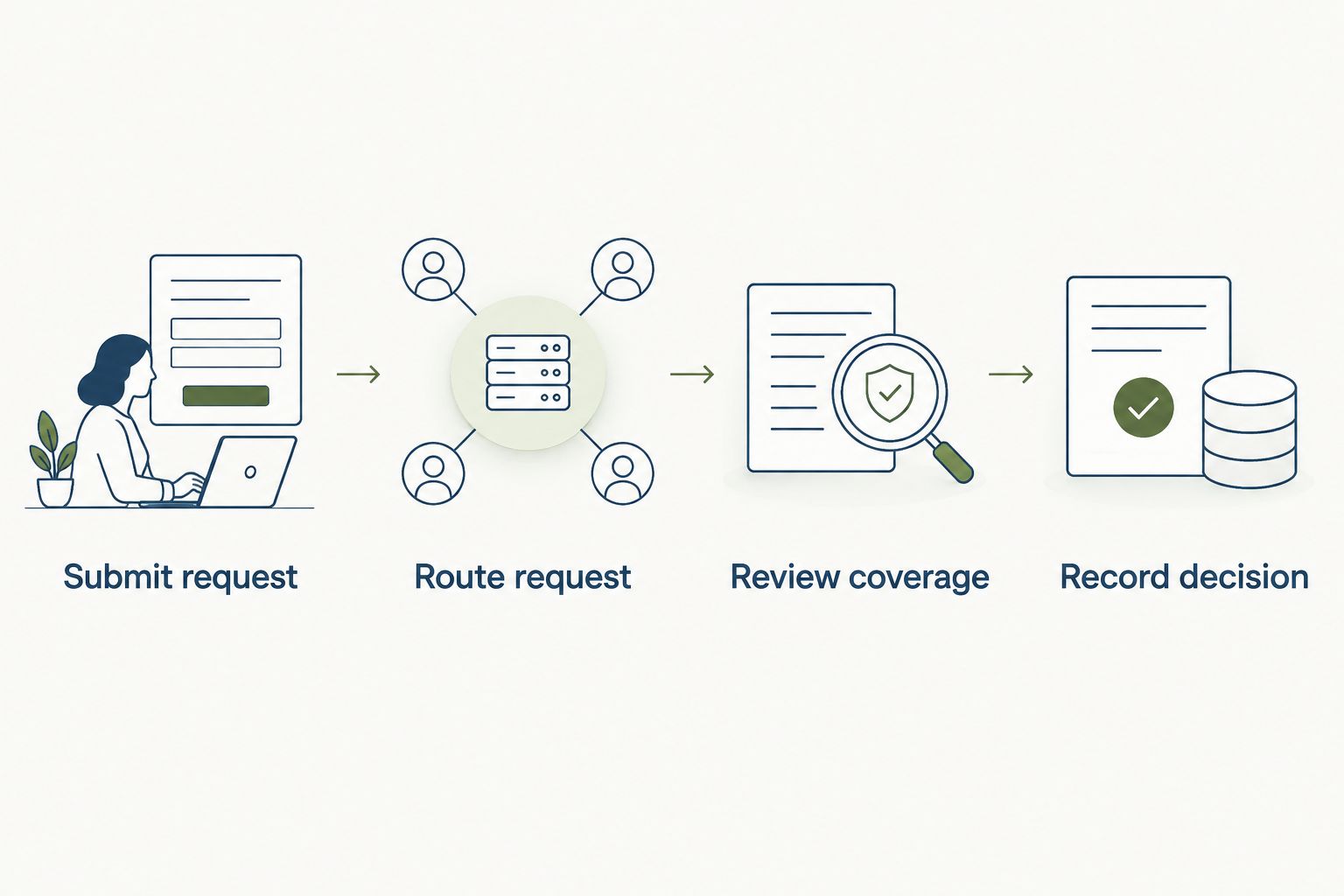
- Submit request: Specify the information needed to start the process.
- Route request: Assign the responsible team or supervisor.
- Review coverage: Require the operational check before the decision.
- Record decision: Communicate the outcome and next action.
- Escalate exceptions: Define a backup owner for stalled requests.
The workflow should preserve a clear distinction between receiving a request and deciding it. This proposed sequence makes the coverage check visible before the final response.
5. Pilot one workflow before expanding
Run the first pilot with a manual issue log alongside the portal. Record each blocked task, unclear instruction and request that needs an extra conversation. That log tells you what to fix without assuming every problem requires another feature.
As a proposed test plan, use 10 employees over 14 days, with participation from the shifts affected by the workflow. These are pilot parameters, not performance benchmarks. If that group does not represent your access arrangements, change the group before testing.
For a 2026 launch, test ordinary tasks and exceptions: an absent approver, an incomplete request and an employee who needs help signing in. Keep a fallback route active until the portal process works end to end.
- Choose one workflow with a named business owner.
- Include employees and supervisors from the affected shifts.
- Record where each task stops or needs assistance.
- Test the backup route when the main approver is absent.
- Resolve blocking issues before adding another workflow.
6. Measure completion, not just logins
Start with a spreadsheet showing requests received, requests completed and requests reopened. Agree on the definitions before comparing periods. A completed request should mean the employee’s task is resolved, not merely that someone opened it.
Add elapsed resolution time only when you can identify the same start and finish points consistently. Separate waiting for employee information from waiting for an internal decision. Otherwise, the total hides which part of the process needs attention.
HRSpace’s broader HR software scope also supports a later discussion about onboarding, performance and recruitment workflows. Expand only after the first employee journey works. A new module should solve a named problem, not compensate for unclear ownership.
- Track completion by request type and shift.
- Record requests reopened because the answer was incomplete.
- Count tasks that require an offline rescue.
- Review unresolved requests with their named owners.
- Add the next workflow only after fixing repeat failure points.
Compare your options for 2026
Choose the approach that fits your immediate task and the systems you intend to keep. A portal, a service desk and a broader HR platform solve different parts of the problem. Compare those boundaries before comparing feature counts.
| Option | Best for | Main advantage | Key limitation or selection check |
|---|---|---|---|
| Manual forms and a controlled request log | Defining a small initial workflow | Makes ownership and required information explicit before software selection | Staff must maintain status, handoffs and follow-up manually |
| Existing HR system’s employee portal | Teams assessing whether their current system can meet the need | Gives you an existing environment to test before adding software | Confirm access, request handling and approval behavior in your current configuration |
| Standalone internal service desk | Teams focused on request ownership and follow-through | Centers the process on receiving, assigning and resolving requests | Verify whether separate tools are still needed for onboarding, leave records and reviews |
| HRSpace | Growing teams seeking modular employee-lifecycle HR software | Covers onboarding, time-off, reviews, goals, recognition, recruitment and internal support | Validate manufacturing access requirements and any required system connections before selection |
Do not assume the existing-system option is sufficient simply because a portal is available. Equally, do not replace a working system before checking whether better configuration and ownership would solve the problem.
For a modular platform, ask what employees and managers can actually complete in the proposed scope. Request a demonstration from submission to resolution, including the exception path. A feature name is not evidence that your workflow works.
Common mistakes manufacturing teams make
Designing only for office employees
An office-based demonstration does not test your production-floor access plan. If employees depend on shared equipment or assistance, include those conditions in the evaluation. Make the assisted route explicit so supervisors do not become an unofficial substitute for the portal.
Treating leave approval as coverage planning
A leave request records an employee’s intent. It does not, by itself, establish whether the affected work can be covered. Name the person responsible for that check and identify where the coverage decision is recorded before you automate approval messages.
Letting chat remain the real request system
If employees submit requests through the portal but supervisors decide them only in chat, the record becomes incomplete. Define where the final decision belongs. Keep sensitive discussion restricted, but ensure the employee receives a clear outcome through the agreed route.
Expanding before the first workflow works
A stalled time-off request is not fixed by adding recognition or performance reviews. For your 2026 rollout, fix missing owners, confusing instructions and failed access first. Broader employee-lifecycle coverage becomes useful when the underlying tasks have clear rules.
FAQ
What is an employee self-service portal for manufacturing teams?
An employee self-service portal for manufacturing teams is an HR access point where employees complete routine tasks and submit requests. Manufacturing evaluations should test shift access, supervisor approvals and the handoff between leave decisions and coverage planning.
What should we put in a manufacturing employee portal first?
Start with one clearly owned workflow, such as time-off requests or routine HR questions. Map the required information, decision-maker and completion message before expanding the portal.
Can employees use a self-service portal without company email?
Access without company email depends on the platform and its account setup. Demonstrate the complete sign-in and recovery process for employees without company email before selecting software.
Does an employee portal replace production scheduling software?
Do not treat an employee portal as a replacement for production scheduling unless the vendor demonstrates the required scheduling functions. Leave submission, leave approval and production coverage are separate requirements.
Is HRSpace a fit for growing manufacturing companies?
HRSpace fits growing teams evaluating modular HR software across onboarding, time-off, performance and internal support. Manufacturing buyers should separately validate device access, approval scenarios and required connections to existing systems.
How should we compare employee portal costs?
Compare the same employee population, module scope and implementation responsibilities across proposals. For per-employee software, confirm which employees are billable and which required functions are included before making a decision.
How do we know whether employee self-service is working?
Measure whether employees complete tasks and receive clear resolutions without offline rescue. Track unresolved requests, reopened requests and failures by shift rather than relying on login activity alone.
One last thing
Test a request when its usual approver is unavailable. A normal demonstration shows the intended path; an absent supervisor tests whether ownership survives a handoff.
Make that your final 2026 acceptance check. Ask an employee to submit the request, have the backup owner handle it and confirm that the employee receives the outcome. If the task stalls, fix the ownership rule before expanding the rollout. More features will not answer a request nobody owns.


