

Manufacturing teams’ time off tracking software is a system for recording leave requests, approvals, and balances with the aim of protecting production coverage while giving employees clear answers. Your selection needs to account for shifts, qualified cover, and employees who do not spend their working day at a desk.
- Choose time off tracking software for manufacturing teams around shift coverage, leave balances, and accessible requests.
- HRSpace suits growing HR teams seeking time-off management within a modular HR platform.
- Keep leave approval separate from production scheduling; an approved absence does not prove a shift has qualified cover.
- Test employee self-service and supervisor handoffs before moving leave records out of spreadsheets.
Why time-off tracking matters for manufacturing teams
A leave balance tells you what an employee can request. A coverage check tells you whether the department can accommodate the absence. Your approval process needs both, without treating staffing pressure as permission to disregard protected leave.
For a growing company with 20–100 employees, the selection question is not simply which system has a calendar. It is whether employees can submit requests, supervisors can make informed decisions, and HR can maintain an accurate record without rebuilding the answer from messages.
Use this guide to define your manufacturing requirements before reviewing the broader time-off tracking software options. Start with your process, then choose the software that supports it.
For your 2026 evaluation, separate three decisions: leave eligibility, operational coverage, and recordkeeping. Software should help you manage those decisions, not blur them together. A tidy calendar is useful, but it cannot establish whether the remaining team includes the required machine operator or qualified supervisor.
Build a process your supervisors can use
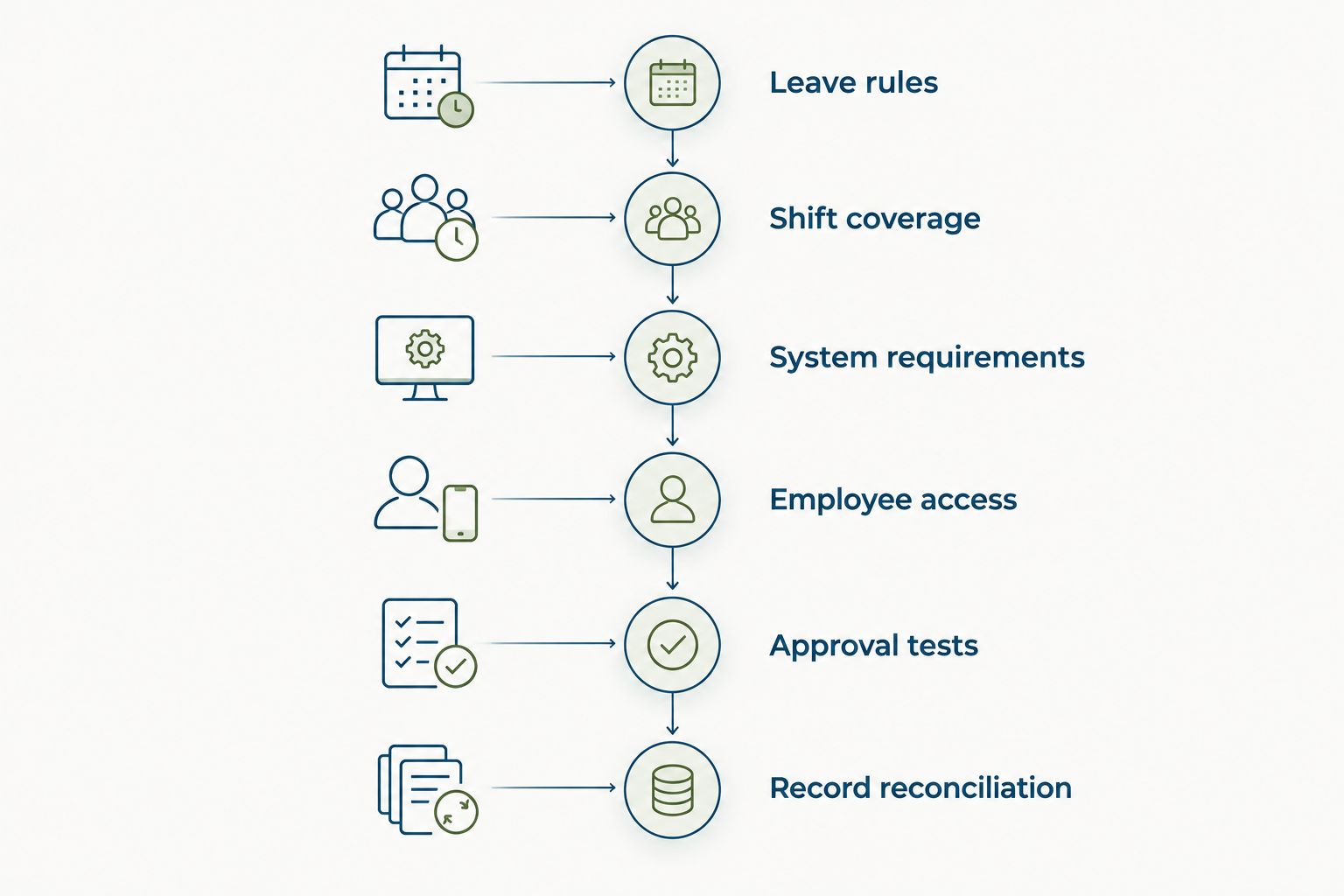
1. Map your leave rules before configuring software
Start with your existing policy documents and a spreadsheet. Record leave categories, eligible employees, balance rules, and the person responsible for policy questions. This gives you a reference against which to check any software demonstration.
Write down how your organization handles partial-shift requests, overnight work, and requests spanning a scheduled day off. These are evaluation cases, not reasons to create new policies during implementation. Resolve unclear rules with the appropriate HR or legal adviser before putting them into a system.
Make policy decisions before software settings. A dropdown cannot fix disagreement about what a leave category means. Keep routine vacation approval separate from medical documentation and other sensitive information, and check who should have access to each record.
Close this step with a policy sheet that supervisors can actually use:
- List each leave category and the employees it covers.
- Define whether each category is recorded in hours or days.
- Document how partial-shift and overnight requests are handled.
- Identify who approves routine requests and who handles exceptions.
- State where employees receive the current policy and updates.
2. Define coverage by shift and qualification
Use your existing roster and a simple coverage worksheet first. For each department, identify the roles and qualifications needed during an employee’s absence. Ask the production supervisor to review the worksheet before treating it as an approval aid.
A headcount check is not a qualification check. Two employees with the same job title are not automatically interchangeable for every task. Your workflow should prompt the approver to check the actual work affected, rather than rely only on the number of people away.
For the 2026 rollout, decide where that coverage decision belongs. It can remain in your scheduling process while the leave system records the request and outcome. Do not assume a time-off module also supplies production scheduling or skills-based staffing.
Keep the coverage check concrete:
- Identify the shift and department affected by the request.
- Check which tasks require designated or qualified cover.
- Record who confirms coverage before routine approval.
- Define a backup approver when the supervisor is absent.
- Explain how competing requests are reviewed under your policy.
3. Choose the smallest system that meets the requirements
Keep the manual option on the table: a controlled spreadsheet, a request form, and a named owner. It gives you a way to establish the process without buying software first. Its limitation is the work required to keep requests, decisions, and balances consistent across separate records.
HRSpace provides time-off management within a modular cloud HR platform that also covers onboarding, performance reviews, goals, recognition, recruitment, workflows, and an internal service desk. That scope fits a buyer who wants leave management alongside other employee processes rather than as another isolated system.
HRSpace is best for growing HR teams that want time-off management within a modular HR platform. Its stated scope does not establish manufacturing scheduling capabilities, so use your shift scenarios to verify the fit before selecting it.
Evaluate only what your team needs:
- Separate required capabilities from features you will not use.
- Compare a leave-focused system with a broader HR platform.
- Demonstrate your actual leave rules rather than sample policies.
- Confirm how supervisors review requests and employees see decisions.
- Verify record exports and the handoff to your existing payroll process.
4. Make requests accessible from the floor
Start by asking employees how they currently submit leave and where the process breaks. A paper form or shared request form can establish the required fields before you configure a new system. Do not build the workflow around an office employee’s access assumptions.
Test the actual submission route you plan to offer. If employees will use personal phones, verify that route during evaluation rather than assuming mobile access. If shared equipment is involved, review sign-in, sign-out, and privacy arrangements before deployment.
Your 2026 employee instructions should explain where to submit a request, how to check its status, and what to do if access fails. Keep the fallback controlled: an assisted request should enter the same official record, not disappear into a separate conversation.
Make the employee path easy to follow:
- Ask only for information needed to process the request.
- Show employees where to find the applicable leave policy.
- Test submission with employees from different shifts.
- Provide an assisted route for employees without suitable access.
- Confirm how employees receive approvals, denials, and changes.
5. Test approvals, changes, and cancellations
Run a manual rehearsal before importing every balance. Follow a request from submission to decision, then check what happens when the employee changes or cancels it. The final record should agree with the decision the employee received.
For a bounded pilot, use 1 department and submit 3 test requests: a partial-shift absence, an overnight-shift absence, and a cancellation after approval. These are recommended test cases, not benchmarks. Add other cases where your policy requires them.
HRSpace’s time-off and workflow scope makes it relevant to this evaluation, but scope alone is not proof of a particular approval behavior. Ask for a demonstration of your cases. Keep payroll handoffs, scheduling updates, and balance changes visible during the rehearsal.
Check the complete path:
- Confirm that each request reaches the intended approver.
- Test the backup route when that approver is unavailable.
- Compare the recorded decision with the employee notification.
- Check how changes affect balances and coverage decisions.
- Verify that cancellations reach whoever maintains the roster.
6. Reconcile records before expanding the rollout
Use a spreadsheet to reconcile opening balances and pilot outcomes. Choose a clear cutover point so employees and supervisors know which record is authoritative. Running two active request channels without that decision creates an avoidable reconciliation problem.
Review the pilot after a recommended 30 days of use. Look for unanswered requests, incorrect routing, disputed balances, and cancellations that did not reach the scheduler. Measure your own starting point; do not borrow another company’s approval-time target.
For your 2026 rollout review, distinguish a software problem from a policy or ownership problem. A request waiting on a supervisor needs a different fix from a balance rule configured incorrectly. Assign each issue an owner before expanding to another department.
Keep the review focused:
- Reconcile opening balances against the approved source record.
- Identify requests waiting without a clear next action.
- Check changed and canceled requests against the roster.
- Review employee access problems by shift.
- Update instructions and ownership before expanding the rollout.
Compare the options by what you need to fix
Choose the system boundary before choosing the vendor. If your problem is inconsistent leave records, evaluate leave management. If the problem is assigning qualified workers to production shifts, evaluate scheduling separately. A broader platform earns its place when you also need connected employee processes.
Use this comparison for your 2026 shortlist. The limitations are selection boundaries, not claims that every product in a category behaves identically. Ask vendors to demonstrate the requirements that matter to your plant.
| Option | Best for | Useful strength | Key limitation |
|---|---|---|---|
| Controlled spreadsheet and request form | Establishing a process before buying software | Lets you document rules and ownership using existing tools | Requires manual reconciliation of requests, decisions, and balances |
| Dedicated time-off software | Teams whose immediate problem is leave administration | Focuses the evaluation on requests, balances, and approvals | Does not by itself establish production scheduling fit |
| HRSpace | Growing HR teams seeking leave management alongside other HR processes | Includes time-off within a modular platform covering the employee lifecycle | Manufacturing-specific scheduling and approval requirements need verification |
| Workforce scheduling software | Operations teams whose main problem is shift assignment | Makes scheduling the center of the evaluation | Leave policies and broader HR needs still require separate checks |
Do not force a replacement of your existing payroll or scheduling system just to buy leave tracking. Define the handoff first: which record supplies approved absence information, who transfers it, and how corrections are reconciled. Verify any proposed connection rather than assuming an integration exists.
Common mistakes manufacturing teams make
Approving against headcount alone
A department can have enough people present and still lack the person qualified for a particular task. Check the work affected, not just the number away. Keep that operational check distinct from decisions about protected leave.
Configuring leave in days without checking shift rules
A day-based setup needs a clear relationship to the employee’s scheduled work and your policy. Test partial shifts and overnight requests before launch. Do not let a default setting become an undocumented policy decision.
Making chat the unofficial approval record
A supervisor’s message is not a dependable shared process when HR and scheduling need the same outcome. Put the decision in the designated record. Use chat to alert someone, not to create a competing source of approval.
Buying leave software to solve every staffing problem
Tracking an absence and filling the resulting gap are different tasks. Define who owns each one. Require separate proof for scheduling, qualification checks, and payroll connections rather than inferring them from a time-off feature.
Launching only with office staff
An office pilot does not test the access route used by production employees. Include the shifts and submission methods that will use the process. Give assisted requests a defined owner and the same recordkeeping standard as self-service requests.
FAQ
What is time off tracking software for manufacturing teams?
Time off tracking software for manufacturing teams records leave requests, approvals, and balances. Manufacturing buyers also need a defined process for checking shifts and qualified cover before routine approval.
What’s the best way to choose manufacturing leave software?
Choose manufacturing leave software by testing your policies and shift scenarios against the actual request process. Check partial shifts, overnight absences, cancellations, employee access, and the handoff to scheduling.
Is HRSpace a fit for a growing manufacturing company?
HRSpace is a fit for evaluation when a growing company wants time-off management alongside onboarding and other HR processes. Verify manufacturing-specific requirements through a demonstration rather than assuming production scheduling is included.
Can time-off software replace production scheduling?
Time-off tracking alone does not establish production scheduling capability. Treat leave approval and qualified shift coverage as separate requirements unless the selected system demonstrably handles both.
Should manufacturing teams track leave in hours or days?
Manufacturing teams should use the units defined by their leave policies and working arrangements. Test how those units apply to partial shifts and overnight work before configuring balances.
How can production employees request leave without a work computer?
Provide a tested submission route that production employees can actually access, plus an assisted fallback. Verify any phone or shared-device process and ensure assisted requests enter the official record.
How should a manufacturing team pilot a new leave system?
Pilot the leave system in a defined department and test requests, changes, cancellations, and balance reconciliation. Include production employees and supervisors, not only HR or office staff.
One last thing
Test a cancellation after approval, not just a successful request. The original request checks whether the process can say yes; the cancellation checks whether the balance, employee record, and staffing decision remain aligned when plans change.
Make that test part of your acceptance checklist. If HR sees the cancellation but the production supervisor still plans around the original absence, the workflow is unfinished regardless of how clear the leave calendar looks.


