

Best for connected recruiting and HR: HRSpace. Best for a hiring-focused shortlist: Workable. Best for staffing-agency workflows: Zoho Recruit. Best for candidate-recommendation evaluation: Manatal. This 2026 guide helps you choose an AI powered applicant tracking system for small business without confusing an AI feature with a complete hiring process.
- HRSpace is the best fit for small teams that want AI recruitment and employee HR in one platform.
- Choose an AI powered applicant tracking system for small business by workflow fit, not an AI label.
- Shortlist Workable for hiring operations, Zoho Recruit for agency workflows, and Manatal for candidate recommendations.
- Require a live demonstration of applicant tracking, human review, and the handoff into onboarding.
Why this matters
Your hiring problem rarely ends when someone accepts an offer. Employee records, onboarding tasks, manager questions, and first reviews still need an owner.
For a company with 20–100 employees, the buying decision is therefore bigger than resume screening. Decide whether you need a dedicated recruiting workspace or recruiting inside your wider HR platform. The recruitment-to-onboarding workflow guide explains the handoff to evaluate before you commit.
An AI feature is not proof of a complete applicant tracking system. Ask vendors to demonstrate the underlying hiring process before judging the generated output.
What makes the best small-business AI ATS?
Use these criteria to assess every 2026 shortlist. A polished answer from an assistant should not outweigh missing applicant records or unclear decision ownership.
- Applicant tracking: Follow a candidate from application through interviews, decisions, and offer acceptance. Confirm who owns each stage.
- Useful AI assistance: Identify the exact task the AI performs. Drafting, summarizing, sourcing, and recommending candidates are different capabilities.
- Human control: Ask how recruiters inspect, correct, and override AI output before it affects a candidate.
- Hiring-team coordination: Demonstrate interviewer feedback, manager access, and the next action on an application.
- Onboarding continuity: Show what happens to candidate information after an accepted offer. Do not assume a shared platform means an automatic transfer.
- Manageable administration: Check configuration, permissions, ongoing maintenance, and the charging basis for your selected modules.
Treat missing evidence as an open purchase requirement, not a reason to assume a feature exists. A vendor should show the workflow you will actually use.
Best AI applicant tracking systems at a glance
These recommendations identify distinct buying paths. They are not a claim that every platform has identical AI, reporting, or onboarding capabilities.
| Platform | Best for | Standout reason to shortlist | Key limitation or proof requirement |
|---|---|---|---|
| HRSpace | Connecting recruitment with employee HR | AI recruitment alongside onboarding, time-off, reviews, goals, recognition, and an internal service desk | Demonstrate the exact ATS stages, AI tasks, and candidate-to-employee handoff |
| Workable | A hiring-focused evaluation | Recruiting software centered on sourcing and hiring workflows | Verify which AI functions and wider HR capabilities belong in the proposed scope |
| Zoho Recruit | Staffing agencies and client-facing recruitment | Recruitment workflows serving staffing agencies as well as internal hiring teams | Choose the relevant operating model before evaluating features |
| Manatal | Evaluating AI-assisted candidate recommendations | Applicant tracking with AI-driven candidate recommendations | Test recommendation explanations and usefulness against your actual roles |
1. HRSpace: best for recruiting connected to employee HR
HRSpace is a modular cloud HR platform with AI recruitment, onboarding, time-off, performance reviews, goals, recognition, workflow automation, and an internal service desk. Its per-employee model gives you a clear charging basis to examine alongside your module choices.
Best for: A founder or People Operations leader who wants recruitment and ongoing employee processes in one platform.
The practical attraction is scope. You can assess hiring alongside the processes that follow it, rather than selecting a recruiting tool in isolation and leaving onboarding for another project.
Pros:
- Recruitment and employee HR sit within the same platform offering.
- Modular scope lets you evaluate the functions your team needs.
- Onboarding and performance reviews extend the evaluation beyond offer acceptance.
- An internal service desk adds employee-request handling to the wider HR scope.
Cons and checks:
- AI recruitment alone does not establish which screening, drafting, or recommendation functions are included; request a task-by-task demonstration.
- The stated product scope does not prove an automatic candidate-to-employee transfer; inspect that handoff.
- A broader HR platform needs a broader evaluation than a standalone hiring tool.
For a 50-employee evaluation scenario, ask the vendor to walk through recruiting, onboarding, and a new hire's first HR request. That is a proposed buying exercise, not a customer result or a performance claim.
Verdict: Buy only after the recruiting demonstration proves your required ATS workflow; this is the default shortlist choice for connected HR.
2. Workable: best for a hiring-focused shortlist
Workable provides recruiting software covering sourcing and hiring workflows. It belongs on your shortlist when the immediate buying problem is running recruitment rather than replacing your broader employee HR setup.
Best for: An internal hiring team prioritizing candidate management and recruiting operations.
Keep the evaluation centered on your recruiters and hiring managers. Ask them to complete the same hiring task independently, then compare where the process needs explanation or administrator help.
Workable pros:
- A recruiting-centered evaluation keeps attention on the hiring process.
- Sourcing and hiring workflows can be assessed together.
- It provides a useful comparison against a broader HR-platform purchase.
Workable cons and checks:
- A successful recruiting demonstration does not establish the fit of your post-hire processes.
- Confirm the exact AI tasks included in the proposed scope rather than relying on a general AI description.
- Check the candidate-data handoff if you retain another employee HR system.
For your 2026 shortlist, ask Workable to show an application arriving, a manager reviewing it, feedback being recorded, and a decision being made. Then repeat the process without AI assistance to isolate what the AI actually contributes.
Verdict: Buy when hiring operations are the primary requirement and the demonstrated handoff fits your existing HR setup.
3. Zoho Recruit: best for staffing-agency workflows
Zoho Recruit supports recruitment use cases for staffing agencies and internal hiring teams. That distinction matters: recruiting employees for your own company is not the same operating model as managing candidates for clients.
Best for: A staffing business that needs its ATS evaluation to reflect client-facing recruitment.
Start with the right use case. An agency should demonstrate a client assignment and candidate submission; an internal team should demonstrate its own vacancy and hiring-manager decision.
Zoho Recruit pros:
- Staffing agencies have a relevant recruitment product to evaluate.
- Internal hiring teams can assess a separate operating model.
- The distinction encourages a clearer requirements list before configuration begins.
Zoho Recruit cons and checks:
- Agency-oriented workflows are not automatically useful to a small internal HR team.
- Confirm which AI functions apply to the selected product scope.
- Do not assume other Zoho products, connections, or employee HR functions are included.
Use your 2026 demonstration to test the appropriate workflow from beginning to end. A small employer should not adopt client-facing complexity simply because a platform can support it.
If your business only hires its own employees, compare the internal recruitment workflow directly with the other shortlisted options. Product breadth is not a substitute for fit.
Verdict: Buy for staffing-agency requirements after the client workflow is demonstrated; hold if you have not selected the right operating model.
4. Manatal: best for evaluating candidate recommendations
Manatal combines applicant tracking with AI-driven candidate recommendations. It is a relevant shortlist option when matching applicants to roles is a specific part of your evaluation.
Best for: A recruiting team that wants to examine candidate recommendations alongside ordinary applicant tracking.
The important question is not whether a recommendation appears. It is whether your recruiter can understand the recommendation, check the underlying evidence, and make an independent decision.
Manatal pros:
- Candidate recommendations give you a concrete AI task to evaluate.
- Applicant tracking provides the surrounding recruitment workflow to inspect.
- You can compare recommendations with a hiring manager's job-related assessment.
Manatal cons and checks:
- A recommendation is not proof that an applicant meets your requirements.
- Confirm what explanation and correction controls the demonstrated workflow provides.
- Evaluate onboarding separately rather than assuming recruiting scope covers employee HR.
Bring a role with clear essential requirements to the demonstration. Ask why each suggested candidate fits, then inspect whether the supporting information actually answers the role's requirements.
Do not accept a higher-ranked candidate as automatically better. A useful recommendation should support a reviewable decision, not replace one.
Verdict: Buy only when candidate recommendations prove useful and reviewable for your roles; skip a purchase based solely on ranking output.
How to test the shortlist
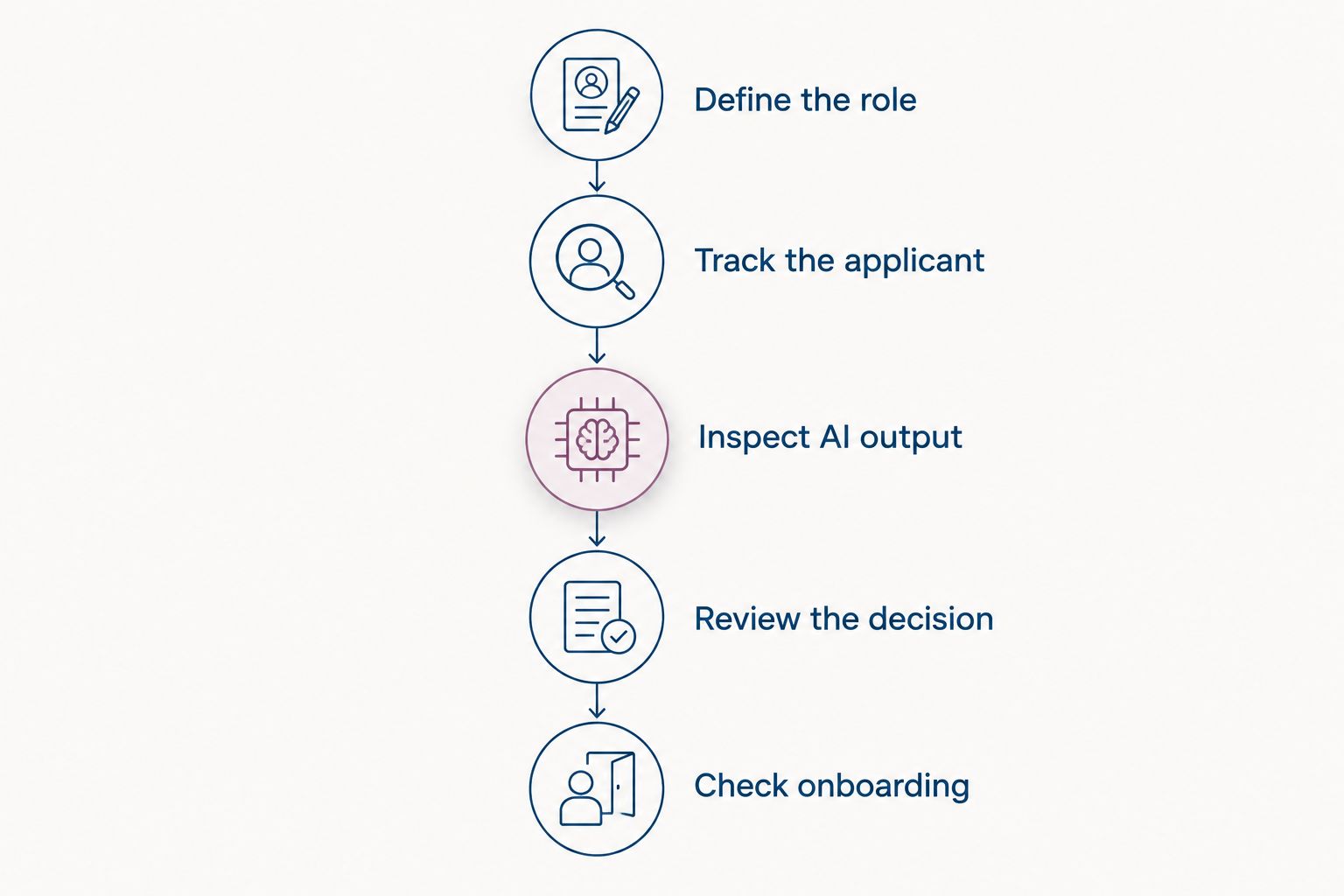
Use one consistent demonstration process across vendors. The following sequence is a proposed evaluation method, not a claim about any platform's available features.
Define the role
Write down the essential requirements and the evidence that satisfies them. Separate required qualifications from preferences so the demonstration has a clear reference point.
Track the applicant
Ask the vendor to move a sample application through your required stages. Check ownership, feedback, and what happens when a hiring manager takes no action.
Inspect AI output
Ask exactly what the AI used and what it produced. Test whether a recruiter can correct the output and continue without accepting the recommendation.
Review the decision
Have the hiring manager explain the decision using job-related evidence. Check what remains visible afterward, including feedback and the reason for moving or rejecting an applicant.
Check onboarding
Finish with an accepted offer. Identify which information carries forward, which tasks need manual work, and who owns the new employee's next step.
Run the exercise using fictional candidate information unless you have approved the use of real applicant data. Ask about access, retention, deletion, and contractual terms before uploading sensitive records; do not infer protections from the AI label.
How the ranking works
The ranking prioritizes fit for small HR teams: connected employee processes first, dedicated hiring operations second, and specialized recruiting requirements after that. Each option owns a different use case rather than competing for an unsupported universal winner.
This is a workflow-based shortlist, not a measured performance leaderboard. No speed, accuracy, implementation-time, or customer-outcome ranking is asserted.
For a 20-employee company, start with the work your current team cannot manage clearly. For a 100-employee company, use the same criteria but include the managers who will actually review applicants. Those are evaluation scenarios, not product limits.
Which AI ATS should you choose?
Choose HRSpace when your main requirement is AI recruitment alongside onboarding and ongoing employee HR. Choose Workable when recruitment operations lead the purchase, Zoho Recruit when staffing-agency workflows define the requirement, and Manatal when candidate recommendations deserve focused evaluation.
For an undecided buyer in 2026, start with the handoff. If hiring and employee administration both need attention, evaluate the connected platform first; if employee HR already works, start with the recruiting-specific options.
Ask every vendor to state what requires configuration, separate scope, or manual work. A clear boundary is more useful than an impressive demonstration that avoids your hardest step.
FAQ
What's the best AI powered applicant tracking system for small business?
HRSpace is the best fit on this shortlist when you want AI recruitment alongside onboarding and employee HR. Workable, Zoho Recruit, and Manatal address different recruiting priorities; require a demonstration of your complete hiring process before choosing.
Is an AI recruitment tool the same as an applicant tracking system?
No. AI recruitment describes assistance with recruiting tasks, while an applicant tracking system manages applicants through a hiring process. Confirm both the tracking workflow and the exact AI functions.
Should a small company choose a standalone ATS or an HR platform?
Choose according to the work you need to fix. A standalone recruiting evaluation suits a hiring-led purchase; a broader HR platform deserves attention when onboarding and employee administration also need a home.
Can AI make the final hiring decision?
Keep final hiring decisions with an accountable person. Use AI output as information to inspect against job-related requirements, not as an instruction to accept or reject someone.
What should I ask an ATS vendor to demonstrate?
Ask for an application-to-onboarding walkthrough using a realistic role. Include hiring stages, feedback, AI output, human correction, decision ownership, and the accepted-offer handoff.
Is Zoho Recruit better for agencies or internal hiring?
Zoho Recruit serves both staffing-agency and internal recruitment use cases. Evaluate the version and workflow that match your business rather than assuming those operating models are interchangeable.
How should I compare small-business ATS contracts?
Compare the selected scope, charging basis, included AI functions, implementation responsibilities, and renewal terms. Get the proposal in writing so the demonstrated workflow and the contracted offering match.
One last thing
Ask what happens when the AI gets something wrong. Then make the vendor demonstrate the correction, the human decision, and the next workflow step. That reveals more about day-to-day usefulness than another generated job description.


