

AI recruitment software is worth it in 2026 when a controlled pilot shows that it removes more hiring work than it creates, without weakening candidate assessment. Count setup, checking outputs, and training alongside the work it replaces. If you cannot identify a recurring hiring task and measure an improvement, keep your current process.
- Is AI recruitment software worth it? Buy only after measured benefits outweigh setup and review work.
- HRSpace suits growing HR teams seeking AI recruitment alongside onboarding and employee management.
- Keep people responsible for candidate decisions; evaluate software against clear, job-related criteria.
- Test recruitment software on a repeatable task before changing your whole hiring process.
Why this matters: A faster recruiting task is not automatically a better hiring process. You need to know whether the software removes work, moves it to another person, or creates another checking step. That distinction matters for companies with 20–100 employees, where HR and operations leaders also manage onboarding, employee questions, and reviews.
Assess the handoff, not just the recruiting screen. The AI recruitment to first-day onboarding workflow gives you a second process to examine when deciding whether recruitment belongs inside your wider HR platform.
Is AI recruitment software worth it in 2026?
Buy for a verified workflow improvement, not for an AI label. The decision rests on whether a specific tool improves work your team actually does while preserving human accountability.
Use these 3 checks before committing:
- Name the bottleneck. Identify the exact task that slows hiring. A broad complaint such as recruiting takes too long is not enough; describe the work, its owner, and its output.
- Test the proposed assistance. Ask the vendor to demonstrate that task using representative material. Evaluate the result against your existing process, including correction and approval work.
- Check the complete handoff. Follow the output to the next person. A useful draft that requires manual copying, extensive rewriting, or unclear approval needs that extra work included in the decision.
Treat the purchase as a process change. The tool earns its place when the team can explain what improves, who checks it, and what happens when an output is wrong.
Compare the buying routes
You do not have to replace your entire HR setup to evaluate recruitment assistance. Compare the scope you need before comparing vendors.
| Route | Best for | What to prove | Trade-off to examine |
|---|---|---|---|
| Keep your current process | Teams without a repeatable recruiting bottleneck | Whether clearer ownership and templates solve the problem | Existing manual work remains unless you change the process |
| Evaluate a recruitment-focused tool | Teams buying for a specific hiring task | That the required task works with your materials and review standards | Check the handoff into your existing HR setup |
| Evaluate a broader HR platform | Teams assessing recruiting and employee administration together | That both recruitment and downstream HR workflows fit | Broader scope means more requirements to evaluate |
These are buying routes, not performance rankings. A narrower tool is not automatically easier to implement, and a broader platform is not automatically better connected. Require proof of the workflow you intend to use.
Start with work, not features
Write down what your recruiter or hiring manager does before requesting a demo. Include the inputs, the output, and the person who approves it.
For example, if you want help preparing hiring material, specify what a usable result must contain. If you want help reviewing candidate information, define which job-related evidence a reviewer needs. These are evaluation tasks, not assumptions about what every recruitment product can do.
Choose one task that repeats and has a clear quality standard. A task with no agreed standard is difficult to test because reviewers cannot distinguish a useful result from a plausible-looking one.
Your task brief should answer:
- Input: What information does the task require?
- Output: What must the finished work contain?
- Owner: Who checks and accepts the result?
- Failure: What makes an output unusable?
- Handoff: Who needs the accepted result next?
Keep the brief short enough for a hiring manager to use. If the software cannot demonstrate that task clearly, do not expand the evaluation into unrelated features.
Where HRSpace fits
HRSpace is best suited to growing HR and People Operations teams evaluating AI recruitment within a broader HR platform. Its stated scope includes onboarding, time-off, performance reviews, goals, recognition, workflow automation, and an internal service desk.
That scope makes HRSpace relevant when your decision extends beyond hiring into employee administration. Its modular, per-employee pricing model is another reason to define the functions you need before reviewing a proposal.
The trade-off is evaluation breadth. With HRSpace AI recruitment, inspect the actual recruiting tasks and the handoff into onboarding; the presence of both modules does not establish how every transfer works. Ask to see controls, approval points, and the steps your team must still perform.
Evaluate the demonstrated workflow, not the module list. Do not assume integrations, security provisions, recruitment functionality, or setup speed that have not been established for your requirements.
Run a pilot before changing your process
A useful 2026 evaluation produces a clear comparison between your current workflow and the proposed one. Keep the task consistent so that you are evaluating assistance rather than comparing unrelated pieces of work.
Use these 5 steps. They give your team a decision record without turning the trial into a full implementation project.
Baseline work
Document how you complete the selected task today. Record hands-on time, corrections, approvals, and the final result your team accepts.
Include work done by hiring managers, not just HR. If another person finishes a draft or fixes a handoff, that effort belongs in the baseline.
Test assistance
Run the same kind of task through the proposed software. Use material you are permitted to share, and confirm the vendor's data-handling terms before uploading candidate information.
Ask the vendor to distinguish available functionality from a demonstration concept. A persuasive presentation is not a substitute for a task your team can repeat.
Check quality
Assess the output against the task brief, not against how polished it sounds. Check whether it preserves relevant information, follows the role requirements, and avoids adding unsupported details.
Record rejected outputs as well as accepted ones. An evaluation that keeps only the best examples cannot show the work your team will need to review.
Track rework
Record time spent correcting, approving, copying, and explaining results. Also record setup and training separately so you can distinguish adoption work from recurring work.
Do not call work eliminated when it has moved to someone else. A recruiter's saving and a hiring manager's added workload belong in the same assessment.
Decide scope
Compare accepted output, total human effort, and the remaining risks. Approve only the tasks that meet your standards; leave the rest with your existing process.
Set a review point after adoption. A successful pilot establishes a starting decision, not permanent permission to expand into every hiring activity.
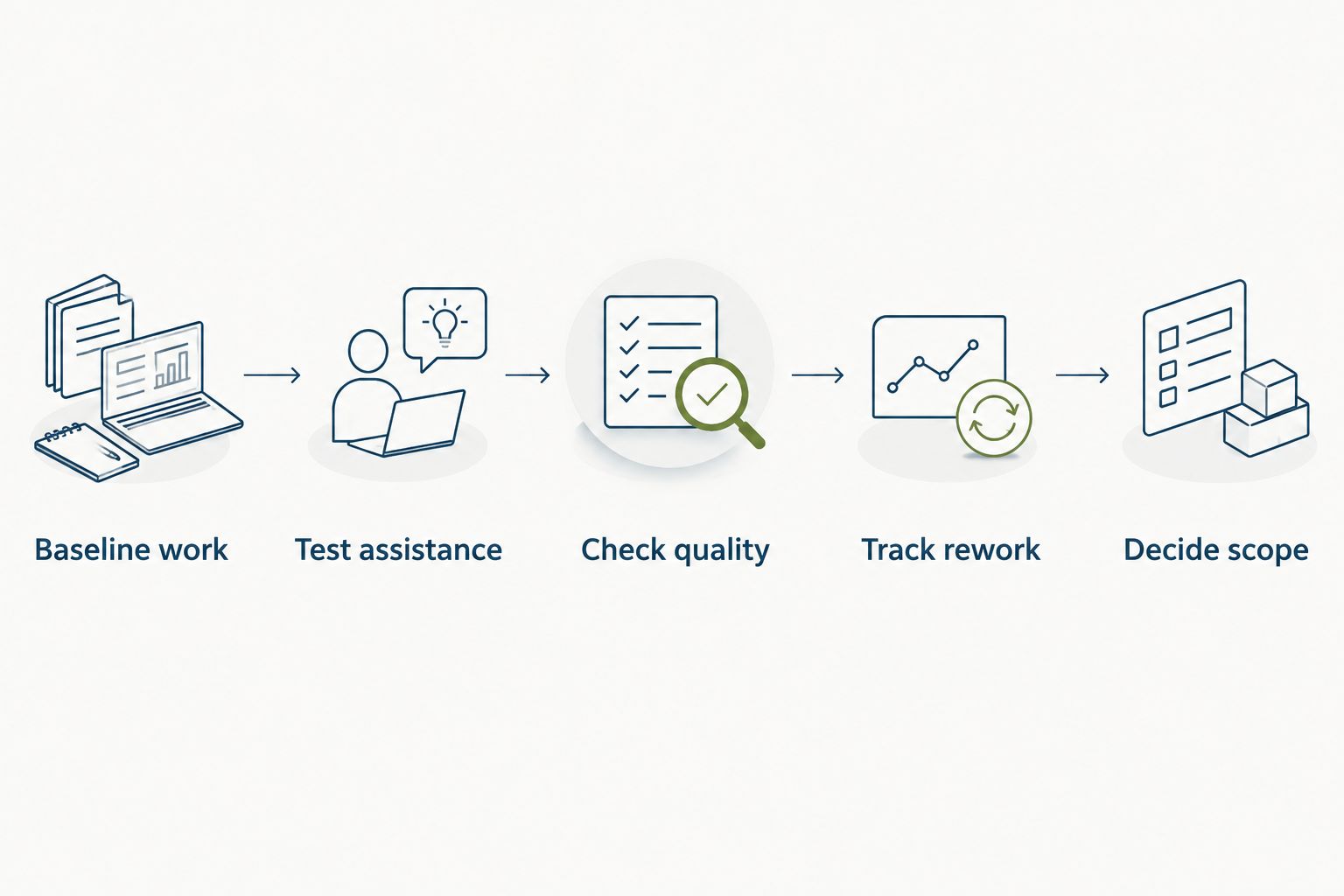
A pilot should end with a short decision document: the approved task, its owner, the acceptance standard, and the evidence supporting adoption. Keep unsuccessful tasks in that document too. They define the limits of the purchase.
Evaluate your HR workflow
Explore recruitment alongside onboarding, employee management, and an internal service desk.
Why recruitment software value varies
The same buying test applies across teams, but the result depends on the work you ask the software to do. Evaluate these factors in your 2026 decision rather than relying on a general promise of faster hiring:
- Task repetition. Identify how often the selected task occurs. A repeatable task gives you something concrete to test and a basis for evaluating recurring benefit.
- Output requirements. Define what makes a result acceptable. The stricter or more contextual the task, the more carefully you need to measure checking and correction.
- Review workload. Count the effort required to verify outputs. Assistance has not removed work if every result needs rebuilding.
- Platform scope. Decide whether you need recruitment alone or a wider employee-management platform. Evaluate each required function rather than treating breadth as proof of value.
- Adoption work. Include configuration, training, and changes to ownership. A feature has no operational value until someone can use it within an agreed process.
- Human accountability. Name the person responsible for decisions and exceptions. Software does not replace the need for a defensible assessment process.
Headcount gives context, not a verdict. A company with 20 employees still needs a specific use case, and a company with 100 employees still needs evidence that the proposed workflow fits.
Keep hiring decisions accountable
Use assistance to support evidence gathering; keep people responsible for decisions. Candidate-facing work deserves a stricter acceptance standard than an internal draft because errors can affect a person's opportunity.
Start with clear, job-related requirements that your hiring team understands. Review software outputs against those requirements and the underlying candidate information. Do not treat confident wording, a ranking, or a summary as evidence by itself.
Ask these questions during the demonstration:
- Can reviewers inspect the information supporting an output?
- Can reviewers correct a result before it affects the next step?
- What happens when information is missing or contradictory?
- Who approves an action involving a candidate?
- How will the team document a decision or handle an exception?
These are purchase requirements to verify, not features to assume. Write down the vendor's answers and test the controls that matter to your process.
Avoid making automatic rejection the starting point of an evaluation. Begin with a bounded task whose output a person can inspect, then decide whether any wider use meets your standards and applicable obligations.
Is AI recruitment software worth it for small teams?
For teams with 20–100 employees, AI recruitment software is worth evaluating when a recurring hiring task competes with other HR responsibilities. Team size alone does not establish a return.
Start with the work you can measure. If hiring is occasional and your current process is manageable, process improvements are a valid alternative to another software purchase.
Can AI recruitment software replace a recruiter?
AI recruitment software should not replace accountable human judgment about candidates. Evaluate it as assistance for verified tasks, with someone responsible for reviewing the result.
A recruiter or hiring manager still needs to define the role, assess relevant evidence, and handle exceptions. Do not purchase on the assumption that software removes those responsibilities.
How do you know whether a pilot succeeded?
A pilot succeeds when accepted outputs require less total human work without weakening your assessment standard. Count corrections and approvals before declaring a saving.
Keep the decision task-specific. Success preparing one type of material does not prove that the software is suitable for candidate assessment or other hiring decisions.
FAQ
Is AI recruitment software worth it in 2026?
AI recruitment software is worth it in 2026 when a controlled pilot demonstrates a useful workflow improvement without weakening candidate assessment. Include setup, checking, and training in the decision.
What's the best way to test AI recruitment software?
Test one repeatable hiring task against your current process. Use the same acceptance standard and record corrections, approvals, and work passed to other people.
Is HRSpace only recruitment software?
HRSpace is a modular cloud HR platform that includes AI recruitment alongside onboarding, time-off, performance reviews, goals, recognition, workflow automation, and an internal service desk. Evaluate the functions your team needs rather than assuming every module belongs in your rollout.
Should we choose a recruitment tool or an all-in-one HR platform?
Choose the scope that matches your verified requirements. Compare a recruitment-focused tool for a specific hiring task with a broader platform when employee administration is also part of the decision.
Can AI recruitment software make hiring decisions for us?
Keep people accountable for hiring decisions and require review of the relevant evidence. Verify the tool's controls and applicable obligations before allowing any automated action involving candidates.
What should we measure besides time saved?
Measure output quality, correction effort, approval work, and handoff work. A task completed faster is not an improvement if someone else must rebuild the result.
Do we need to replace our current HR software?
Do not assume replacement is necessary. Establish the recruitment task first, then verify whether the proposed tool fits your existing process or whether a broader change is justified.
One last thing
The strongest 2026 buying question is: what work stops after we adopt this? Ask the vendor to answer it with your task brief in view, then confirm the answer in a pilot.
If the answer is only that you gain another dashboard, a new score, or more material to review, the business case is unfinished. Identify the useful work the software replaces and the checking work it creates. Buy only when that comparison supports the change.


