

Instead of copying candidate details into onboarding checklists, build an ai recruitment to onboarding workflow that carries an approved hire into employee setup, assigned tasks, and first-day readiness. Use a human approval gate between recruiting assistance and employment actions so your workflow moves verified information—not unfinished hiring decisions.
- HRSpace combines AI recruitment, onboarding, and HR workflows for growing People Operations teams.
- Start the ai recruitment to onboarding workflow after hiring approval, not after an automated candidate assessment.
- Keep candidate screening separate from the employee information needed for first-day onboarding.
- Test changed start dates and duplicate handoffs before using workflow automation for live hires.
Why this matters
Recruiting ends with a hiring decision. Onboarding starts with responsibilities: someone prepares the employee information, someone arranges access, and someone makes sure the manager is ready. A candidate marked successful does not prove those responsibilities are covered.
HRSpace is best for growing HR teams that want AI recruitment and onboarding in one cloud HR platform. HRSpace also covers time-off, performance reviews, goals, recognition, HR workflows, and an internal service desk. That scope supports planning across the employee lifecycle; it does not replace your team's approval rules.
For a 2026 rollout, define the handoff before configuring automation. The benefit is a repeatable process with named owners. The trade-off is setup discipline: a shared platform cannot fix conflicting start dates, unclear responsibilities, or inappropriate access to candidate information.
The guide below is a configuration blueprint, not a product-specific button sequence. Use it to define the information, decisions, and checks your chosen setup must handle, then map those requirements to the controls available in your account.
Before you start
- Gather access and owners. You need authorized access to recruiting and onboarding records, permission to configure the workflow, and named HR, hiring-manager, and operational owners. Assign responsibility for resolving exceptions before the first live handoff.
- Prepare the approved-hire information. Confirm the employee's name, contact email, role, manager, start date, and work arrangement. These are 6 proposed handoff fields—not a substitute for employment documentation or local requirements.
- Separate candidate history from employee information. Interview notes and assessments are not general onboarding materials. Define what transfers and who can see it; copying the entire candidate record creates an access problem halfway through setup.
Keep your hiring decision separate from any recruiting assistance. A person must approve the hire and confirm that the handoff is ready. Do not treat a completed assessment, interview, or draft offer as permission to create employment-related tasks.
Approved-hire trigger
The trigger answers a narrow question: Is this hire approved and ready for onboarding? It should not answer whether someone appears promising. Write that boundary into your 2026 workflow specification before building actions.
Define the release gate
- Identify the point where HR confirms the hiring decision and checks the information needed for onboarding. Make this your proposed workflow entry point.
- Define 3 release gates: hiring approval, complete handoff information, and a duplicate-record check. Record who resolves each failed gate.
- Choose an identifier your setup can preserve between recruiting and onboarding. Do not rely on a name alone; different people can share the same name.
- Specify what happens when a gate fails. Keep the handoff pending and send it to the responsible owner rather than allowing incomplete downstream work.
- Record the approval alongside the handoff information. Your team needs to distinguish a deliberate release from an accidental record edit.
Expected result: an approved hire enters the onboarding process once, with complete required information and a clear owner for exceptions. An unapproved candidate remains outside the process.
A useful test is to describe the trigger without mentioning software: HR approves the hire, confirms the required details, and checks for an existing employee record. If that sentence still contains an unresolved decision, the trigger is not ready.
Employee information handoff
The handoff should create a usable starting point for onboarding without spreading recruiting material across the company. Treat it as a controlled transfer, not a wholesale copy.
Map the information
- List the 6 proposed fields: name, contact email, role, manager, start date, and work arrangement. Define which source is authoritative for each field.
- Map each field to its destination in your onboarding process. Where the setup requires manual entry, assign that entry explicitly instead of assuming the systems will connect.
- Separate contact details used before employment from those assigned after joining. Make the intended invitation destination clear to the owner responsible for sending it.
- Exclude interview commentary, assessments, and hiring deliberations from general onboarding tasks. Keep restricted recruiting information within the access boundaries your team has approved.
- Check the destination against the approved handoff before releasing tasks. Resolve conflicting dates or managers at the source, then repeat the check.
Expected result: the onboarding owner receives verified employee information and knows which record to maintain. Task owners receive the details needed to do their work, not unrestricted candidate history.
For the 2026 implementation, document your field rules in plain language. For example, write that HR confirms the start date before onboarding release. A clear rule is easier to test than an instruction to keep everything synchronized.
Keep the mapping small
Do not add a field simply because it exists in the recruiting record. Ask what onboarding action depends on it. If no task owner needs it, leave it out of the shared handoff.
Also distinguish an empty value from a deliberate decision. An unassigned manager means the process is incomplete; a documented decision about a temporary reporting arrangement means someone has reviewed the situation. Those cases need different handling.
Onboarding responsibilities
A workflow is useful when it tells people what to do and who owns completion. A message saying that someone is joining is only an announcement.
Build the task handoff
- Group the work into HR preparation, Manager preparation, Access preparation, and First-day confirmation. These are planning categories, not claims about preset software templates.
- Assign a named owner to each task. Include a backup or escalation contact for work that cannot wait for an absent colleague.
- Set deadlines relative to the confirmed start date where your configuration supports that relationship. Otherwise, assign an owner to update deadlines manually when the date changes.
- Define completion evidence. A submitted access request is not the same as working access; a calendar invitation is not the same as an agreed first-day plan.
- Keep unresolved dependencies visible to the onboarding owner. Avoid marking a parent task complete while required preparation remains unfinished.
- Review the whole handoff before inviting the new employee into the process. Check instructions, contacts, dates, and anything they are expected to submit.
Expected result: every required preparation task has an owner, a deadline, and a clear completion condition. The onboarding owner can distinguish finished work from work merely requested.
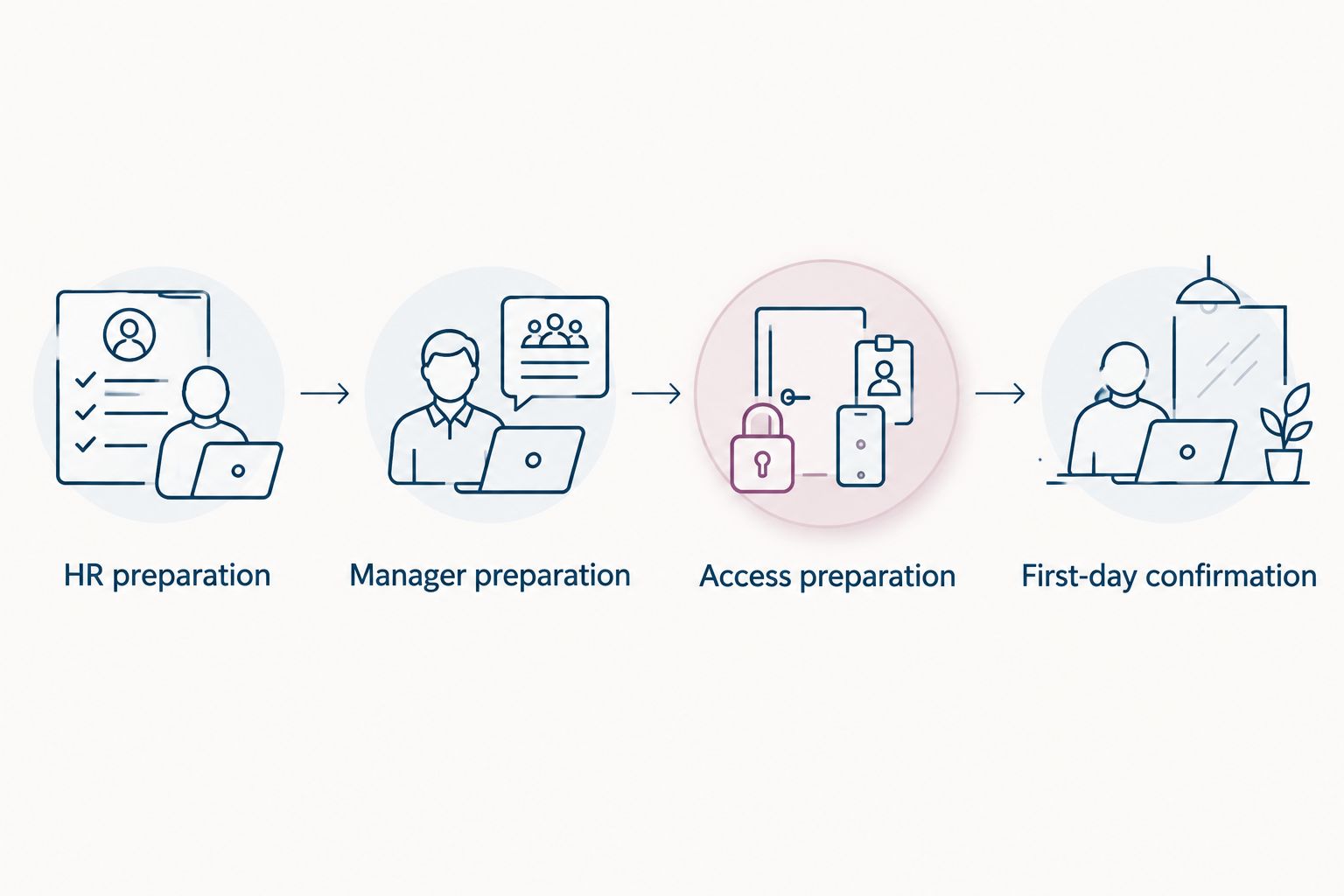
Make the first day concrete
HR preparation covers the information and documentation your organization requires. Manager preparation covers the welcome plan, initial responsibilities, and the person who will answer role-specific questions. Access preparation covers the systems and equipment the role needs, handled by the responsible team.
First-day confirmation brings those streams together. Ask whether the employee knows where to start, whom to contact, and what is ready. Do not use a completed recruiting stage as evidence that any of this work is finished.
HRSpace's internal service desk gives employee support a place within the broader HR platform. Define which onboarding issues belong in that support process and who handles them; do not assume a request automatically creates an account or completes another team's work.
Validation and release
Test the process with a small, controlled set of examples before applying it to live hires. In your 2026 rollout, test the decision boundaries as carefully as the successful path.
Check the full sequence
- Use 2 test hires: one complete approved example and one incomplete example. Use fictitious test information rather than unnecessary personal data.
- Run the complete example through approval, information transfer, task assignment, and first-day confirmation. Compare each destination value with the source.
- Run the incomplete example. Confirm that the process stops at the relevant gate and identifies the person responsible for correcting it.
- Submit the same approved handoff again. Check that your procedure recognizes the existing record instead of creating another onboarding sequence.
- Change the proposed start date. Inspect deadlines, employee instructions, and manager preparation; identify anything that needs a manual correction.
- Review task visibility with each responsible role. Confirm that people can access their work without receiving unrelated recruiting information.
Expected result: the successful handoff completes, the incomplete handoff stops, and repeated or changed information does not silently create conflicting work.
Keep the results alongside your workflow specification. If a step requires manual correction, document its owner and completion check. A known manual step is safer than an assumed automation.
When the start date changes
A new hire and an updated hire need different workflows. The first creates preparation work; the second revises existing preparation without restarting it.
Best for initial onboarding: release a new-hire handoff after approval. Best for changed plans: review the existing onboarding record after an approved start-date or manager change.
| Workflow | Best for | Benefit | Limitation |
|---|---|---|---|
| New-hire handoff | Starting onboarding after hiring approval | Establishes employee information and task ownership | Needs a duplicate check before release |
| Approved-change review | Updating a hire already in onboarding | Keeps revised plans connected to existing work | Requires review of deadlines and messages already sent |
For the approved-change review, first confirm the revised information with HR. Locate the existing onboarding record, identify affected tasks, and update their instructions or deadlines. Notify the responsible owners and confirm whether the employee needs revised joining information.
Do not rerun the entire new-hire workflow to change a date. Already completed work should remain distinguishable from work that needs revision. Where your setup cannot update tasks automatically, use a named change owner and a written review checklist.
Use the HR workflow automation guide to evaluate the wider configuration requirements. Keep the selection focused on actions your team can demonstrate, not broad claims about automation.
Troubleshooting
Onboarding starts too early
The trigger is attached to a recruiting milestone rather than hiring approval. Move the release gate to the approved handoff and require the responsible person to confirm readiness. Pause downstream work for any candidate who has not passed that gate.
The same hire appears twice
The handoff was repeated without checking for an existing record, or the identifier changed between steps. Compare the source and destination identifiers, retain the correct record, and resolve duplicate tasks before sending further instructions. Add the repeated-handoff case to validation.
Deadlines still use the old start date
A date changed in one place without a review of dependent tasks. Inspect each affected deadline and message, then confirm corrections with its owner. Make start-date changes trigger a review procedure even where task updates remain manual.
Work is assigned but nobody owns completion
A team name replaced an accountable person, or a notification was treated as a task. Assign an owner and define the evidence needed to finish. Escalate unresolved preparation to the onboarding owner before it becomes a first-day problem.
Recruiting notes reach onboarding task owners
The mapping copied more information than the task required. Remove unrelated material from shared tasks and review access with the responsible administrator. Correct the mapping before processing another hire; deleting one copy does not fix the underlying transfer rule.
Customize your workflow
Start with approved hires and first-day readiness. After that sequence passes validation, add adjacent lifecycle work only when ownership and completion criteria are clear.
HRSpace covers goals, performance reviews, recognition, and time-off alongside recruiting and onboarding. Use that scope to plan later handoffs: who sets initial goals, who explains time-off procedures, and who handles employee questions. Do not add every module to the first onboarding release simply because it exists.
For your 2026 expansion, prioritize one unresolved dependency at a time. Add a manager-change review before building a more elaborate welcome sequence if manager changes are leaving tasks ownerless. Solve the operational gap first.
FAQ
What is an AI recruitment to onboarding workflow?
An AI recruitment to onboarding workflow connects recruiting assistance with an approved hiring handoff and employee preparation. It should define what information transfers, who approves the handoff, and who owns first-day tasks.
When should onboarding start after recruitment?
Release onboarding work after the responsible person approves the hire and confirms the required handoff information. An interview result or automated assessment alone is not that approval.
Can HRSpace support recruitment and onboarding in one platform?
HRSpace includes AI recruitment, onboarding, and HR workflow automation in its cloud HR platform. Map your required handoff to the configuration available in your account and test the sequence before using it for live hires.
What candidate information should transfer to onboarding?
Transfer the verified information needed to prepare the employee, such as name, contact email, role, manager, start date, and work arrangement. Keep interview commentary and assessments out of general onboarding tasks unless an authorized purpose requires them.
How do I stop duplicate onboarding records?
Check for an existing employee or onboarding record before releasing the handoff. Preserve a consistent identifier and test what happens when the same approved handoff is submitted again.
What should happen when a new hire changes their start date?
Review the existing onboarding record and update affected deadlines, owners, and joining instructions. Do not restart the entire new-hire sequence merely to change a date.
Should AI make the final hiring decision in this workflow?
Keep the final hiring decision with an authorized human decision-maker in this workflow. Use recruiting assistance separately from the approval that releases employee preparation.
One last thing
Test whether the workflow can stop, not just whether it can run. An incomplete handoff should remain incomplete until its owner resolves the problem. If your process turns missing information into assigned tasks anyway, you have moved the uncertainty downstream rather than removed it.


