

Instead of manually checking finished goals and sending congratulations, design automatic recognition awards for completed goals around a verified completion event, an eligibility check, and a duplicate check. This guide shows you how to specify that workflow, test it, and decide when a manager should approve recognition before it reaches an employee.
- Automatic recognition awards for completed goals need verified completion, clear recipients, and duplicate prevention.
- HRSpace combines goals, recognition, and HR workflows; confirm the exact trigger and award action before configuring this connection.
- Use direct recognition for objective milestones and manager approval for achievements that need judgment.
- Test reopened goals, repeated updates, and shared ownership before enabling the workflow for employees.
Why this matters
A finished goal and a recognition-worthy achievement are not always the same thing. Someone can close an administrative task, correct a mistaken status, or complete a team objective without identifying every contributor. Your workflow needs to distinguish those events before sending an award.
HRSpace is best for growing People Operations teams that want goals, recognition, and HR workflows in one platform. HRSpace covers those areas alongside onboarding, time-off, performance reviews, recruitment, and an internal service desk. That platform scope does not establish the exact goal-to-recognition connection: confirm the supported completion trigger, recognition action, and duplicate controls before treating this as a native automation.
For a company with 20–100 employees, start with a narrowly defined recognition policy rather than every goal in the organization. Your 2026 rollout should answer a simple question: which completed achievements deserve consistent acknowledgment without another reminder from HR?
Before you start
- Accounts and access: Have access to the goal records, employee records, recognition settings, and whichever workflow configuration your implementation supports. Confirm who can approve the policy and publish recognition.
- Materials: Prepare an eligible goal category, a recipient rule, a message template, and a decision about private versus shared recognition. Define whether an award means a written acknowledgment or something else; do not assume points, badges, or financial rewards exist.
- The gotcha: Confirm that the workflow can distinguish a goal becoming complete from a completed goal being edited. Also verify how previous awards are recorded. Without those controls, an innocent correction can send recognition again.
This is a configuration specification, not a verified screen-by-screen product walkthrough. The bold terms below describe the information and behavior to configure; they are not claimed interface labels. If your implementation cannot support a required control, keep that part manual instead of approximating it with an unreliable rule.
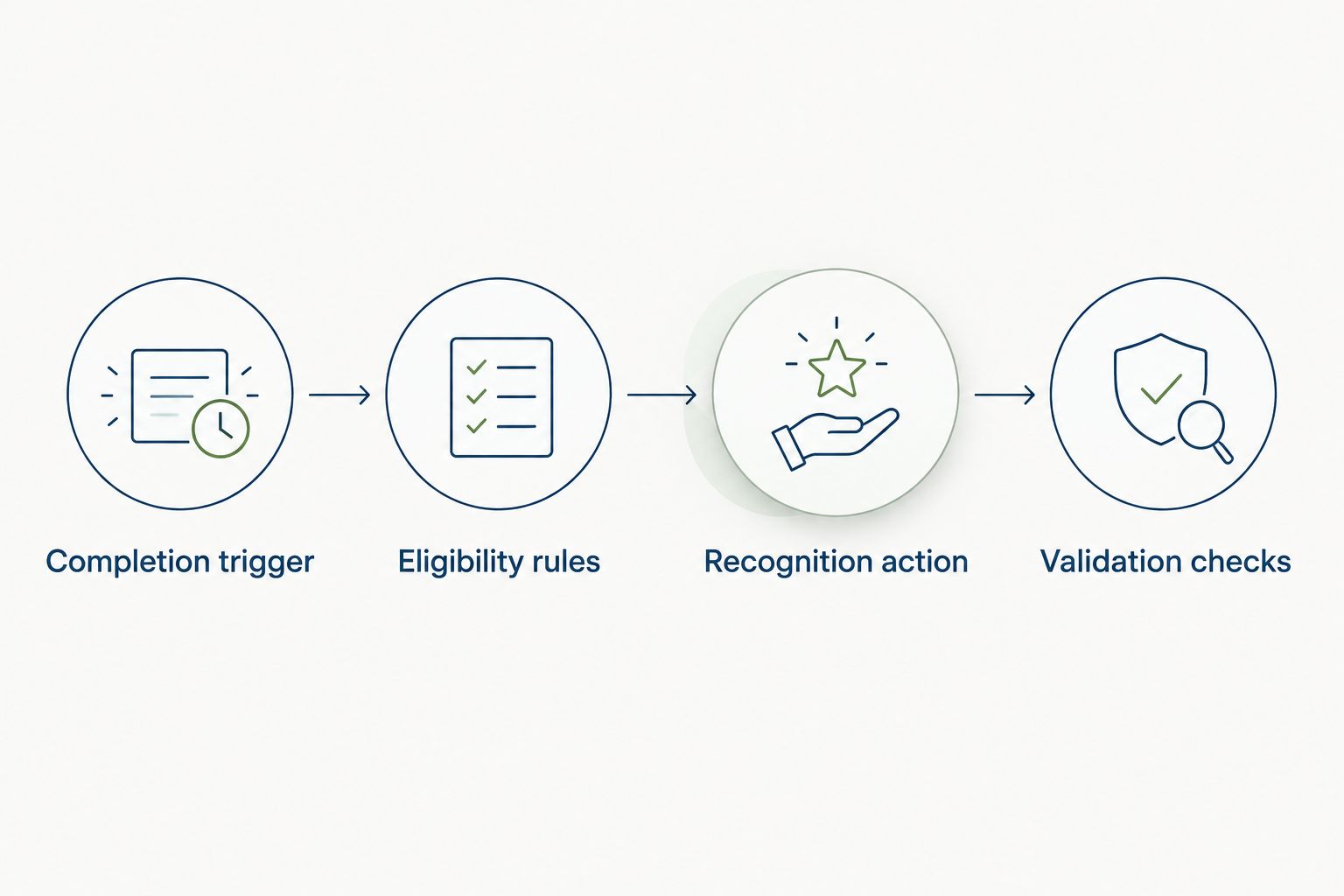
Completion trigger
Start with the event that proves the work has finished. A general record update is not enough.
- Define completion. Write the exact condition that qualifies a goal as finished. Use the status or approval state your goal system actually supports. Do not substitute a due date for completion: reaching a deadline says nothing about whether the work was delivered.
- Require a transition. Specify that the goal must move from an unfinished state into the qualifying finished state. An edit to an already completed goal must not count as another achievement.
- Identify the source record. Carry the goal's stable identifier into the workflow. Add the goal title and the responsible employee identifier where supported. Names alone are a poor matching rule because employees can share names or change them.
- Set the launch boundary. Decide whether the automation covers only new completion events or also a reviewed set of older completions. For your 2026 launch, handle historical recognition separately so activating the workflow does not unexpectedly congratulate people for old work.
Expected result: A newly completed eligible goal produces a candidate event. Editing its description afterward produces no additional candidate award.
Choose the narrowest supported event that matches your policy. If only broad record updates are exposed, require a reliable comparison against the previous state before continuing. If that comparison is unavailable, use a reviewed completion list rather than presenting the workflow as fully automatic.
Eligibility rules
Completion starts the check; it should not automatically settle the decision. Your eligibility rules determine whose work gets recognized and why.
- Choose eligible goals. Limit the initial workflow to a category with clear completion evidence. Exclude routine housekeeping if your recognition policy is intended to acknowledge meaningful achievements rather than every closed item.
- Resolve the recipient. Match the goal owner to the intended employee record. For shared goals, explicitly choose individual recognition, recognition for named contributors, or a manager decision. Do not silently award only the person who happened to update the record.
- Check approval requirements. Decide whether the goal's completion already represents an accepted result. If quality or contribution still needs judgment, require a manager review before sending recognition.
- Check for a previous award. Use the goal identifier, recipient identifier, and recognition purpose as the basis for detecting a repeated request. Define a default policy of 1 award per goal per recipient unless a separate, documented achievement justifies another.
- Define exceptions. Send missing owners, unresolved contributors, and unclear completion evidence to a named person for review. An exception should have an owner, not disappear into a general queue.
Expected result: Each candidate either qualifies with a clear recipient and reason, waits for review, or is excluded with an explanation.
Keep these 2026 recognition rules separate from individual message wording. A policy change should trigger a deliberate review, not accidentally make previously recognized goals eligible again.
Recognition action
Now define what the employee receives. Make the acknowledgment specific enough to explain the achievement without exposing details that should remain restricted.
- Choose the delivery path. Use a supported recognition action if your implementation exposes one. If it does not, route the approved candidate to a person who can create the recognition manually. Do not assume a connector or external messaging destination exists.
- Map the content. Include the recipient, an appropriate goal reference, and a plain-language statement of what was accomplished. Review whether the goal title contains customer information, personnel details, or other material unsuitable for a shared message.
- Set visibility. Decide who should see the acknowledgment. Use only visibility controls the destination actually provides. When the goal contains sensitive information, write a separate recognition summary instead of copying the record verbatim.
- Record the outcome. Specify where the workflow will retain a successful award reference or a reviewed completion record. A request to create recognition is not proof that recognition was created.
Expected result: An eligible goal results in the intended acknowledgment, for the intended employee, with evidence of delivery or an explicit exception.
Keep the achievement in the message, not just the status. A note explaining the result gives the employee a reason for the recognition. A copied completion label does not.
Validation checks
Test the workflow's decisions before you test its volume. A successful demonstration is not enough if an ordinary edit creates another award.
- Complete an eligible test goal. Verify the recipient, message, visibility, and recorded outcome. Use an approved test record and controlled audience where supported.
- Edit the completed goal. Change a nonessential detail. Confirm that the existing recognition does not repeat.
- Reopen and complete the goal. Apply the policy you defined for reopened work. The default should preserve the existing award rather than create a second acknowledgment for the same achievement.
- Test an unresolved owner. Remove or mismatch the recipient in a controlled test. Confirm that the workflow stops for review instead of guessing who should receive recognition.
- Test an interrupted action. Where your setup permits controlled failure testing, confirm how a failed or uncertain delivery is handled. Check for an existing award before retrying.
Expected result: All 5 test cases produce the intended decision, and the person responsible for exceptions can explain each outcome.
Your 2026 launch record should preserve these expected outcomes. Reuse them after changes to goal statuses, recognition rules, or employee matching.
Add approval when completion needs judgment
A second workflow makes sense when a finished goal still needs someone to verify quality, impact, or contribution. Keep the same completion event and duplicate checks, but insert a manager decision before recognition.
Choose the path by the evidence available, not by a preference for more automation.
| Workflow option | Best for | Advantage | Limitation |
|---|---|---|---|
| Direct recognition | Objective milestones with accepted completion evidence | Removes a separate approval task | Depends on accurate completion and ownership data |
| Manager-approved recognition | Shared or judgment-based achievements | Adds context before an award is sent | Creates a review task that needs an owner |
For the approval variant, route the candidate to the responsible manager using a supported approval mechanism. Ask the manager to confirm the recipient and achievement summary. A rejected candidate should retain its reason; an approved candidate should pass through the same duplicate check before publication.
HRSpace includes goals, recognition, and workflow automation, but the available inputs do not establish this exact approval sequence. Verify those operations before choosing a fully native implementation. Keep approval manual when the supported configuration cannot enforce it.
Troubleshooting
Recognition appears twice
Check whether the workflow responds to every update rather than only the transition into completion. Then inspect the duplicate rule: it must identify the goal and recipient consistently. Before retrying an uncertain action, verify whether an award already exists.
The wrong employee receives recognition
Inspect how the goal owner is matched to the employee record. Replace name-based matching with a stable identifier where supported, and define shared-goal recipients explicitly. Hold unresolved matches for review instead of defaulting to the manager or record editor.
A completed goal produces no award
Check the completion condition, eligibility exclusions, approval status, and recipient mapping in that order. Distinguish a rejected candidate from a failed delivery. Only retry the action after confirming that no recognition was created.
Sensitive details appear in the message
Stop copying unrestricted goal text into recognition. Replace it with an approved summary and review the destination's supported audience controls. Keep detailed evidence in the source record rather than broadening access through the acknowledgment.
Reopened goals receive another award
Check whether reopening clears the record of previous recognition. Preserve the original award reference, and require an explicit policy decision before allowing repeat recognition. A status reversal alone is not a new achievement.
Customize your workflow
Expand the workflow only after the initial goal category passes testing. Add another category with its own eligibility rules, or introduce manager review for shared achievements. Do not broaden the recipient list and completion rules simultaneously; separate changes make unexpected outcomes easier to trace.
Keep milestone recognition distinct from performance evaluation. Finishing several small goals should not automatically outweigh completing a demanding objective. Recognition acknowledges an achievement; a review considers the wider performance context.
For your next 2026 workflow, connect the resulting conversations to development planning. The performance reviews to personalized growth plans workflow covers that adjacent process. HRSpace spans goals, recognition, and performance reviews, so evaluate those areas together without assuming that every cross-module action is already configured.
FAQ
How do I set up automatic recognition awards for completed goals?
Define a verified completion event, check eligibility and recipients, prevent duplicates, and send recognition through a supported action. Test edits, reopened goals, and uncertain delivery before enabling the workflow for employees.
Can HRSpace automatically award recognition when a goal is completed?
HRSpace includes goals, recognition, and workflow automation, but the exact goal-completion trigger and recognition action need confirmation. Verify that connection and its duplicate controls before treating this guide as a native setup procedure.
Should a manager approve every goal completion award?
Use manager approval when completion does not establish quality, contribution, or the correct recipient. Direct recognition fits objective milestones with accepted evidence and reliable ownership.
How do I stop recognition awards from being sent twice?
Check for previous recognition using a consistent goal identifier, recipient identifier, and recognition purpose before sending an award. Preserve that record when a goal is edited or reopened.
Can a shared team goal recognize everyone who contributed?
A shared goal needs an explicit recipient policy before recognition is sent. Verify that your implementation can identify the intended contributors; otherwise, require a manager to confirm them.
Do automatic recognition awards have to include financial rewards?
No. Define the award as the acknowledgment your policy requires, and confirm what the recognition system supports. This workflow does not assume financial rewards, points, badges, or redemption features.
What should happen when an automatic award fails?
Check whether recognition was created before retrying the action. If the outcome is uncertain, hold the candidate for review so a retry does not produce another award.
One last thing
Do not make the person who clicks complete the default award recipient. The updater, goal owner, and actual contributor can be different people. Resolve that distinction before launch; otherwise, a technically correct automation can recognize the wrong work.


