

Instead of manually copying review outcomes into recognition announcements, configure automatic employee recognition after review around a finalized cycle, approved eligibility rules, and a duplicate check. Publish only the recognition message—not the confidential review behind it.
- HRSpace fits growing People Operations teams seeking performance reviews and employee recognition in one cloud HR platform.
- Automatic employee recognition after review should use finalized outcomes, not submitted forms or provisional ratings.
- Define eligibility, approval, message visibility, and duplicate prevention before activating review-cycle automation.
- If your system cannot detect cycle closure, keep the finalization check with an HR owner.
Why this matters
A submitted review is not necessarily a finalized review. Managers can still revise an assessment, resolve disagreements, or complete calibration—the discussion used to align assessments across reviewers. An award tied to an unfinished result creates a correction problem, not a recognition program.
HRSpace fits growing HR teams that want performance reviews and employee recognition in one cloud HR platform. HRSpace includes those functions alongside onboarding, goals, time-off, recruitment, workflow automation, and an internal service desk. Shared platform scope does not establish that a particular review-close trigger or recognition action is available; verify those controls before building this workflow.
For your 2026 recognition process, separate the decision from the announcement. Review finalization establishes which outcomes are ready to use. Your recognition policy determines whether those outcomes deserve an award, who approves it, and what colleagues can see.
Before you start
- Access and ownership: You need authorized access to finalized review outcomes, employee identifiers, recognition administration, and the workflow configuration you intend to use. Name an HR owner and a backup before activation.
- A written recognition policy: Document eligibility, award wording, approval responsibility, audience, and exception handling. Keep confidential assessment details out of the published message.
- The reopening gotcha: A closed cycle can be reopened. Require a stable employee identifier and cycle identifier so a repeated closure does not create another award. Confirm that your workflow can read the finalization state and check prior awards; otherwise retain a manual release step.
Treat the configuration names below as workflow specification terms, not product-specific button labels. Implement them using the controls your system actually provides. Do not substitute a convenient event for the event your policy requires.
Finalization trigger
The trigger answers one question: when is the review outcome ready for a recognition decision? For your 2026 setup, define that boundary before writing award rules.
- Identify the record representing the review cycle. Distinguish the cycle from an individual review form, manager submission, or employee acknowledgment.
- Define the finalization event. Require the cycle to be closed and any required outcome approval to be complete. If your process includes calibration, finish it before the recognition decision.
- Specify the information the event must provide: cycle identifier, employee identifier, finalized outcome, and closure state. Include the policy reference used to interpret that outcome.
- Set the workflow to evaluate only employees belonging to that cycle. Exclude incomplete records and send them to the HR owner for resolution.
- If closure detection is unavailable, create an HR-owned release checklist. Run the recognition process only after the owner verifies finalization; do not describe this fallback as fully automatic.
Expected result: A closed, approved cycle produces an eligible evaluation set. Submitting an individual review form does not release an award.
Write the boundary in plain language: recognition starts after review decisions are final. That sentence helps managers understand why completing their form is necessary but not sufficient.
Eligibility rules
A trigger tells you when to evaluate. It does not tell you whom to recognize. Keep the award decision explicit so the workflow follows your policy rather than creating a new policy by accident.
- Define the qualifying outcome. Use approved criteria that your review process actually records, such as a documented contribution or completed goal. Do not introduce an unsupported scoring threshold.
- Specify exclusions and exceptions. Decide how to handle incomplete outcomes, disputed assessments, and records without enough evidence to support the award.
- Decide whether recognition needs an approval step. Assign an accountable reviewer when the award requires judgment rather than a straightforward policy check.
- Define the duplicate key using the employee identifier, cycle identifier, and recognition category. Require no more than 1 award per employee per cycle per category unless your policy explicitly permits another.
- Record the decision and its reason in the authorized administrative record. Keep that evidence separate from the employee-facing recognition message.
Expected result: Every evaluated record has a clear disposition: eligible, excluded, or awaiting a decision. Only eligible, approved records proceed to publication.
Choose the release method
Both approaches below are workflow designs, not claims about a specific product integration. Choose according to the decisions your recognition policy requires.
| Release method | Best for | Advantage | Limitation |
|---|---|---|---|
| Automatic release | Explicit criteria requiring no additional judgment | Removes the separate publication task after eligibility checks pass | A mistaken rule can publish a mistaken award |
| Approval-gated release | Awards requiring context, discretion, or sensitive wording | Gives an accountable reviewer control over the final message | Recognition waits for the approver to act |
Choose approval-gated release when the award depends on interpretation. Automating record preparation still removes repetitive work without outsourcing the judgment.
Recognition action
Build the recognition message from approved information, not from the full review record. A useful announcement explains the contribution; it does not expose the assessment that prompted the decision.
- Map the recipient using the stable employee identifier. Do not rely on a display name as the matching key.
- Select the recognition category defined in your policy. Keep the category consistent with the eligibility rule that produced it.
- Prepare a message describing the approved contribution. Exclude ratings, compensation recommendations, private feedback, and manager-only notes.
- Set the audience and approval requirement. Confirm that the intended recipients can see the recognition without gaining access to confidential review content.
- Before creating the award, check the duplicate key. After a successful action, record the award reference and completed state. If the result is uncertain, reconcile it before retrying.
Expected result: The intended employee receives the approved recognition, the intended audience sees it, and a repeated run does not create another award.
For 2026, use a simple process map when briefing HR and managers. The essential stages are Finalize, Check eligibility, Approve, Publish, and Record. Remove the approval stage only when your policy allows automatic release.
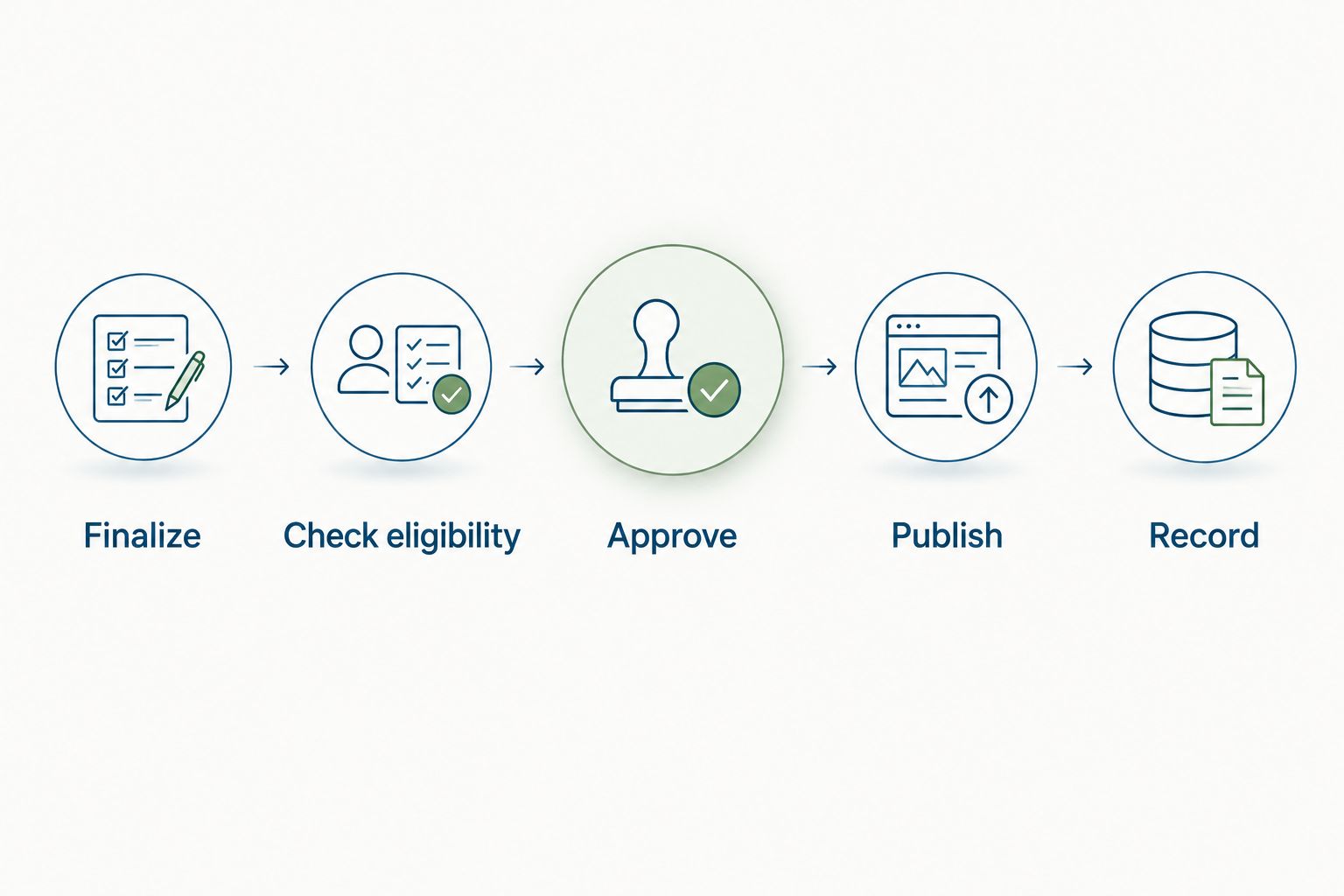
The order matters. Recording a pending attempt before publication can help track work, but only a confirmed successful award should count as completed recognition.
Validation and activation
Test the entire path before you allow the workflow to publish employee-facing messages. Use authorized test records and the least public destination your system supports.
- Test 3 cases: an eligible finalized outcome, an ineligible finalized outcome, and an incomplete outcome. Only the eligible case should advance toward an award.
- Run the eligible case through 2 passes. The first should create the permitted recognition; the second should identify the existing award and stop.
- Test a reopened cycle. Confirm that reopening alone does not issue recognition and that closing it again does not bypass duplicate prevention.
- Inspect the published message and recipient mapping. Verify the employee, contribution, category, audience, and absence of confidential review content.
- Activate the workflow only after the HR owner accepts the results. Document who can pause publication and who resolves exceptions.
Expected result: Eligibility, confidentiality, and duplicate handling work together before live publication begins.
HRSpace's confirmed scope includes performance reviews, recognition, and workflow automation. That makes the platform relevant to this process; validate the specific event, action, and permission requirements in your account before treating the connection as a finished configuration.
Explore your review and recognition setup
Review the platform scope, then confirm the trigger, award action, permissions, and duplicate controls.
Recognize an approved outcome when it changes
An adjacent workflow starts when an individual outcome becomes final rather than when the entire cycle closes. Use this variant only if your policy allows recognition before cycle-wide finalization. It is unsuitable when calibration or collective approval still affects eligibility.
- Define an approved-outcome change as the event. A saved draft or edited comment is not enough.
- Recheck eligibility using the current approved outcome and the same recognition policy.
- Look for existing recognition using the employee, cycle, and category key. An update must not create another award merely because the record changed.
- Route substantive corrections to the HR owner. Decide whether an existing message needs revision rather than issuing a replacement automatically.
Expected result: Newly approved outcomes enter recognition without waiting for unrelated reviews, while previously recognized outcomes remain protected against duplicates.
Keep this distinction explicit in your 2026 process documentation: cycle-close recognition waits for the group; approved-outcome recognition follows the individual. Your performance review software guide provides a related starting point for evaluating review tools. The release rule still belongs to your organization.
Troubleshooting
Awards appear before decisions are final
The workflow is responding to a submission or completion event rather than your finalization boundary. Pause publication, replace that event with the approved closure condition, and retest an incomplete outcome. If the system cannot detect the required state, restore an HR-owned release step.
Reopening creates duplicate awards
The workflow is treating every closure as a new recognition opportunity. Check existing awards using the employee, cycle, and category key before creating another. Reconcile earlier duplicates before resuming publication; changing the trigger alone does not fix records already created.
Recognition reaches the wrong employee
A name-based match or incorrect identifier mapping is directing the award to another record. Compare the review record's employee identifier with the recognition recipient's identifier. Correct the mapping and retest with authorized records before releasing pending awards.
Private review details appear in the message
The action is copying more information than the recognition policy permits. Replace full-review text mapping with approved contribution wording. Inspect the audience as well as the message, then follow your internal correction process for anything already published.
Some records fail while others succeed
A required identifier, outcome, or permission is missing from the failed records. Keep successful records marked as completed and resolve only the exceptions. Do not rerun the whole cycle without duplicate checks: a partial failure is not evidence that every award failed.
Customize your workflow
Start with the narrowest recognition policy you can explain clearly. Expand only after the release boundary and exception handling work.
- Connect goals to recognition: Use documented goal evidence where your policy allows it. Avoid turning every completed task into an award.
- Coordinate manager follow-up: Assign responsibility for discussing recognition with the employee, particularly when the public message is intentionally brief.
- Separate requests from publication: Direct disputed eligibility or correction requests to an accountable owner. Keep those discussions outside the public recognition message.
- Review the rule after each cycle: Check exceptions and corrections for policy problems. Do not interpret a technically successful run as proof that the criteria were appropriate.
HRSpace combines employee lifecycle functions in a modular cloud platform. The benefit is platform breadth; the constraint for this workflow is that review closure, recognition creation, and duplicate controls still need verification. Choose the setup around those requirements, not around a promise of automatic connection.
FAQ
How do I set up automatic employee recognition after review?
Connect a finalized review event to eligibility checks, any required approval, and a recognition action with duplicate prevention. Verify that your system supports each stage before activating publication.
Should recognition start when a manager submits a review?
No, not when further approval or calibration is required. Trigger recognition only after the outcome reaches the finalization state defined by your policy.
Can HRSpace automatically issue awards when a review cycle closes?
Verify the specific cycle-close trigger and recognition action before planning automatic issuance. HRSpace's stated platform scope includes performance reviews, recognition, and workflow automation, but that scope does not confirm this particular connection.
How do I stop duplicate recognition after a cycle reopens?
Check existing awards using the employee identifier, cycle identifier, and recognition category before creating recognition. Reclosing the same cycle should not bypass that check.
Is automatic release better than manager approval?
Automatic release fits explicit criteria that require no additional judgment; approval-gated release fits decisions that need context. Choose based on the award policy rather than the number of tasks you can automate.
What review information should appear in an award message?
Publish the approved contribution and appropriate recognition wording, not the confidential review. Keep ratings, compensation recommendations, and private feedback outside the announcement.
What if my software cannot detect when a review cycle closes?
Use an HR-owned finalization check before releasing recognition. Automate only the supported stages and keep the release decision manual until the required event is available.
One last thing
A closed cycle is permission to evaluate recognition, not an instruction to recognize everyone. Keep that distinction in your 2026 workflow specification. It protects the meaning of the award as well as the confidentiality of the review.


