

Real estate teams’ time-off tracking software is a system for recording employee leave and coordinating approvals with the aim of keeping client-facing work covered. This 2026 guide explains how to manage absences around showings, closings, property visits, and office support without confusing leave approval with coverage planning.
- Choose time off tracking software for real estate teams around leave policies, approval ownership, and coverage handoffs.
- HRSpace suits growing teams seeking time-off tracking within a broader modular HR platform.
- Approve employee leave and assign client coverage as separate, connected decisions.
- Test cancellations, partial-day absences, and unavailable managers before replacing your current process.
Why time-off tracking matters for real estate teams
An approved absence is not a completed handoff. Your leave record answers who is away; your coverage plan answers who handles the showing, closing preparation, or tenant follow-up while that person is absent.
For founders and People Operations leaders managing 20–100 employees, the buying decision starts with that distinction. Compare time-off tracking software options against your actual approval process, not just a feature checklist.
A brokerage, property management business, or mixed real estate operation should define which responsibilities need continuity. A transaction coordinator’s absence requires a different handoff from an office administrator’s absence. Assign coverage by responsibility rather than assuming everyone with the same title can substitute.
Your 2026 selection criteria should also separate employees from independent contractors. Confirm worker classification and applicable obligations with qualified advisers; do not apply employee leave rules to everyone simply because they appear on the same team roster.
Build the process before choosing the platform
Define who belongs in the leave process
Start with a spreadsheet listing employees, reporting managers, work locations, and applicable leave policies. Use a separate roster for contractor availability when appropriate. The manual version forces you to resolve ownership before software makes an unclear process easier to repeat.
Identify who maintains each record. Operations can coordinate client coverage while HR owns policy interpretation, but employees still need a clear place to submit requests.
Treat worker status, leave eligibility, and operational availability as different fields. An agent being unavailable for a showing does not, by itself, establish that an employee leave balance should change.
- List each employee’s manager and backup approver.
- Record the policy that applies to each employee.
- Separate contractor availability from employee leave records.
- Assign an owner for policy questions and corrections.
- Document which roles require a client-work handoff.
Map responsibilities before approving absences
Build a simple coverage sheet before buying anything. Record the responsibility, its primary owner, its backup, and the handoff location. Include work that is easy to overlook, such as document follow-ups and shared inbox monitoring.
Approve leave under your policy; plan coverage around the decision. Avoid letting undocumented preferences about busy periods become substitute leave rules. Protected leave and accommodation questions need a separate review with the appropriate adviser.
For planned vacation, ask the employee and manager to identify outstanding commitments. Do not put sensitive leave details into a shared coverage document; colleagues need the operational handoff, not a medical explanation.
- Identify pending showings, visits, and closing-related tasks.
- Name a backup for each responsibility requiring continuity.
- Record where authorized colleagues can find handoff notes.
- Keep sensitive explanations outside shared coverage records.
- Escalate policy exceptions to the designated HR owner.
Choose the right scope for your HR stack
Write down what you need beyond leave tracking before requesting demonstrations. If your onboarding, reviews, and employee support processes also need attention, assess a broader platform. If those processes already work, a narrower tool deserves consideration.
HRSpace offers time-off tracking alongside onboarding, performance reviews, goals, recognition, AI-assisted recruitment, workflow automation, and an internal service desk. Its modular, per-employee model gives you a way to evaluate those needs together rather than treating every HR process as a separate purchase.
HRSpace is best for growing teams that want time-off tracking within a modular HR platform. The trade-off is scope: a broader platform requires decisions about records, ownership, and which modules belong in the initial rollout. Verify specific leave rules and connections during the demonstration rather than assuming they exist.
- Separate essential leave requirements from later HR projects.
- Identify which existing tools you intend to keep.
- Ask vendors to demonstrate your actual approval scenarios.
- Confirm employee access and manager permissions.
- Verify calendar, payroll, and export requirements directly.
Test the request-to-coverage handoff
Use a sample request form and coverage checklist to test the process manually first. Capture the absence dates, leave category, approver, and affected responsibilities. Then ask each shortlisted vendor to show how the same request moves through its system.
Use 5 test scenarios for your 2026 evaluation: planned vacation, a partial-day absence, an unavailable manager, a changed request, and overlapping absences. These are acceptance tests, not claims about a vendor’s features.
The process should distinguish approval from coverage assignment. A manager approving leave does not automatically tell the backup which documents need attention. Ask who receives each decision and what happens when the original plan changes.
- Submit a planned absence with an identified backup.
- Enter a partial-day request and check the recorded units.
- Route a request while the usual manager is unavailable.
- Change or cancel a request after approval.
- Review overlapping absences against named responsibilities.
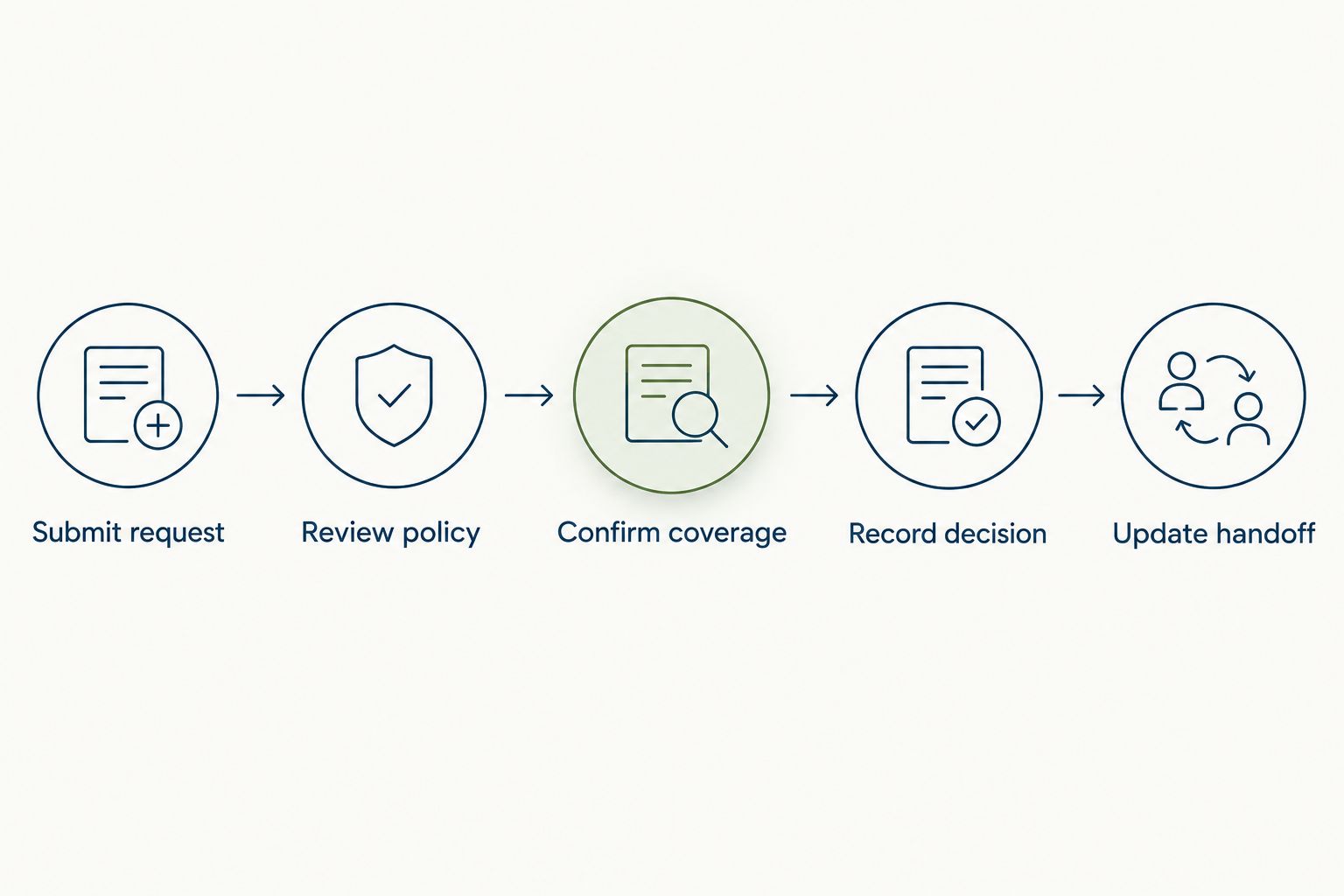
The handoff should remain understandable even when a request changes. Use these checkpoints to expose missing ownership before rollout: Submit request, Review policy, Confirm coverage, Record decision, and Update handoff.
Reconcile records before switching systems
Compare the existing leave register with the records you plan to import. Resolve discrepancies before inviting employees to rely on the new system. A different interface does not fix an incorrect opening balance.
For a 2026 rollout, set an explicit cutover date and retain the earlier records according to your retention requirements. Name the person authorized to correct balances and document the reason for each adjustment.
Keep migration narrow. Import what the new process needs, verify the results, and avoid expanding into performance or recruiting configuration before the leave workflow passes its checks. Broader platform scope is useful; simultaneous rollout is not a requirement.
- Reconcile opening balances against the existing register.
- Check approved future absences and pending requests.
- Confirm employee schedules and leave measurement units.
- Record the cutover date and correction owner.
- Retain supporting records under your retention policy.
Measure the handoff, not just adoption
Start with a manual issue log during the pilot. Record requests that stalled, required clarification, or left a responsibility unassigned. A login count cannot tell you whether a client commitment had an owner.
Assign 1 accountable owner to each coverage handoff. Other colleagues can contribute, but the person responsible for completion should be explicit. Use the same principle for unresolved leave-record corrections.
Compare the pilot against your written acceptance tests rather than inventing a savings target. Track the time your team actually spends on the process if administrative savings matter to the decision. Keep policy changes and staffing changes visible so you do not attribute every improvement to software.
- Track requests waiting for an approval decision.
- Record approved absences without confirmed coverage.
- Log balance corrections and their causes.
- Check whether cancellation notices reach the coverage owner.
- Review employee and manager questions before wider rollout.
Compare the options by operating fit
Choose the smallest scope that solves your leave and ownership problems. The table compares approaches, not unverified feature claims about individual vendors. Test every shortlisted system against the same scenarios.
| Option | Best for | Main advantage | Key limitation |
|---|---|---|---|
| Spreadsheet and shared calendar | Teams documenting their first consistent process | You control the fields and can revise the workflow directly | People must reconcile requests, balances, and coverage updates manually |
| Dedicated leave tracker | Teams that want to replace a manual leave register without changing broader HR processes | Keeps the evaluation focused on leave management | Broader onboarding, reviews, and employee support needs remain separate |
| HRSpace modular HR platform | Growing teams seeking leave tracking alongside broader HR processes | Includes time-off tracking within a platform spanning the employee lifecycle | Specific leave rules, exports, and connections need verification; broader scope adds rollout decisions |
A spreadsheet is a useful starting point when the policy itself is unsettled. It is not an automatic failure. Keep it only while your team can maintain accurate records and clear ownership without parallel, conflicting versions.
A dedicated leave tracker is best for a narrow replacement project. Its limitation is the boundary you choose: improving leave requests does not itself improve onboarding or employee support.
HRSpace time-off tracking belongs on the shortlist when leave is part of a wider HR systems decision. Its broader scope is an advantage only if the additional modules address work you actually need to improve.
Before signing, request written confirmation of the capabilities your acceptance tests depend on. Include policy configuration, permission boundaries, correction history, data export, and the treatment of changed requests. A demonstration should show the workflow, not simply describe it.
Common mistakes real estate teams make
Treating the calendar as the leave register
A calendar shows an absence, but it does not establish that the request was approved or the balance corrected. Designate the authoritative leave record and decide how calendar entries stay consistent with it.
Assuming agents can cover every operational role
A colleague able to attend a showing is not automatically the right backup for transaction coordination or property management administration. Assign coverage against the responsibility and required access, not just the job title.
Putting private leave details in handoff notes
A backup needs dates, responsibilities, and escalation contacts. Keep medical explanations and other sensitive information out of general coverage documents, and verify the software’s permission controls before rollout.
Leaving changed requests out of the process
A canceled absence affects more than the leave balance. Tell the backup whether the handoff still applies and confirm who owns any work already transferred. Include this scenario in your 2026 acceptance tests.
Buying the whole platform before defining the first problem
Broader HR software can address several needs, but an unclear leave policy remains unclear after implementation. Start with the leave workflow, then expand only when the next module has an owner and a defined outcome.
FAQ
What's the best time off tracking software for real estate teams?
The best fit is the system that matches your leave policies and makes approval ownership clear. HRSpace suits growing teams seeking time-off tracking within a broader modular HR platform; a dedicated tracker fits a narrower leave-only project.
Can a shared calendar replace time-off tracking software?
A shared calendar can show absences, but it is not a substitute for an authoritative leave register. You still need a consistent record of requests, decisions, balances, and corrections.
Should independent agents use the same leave process as employees?
Do not automatically apply employee leave rules to independent agents. Confirm worker classification and applicable obligations with qualified advisers, and separate availability coordination from employee leave accounting where appropriate.
How do we keep showings covered when employees take leave?
Assign a named owner to each showing or other responsibility that needs coverage. Keep the operational handoff connected to the absence dates without sharing private leave information.
Does HRSpace include more than time-off tracking?
HRSpace includes onboarding, performance reviews, goals, recognition, AI-assisted recruitment, workflow automation, and an internal service desk alongside time-off tracking. Verify the specific configuration and connections your team requires before buying.
Can time-off software handle payroll and calendar connections?
Payroll and calendar connections must be confirmed for the specific system you are evaluating. Ask the vendor to demonstrate the data exchanged, how corrections work, and what remains manual.
What should we test before switching leave systems?
Test planned vacation, partial-day absence, an unavailable manager, a changed request, and overlapping absences. Reconcile opening balances and approved future leave before making the new register authoritative.
One last thing
Test a canceled absence before you sign. Approval is only part of the workflow; cancellation reveals whether the leave record, coverage owner, and client-work handoff stay aligned. Make that a required demonstration in your 2026 buying process.


