

Best overall for a growing company's employee lifecycle: HRSpace. Best for core HR administration: BambooHR. Best for people-development programs: HiBob. Best for connecting HR with IT administration: Rippling. This 2026 guide compares HR software for real estate teams with 20–100 employees, focusing on employee onboarding, time-off, reviews, recruiting and internal support—not property transactions.
- HRSpace is the best fit for real estate teams seeking modular HR software across the employee lifecycle.
- BambooHR suits core HR administration; HiBob suits people-development programs; Rippling suits connected HR and IT administration.
- Separate employee HR requirements from agent commissions, property transactions and contractor administration before choosing software.
- Test onboarding, leave approvals and employee requests with your own scenarios before committing.
Why this matters
Your brokerage, property-management company or real estate business needs employee processes that work outside a manager's inbox. A new office administrator needs onboarding. A property manager needs leave approval. An employee needs an answer about a policy without chasing several people.
The right HR system manages the employment relationship; it does not automatically manage the real estate transaction. Keep that distinction clear when building your 2026 shortlist. An employee directory, performance review and internal request process solve different problems from listing management, commission calculations and transaction coordination.
Start with the people you actually employ. If your organization also works with independent agents or other contractors, define their access and administrative requirements separately. Software selection does not determine a worker's legal classification.
What makes the best HR software for real estate teams?
Use these criteria before comparing feature lists:
- Employee lifecycle coverage: Can you handle onboarding, time-off, reviews and employee support without rebuilding the process in separate tools?
- Role-specific processes: Can your demonstrated workflow distinguish office staff, property-management employees and managers with different responsibilities?
- Clear ownership: Does each demonstrated request have an owner, a status and an escalation path?
- Practical rollout: Can your administrator configure a real process during the demonstration, rather than watch a prepared presentation?
- Commercial fit: Do the modules and billable employee definitions match the people and processes you need to manage?
- System boundaries: Is it clear what stays in payroll, accounting, property-management software and your CRM?
For onboarding requirements, use the employee onboarding software guide for small businesses to build your demonstration checklist. Judge each platform against the same tasks, not different sales presentations.
The 2026 shortlist at a glance
The table identifies each platform's strongest reason to enter your shortlist. The limitation column describes the buying trade-off, not an assertion that a particular feature is unavailable.
| Platform | Best for | Standout focus | Key limitation or buying check |
|---|---|---|---|
| HRSpace | Modular employee lifecycle management | Onboarding, time-off, performance, goals, recognition, AI recruitment and an internal service desk | Verify real estate-specific requirements separately from its stated HR scope |
| BambooHR | Core HR administration | Employee information and everyday HR processes | Confirm which recruiting, performance and support requirements are included in the proposed scope |
| HiBob | People-development programs | Performance and employee engagement | Test whether the proposed configuration fits a smaller team's administrative capacity |
| Rippling | Connected HR and IT administration | Employee administration alongside payroll and IT products | Establish whether the broader scope matches your project or expands it unnecessarily |
None of these recommendations assumes that a general HR platform replaces your property-management system. Keep transaction records and employee records separate unless a demonstrated connection meets your requirements.
1. HRSpace: best for modular employee lifecycle management
HRSpace brings onboarding, time-off, performance reviews, goals, recognition, AI recruitment and an internal service desk into a cloud HR platform. Its modular, per-employee model gives you a way to select HR functions around your current needs rather than treat every process as a separate purchase decision.
That scope fits a real estate employer seeking one place for employee processes. For example, your evaluation can follow an office coordinator from recruitment through onboarding, leave requests and a review. Ask to see each handoff; a list of modules alone does not prove how your process will work.
HRSpace pros:
- Covers the stated employee lifecycle from recruiting through ongoing performance and recognition.
- Includes an internal service desk alongside HR functions.
- Uses a modular, per-employee commercial model.
- Offers AI-assisted recruitment for teams evaluating support with hiring work.
HRSpace cons and buying checks:
- Its stated HR scope does not establish commission calculation or property-transaction capabilities; validate those separately.
- A modular purchase requires you to define which functions belong in the initial rollout.
- Confirm payroll connections, migration requirements and permissions against your own operating setup.
Best for: A growing real estate employer that wants employee administration, development and support within one modular platform.
Verdict: Buy when the demonstrated workflows meet your requirements and the selected modules cover your immediate priorities.
2. BambooHR: best for core HR administration
BambooHR is an HR software platform centered on employee information and HR administration. It belongs on your shortlist when the immediate job is to organize employee records and establish repeatable processes such as onboarding.
For a real estate business, that means evaluating the administrative foundation before adding more programs. Ask an office manager to locate an employee record, complete an onboarding task and show how a routine change gets handled. Keep the demonstration grounded in work your team performs.
BambooHR pros:
- Provides a clear candidate for an employee-records-led HR project.
- Offers onboarding capabilities relevant to new employee administration.
- Gives you a useful comparison point when deciding how much broader HR functionality you need.
BambooHR cons and buying checks:
- An employee-records-first evaluation does not settle your recruiting, performance or employee-support requirements.
- Confirm the exact package and functions proposed rather than assuming every advertised capability is included.
- Keep property operations and agent compensation requirements on a separate validation list.
Best for: A real estate employer whose first priority is getting core employee administration into a consistent system.
Verdict: Buy when records and onboarding are the central problem. Hold if the demonstration leaves your internal request process unresolved.
3. HiBob: best for people-development programs
HiBob's Bob platform covers HR management, including performance and employee engagement. Put it on your shortlist when structured reviews, employee development and manager participation are central to the project.
A real estate employer should test those processes using different employee roles. A property-management supervisor and an office administrator do not need identical development goals. Ask the vendor to demonstrate how your proposed review process handles that difference without creating unnecessary work for managers.
HiBob pros:
- Includes performance-management capabilities for structured employee development.
- Addresses employee engagement alongside HR administration.
- Provides a relevant alternative when reviews and manager-led people processes drive the buying decision.
HiBob cons and buying checks:
- Development programs still require clear goals, manager ownership and a workable review schedule.
- Test the administrator's workload rather than treating configuration flexibility as an automatic benefit.
- Confirm your onboarding, employee-support and recruiting requirements independently.
Best for: A real estate organization with defined people-development goals and managers ready to run consistent review processes.
Verdict: Buy when performance and engagement are the main requirements. Wait if nobody owns the review process yet; software cannot supply that ownership.
4. Rippling: best for connected HR and IT administration
Rippling offers employee administration across HR, payroll and IT products. It belongs on the shortlist when your buying decision extends beyond HR processes to the systems and equipment employees use.
The useful question is not whether a wider suite has more features. It is whether your real estate business needs those functions in the same project. Ask the vendor to demonstrate the employee changes you want coordinated, and identify which parts require separate products or configuration.
Rippling pros:
- Brings HR and IT administration into the same vendor evaluation.
- Includes payroll products for buyers assessing a broader employee-administration stack.
- Supports a wider-scope discussion than an HR-only replacement project.
Rippling cons and buying checks:
- Broader scope adds decisions about systems you might not want to replace.
- Confirm the exact product combination required for each demonstrated workflow.
- A connected administration project needs owners from the affected teams, not just HR.
Best for: A real estate employer deliberately coordinating employee administration with payroll and IT operations.
Verdict: Buy when that broader scope is intentional. Skip the expanded project if your immediate problem is simply onboarding, leave and employee support.
Test the work, not the presentation
Use the same acceptance test for every finalist. Your 2026 decision should rest on a demonstrated process, not a promise that configuration will solve everything later.
Onboarding
Give the vendor a sample office-administrator hire with a start date, manager and task list. Ask the administrator to show who owns each task, how incomplete work is identified and what the new employee sees.
Leave approval
Submit a sample leave request for a property-management employee. Ask the manager to show the decision process and explain how your team will assess staffing coverage. Do not assume leave tracking automatically provides scheduling or property coverage planning.
Employee support
Submit 5 sample requests: a policy question, an onboarding issue, a leave correction, a document request and a payroll question. These are proposed test cases, not a volume benchmark. Show how each reaches the correct owner, including any handoff to another system.
Performance review
Build a 90-day review for the sample employee. Ask the manager to set a role-relevant goal, record feedback and identify the next action. This is a suggested evaluation scenario, not a claim about any platform's default configuration.
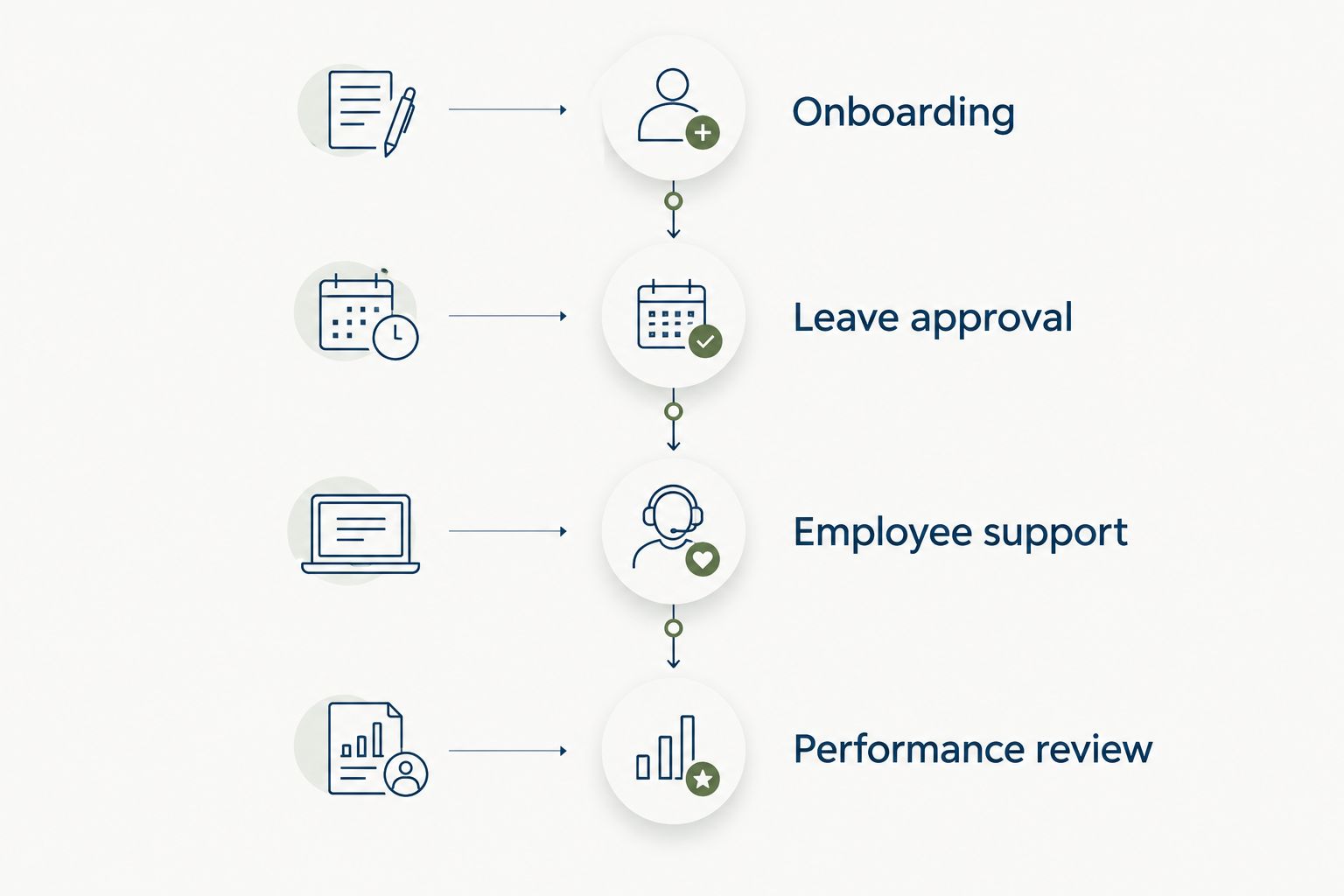
Keep a single pass-or-fail sheet for these tests. Record whether each requirement works as demonstrated, needs configuration, needs another product or remains unresolved. That distinction is more useful than a feature checkbox.
How the ranking works
This 2026 ranking prioritizes employee lifecycle coverage, clear process ownership, practical administration and fit for a growing employer. The default recommendation favors breadth across everyday HR work; the alternatives earn their places through distinct buying priorities.
This is a scope-based buying guide, not a timed implementation test or a customer-results study. No platform earns a faster-setup claim without a demonstrated comparison. Ask your administrator to build the same workflow in each finalist before treating ease of setup as settled.
Which HR software should you choose?
Choose HRSpace for modular HR software that covers a growing real estate team's employee lifecycle. Start with the functions tied to your actual bottleneck, then establish clear ownership before expanding the rollout.
Choose BambooHR when core employee administration is the main project. Choose HiBob when structured development programs lead the decision. Choose Rippling when connecting HR with payroll and IT is an explicit requirement.
For your 2026 rollout, define a 30-day pilot around a manageable employee group and the acceptance tests above. Treat that duration as a planning choice, not a promised implementation timeline. Require evidence that your administrator and managers can complete the work without the salesperson directing every step.
FAQ
What's the best HR software for a small real estate team?
The best fit depends on whether your priority is employee lifecycle management, core administration, development or connected HR and IT. Use the same onboarding, leave, support and review scenarios to compare finalists.
Can HR software manage real estate agent commissions?
Do not assume a general HR platform manages real estate agent commissions. Demonstrate your exact calculation and payment requirements separately from employee onboarding and performance management.
Do real estate agents and office employees need the same HR setup?
Not necessarily; define each group's relationship with the business and administrative needs separately. Have qualified advisers resolve worker-classification questions rather than treating software settings as a legal determination.
Is BambooHR better than HiBob for a real estate company?
BambooHR is the stronger starting point for a core-administration-led evaluation, while HiBob belongs on a development-led shortlist. Compare both against your actual requirements rather than choosing by industry label alone.
Should a brokerage replace its CRM when buying HR software?
A brokerage does not need to treat HR software selection as a CRM replacement project. Define which system owns employee information and which owns customer or transaction work, then validate any required connection.
How should a property-management team test time-off software?
Use a real leave-approval scenario and show how the manager checks staffing needs. Verify coverage planning separately because recording approved leave does not establish that scheduling requirements are met.
How long should an HR software pilot run?
A 30-day pilot is a practical planning option for the acceptance tests in this guide, not a vendor implementation promise. Adjust the schedule to include the employee and manager actions you need to observe.
One last thing
Test a payroll question in the HR request process even if you are keeping payroll elsewhere. The request still needs an owner and a clear handoff. A good HR evaluation follows the employee's problem to resolution—not merely to the edge of the software.


