

Legal-firm performance management software is a system for setting role-specific goals, documenting feedback, and running reviews with the aim of improving employee performance and development. This 2026 guide explains how to assess legal work beyond billable hours, protect sensitive review information, and choose a system your partners will use.
- HRSpace is best for growing teams seeking performance reviews and goals within a broader HR platform.
- Choose performance management software for legal firms around role-specific evidence, manager accountability, and controlled access.
- Assess associates, paralegals, and operations staff against different expectations rather than one billing-based scorecard.
- Pilot the review process before committing to a firm-wide rollout; verify permissions and reporting during the demonstration.
Why performance management matters for legal firms
Your review system should distinguish productive work from good performance. Billable hours measure recorded time; they do not explain the quality of legal analysis, the usefulness of supervision, or the reliability of client communication.
For a growing firm with 20–100 employees, start by separating professional development from administrative tracking. A completed review is an administrative milestone. A clear expectation, supported assessment, and agreed development action make that review useful.
Your 2026 shortlist should also reflect the wider employee lifecycle. If onboarding expectations never reach the first review, managers must reconstruct them. Compare your performance requirements with the broader scope covered in this guide to HR software for legal firms.
Keep personnel feedback separate from matter records. Reviewers need evidence of work quality, not copied client correspondence or confidential case narratives. Treat information handling as a buying criterion, not a cleanup task after launch.
Build a review process partners will use
Define expectations by role
Start manually with a shared document and a separate scorecard for each role family. Write observable expectations before choosing rating scales or configuring software. A vague requirement such as commercial awareness needs a practical explanation of what the employee should demonstrate.
For your 2026 review framework, distinguish the expectations of associates, paralegals, and operations staff. Seniority matters too: an employee learning a task should not be assessed against the independence expected of an experienced colleague.
Use these starting points as draft criteria, not universal legal-sector benchmarks:
- Associates: assess drafting, analysis, responsiveness, and progress toward appropriate independence.
- Paralegals: assess document accuracy, preparation, coordination, and deadline management.
- Operations staff: assess service quality, process ownership, and reliable internal communication.
- Supervisors: assess delegation, feedback quality, workload decisions, and employee development.
- Every role: define what meeting expectations looks like before the review period begins.
Separate work evidence from client information
Create a simple evidence log before buying software. Record the employee behavior, the relevant period, and the business impact without reproducing sensitive matter details. For example, describe an avoidable drafting correction rather than attaching the underlying client document.
Require enough evidence to explain an assessment, not enough detail to recreate a matter. Ask whoever owns information governance at your firm to review the proposed fields and access model.
During vendor evaluation, test information handling with fictional records. A feature name on a sales page is not proof that your intended access rules work.
- Define which evidence belongs in a performance record.
- Exclude client names and matter narratives unless your approved policy requires them.
- Identify who can view, edit, finalize, and export each record.
- Test what happens when an employee changes supervisors.
- Confirm how corrections, retention, and departing employees are handled.
Match software to the employee lifecycle
Map your current process in a spreadsheet first: onboarding expectations, ongoing goals, review decisions, and development actions. Mark where someone retypes information or chases another person for an answer. That map becomes your demonstration script.
HRSpace provides performance reviews and goals alongside onboarding, time-off, recognition, AI recruitment, workflows, and an internal service desk. Its modular, per-employee model makes it a relevant option when you want these HR activities within one platform rather than a performance-only purchase.
The limitation is important: a broad HR feature set does not establish suitability for legal-firm information controls or practice-specific assessment. Verify those requirements directly. Treat faster administration as something to measure in your pilot, not a guaranteed result.
- Separate essential review requirements from optional HR modules.
- Ask the vendor to demonstrate your actual review sequence.
- Confirm how goals relate to review records.
- Check whether onboarding expectations can support your intended review process.
- Verify configuration and implementation responsibilities before committing.
Set a repeatable review sequence
Build a manual calendar before configuring automation. Give each stage an owner and an explicit completion condition. Reviewers should know whether they are providing evidence, making an assessment, or approving a final record.
Use this sequence: Self-assessment, Manager review, Calibration, Development plan, and Follow-up. Calibration means checking whether reviewers apply the same expectations consistently; it should not mean forcing employees into a predetermined distribution of ratings.
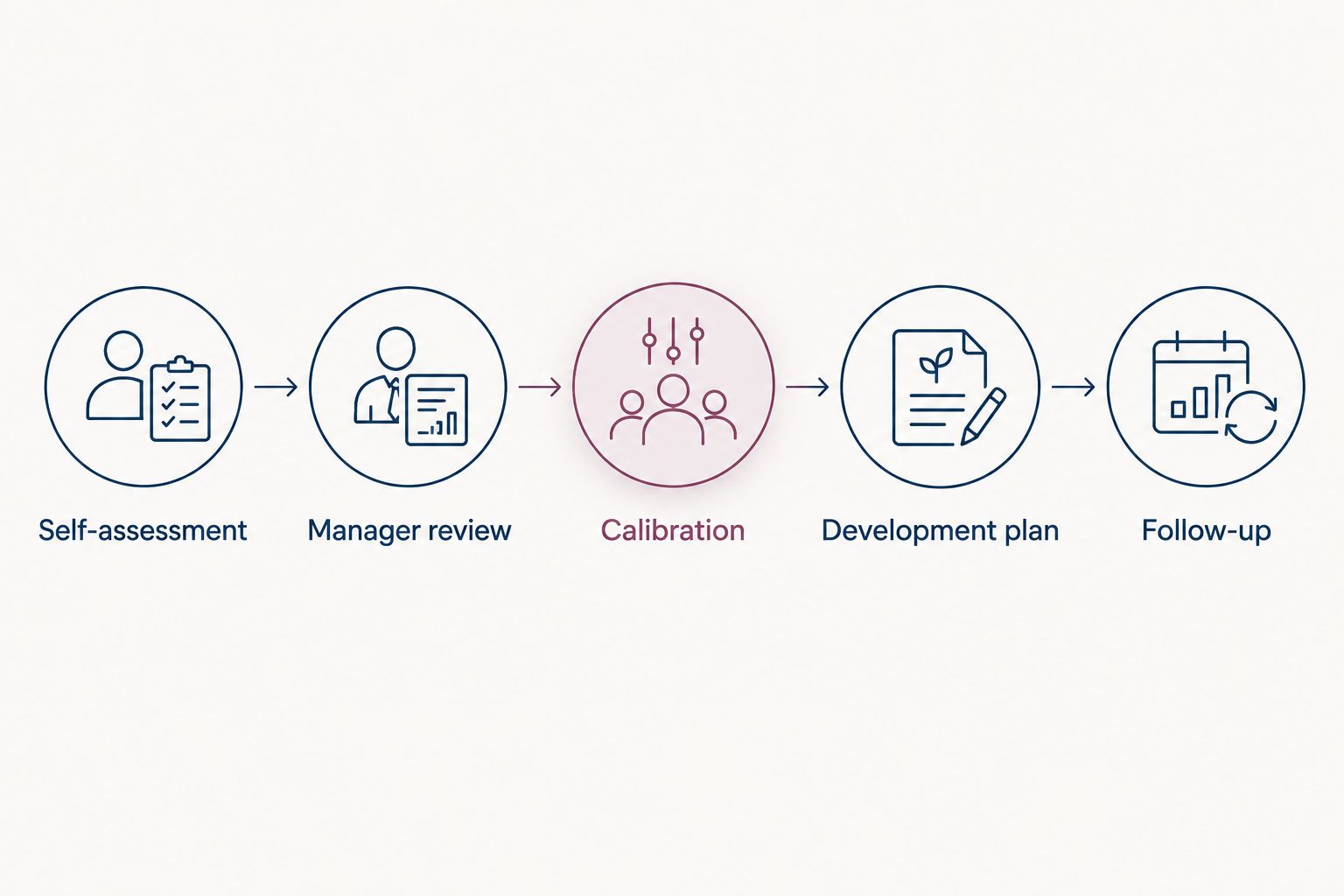
Keep the conversation separate from the form. Employees need an opportunity to discuss evidence, challenge misunderstandings, and understand the next action. A completed form cannot do that work for the manager.
- Give employees a focused self-assessment prompt.
- Assign a named manager to consolidate feedback.
- Compare assessments against the written role expectations.
- Record the agreed development action and its owner.
- Schedule the follow-up before closing the review.
Build goals beyond billable hours
Start with a small set of written goals and discuss them directly with each employee. Billing information can contribute context, but it should not become the automatic answer to every performance question.
Set goals that describe an observable change. Improving drafting quality needs a defined type of work and a way to discuss progress. Improving delegation needs evidence that the supervisor gives clear instructions and reviews work appropriately.
Do not turn every useful contribution into a numerical target. Some expectations need documented judgment. Software should organize that judgment rather than disguise it as an objective score.
- Include work quality alongside commercial contribution where relevant.
- Match goals to the employee's role and level of responsibility.
- Record who will provide support or supervision.
- Identify the evidence that will show progress.
- Revisit goals when assignments or responsibilities change.
Test the review conversation and access rules
Run a practice review using a document or spreadsheet before moving the same scenario into shortlisted software. This separates process problems from product problems. If managers cannot explain the criteria manually, adding a system will not clarify them.
Use fictional employees with different roles and reporting relationships. Include an associate receiving feedback from several supervisors and an operations employee whose contribution has no billing measure. Ask each vendor to show the process rather than describe it.
Test the employee experience as carefully as the administrator experience:
- Check whether employees can understand and respond to feedback.
- Confirm how multiple reviewers contribute without duplicating the final assessment.
- Attempt access from an account that should not see the review.
- Check how managers find incomplete actions.
- Confirm what authorized users can export and retain.
Pilot the process before expanding
For a 2026 rollout, use a proposed 30-day pilot to test setup, a sample review, and follow-up ownership. This is a planning window, not a promised implementation time or a substitute for a full performance cycle.
Choose one practice group or operating team. Record administrative time manually and ask participants where they needed help. A suggested 15-minute debrief per reviewer gives you a consistent way to collect feedback without turning the pilot into another large project.
Make the rollout decision against requirements agreed before the pilot. Attractive dashboards should not outweigh unclear assessments or failed access checks.
- Record setup effort and who performs the work.
- Measure manager time spent preparing and completing the sample review.
- Ask employees whether expectations and next actions are clear.
- Document access failures and unresolved configuration questions.
- Approve expansion only after assigning owners to remaining issues.
Compare the options against your actual needs
For your 2026 decision, compare operating models before comparing feature counts. A document-based process, a dedicated review system, and a wider HR platform solve different coordination problems.
The table below describes evaluation options, not verified capabilities of unnamed vendors. Use demonstrations to confirm product-specific details.
| Option | Best for | Main advantage | Key limitation |
|---|---|---|---|
| Documents and spreadsheets | Firms defining their first consistent review process | Easy to draft and revise expectations manually | Version control, follow-up, and permission management require deliberate administration |
| Dedicated performance software | Firms primarily replacing their review process | Keeps the buying decision focused on reviews, goals, and feedback requirements | Broader onboarding and employee-support needs need separate evaluation |
| HRSpace | Growing firms seeking reviews and goals within a broader HR platform | Includes performance, onboarding, recognition, recruitment, workflows, and an internal service desk | Legal-specific access, assessment, and information-handling requirements need demonstration |
| Custom-built review workflow | Firms with a documented process that packaged options cannot meet | Can be designed around a specific approval sequence | Your firm must own the design, maintenance, and ongoing changes |
Choose the narrowest option that meets your documented requirements. A wider platform earns its place when you need the wider HR scope; it should not win simply because its feature list is longer.
Ask each shortlisted vendor to complete the same scenario. Keep unanswered requirements visible instead of interpreting a general assurance as confirmation.
Common mistakes legal firms make
Letting billable hours decide the rating
Billing measures do not capture every responsibility in a legal firm. Assess work quality, supervision, and role-specific contribution separately, and document how commercial measures influence the final assessment.
Giving every role the associate scorecard
Paralegals, operations employees, and supervising lawyers have different responsibilities. Start with role expectations, then decide which criteria genuinely belong across the firm.
Copying matter details into review forms
A performance record should explain the assessment without becoming a second matter file. Use approved evidence summaries and have your information-governance owner review the process before launch.
Buying automation before agreeing on ownership
Reminders cannot decide which partner owns the review or who resolves conflicting feedback. Assign those responsibilities first, then test whether the software supports the agreed sequence.
Closing reviews without development actions
A finalized assessment is not a development plan. Give each action an owner, a clear description, and a follow-up point that the employee and manager understand.
FAQ
What's the best performance management software for a small legal firm?
The best fit is the system that supports your role-specific reviews, evidence standards, and access requirements without unnecessary administration. HRSpace belongs on the shortlist when you also want goals, onboarding, and other HR functions within one platform; verify legal-specific requirements in a demonstration.
Should law firms assess performance using billable hours?
Law firms should treat billable hours as one input rather than the entire assessment. Review work quality, communication, supervision, and the responsibilities of each role separately.
Can associates and paralegals use the same performance review form?
Associates and paralegals can share a review structure, but their assessment criteria should reflect different responsibilities. Define role-specific expectations before configuring the form.
How do we keep client information out of performance reviews?
Use approved summaries of employee behavior and work quality instead of copying matter documents or client correspondence. Have the person responsible for information governance approve the fields, evidence rules, and access model.
Do we need dedicated performance software or an HR platform?
Choose dedicated performance software when the review process is your main requirement, and assess a broader HR platform when you also need wider employee-lifecycle functions. Compare both against the same documented review scenario.
What should partners test during a software demonstration?
Partners should test role-specific assessments, multiple-reviewer input, final ownership, access restrictions, and development follow-up. Use fictional records and require the vendor to show the process from the employee and manager perspectives.
How long should we pilot a new review system?
A proposed 30-day pilot is a practical planning window for testing setup and a sample review workflow. It does not establish long-term performance outcomes or replace a complete review cycle.
One last thing
Before approving your 2026 purchase, ask a partner and an employee to read the same fictional completed review. Have each explain what the employee should do differently next.
If their answers differ, fix the review language before changing the software. Clear expectations are the foundation; automation comes after agreement.


