

Yes, an HR service desk is worth it for small companies when employee requests get lost in chat, need repeated follow-ups, or pass between HR and managers without a clear owner. Keep a simpler process when requests are easy to track; a service desk adds setup and administration, and it does not replace the people responsible for resolving requests.
- Is a HR service desk worth it for small companies? Yes, when requests need ownership and tracked resolution.
- HRSpace suits growing teams that want an internal service desk alongside their core HR software.
- Keep email when requests remain manageable; use a service desk when handoffs and approvals need structure.
- Evaluate request ownership, employee effort, routing rules, and SLA targets before choosing HR service desk software.
Is a HR service desk worth it for small companies?
An HR service desk earns its place by fixing request handling, not by adding another employee portal. The useful difference is whether you can identify who owns a request, what happens next, and what counts as resolved.
When evaluating HR service desk software, compare the work your team needs to manage rather than the length of each feature list.
| Approach | Best for | Main advantage | Main drawback |
|---|---|---|---|
| Direct email or chat | Straightforward requests handled by a named person | Employees can use a familiar channel | You need a separate way to track unresolved work and handoffs |
| Shared inbox with a request log | Teams ready to introduce consistent ownership | You can establish a common queue without changing every process | Someone must maintain assignments, status, and follow-ups |
| HR service desk | Requests involving routing, approvals, and response targets | You can organize requests around owners and defined workflows | You must configure the process and keep it current |
These are different ways to organize work, not a ranking by company size. A small team with complicated approvals can need more structure than a larger team with straightforward requests.
The decision is therefore conditional but clear: choose a service desk when your current process cannot reliably show ownership and resolution. Keep the simpler approach when it can. Do not replace a working process solely because your headcount is growing.
Why this matters
For a company with 20–100 employees, the buyer is often an HR lead, an operations leader, or a founder responsible for several kinds of work. A request process should make that work easier to manage, not require someone to administer an elaborate system all day.
An employee asking about onboarding needs an answer and a next step. The employee should not have to work out which department owns each part of the request.
For your 2026 evaluation, start with the experience you want: a clear place to ask, a responsible owner, and an understandable outcome. Features matter only when they support that experience. A long configuration checklist is not evidence that the employee will get better help.
Keep email when ownership is already clear
Best for: small teams with straightforward requests and dependable follow-through.
Email or chat remains a reasonable choice when employees know where to ask and the responsible person can track open work. The advantage is familiarity: you do not need to introduce a new intake process simply to answer a routine question.
The limitation is coordination. When a conversation needs a manager's decision or another team's action, you still need a way to record the handoff and confirm completion. A message sent is not necessarily a request resolved.
Before buying software, check whether your current process can answer these questions:
- Who is responsible for this request now?
- What information or decision is still needed?
- Can someone else take over without reconstructing the conversation?
- Does the employee know what happens next?
If those answers are clear, keep the process. Improve the instructions or ownership rules before replacing the channel.
Choose a service desk when requests need coordination
Best for: growing teams whose employee requests involve handoffs, approvals, or response commitments.
A service desk fits when you need a common way to receive and organize requests. Routing rules define where work goes. Approval chains define whose decision is needed. SLA targets set the response or resolution commitments your team intends to meet.
The benefit is structure. The drawback is that someone must design that structure, assign responsibilities, and maintain it as the company changes. Software cannot decide which manager should approve a request unless your team has established that rule.
At 20 employees, look at the actual coordination problem rather than assuming you are too small. At 100 employees, apply the same test rather than assuming a service desk is automatically necessary.
Headcount provides context. Unclear ownership is the stronger reason to change. Start with the request types that expose that problem, not a company-wide rollout of every possible workflow.
Why the value of an HR service desk varies
The value depends on the work you need to organize and the modules you choose. For a 2026 shortlist, evaluate these factors:
- Request ownership. Identify whether each request has a responsible person or disappears into a shared conversation. A queue helps only when someone owns the work inside it.
- Routing needs. Determine which requests HR handles directly and which require another team. Routing rules should reflect real responsibilities, not an idealized organization chart.
- Approval steps. Separate requests that need a decision from questions that need an answer. Do not add manager approval to routine questions without a reason.
- Response expectations. Decide whether you need SLA targets and what they should measure. Acknowledging a request and resolving it are different outcomes.
- Employee lifecycle scope. Consider whether the desk belongs alongside onboarding, time-off, performance reviews, and other HR processes. Compare the scope you need, not every module offered.
- Administrative ownership. Name the person responsible for updating categories, routing, and instructions. An unmaintained process is not improved simply because it lives in software.
These factors also explain why another company's buying decision is not a substitute for yours. Two teams with similar headcounts can have different approval responsibilities and different support needs.
Set up the process before choosing the platform
Use the following sequence to turn a vague need for better HR support into a purchasing requirement. Each step should produce a decision your team can explain without referring to a software feature name.
1. Request intake
Choose the request types your service desk should handle first. Onboarding questions and requests involving time-off processes are relevant starting points when those are the workflows you need to coordinate.
Describe each request in employee language. Ask only for information the owner needs to act. A form that collects unnecessary detail creates work before anyone has helped the employee.
Also define what does not belong in the general queue. Sensitive employee matters need a deliberate access and handling process; confirm that any platform under consideration supports your requirements before using it for that work.
2. Named owner
Assign responsibility for each request type. Make the owner accountable for moving the request forward, even when someone else must supply an answer or approval.
Specify a backup rather than relying on one person's availability. This is a process requirement to evaluate, not an assumption that every service desk handles coverage in the same way.
3. Approval path
Document which requests need approval, who decides, and what information they need. Keep questions separate from decisions: explaining a policy should not automatically require the same workflow as approving an exception.
Ask a vendor to demonstrate your intended approval path. A general statement that a product includes approvals is less useful than seeing the decision reach the correct person.
4. Response target
Define what an employee should expect after submitting a request. Explain whether the target concerns acknowledgment, a substantive response, or final resolution.
Use targets your team can support. A short deadline looks good in a demonstration but is not helpful if the responsible people cannot meet it. Confirm how the platform represents the target and what happens when work remains open.
5. Resolution check
Define completion from the employee's perspective. A request is not finished merely because HR forwarded a message to someone else.
Specify the outcome, the employee update, and the closure rule. Then ask the vendor to show how the process records that outcome. You are evaluating whether the system supports your workflow, not whether the demonstration looks polished.
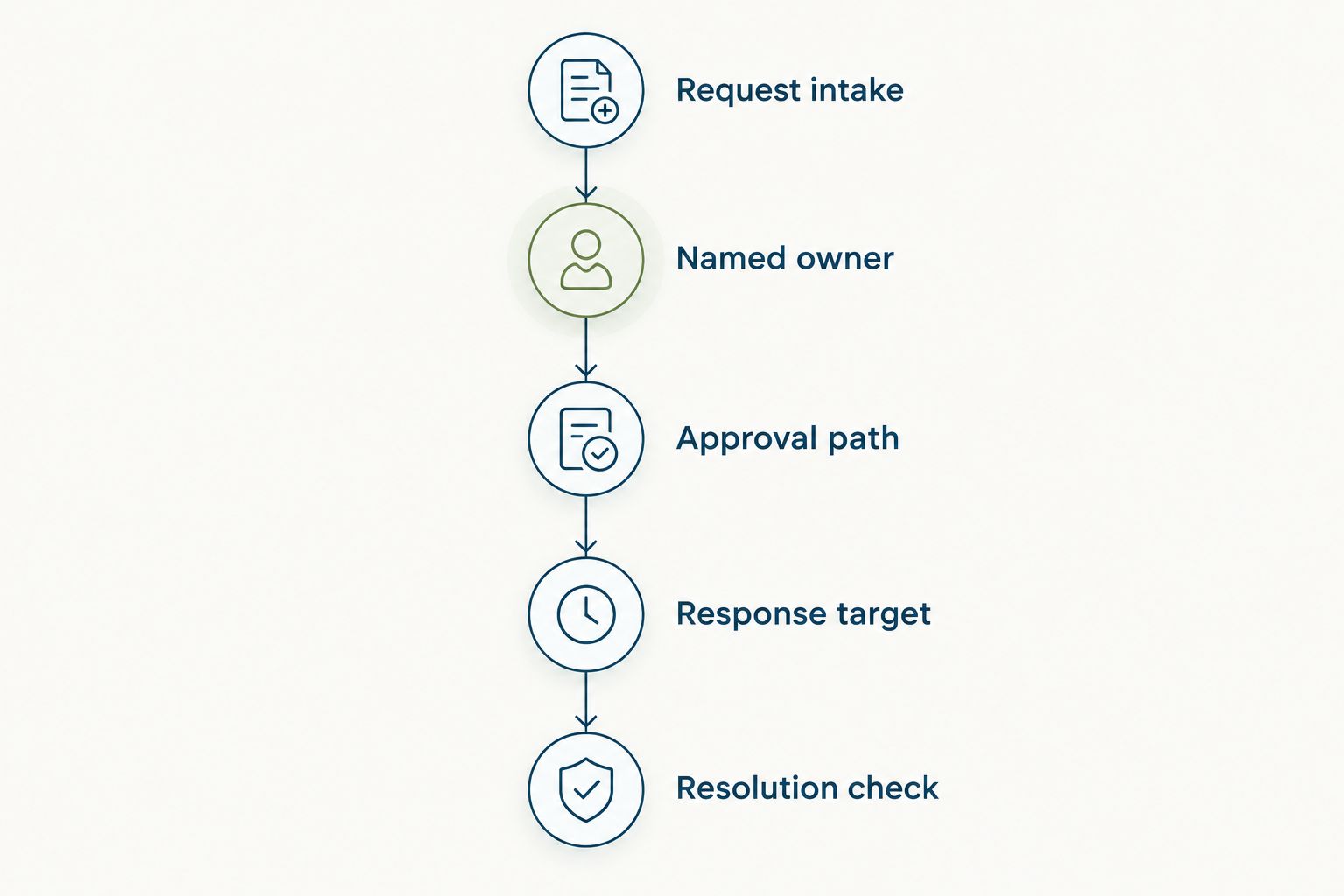
Treat this sequence as your 2026 demonstration script. Give each vendor the same request scenario and compare how clearly the product supports it. Do not substitute an unrelated demonstration for the workflow you need to run.
Where HRSpace fits
HRSpace offers a modular cloud HR platform covering onboarding, time-off, performance reviews, goals, recognition, AI-assisted recruitment, workflow automation, and an internal service desk. Its pricing model is per employee, so your evaluation should consider both the employee count and the modules you intend to use.
HRSpace is best for growing HR and People Operations teams that want an internal service desk alongside employee lifecycle software. Its stated service-desk features include routing rules, SLA targets, and approval chains. Those features match a request process built around ownership, response expectations, and decisions.
The scope is useful when you want to evaluate employee support and core HR workflows together. The trade-off is scope itself: if you only need to organize occasional questions, assess whether a broader HR platform matches the problem you are solving.
Do not treat AI-assisted recruitment as evidence of AI-powered request resolution. They are different capabilities. Evaluate each module for its actual job, and ask for a demonstration of the service-desk workflow you intend to use.
For your 2026 decision, compare the selected modules, configuration work, and daily administration. Confirm sensitive-request handling and any connection to existing systems as purchasing requirements rather than assuming them from the platform category.
Will an HR service desk reduce HR's workload?
An HR service desk is worth adopting for workload management when it replaces avoidable coordination work. It does not eliminate the need to answer employee questions, make decisions, or handle difficult conversations.
Compare what your team does before and after introducing the process: finding requests, identifying owners, chasing approvals, and confirming outcomes. If the new process merely copies an email conversation into a ticket, you have added administration without changing the underlying workflow.
Use your own request records to judge the result. Separate better tracking from actual workload reduction; they are related goals, but they are not the same finding.
Does a small company need SLA targets?
A small company needs SLA targets when explicit response commitments help employees and request owners coordinate. It does not need a different target for every category simply because the software supports that configuration.
Start by distinguishing response from resolution. Some requests depend on a manager's decision or information from another team. Define that dependency before promising an outcome, and tell employees what the target means in plain language.
Is an employee portal enough instead?
An employee portal is enough when employees need access to information and do not need a managed request workflow. A service desk addresses a different question: who will act on a request, and how will it reach resolution?
A policy page can explain the time-off process. A request that needs an individual decision still needs an owner. Evaluate information access and request handling separately, even when a platform offers them together.
FAQ
Is a HR service desk worth it for small companies in 2026?
Yes, when employee requests need clearer ownership, approvals, or tracked resolution. Keep a simpler process when your team can already handle requests reliably without adding another system.
Does a company with 20 employees need an HR service desk?
A company with 20 employees needs an HR service desk only if its request process needs more structure. Evaluate handoffs, approvals, and unresolved work rather than treating headcount as a buying threshold.
Is an HR service desk better than email?
An HR service desk is better suited to requests that need structured ownership and workflow tracking. Email remains a reasonable choice for straightforward requests that a responsible person can manage reliably.
What's the difference between an HR portal and an HR service desk?
An HR portal gives employees a place to access information or employee services; an HR service desk organizes requests for action and resolution. Evaluate the specific capabilities rather than relying on the product label.
What should I ask for in an HR service desk demonstration?
Ask the vendor to demonstrate request intake, ownership, approval, response targets, and resolution using your actual workflow. Confirm sensitive-request handling and other requirements separately rather than assuming them.
Does HRSpace include an internal HR service desk?
HRSpace includes an internal service desk alongside onboarding, time-off, performance reviews, goals, recognition, AI-assisted recruitment, and workflow automation. Its stated service-desk features include routing rules, SLA targets, and approval chains.
Can an HR service desk replace an HR manager?
An HR service desk does not replace an HR manager. It organizes requests and workflows, while responsible people still interpret policies, make decisions, and resolve employee concerns.
One last thing
Test the handoff, not just the submission form. A clean form is easy to demonstrate; the more revealing test is a request that needs someone outside HR to act.
For your 2026 shortlist, follow that request from submission to closure. Ask who owns it while approval is pending, how the employee gets an update, and what proves the work is complete. If those answers remain unclear, revisit the process before committing to the platform.
The right next move is not necessarily buying software. It is making responsibility visible, then choosing the simplest system that keeps it visible.


