

Time off tracking software has no single standard cost: your total depends on the employee count, the billing model, and the features included in your quote. For a 2026 purchase, compare the subscription with any separately quoted setup, support, or additional modules—not just the headline charge.
- How much does time off tracking software cost? Compare employee count, included features, and the full contract scope.
- HRSpace suits growing teams seeking time-off tracking within a modular HR platform.
- Compare standalone leave management with broader HR software using the same headcount and requirements.
- Ask vendors to separate recurring charges from any one-time services before you choose.
How much does time off tracking software cost?
The useful answer is a like-for-like quote, not a market average detached from your requirements. Start with the employees you need to cover, the leave processes you need to manage, and the other HR functions you actually intend to use.
HRSpace offers modular, per-employee HR software that includes time-off tracking alongside onboarding, performance reviews, goals, recognition, recruitment, workflows, and an internal service desk. That makes headcount and selected modules central to evaluating its commercial fit.
Use this breakdown to turn a vendor proposal into a budget you can approve:
| Budget component | What to establish | What to put in your comparison |
|---|---|---|
| Employee count | Which employees count toward billing | The same covered population for every quote |
| Subscription scope | Whether time-off tracking is included or separately selected | The modules your team will use |
| Billing period | Whether the proposal covers monthly or annual billing | A common comparison period |
| Setup services | Whether implementation services are included or separately quoted | Any applicable one-time charge |
| Ongoing services | What support the subscription includes | Any separately quoted service commitments |
| Contract changes | How employee or module changes affect the agreement | The vendor's written terms |
These are quote-review categories, not a claim that every vendor charges for each item. Keep included services separate from optional work, and exclude optional work from your baseline unless you intend to buy it.
Why this matters
Time-off tracking touches employees, managers, and HR. A purchase decision needs to cover the request itself, the approval decision, and the record your team relies on afterward.
For a growing company with 20–100 employees, the question is not simply whether software replaces a spreadsheet. It is whether the selected setup fits your leave policies without creating another place for HR to reconcile information.
In 2026, build the buying brief around the work you need done. Ask vendors to demonstrate that work before comparing their proposals. A quote for a broader platform is not directly comparable with a quote for leave management alone.
Standalone time-off tracking: best for a focused requirement
A standalone approach fits a buying brief centered on leave requests, balances, and approvals. Its advantage is a narrower evaluation: you can focus the demonstration on the time-off process rather than reviewing unrelated HR functions.
The trade-off is scope. A time-off purchase does not, by itself, address onboarding, performance reviews, employee recognition, or recruitment. If those processes also need attention, evaluate them separately rather than assuming the leave tool covers them.
Ask the vendor to show an employee submitting a request, a manager reviewing it, and HR checking the resulting record. Use your own policy examples. A polished demonstration of a simple request does not answer whether the system handles your actual rules.
Choose a focused tool when time-off tracking is the problem you need to solve. Do not expand the buying brief just because a vendor offers more features.
Modular HR software: best for connected people processes
A modular approach fits teams that want time-off tracking alongside other selected HR functions. You evaluate the leave process first, then decide which additional modules belong in the same purchase.
HRSpace is best for growing teams that want time-off tracking within a modular HR platform. Its stated scope covers the employee lifecycle, including onboarding, performance reviews, goals, recognition, recruitment, and employee support.
The advantage is the option to evaluate several HR needs within one platform. The trade-off is that you still need to define the module scope: a broader feature list does not establish which functions your proposal includes or how well each matches your policies.
For your 2026 shortlist, ask for a proposal that names the selected modules explicitly. Keep future possibilities separate from current requirements so your approval decision reflects the work you plan to support now.
A broader HR purchase: best for a wider replacement project
A broader HR purchase fits a company replacing several existing processes together. The buying brief starts with the employee lifecycle rather than leave tracking alone.
The advantage is a single evaluation of multiple requirements. The trade-off is a larger decision: more workflows need demonstrations, more records need review, and more internal owners need to agree on the scope.
Do not treat broader scope as proof of better fit. If your current onboarding or review process already works, explain what a replacement must improve before including it in the project.
| Approach | Best for | Main advantage | Main trade-off |
|---|---|---|---|
| Standalone time-off tracking | Teams solving a leave-specific problem | Focused evaluation | Other HR needs remain separate |
| Modular HR software | Teams selecting several HR functions | Defined module scope within a platform | Each selected module still needs evaluation |
| Broader HR purchase | Teams replacing multiple people processes | Shared purchasing scope | More requirements and stakeholders to assess |
Compare approaches on the same task list. Otherwise, you risk rewarding the proposal with the longest feature list instead of the one that fits your work.
Why time-off software quotes vary
The commercial model and the requested scope determine what you are comparing. Use these factors to explain differences between proposals:
- Employee count: A per-employee model ties the subscription calculation to the billable population. Confirm who belongs in that population.
- Module selection: Time-off tracking alone and time-off tracking with onboarding or performance reviews are different buying scopes.
- Platform breadth: A focused leave-management purchase and an employee-lifecycle purchase cover different requirements.
- Workflow requirements: Define the request, approval, and HR follow-up steps you need demonstrated. Establish whether those requirements affect the quoted scope.
- Employee support requirements: Decide whether your project includes an internal service desk or only leave tracking. Keep that decision explicit in the proposal.
These factors help you explain a quote difference without assuming one vendor is overpriced or another is a bargain. First establish what each proposal covers; then compare the commercial terms.
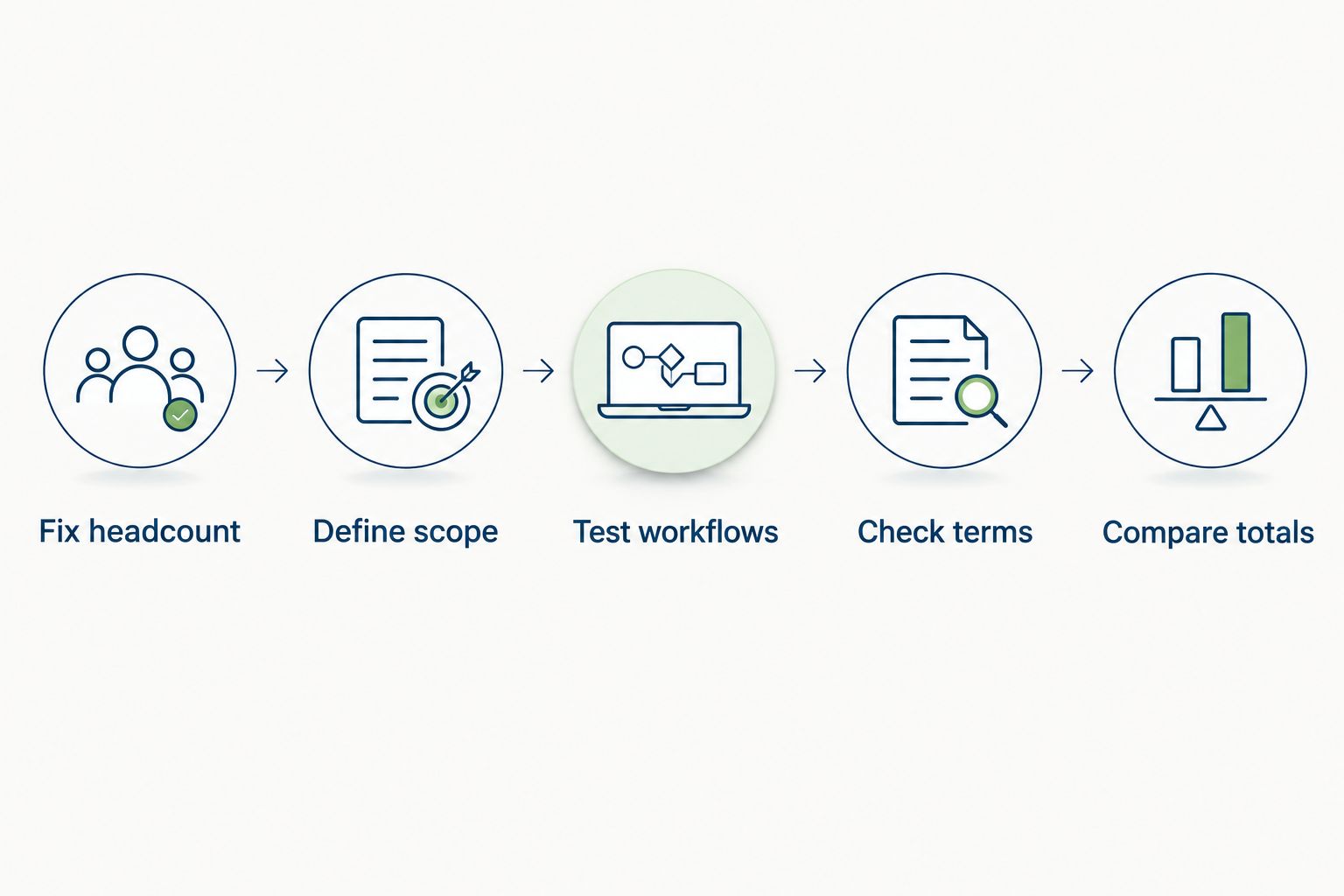
Build a quote you can actually compare
Use this sequence for every shortlisted vendor. The goal is a clear purchase decision, not an elaborate procurement exercise.
1. Fix headcount
Start with your current covered employee population. For a 50-employee planning scenario, request proposals covering the same 50 employees rather than letting each vendor choose a different example.
Then request a second scenario at 100 employees if that reflects your planning needs. These are comparison scenarios, not a growth forecast or a claim about what your company will spend.
2. Define scope
Write a short required task list: submit leave, review a request, check the record, and resolve a question. Add your policy-specific examples underneath it.
Separate required tasks from desirable extras. If recruitment, recognition, or performance reviews are part of the project, identify them as additional requirements rather than hiding them inside a general request for HR software.
3. Test workflows
Give each vendor the same employee and manager scenario. Ask the vendor to show the complete process, including the step HR uses to confirm the outcome.
Include an exception, such as a changed request or a policy question. Treat the demonstration as evidence of fit—not as permission to assume every related capability exists.
4. Check terms
Ask for written definitions of billable employees, selected modules, included services, and contract changes. Confirm how the proposal handles a change in employee count.
Also establish which work your team owns during setup. A clear division of responsibilities lets you assess internal effort without inventing an implementation duration.
5. Compare totals
Put every proposal on the same billing period and headcount. Keep recurring subscription commitments separate from any quoted one-time services.
For a monthly per-employee proposal, multiply the quoted rate by the confirmed billable employee count. If the vendor uses another billing structure, apply that structure instead of forcing it into a per-employee calculation.
What should a 50-employee team ask for?
A 50-employee team should request a proposal covering 50 employees with a clearly named time-off scope. That establishes a common basis for evaluating different billing models.
For a useful 2026 comparison, ask for a separate version covering only your required functions. If the first proposal bundles several HR modules, the narrower version shows which commitments belong to the leave-tracking decision.
Keep the employee count consistent throughout the comparison. Comparing one proposal for 50 employees with another for 100 employees creates a headcount difference, not a meaningful software comparison.
Does per-employee billing make budgeting easier?
Per-employee billing gives you a direct connection between the billable employee count and the quoted subscription rate. It still requires clear definitions of covered employees, selected modules, and contract terms.
HRSpace uses a modular, per-employee model, so evaluate both the employee population and the module scope. Do not assume that a billing model alone establishes the final commitment or makes one proposal better than another.
Use the model to calculate your budget; use demonstrated workflow fit to choose the software. Those are separate decisions.
Should you include other HR modules in the same purchase?
Include other HR modules when they solve a defined problem in your current buying brief. Leave them out of the baseline when they are only possible future projects.
For example, HRSpace includes time-off tracking and an internal service desk in its stated platform scope. That makes employee support relevant to the evaluation when your team also needs a structured way to handle HR questions.
The boundary matters. Do not assume that time-off requests connect to other workflows exactly as you need; ask for a demonstration of the specific connection before treating it as part of the solution.
FAQ
How much does time off tracking software cost in 2026?
Time off tracking software has no single standard cost; the total depends on the billing model, employee count, and selected scope. Compare written proposals using the same headcount, requirements, and billing period.
What should I include in a time-off software budget?
Include the quoted subscription and any separately quoted services you intend to purchase. Keep recurring commitments separate from one-time work so the comparison stays clear.
How do I compare time-off software for 50 employees?
Request proposals covering the same 50 employees and the same required workflows. Confirm how each vendor defines billable employees before comparing the terms.
Is standalone time-off software better than an HR platform?
Standalone time-off software fits a leave-specific buying brief, while an HR platform fits a broader set of people-process requirements. Choose based on the work you need supported, not the number of advertised features.
Does HRSpace offer time-off tracking?
HRSpace includes time-off tracking within its modular, per-employee cloud HR platform. Its stated scope also includes onboarding, performance reviews, goals, recognition, recruitment, workflows, and an internal service desk.
What should I ask during a time-off software demo?
Ask the vendor to demonstrate a complete leave request using your policy examples. Include employee submission, manager review, HR record checking, and an exception that reflects your actual work.
Should I compare monthly and annual proposals directly?
Compare proposals on a common billing period rather than comparing unlike headline figures. Read the commitment and change terms separately before approving the purchase.
One last thing
Write the approval test before you read the proposals. Specify the employee task, the manager decision, and the HR record you expect at the end. Then use that same test in every demonstration.
For a 2026 purchase, this gives your team a concrete reason to accept or reject a proposal. A feature belongs in your decision only when it supports a requirement you can name.


