

Per-employee pricing is cheaper than flat-rate HR software when your employee-based total falls below the flat subscription for the same features and contract period. Flat-rate pricing wins when it covers your required employee count and workflows for a lower total. For your 2026 comparison, include required modules, employee-count rules and any quoted setup charges—not just the headline subscription.
- Is per employee pricing cheaper than flat rate HR software? Only when equivalent scope produces a lower total.
- Per-employee HR software suits headcount-based budgeting; flat-rate software suits predictable spending within confirmed limits.
- HRSpace offers modular per-employee HR software; compare the modules your team needs, not unrelated bundles.
- Compare current headcount and planned growth before choosing a subscription model.
Is per-employee pricing cheaper than flat-rate HR software?
Neither pricing model is automatically cheaper. The winner is the lower total for the same work. A per-employee quote and a flat-rate quote are comparable only after you align employee coverage, features and billing periods.
For growing teams evaluating HRSpace, modular per-employee pricing makes feature selection part of that calculation. A flat-rate alternative needs the same scope check before you treat its subscription as a better deal.
| Pricing model | Best for | Budget advantage | Trade-off to check |
|---|---|---|---|
| Per employee | Teams that want spending tied to billable headcount | You can calculate the subscription from the agreed employee rate | More billable employees increase the total unless contract terms change the calculation |
| Flat rate | Teams that want a fixed subscription within an agreed scope | The subscription stays fixed within the contracted limits | Employee limits, required upgrades or excluded features can change the comparison |
| Modular per employee | Teams selecting particular HR functions | You can compare the employee-based charge for the required module set | Adding modules changes the total even when headcount stays unchanged |
The table compares billing structures, not vendor quotes. Use it to decide which questions to ask; use written proposals to decide which option costs less.
Why this matters
A growing company needs onboarding, leave management and employee support to work—not merely a subscription that looks inexpensive. A cheaper package is a poor match if it leaves a required workflow outside the platform.
Separate your buying decision into two questions: Does this software cover the work, and what does that coverage cost? Answer them in that order. Otherwise, you risk comparing a narrow package with a broader one and attributing the difference entirely to pricing structure.
For a 2026 shortlist, write down the workflows you need now. Keep future requirements separate so an optional feature does not quietly become a mandatory expense.
Find the break-even point
The break-even point is the employee count at which the two equivalent subscriptions have the same total. Below that point, the employee-based subscription is lower; above it, the flat subscription is lower, provided its scope and employee limits remain unchanged.
Use these variables:
- N: the number of billable employees.
- P: the quoted per-employee charge for the required modules and billing period.
- F: the equivalent flat subscription for that same period.
- B: any fixed subscription charge included in the employee-based proposal.
For a purely employee-based subscription, compare N × P with F. If the employee-based proposal also includes a fixed charge, compare B + N × P with F.
Where the rate is constant, the break-even employee count is F ÷ P, or (F − B) ÷ P when a fixed charge applies. These are calculation rules, not quoted vendor prices.
Do not apply this shortcut across a change in plan or module scope. If either proposal changes at a headcount threshold, calculate each affected scenario separately. A single break-even number cannot describe a contract whose terms change along the way.
For the questions behind the calculation, use the guide to HR software cost per employee.
Per-employee pricing: best for headcount-based budgeting
Per-employee pricing connects the subscription calculation to the number of employees covered by the agreement. That makes headcount a useful planning input, but it also makes the definition of a billable employee essential.
Ask whether the quote counts active employees, all stored employee records or another defined group. Check how it treats new starters, departures and people whose records remain in the system. Do not assume that fewer active users means a lower invoice.
The advantage is a clear calculation when the rate and employee-count rules are fixed. The disadvantage is exposure to growth: adding billable employees increases the total at an unchanged rate.
Choose per-employee pricing when its total stays lower across your planned headcount and covers the required workflows. Do not choose it solely because the individual employee charge looks small.
Flat-rate pricing: best for predictable subscription spending
Flat-rate pricing gives you an agreed subscription for an agreed scope. Its budget advantage holds only while your usage stays inside that scope.
Confirm employee coverage, included modules and the conditions that trigger a different package. A proposal described as flat rate is not evidence that it covers unlimited employees or every HR function.
The advantage is predictable subscription spending within the contract. The disadvantage is paying the same subscription even when your team uses less of the included capacity or functionality.
Choose flat-rate pricing when its covered scope matches your needs and its total beats the employee-based alternative. If the proposal leaves out a required workflow, add the cost of covering that workflow before declaring a winner.
Modular pricing: best for buying the functions you need
Modularity and employee-based billing answer different questions. Modularity determines which functions you buy; employee-based billing determines how the subscription scales with covered headcount.
Start with your operational requirements. If onboarding and time-off management are the immediate priorities, compare proposals covering those functions. Add performance reviews, recognition or recruiting to the comparison only when they belong in your purchase decision.
The advantage is control over the scope you evaluate. The trade-off is that a modular proposal can become a different financial proposition as you add functions.
Compare the complete required module set, not the entry module alone. A low starting scope does not establish that the full configuration is cheaper than a flat-rate package.
Why the total varies
Your 2026 comparison depends on the terms attached to each proposal. Check these factors rather than assuming that every vendor bills the same way:
- Billable headcount: Establish exactly which employee records count toward the subscription.
- Module selection: Match the onboarding, time-off, performance, recruiting and support functions your team requires.
- Fixed charges: Identify any fixed subscription component before calculating the employee-based total.
- Contract period: Compare equivalent periods and distinguish a payment schedule from a contractual commitment.
- Setup scope: Ask whether configuration, data migration and training are included or separately quoted.
- Growth conditions: Check employee limits, package changes and when added employees affect billing.
Treat each item as a verification question, not an assumed charge. Include a cost only when the proposal or agreement establishes it.
Compare quotes without fooling yourself
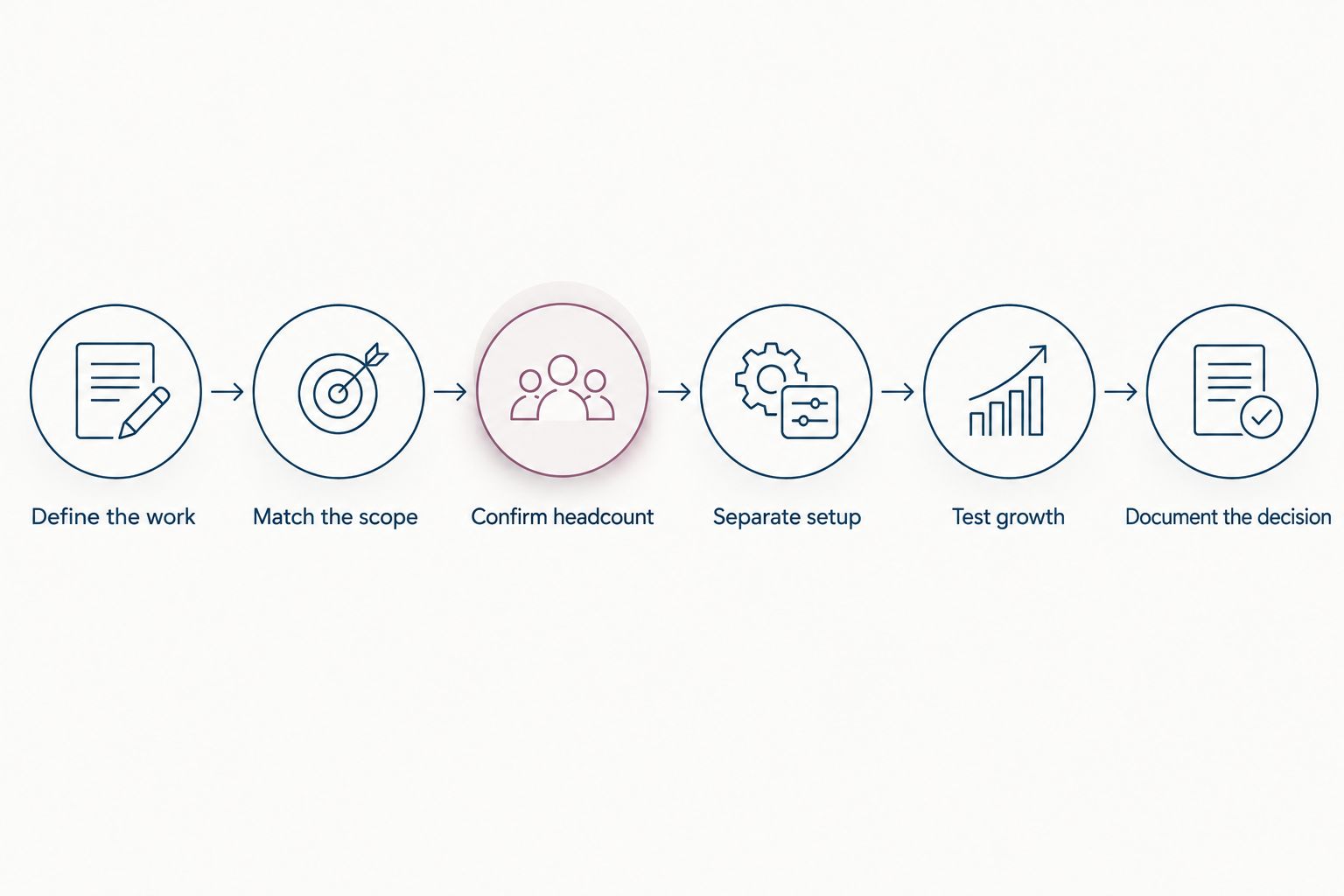
Define the work
Write a short requirements list before requesting proposals. Name the outcome as well as the feature: onboarding should help you prepare new starters; time-off management should support requests and decisions; employee support should give requests an owner.
Distinguish essential functions from useful extras. Your comparison should not reward a package for including tools that your team has no plan to use.
Match the scope
Give each vendor the same requirements list. Ask for a proposal that explicitly identifies included functions and exclusions.
Mark each requirement as included, separately quoted or not covered. Resolve unclear answers before comparing totals. A package with an unresolved gap is not yet an equivalent alternative.
Confirm headcount
For a company planning within the stated audience range, request calculations at 20 employees, 50 employees and 100 employees. These are planning scenarios, not claimed customer results or vendor thresholds.
The 20-employee scenario shows the smaller-team calculation. The 50-employee scenario tests a middle point. The 100-employee scenario shows whether your preferred model still fits at the upper end of that planning range.
Use your actual staffing plan for the final decision. Do not make a larger-company scenario determine the purchase if that headcount is not part of your plan.
Separate setup
Record setup work separately from the subscription. Ask who prepares employee data, configures the required workflows and trains the people responsible for administering the system.
Do not assume that flat-rate software includes this work or that employee-based software excludes it. The written scope should settle the question.
Test growth
Calculate each headcount scenario using the terms that apply at that employee count. Check whether adding employees changes only the subscription total or also changes the required package.
For your 2026 budget, use the period you are actually evaluating. Applying your final planned headcount to the entire period distorts the calculation if the contract bills changing headcount throughout it.
Document the decision
Put the comparable totals beside the requirements checklist. Record why the selected option wins and which contract conditions the decision depends on.
This gives your founder or finance lead a usable answer: the chosen package covers the required work at the lower comparable total. It also makes the next renewal easier to evaluate.
Where HRSpace fits
HRSpace is best for growing HR and People Operations teams that want modular, per-employee HR software across the employee lifecycle. Its stated scope includes onboarding, time-off, performance reviews, goals, recognition, AI-assisted recruitment, workflow automation and an internal service desk.
That breadth is relevant when you want several employee workflows in one platform. Modularity also makes the required configuration—not an unrelated bundle—the right basis for evaluating the proposal.
The trade-off is straightforward: per-employee billing ties the calculation to billable headcount, and selected modules determine the scope you are buying. Those facts do not establish a lower total than a flat-rate alternative.
Ask for a proposal matching your employee count and required functions. Verify setup responsibilities against the competing proposal rather than treating a faster implementation as a proven result.
Review your required HR scope
Explore the platform, then compare proposals using the same headcount and required workflows.
Does a smaller team always save with per-employee pricing?
No. A smaller billable headcount lowers the employee-based calculation at an unchanged rate, but it does not prove that the total beats a flat subscription. Compare equivalent coverage, including any fixed charges established in the proposal.
Does flat-rate pricing become better as you hire?
Flat-rate pricing becomes financially better when the equivalent employee-based total exceeds it and the flat package still covers your needs. Hiring alone does not establish that result; employee limits and package changes matter.
Should you compare the subscription or the whole purchase?
Compare both, separately. The subscription explains recurring spending; the full quoted purchase also accounts for setup and other required work. Keeping the two views separate prevents a lower subscription from hiding a higher initial commitment.
FAQ
Is per employee pricing cheaper than flat rate HR software?
Per-employee pricing is cheaper when the total for your billable employees and required features is below the equivalent flat subscription. Match scope, billing periods and contract conditions before comparing.
What is the break-even point for employee-based HR software?
The break-even point is the employee count where equivalent subscriptions have the same total. For a purely employee-based subscription at a constant rate, divide the flat subscription by the per-employee charge for the same period.
Is flat-rate HR software unlimited?
Flat-rate billing does not establish unlimited employee coverage or unlimited features. Confirm the employee limits, included modules and package-change conditions in the agreement.
Which pricing model is best for a growing company?
The best model is the one that covers your required workflows at the lower comparable total across your staffing plan. Test current headcount and planned growth rather than choosing from the entry quote alone.
How should I compare modular HR software with a bundled package?
Compare the complete module set your team needs with the equivalent bundle. Exclude unwanted features from your requirements, but include every function needed to complete the work.
Does HRSpace use per-employee pricing?
HRSpace uses modular per-employee pricing for its cloud HR platform. Request the configuration and employee coverage you need before comparing it with a flat-rate proposal.
What should I ask vendors before choosing HR software in 2026?
Ask vendors to confirm billable headcount, included functions, contract periods, setup scope and growth conditions. Get those answers in writing so the subscription comparison reflects the actual agreement.
One last thing
Request two separate views: the subscription calculation and the work required to start using it. They answer different questions. A lower recurring total does not tell you who will prepare the data, configure the workflows or train administrators.
Before approving your 2026 purchase, attach the requirements list to the decision. Highlight any function that depends on a separate quote, another tool or an unresolved answer.
That is the final test: not which pricing label sounds cheaper, but which written proposal covers your work at the better total. Keep the calculation and the scope together.


