

Yes, HR software can automate onboarding paperwork by collecting employee information, assigning document tasks, sending reminders, and tracking completion when those features are included. Automation does not replace a person's responsibility to verify information, handle exceptions, or meet applicable legal requirements. Choose a system that demonstrates the complete paperwork workflow, not just a place to upload files.
- Can HR software automate onboarding paperwork? Yes, but document collection, signatures, approvals, and verification are separate capabilities.
- HRSpace combines onboarding and HR workflows; verify document-specific capabilities before choosing it for paperwork automation.
- Keep human review for incorrect information, exceptions, and legally required checks.
- Test employee onboarding with an incomplete form before approving a purchase.
Can HR software automate onboarding paperwork?
Yes. The useful distinction is between storing paperwork and moving it through a controlled process. A document repository holds files. An automated onboarding workflow tells people what to complete, identifies unfinished work, and moves the process toward an approved employee record.
For a 2026 evaluation, ask the vendor to show these steps using your actual paperwork requirements:
- Assign tasks. Start the appropriate onboarding checklist for the new hire.
- Collect information. Give the employee a clear way to submit required details and documents.
- Check completion. Identify missing responses, unsigned documents, or unfinished tasks.
- Route review. Send submitted information to the person responsible for checking it.
- Record the outcome. Distinguish approved work from work that still needs attention.
These are acceptance criteria, not features every product includes. Ask which steps are native, which require another service, and which remain manual. HRSpace offers onboarding and workflow automation within its modular HR platform; document-specific requirements still need a demonstration.
The paperwork stage also needs a clear handoff into the wider employee lifecycle. The guide to new-hire onboarding through 90-day reviews covers that broader process.
Why this matters
Paperwork becomes an operational problem when nobody can tell whether it is submitted, checked, or approved. Those are different states. Treating them as the same creates a checklist that looks finished while the underlying work remains unresolved.
For a company growing from 20 employees toward 100 employees, the buying question is not whether software can hold more documents. It is whether your HR team can manage onboarding without reconstructing the status of each hire from messages and attachments.
In 2026, evaluate the employee experience and the HR experience together. A simple submission screen is useful, but it does not solve the problem if HR still has to chase every reviewer separately.
Manual paperwork or an automated workflow?
Neither approach removes the need for clear ownership. Software changes how information moves and how unfinished work becomes visible.
| Approach | Best for | Main advantage | Main limitation |
|---|---|---|---|
| Manual checklist and document collection | Teams defining their onboarding process before selecting software | You can change the process without configuring a system | People must update status and chase outstanding work themselves |
| HR software with document storage | Teams primarily needing a central place for onboarding files | Documents sit within a defined HR process | Storage alone does not establish reminders, signatures, or approval routing |
| HR software with verified paperwork workflows | Teams needing repeatable collection, review, and follow-up | Configured rules can move tasks between responsible people | You must configure rules, test exceptions, and confirm document-specific capabilities |
Choose the workflow that proves your requirements, not the option with the longest feature list. A basic process with a clear reviewer is more useful than an elaborate setup that marks paperwork complete before anyone checks it.
Do not assume that an onboarding module includes every document function. File uploads, electronic signatures, reusable forms, reminders, and approval routing are separate questions. Have the vendor show each requirement rather than treating the word onboarding as proof.
What paperwork tasks should you test?
Start with the documents and information you already request. Keep the evaluation grounded in real work instead of a vendor's sample checklist.
Employee information collection
Ask whether the employee enters information directly and whether the system identifies required fields. Then check what happens when a response needs correction.
The key test is not whether a form opens. It is whether HR can return an incorrect response without losing sight of the task or creating competing versions of the same information.
Document delivery and acknowledgment
Distinguish sending a document from recording that an employee has acknowledged it. Also distinguish acknowledgment from signing: they are not interchangeable requirements.
Ask the vendor to demonstrate the action your process actually requires. If you need evidence tied to a particular document version, make that an explicit acceptance criterion rather than assuming a completed task provides it.
Electronic signatures
Do not infer electronic-signature support from document storage or onboarding functionality. Ask whether signatures are included, handled through another service, or completed outside the platform.
Confirm which documents your organization accepts electronically with the appropriate legal or compliance adviser. A convenient signature process does not establish that every document is suitable for it.
Review and approval
Define who checks each submission and what approval means. An employee confirming that a task is done should not automatically stand in for HR verifying the contents.
Ask to see both the approved path and the correction path. The correction path matters because automation should keep ownership clear when a submission is incomplete, not just when everything goes right.
Reminders and unfinished work
Ask how the system identifies overdue or incomplete tasks and who receives the follow-up. Check whether reminders stop when the required action is complete.
Keep the distinction between employee action and reviewer action visible. Reminding a new hire to submit a document is different from reminding HR to review one that has already arrived.
Build the workflow before configuring the software
Write the process in plain language first. If your team cannot explain who acts next, software configuration will only preserve the ambiguity.
For your 2026 implementation plan, use a short sequence that separates submission from approval. Give each stage an owner and a clear exit condition.
- Assign tasks. Identify the documents required for the role and name the person responsible for starting onboarding.
- Collect information. Tell the employee what to submit and where questions should go.
- Check completion. Separate missing items from submitted items awaiting review.
- Route review. Name the reviewer and define how corrections return to the employee.
- Record the outcome. Mark the work approved only after the required review is finished.
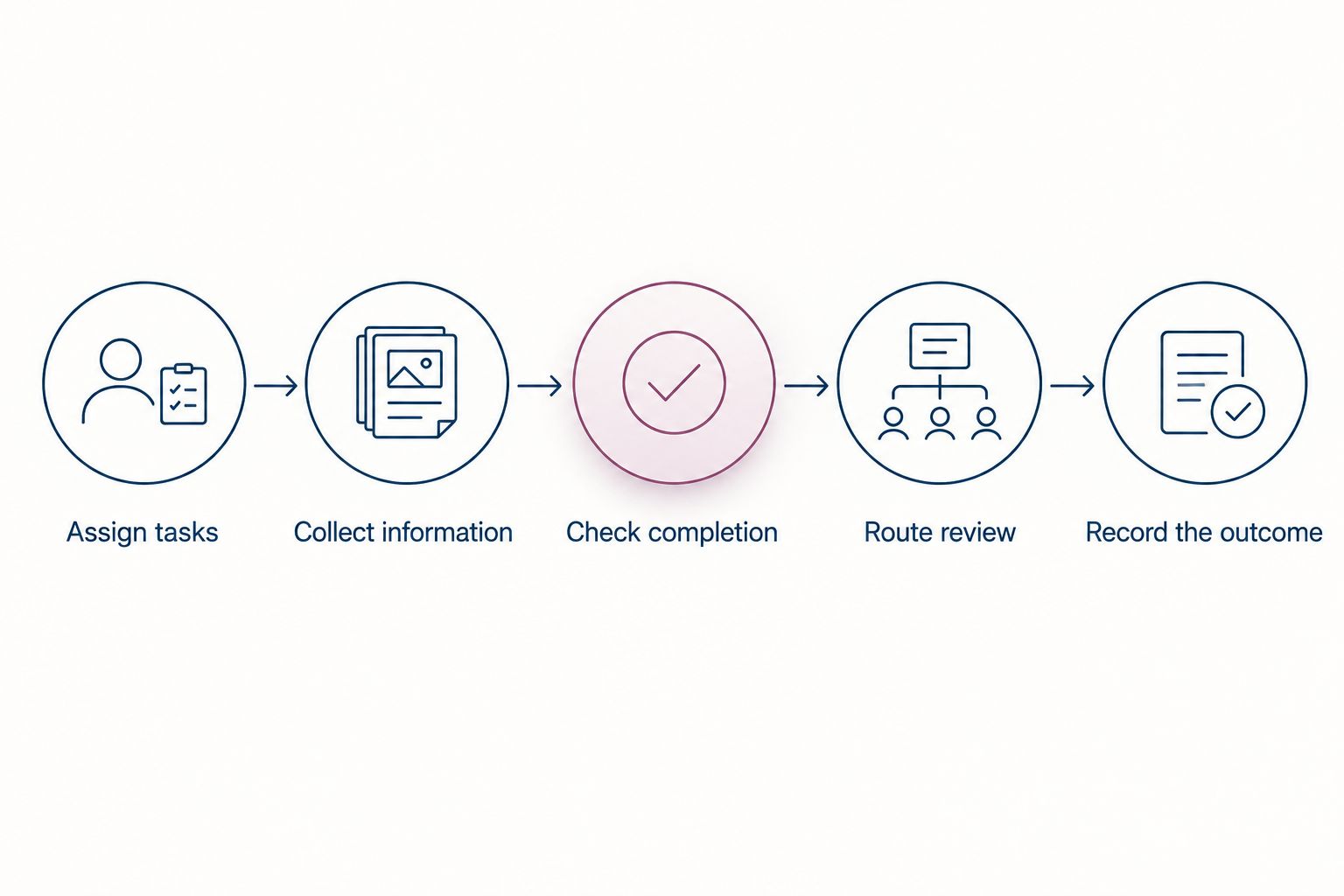
Use the same definitions in your checklist, demonstration script, and acceptance test. This gives you a consistent way to compare what the vendor shows with what your team needs.
Include a route for questions. A new hire who cannot complete a document needs a clear support path, not another reminder to finish an impossible task.
Why onboarding automation varies
The amount of paperwork you can automate depends on the capabilities you select and the process you configure. Use these factors to scope the purchase:
- Module scope. Confirm what the onboarding module includes instead of assuming every HR feature covers paperwork.
- Workflow scope. Specify where assignment, review, approval, and follow-up begin and end.
- Recruiting handoff. Define which information should move from recruitment into onboarding, then verify the transfer.
- Employee support. Decide how questions and blocked tasks reach the person responsible for resolving them.
- Lifecycle scope. Separate onboarding requirements from later time-off, goals, reviews, and recognition needs.
These boundaries matter when comparing a focused setup with a broader HR platform. More modules do not automatically mean more complete paperwork automation. Buy against the process you need to operate.
Where does HRSpace fit?
HRSpace is best for growing teams seeking onboarding and HR workflows within one modular employee-lifecycle platform. Its stated scope includes onboarding, time-off, performance reviews, goals, recognition, AI-assisted recruitment, workflow automation, and an internal service desk.
The advantage is that your selection can address more than the new hire's first paperwork tasks. Modular, per-employee pricing also gives you a defined purchasing model to evaluate against the functions you need. Confirm module boundaries and commercial terms directly.
The limitation is specific: that scope alone does not establish electronic signatures, document validation, payroll connections, or automatic completion of statutory forms. Require a demonstration for each document-related requirement. Do not substitute a broad platform description for proof.
For your 2026 shortlist, keep setup equally concrete. Ask the vendor to configure your sample workflow and explain which work belongs to your team; do not assume a setup-time advantage without evidence.
How do you know the automation actually works?
Use a sample onboarding case with fictional employee information. Avoid putting real personal documents into an evaluation environment simply to make the demonstration feel realistic.
Run 3 checks before accepting the process:
- Complete submission. Submit all required items and confirm that the correct reviewer receives the next action.
- Incomplete submission. Leave an item unfinished and confirm that it remains visible rather than disappearing into a completed checklist.
- Correction required. Return an incorrect response and confirm that the employee knows what to fix and HR retains ownership of the review.
Ask the vendor to explain what happened at each stage. Which action was automatic? Which action required a person? Which action depended on configuration or another service?
For a 2026 purchase decision, record those answers beside your acceptance criteria. A successful demonstration ends with a verified outcome, not simply a notification being sent.
Can onboarding software complete every form automatically?
No. Onboarding software can move paperwork through configured steps, but employees still need to provide accurate information and responsible people still need to perform required checks. Do not confuse automatically assigning a form with automatically establishing that its contents are correct.
Does electronic signing mean onboarding is complete?
No. A signature completes a signature requirement, not every requirement in an onboarding process. Keep document submission, review, approval, and any other required action visible as separate tasks.
Should you automate paperwork before the rest of onboarding?
Start with a clearly defined paperwork process if document collection and follow-up are your immediate problem. Then connect the approved outcome to the next onboarding action; do not expand the scope until the initial workflow handles both ordinary submissions and corrections.
FAQ
Can HR software automate onboarding paperwork?
Yes, HR software can automate onboarding paperwork when it includes the required collection, assignment, reminder, and review functions. Verify signatures and document-specific requirements separately.
What's the difference between storing documents and automating onboarding?
Document storage holds files; onboarding automation moves tasks through a defined process. Look for clear ownership, incomplete-work tracking, and a distinction between submission and approval.
Can onboarding software sign employee documents?
Electronic-signature support is a separate capability that you must verify. Ask whether it is included, supplied through another service, or handled outside the platform.
Does HRSpace offer onboarding and workflow automation?
HRSpace offers onboarding and workflow automation as part of its modular HR software platform. Confirm the specific document collection, signature, and approval functions your process requires.
Can automated onboarding replace HR review?
No, automated onboarding does not replace the checks and decisions assigned to HR or other responsible people. Configure the workflow so submitted information remains distinct from approved information.
How should a small company test onboarding automation?
Test a complete submission, an incomplete submission, and a submission requiring correction. Use fictional employee information and confirm who owns the next action in each case.
What should I ask an onboarding software vendor in 2026?
Ask the vendor to demonstrate your paperwork process from assignment through approval. Identify every manual step, configuration requirement, and dependency on another service.
One last thing
The most revealing demo is the one where something goes wrong. Leave a required item incomplete, ask a question, and return a document for correction.
If the process still shows the outstanding work, the responsible person, and the next action, you have evidence that the workflow handles real onboarding. A perfect submission only proves the easiest path.


