

Insurance companies’ HR ticketing software is a system for assigning, tracking, and resolving employee requests with the aim of giving HR clear ownership and employees reliable answers. Your 2026 setup should separate employee support from policyholder claims, protect sensitive conversations, and make handoffs between HR, managers, and operations explicit.
- An HR ticketing system for insurance companies should separate employee requests from customer claims and policy servicing.
- HRSpace suits growing teams seeking an internal service desk alongside onboarding, time-off, and performance management.
- Start with request categories, named owners, and escalation rules before automating HR workflows.
- Verify access controls, retention settings, and reporting through a demonstration rather than assuming they exist.
Why HR ticketing matters for insurance companies
An employee request needs an owner, not another chat thread. A leave question, onboarding task, and workplace complaint require different handling, even when the same HR person receives all three.
For an insurance company, the first boundary is straightforward: employee support belongs in the HR process; policyholder claims and customer servicing belong elsewhere. Tell employees which channel handles each request so HR does not become an accidental customer-service queue.
For teams of 20–100 employees, focus your 2026 selection on whether one HR owner can see what needs attention without exposing every conversation to every manager. A broader HR service desk software comparison helps distinguish request management from a general employee database.
The goal is not simply more tickets. It is a clear record of who owns the next action, what the employee has been told, and what counts as resolved.
Build a service desk employees can trust
Define the requests HR should handle
Start manually. Review the requests already arriving through email and chat, then group them in a spreadsheet without copying sensitive message content into a shared file.
Separate routine questions from cases needing restricted handling. An employee asking where to find a policy does not need the same intake process as an employee reporting misconduct. Treat licensing-related administration as a separate category only if HR actually owns it; do not assign it to HR merely because your business sells insurance.
Write a short boundary statement for every category. Include the responsible function and the destination for requests that arrive in the wrong place.
- Onboarding: paperwork questions, start-date coordination, and outstanding tasks.
- Time-off: policy questions, request corrections, and approval follow-ups.
- Employee records: change requests and questions about existing records.
- Workplace concerns: restricted intake with an explicitly designated owner.
- Out-of-scope requests: customer claims, policy servicing, and other non-HR matters.
Assign owners before setting deadlines
Create a simple responsibility sheet before buying software. Name the person who accepts each request, the person who can approve a decision, and the backup when either person is absent.
Distinguish an acknowledgment from a resolution. Confirming receipt does not mean a leave correction is complete or a manager has approved an action. An SLA, or service-level target, should describe the response you promise and when its clock runs.
For your 2026 process, define urgency by employee impact and actual deadlines, not by whoever sends the most follow-up messages. Keep urgent safety or workplace-reporting channels separate from ordinary queue targets.
- Name a primary owner for each category.
- Assign a backup owner for absences.
- Define what counts as the first meaningful response.
- State business hours and how paused requests are handled.
- Specify who receives an overdue-request escalation.
- Define the evidence required before closing a request.
Map the workflow before choosing automation
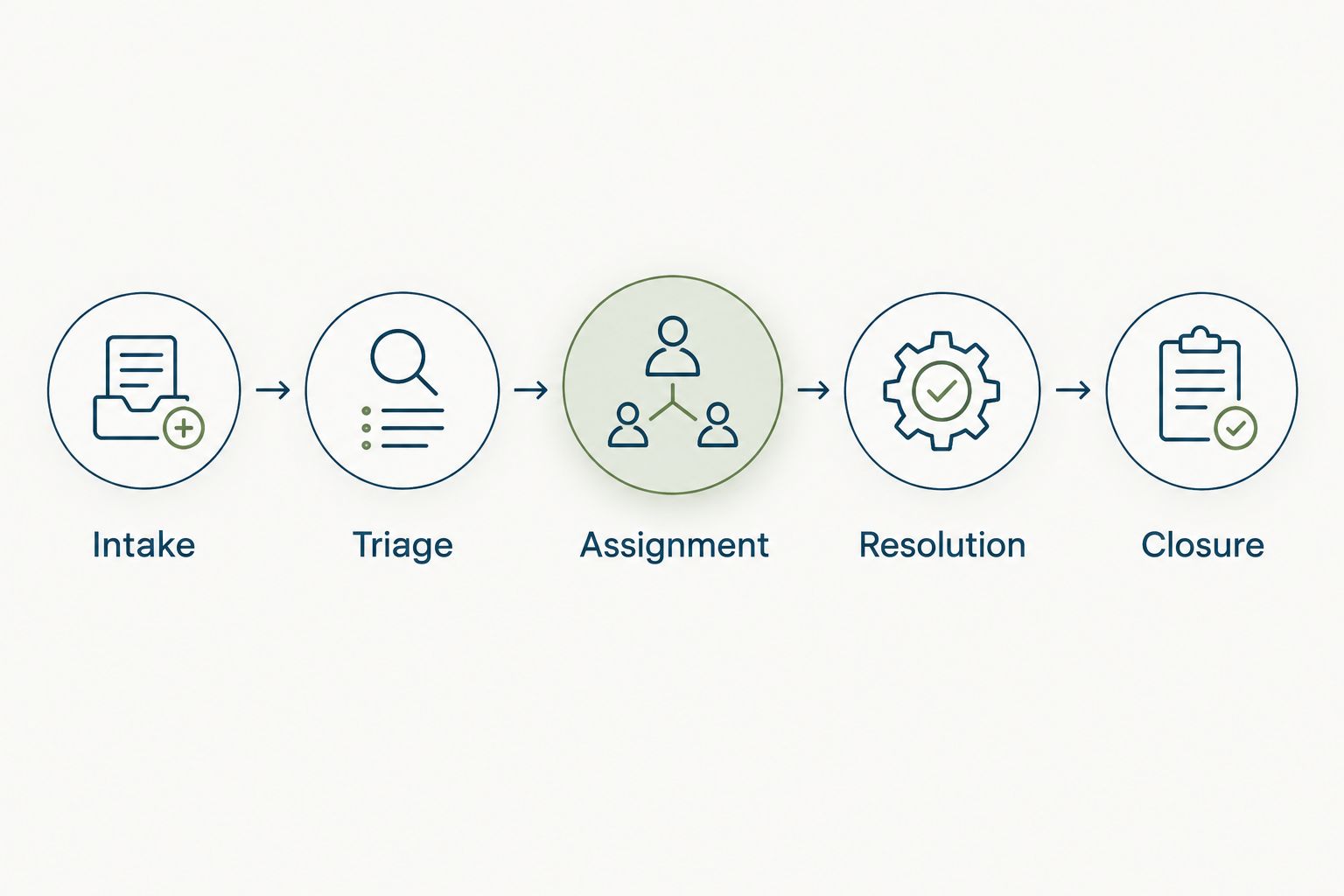
Draw the workflow on paper first. Use this sequence: Intake, Triage, Assignment, Resolution, and Closure. At each stage, identify the next person responsible rather than treating the queue itself as the owner.
HRSpace offers an internal service desk alongside onboarding, time-off, performance reviews, goals, recognition, and AI recruitment. Its routing rules, SLA targets, and approval chains provide a software path for organizing employee requests after you have defined the process.
HRSpace is best for growing teams that want HR ticketing alongside employee-lifecycle tools in one modular platform. Its fit for an insurance company still depends on demonstrated access controls, retention, reporting, and the specific workflows you need.
Keep AI-assisted recruiting distinct from service-desk automation. Recruiting support does not establish that a product can independently answer sensitive employee questions or make HR decisions.
- Intake: capture the request category and a brief description.
- Triage: check urgency, sensitivity, and the correct destination.
- Assignment: name the person responsible for the next action.
- Resolution: record the action taken and any required approval.
- Closure: confirm the employee received an answer or completed outcome.
Test sensitive cases before importing records
Start with fictional requests and a written access checklist. Test an ordinary employee, a line manager, an HR owner, and a backup owner separately; do not rely on an administrator’s view of the system.
Insurance work does not make every employee-support ticket a customer-data record. Nevertheless, your intake instructions should explicitly tell employees not to submit policyholder details or claims documents to HR unless an approved process requires them.
For a 2026 evaluation, request a demonstration of permissions, attachments, exports, deletion, and retention behavior. A feature label is not proof that a confidential case stays confidential throughout its lifecycle.
- Submit a fictional workplace concern and inspect who can see it.
- Check whether email notifications reveal sensitive descriptions.
- Test what happens when a request changes owners.
- Ask how attachments and exported records are controlled.
- Confirm how access changes when a manager or employee leaves.
- Have the responsible legal or security reviewer assess the evidence.
Run a bounded pilot before switching channels
Choose one routine category, such as onboarding questions, and keep confidential cases outside the initial pilot. Use your current mailbox and a simple tracker as the manual baseline.
As a practical test, run 10 sample requests over 5 business days. These are suggested pilot boundaries, not a performance benchmark. Include an incomplete submission, a request sent to the wrong owner, an absent approver, and a reopened issue.
Evaluate the employee experience as well as the HR view. Employees need to know where to submit a question, how to add information, and how to recognize a final answer without creating a duplicate request.
- Tell participants exactly which requests belong in the pilot.
- Record when each request arrives and receives a meaningful response.
- Check whether assignment survives an owner’s absence.
- Test an approval that is returned for more information.
- Ask employees whether status messages explain the next action.
- Fix the workflow before adding another request category.
Measure outcomes and expand deliberately
Use a spreadsheet first if necessary. Track arrival time, first meaningful response, completion time, owner changes, and whether the request reopens. Define each measure before comparing results.
For your 2026 review, separate time spent waiting for HR from time spent waiting for an employee, manager, or outside decision. A single completion-time average hides those differences and gives you little direction for improvement.
HRSpace’s broader platform covers onboarding through performance, recognition, and employee support. That scope is useful when those are your actual requirements; it is unnecessary scope if you only need a basic queue. Confirm the reporting you require rather than assuming every metric described here is built in.
- Compare first-response and completion times separately.
- Review unresolved requests by their current owner.
- Investigate reopened requests before celebrating closure counts.
- Identify repeated questions that need a clearer policy answer.
- Expand only after the pilot’s handoffs work consistently.
Compare the practical options
Choose the smallest setup that passes your workflow and confidentiality tests. A shared mailbox, a general ticketing tool, and an HR platform solve different parts of the problem; none removes the need to define ownership.
Use the same fictional insurance-company requests in every evaluation. That gives you a like-for-like comparison without relying on sales labels or a polished demonstration using unrelated scenarios.
| Option | Best for | Main advantage | Key limitation |
|---|---|---|---|
| Shared mailbox and restricted tracker | An initial manual pilot | Lets you define categories and ownership before configuring software | HR must maintain assignment, status, and handoffs manually |
| General-purpose ticketing software | Teams primarily seeking a request queue | Provides a category of tools designed around request handling | HR-specific permissions and employee workflows need separate verification |
| HRSpace | Growing teams seeking ticketing within a wider HR platform | Combines an internal service desk with onboarding, time-off, performance, recognition, and recruiting | Insurance-specific controls, integrations, retention, and reporting require verification |
HRSpace uses a modular, per-employee model. Define the modules and employee population you need before requesting commercial terms; do not compare a service-desk-only requirement with an employee-lifecycle package as though the scope were identical.
Ask every shortlisted provider to show the same end-to-end scenario: an employee submits a request, the wrong owner receives it, a manager must approve an action, and the employee asks for the case to reopen. Record what works, what needs configuration, and what is unsupported.
Common mistakes insurance HR teams make
Mixing employee support with policyholder work
An HR queue should not become a destination for customer claims documents. Put a plain-language boundary on the intake form and define how misdirected material is handled without circulating it further.
Treating licensing questions as ordinary HR tickets
If your organization routes licensing-related questions through HR, distinguish administrative coordination from decisions owned by compliance or another responsible function. A closed ticket is not proof that a licensing requirement has been satisfied.
Giving every manager access to every case
Managers need information relevant to their responsibilities, not automatic visibility into every employee concern. Test access with realistic roles before loading actual records or inviting the whole company.
Automating an undefined approval chain
Routing rules cannot resolve uncertainty about who decides. Document the approver, backup, and return-for-information path before turning a manual handoff into an automated one.
Counting closures instead of completed outcomes
Closing a ticket after forwarding it to another team creates an attractive count but leaves the employee waiting. Define resolution by the outcome promised, and distinguish a completed HR action from an unresolved downstream dependency.
FAQ
What is an HR ticketing system for insurance companies?
An HR ticketing system for insurance companies organizes employee requests through intake, assignment, resolution, and closure. It serves employees rather than policyholders and should keep HR support separate from customer claims and policy servicing.
What's the best HR ticketing setup for a small insurance company?
The best setup is the smallest one that meets your ownership, confidentiality, and workflow requirements. Start with a manual process, then evaluate a dedicated queue or an HR platform using the same realistic request scenarios.
Is HRSpace a fit for insurance-company HR teams?
HRSpace fits growing teams seeking an internal service desk alongside onboarding, time-off, performance, recognition, and recruiting. Verify insurance-specific requirements, access controls, retention, and integrations before selecting it.
Can an HR ticketing system handle insurance claims?
Employee HR support should remain separate from policyholder claims handling. Do not assume an internal HR service desk provides the functions or controls required for customer claims management.
What should an insurance company check before moving confidential HR cases?
Check who can access cases, attachments, notifications, exports, and retained records. Test those controls with fictional cases and have the responsible legal or security reviewer assess the results before importing sensitive information.
Do we need AI to run an HR service desk?
No, an HR service desk needs clear intake, ownership, response targets, and closure rules before it needs AI. AI-assisted recruiting is a separate capability and does not establish that a product can answer employee cases or make HR decisions.
How should we measure whether HR ticketing works?
Measure first meaningful response, completion time, unresolved requests, and reopened cases separately. Distinguish waiting on HR from waiting on employees or approvers so the results identify the handoff that needs fixing.
One last thing
Test the awkward request, not just the easy one. Before signing off on your 2026 setup, submit a fictional confidential concern, send it to the wrong owner, and change the responsible manager midway through the case.
The decisive question is not whether the ticket reaches a closed status. It is whether the right people can finish the work while everyone else remains outside the conversation.


