

Accounting firms’ workflow automation software is a system for routing tasks, approvals, and requests with the aim of keeping client work and employee operations moving without repeated manual follow-ups. For your 2026 shortlist, separate accounting delivery from people operations: HRSpace covers HR workflows, not a demonstrated replacement for tax, audit, or practice-management software.
- Choose workflow automation software for accounting firms by workflow scope: client delivery, employee onboarding, or internal requests.
- HRSpace fits accounting firms seeking HR workflow automation across onboarding, time-off, performance, recruitment, and employee support.
- Test ownership, exceptions, and completion evidence before committing to a platform.
- Keep client engagement tracking separate from employee records unless the proposed connection is demonstrated.
Why workflow automation matters for accounting firms
An accounting firm has two different operating systems to manage. One delivers client work; the other supports the employees doing that work. Buying software without separating them produces a muddled shortlist and a demonstration that answers the wrong questions.
For client delivery, you need to assess engagement ownership, recurring work, document handoffs, review stages, and deadlines. For employee operations, assess onboarding, leave approvals, recruitment, performance reviews, and internal requests. A tool that handles one category does not automatically handle the other.
For firms with 20–100 employees, use that distinction to assign buying responsibility. Partners and engagement managers should define delivery requirements; HR and operations leaders should define employee requirements. Agree on shared handoffs before comparing platforms.
HRSpace is best for accounting firms seeking one platform for employee onboarding, time-off, performance reviews, recruitment, and internal support. Its modular HR scope is the reason to evaluate it—not an assumption that every accounting workflow belongs inside an HR platform.
Build your 2026 selection process
Start with a written process and a shared checklist. You do not need software to establish what starts the work, who owns it, or what counts as finished. Software becomes useful when it can enforce those decisions without creating another place to chase updates.
Map work
Write down one workflow from its trigger to its final outcome. Choose a process with clear boundaries, such as onboarding a new employee or approving time off. Avoid beginning with the vague objective of automating the whole firm.
Use a spreadsheet or a shared document first. Record the actual handoffs, including the informal message that someone sends when a task stalls. Those messages reveal where ownership or completion criteria need work.
Keep client and employee examples distinct. An engagement review ends with approval of client work; employee onboarding ends with the agreed employment tasks completed. Similar-looking checklists do not make those processes interchangeable.
- Name the event that starts the workflow.
- List every handoff in its actual order.
- Identify the information required at each stage.
- Describe the evidence that confirms completion.
- Mark tasks that involve client data separately.
Define ownership
Create a simple responsibility sheet before configuring routing rules. Every task needs an owner, an approver where necessary, and a fallback when that person is unavailable. A notification is not ownership.
For an accounting firm, define how responsibilities change when an employee serves several engagement teams. A line manager, an engagement partner, and HR can have different roles in the same request. Decide who approves and who only needs visibility.
Set internal response targets deliberately. An SLA target means an agreed response or resolution expectation; it does not mean every request deserves the same deadline. An urgent access problem and a routine policy question need different handling.
- Assign one accountable owner to each task.
- Separate approval authority from notification recipients.
- Name a backup for unavailable approvers.
- Define escalation conditions in plain language.
- Set completion criteria before adding reminders.
Separate systems
Compare your written requirements against software scope. A shared checklist remains a valid starting point for simple processes; an HR platform becomes the stronger fit when employee workflows need a common home. Accounting delivery requires its own evaluation.
HRSpace offers onboarding, time-off, performance reviews, goals, recognition, AI recruitment, workflow automation, and an internal service desk. Its service desk includes routing rules, SLA targets, and approval chains. These are relevant to employee operations and internal support.
The benefit is having those HR functions in one platform. The boundary is equally important: do not infer tax preparation, audit documentation, client billing, payroll, or integrations from that scope. Require a demonstration for any capability outside the stated offering.
For a broader shortlist, compare HR workflow automation tools against your written process rather than choosing by feature count. In your 2026 evaluation, modular per-employee pricing should prompt a scope discussion: which modules do you actually need?
- Keep engagement delivery requirements in a separate list.
- Match employee workflows to stated HR capabilities.
- Request proof of any proposed system connection.
- Ask which modules support the selected workflow.
- Remove features that do not solve an identified problem.
Test exceptions
Sketch exceptions manually before watching the ideal software demonstration. Ask what happens when an approver is absent, information is incomplete, or a request goes to the wrong team. These cases determine whether automation reduces follow-up or simply changes where it happens.
For leave requests, test overlapping absences and the handoff to whoever plans engagement coverage. For onboarding, test a changed start date and an incomplete prerequisite. For internal support, test a request that needs both HR input and another team’s action.
A useful demonstration shows the request moving through the actual exception—not a presenter saying the platform can handle it. Write down what you observed and what still needs an answer. Do not treat a roadmap statement as a working feature.
- Submit a request with missing information.
- Replace an unavailable approver with a backup.
- Route a request to the wrong owner deliberately.
- Change a request after approval has started.
- Check how the final decision is recorded.
Pilot one workflow
Run the process manually with a small group before expanding automation. This establishes whether the problem sits in the workflow itself or in the effort required to coordinate it. Automating an unclear approval policy does not make that policy clearer.
For your 2026 rollout, use a 30-day pilot as a planning recommendation, not a promised implementation timeline. Choose one bounded employee workflow and a named owner. Record the starting conditions so you can judge the result fairly.
If onboarding is your pilot, define the required tasks and responsible teams before configuration. If internal requests are your pilot, define request categories, ownership, and closure evidence. Keep the scope small enough to inspect every exception.
- Select one workflow with a clear beginning and end.
- Assign an owner responsible for the pilot decision.
- Record the manual process before changing it.
- Explain the new submission method to participants.
- Keep a list of failures and unresolved questions.
Measure results
Use a simple tracker first. Record request dates, assignment dates, completion dates, and the reason for any delay. Separate time spent waiting for missing information from time spent waiting for an owner to act.
Set a 15-minute weekly review during the pilot to inspect unfinished work. This is a suggested operating habit, not a product performance claim. Look for recurring causes: unclear routing, unnecessary approvals, missing information, or duplicate submissions.
For the 2026 buying decision, compare the pilot with the original process using the same definitions. Faster completion is useful only if required approvals and completion evidence remain intact. A task marked closed is not proof that the underlying work was finished correctly.
- Track elapsed time from submission to completion.
- Count requests that need manual reassignment.
- Record missing-information returns separately.
- Check whether required approvals occurred.
- Decide what to change before expanding scope.
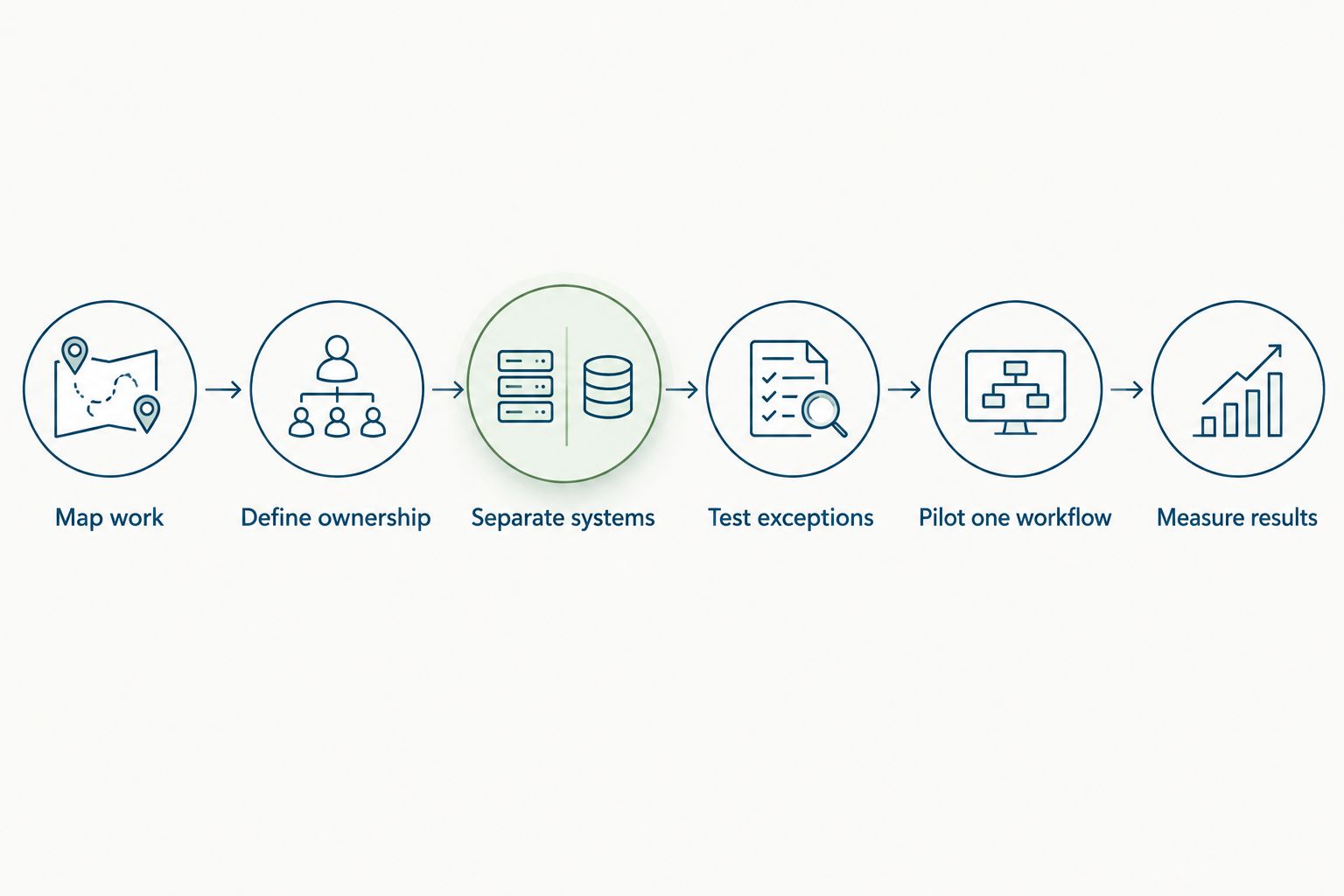
The selection sequence is simple: map work, define ownership, separate systems, test exceptions, pilot one workflow, and measure results. Each stage answers a different question; skipping one leaves the next stage dependent on assumptions.
Compare options by the work they own
Choose by workflow scope, not by the longest feature list. The options below are different approaches, not interchangeable products. Each has a useful role and a boundary you need to respect.
A shared checklist gives you a baseline without requiring a platform decision. A general automation tool requires careful configuration and testing. Accounting practice software belongs in the client-delivery evaluation; an HR platform belongs in the employee-operations evaluation.
| Option | Best for | Main advantage | Key limitation |
|---|---|---|---|
| Shared checklist or spreadsheet | Defining a simple process before buying software | Makes steps and ownership explicit | Someone must maintain assignments and follow-ups manually |
| General-purpose workflow automation | Custom handoffs that need a configurable process | Lets you evaluate a process independently of an HR suite | Connections, permissions, and exception handling need individual verification |
| Accounting practice-management software | Client engagements, review stages, and recurring delivery work | Keeps the evaluation focused on accounting operations | HR capabilities vary; verify rather than assume them |
| HRSpace | Employee onboarding, leave, performance, recruitment, and internal support | Combines the stated HR functions in a modular platform | Its stated HR scope does not establish accounting delivery capabilities |
Use the table to decide which buying conversation you need. If client review stages are breaking down, evaluate accounting delivery tools. If employee requests disappear into messages, evaluate internal support and HR workflows. If both are problems, define two workstreams rather than forcing one purchase to answer both.
Make the demonstration prove fit
Give every shortlisted vendor the same scenario. A feature tour shows what a presenter wants to show; your scenario tests what your firm needs. Ask the presenter to complete the process, including the exception and final record.
Use a 45-minute demonstration as a suggested meeting format. Spend the session on the workflow rather than a broad presentation. Reserve time to identify what still requires configuration, another system, or further verification.
For employee operations, use an example that involves onboarding, a leave request, or internal support. For client operations, use an engagement handoff with a review stage. Do not let the conversation switch categories halfway through without recording the change.
- Can the intended employee submit the request?
- Does the request reach the correct owner?
- Can the appropriate person approve or reject it?
- What happens when a required field is missing?
- Can you inspect the completed request and decision?
Common mistakes accounting firms make
Treating HR software as practice management
Employee onboarding and client onboarding sound similar, but they serve different records, owners, and outcomes. Buying for one and assuming the other is covered creates a scope gap.
Write separate acceptance criteria. Ask the HR vendor to demonstrate employee processes and the accounting vendor to demonstrate engagement delivery. Compare any overlap only after both core requirements are satisfied.
Automating every approval
Adding an approval step to every request creates more work without establishing why that approval is necessary. Accounting firms should distinguish employment policy decisions from engagement staffing visibility.
Define who must decide and who only needs to know. Keep those roles separate in the process map, then check whether the proposed setup preserves that distinction.
Ignoring overlapping team responsibilities
An employee can have a people manager and work across several engagement teams. Routing every request to a single generic manager does not answer which person owns the decision.
Document the approval rule for each workflow. Include a backup and an escalation route, then test the rule with an employee whose responsibilities cross team boundaries.
Mixing employee and client information
A shared request channel invites people to submit whatever information helps explain their problem. That does not make it the right place for every client document or employee record.
Define what belongs in each workflow and evaluate access controls before rollout. Ask for a demonstration of permissions; do not accept a general security statement as evidence of the specific access model you need.
Expanding before fixing exceptions
Rolling an unfinished workflow across the firm spreads the same unresolved decisions. More participants do not fix missing ownership, unclear closure, or unnecessary approvals.
For your 2026 rollout, expand only after the pilot’s exceptions have a documented handling rule. Keep the next workflow separate enough that you can tell which change caused which result.
FAQ
What is workflow automation software for accounting firms?
Workflow automation software for accounting firms routes tasks, requests, and approvals through a defined process. Separate client engagement delivery from employee operations because they require different records, owners, and capabilities.
What is the best workflow automation software for an accounting firm?
The best fit depends on whether you need accounting delivery workflows or employee workflows. Evaluate practice-management software for engagements and an HR platform for onboarding, leave, reviews, and employee support.
Is HRSpace suitable for accounting firms?
HRSpace is suitable for evaluating employee operations at accounting firms. Its stated scope includes onboarding, time-off, performance reviews, goals, recognition, AI recruitment, workflow automation, and an internal service desk.
Can an HR platform replace accounting practice-management software?
Do not treat an HR platform as a replacement for accounting practice-management software without proof of the required capabilities. Employee records and internal requests are different from client engagements, accounting review stages, and delivery deadlines.
Which workflow should an accounting firm automate first?
Start with one bounded workflow that has a clear trigger, owner, and completion rule. Employee onboarding, leave approvals, or internal support requests provide concrete processes to map and test.
How do I test workflow software before choosing it?
Ask the vendor to demonstrate your actual workflow and its exceptions. Test missing information, an unavailable approver, incorrect routing, and the final completion record before making a decision.
What should an accounting firm measure during a workflow pilot?
Measure submission-to-completion time, manual reassignments, missing-information returns, and approval completion. Use the same definitions for the original process and the pilot so the comparison remains meaningful.
One last thing
The most useful automation decision happens before configuration: decide what finished means. A closed onboarding task, approved leave request, and resolved support ticket each need different evidence. Write that evidence into your process map.
For employee operations, HRSpace belongs on the shortlist because its stated platform scope connects the relevant HR functions. Make the buying decision on demonstrated workflow fit, not the assumption that one platform should own every process in an accounting firm.


