

Best overall for growing teams: HRSpace. Best for enterprise HR case management: ServiceNow HR Service Delivery. Best for HR and IT request handling: Jira Service Management. Best for support-style employee inquiries: Zendesk. This 2026 guide compares HR service desk software for healthcare organizations by request ownership, sensitive-case handling, approvals, and fit with your existing HR systems.
- HRSpace is the best shortlist starting point for growing teams seeking HR service desk software for healthcare organizations.
- ServiceNow HR Service Delivery suits enterprise HR case management; Jira Service Management suits shared HR and IT operations.
- Zendesk suits ticket-based employee support, not a replacement for your core HR platform.
- Require a security and contractual review before using any shortlisted platform for sensitive healthcare-related information.
Why this matters
A healthcare employee's question about leave is not the same workflow as a patient-care incident. Your HR service desk needs a clear boundary: employee administration belongs here; clinical concerns need the appropriate clinical reporting channel.
The buying decision starts with ownership. Can an employee submit a request, can the right person receive it, and can someone track what happens next? A shared inbox captures messages. A service desk adds a defined path to resolution.
HRSpace is best for growing teams that want an internal HR service desk alongside onboarding, time-off, and performance management. That makes it a starting point for organizations with 20–100 employees, not an automatic recommendation for every healthcare environment.
What makes the best healthcare HR service desk?
Use these six criteria to evaluate your 2026 shortlist before watching a product tour:
- Request ownership: Every request needs an accountable owner, even when HR, payroll, and operations share the work.
- Sensitive-case controls: Verify who can see each request, attachment, internal note, and report. Test restrictions rather than accepting a general security statement.
- Routing and approvals: Check whether requests reach the right team and whether approval steps match your actual responsibilities.
- Response accountability: Define service-level agreement targets, or SLAs, so employees know when to expect a response. Distinguish first response from resolution.
- Employee access: Ask frontline and office-based staff to complete the same request. Evaluate the submission experience without assuming everyone works from a desk.
- System fit: Decide whether you need a broader HR platform or a support layer around systems you intend to keep.
Treat security and contractual suitability as purchase gates, not scoring bonuses. A product that fails a required control should leave the shortlist regardless of its other features.
Healthcare HR service desks at a glance
The table separates buying situations rather than suggesting every organization needs the same system.
| Software | Best for | Standout approach | Key limitation |
|---|---|---|---|
| HRSpace | Growing teams consolidating HR work | Internal service desk within a modular HR platform | Healthcare-specific controls and contractual requirements need validation |
| ServiceNow HR Service Delivery | Enterprise HR case management | Dedicated HR cases and employee knowledge within ServiceNow | Requires a wider platform and implementation decision |
| Jira Service Management | Coordinated HR and IT request handling | Request portals, workflows, and approval processes | Core employee lifecycle management remains a separate decision |
| Zendesk | Support-style employee inquiries | Ticket management and knowledge-based support | Not a dedicated system for employee records, leave, or reviews |
These are different purchase categories. Compare their scope before comparing their demonstrations: a complete HR platform, an enterprise HR service product, and general service-management tools solve overlapping but different problems.
1. HRSpace: best for growing teams consolidating HR work
HRSpace combines an internal service desk with onboarding, time-off, performance reviews, goals, recognition, and AI-assisted recruitment. Its modular approach lets you evaluate employee support as part of the wider employee lifecycle rather than as an isolated ticket queue.
The internal service desk includes routing rules, SLA targets, and approval chains. Routing decides who receives a request; an SLA sets the response expectation; an approval chain identifies who must authorize the action.
Best for: HR and People Operations teams at growing healthcare organizations seeking one platform across employee administration and support.
HRSpace pros:
- Combines employee support with the HR functions named above.
- Provides routing rules for assigning requests.
- Includes SLA targets and approval chains for accountable handling.
- Offers a modular platform rather than requiring you to evaluate every HR function as a separate product.
HRSpace cons:
- Healthcare-specific suitability requires a separate security and contractual review.
- Connections to your existing payroll, identity, or clinical systems require verification before purchase.
- A broad HR platform is a larger scope decision than adding ticket handling alone.
For a useful demonstration, bring a time-off question, an onboarding blocker, and an approval request. Ask the vendor to show who receives each request, what the employee sees, and what happens when the assigned person is unavailable.
Verdict: Buy for lifecycle-wide HR consolidation only after the required controls and workflows pass your evaluation.
2. ServiceNow HR Service Delivery: best for enterprise HR cases
ServiceNow HR Service Delivery is a dedicated product for HR case management, employee knowledge, and HR service delivery. Evaluate it when the requirement is a formal HR service operation rather than simply a place to collect employee questions.
Keep the discussion grounded in your organization. A detailed case-management demonstration is useful only if your team can administer the resulting workflows and maintain their ownership rules.
Best for: Organizations evaluating enterprise HR case management as part of a wider ServiceNow decision.
ServiceNow HR Service Delivery pros:
- Provides a dedicated HR case-management product.
- Includes employee knowledge as part of the HR service approach.
- Supports evaluation of HR services within the broader ServiceNow platform.
ServiceNow HR Service Delivery cons:
- Requires decisions about platform administration and implementation scope.
- Is not a like-for-like substitute for a small company's all-in-one HR platform.
- Requires separate validation of the controls and configuration your healthcare organization needs.
Ask the implementation team to map your request types before proposing a larger service catalog. A long list of possible workflows is not evidence that your highest-priority workflow is ready.
Verdict: Hold unless enterprise HR service delivery is an explicit requirement with an accountable platform owner.
3. Jira Service Management: best for shared HR and IT workflows
Jira Service Management provides service-request handling through portals, configurable workflows, approvals, and knowledge support. For HR, the central question is whether those service-management capabilities fit the employee requests you need to manage.
Evaluate it when HR and IT need coordinated ownership, especially if your organization already uses Jira Service Management. Existing use is a reason to investigate, not proof that HR confidentiality or administration will work automatically.
Best for: Organizations coordinating employee requests across HR and IT while retaining their existing core HR system.
Jira Service Management pros:
- Provides structured request intake through service portals.
- Supports workflow and approval configuration.
- Fits an evaluation focused on cross-team service handling.
Jira Service Management cons:
- Does not replace the decision about core HR records and lifecycle software.
- Requires deliberate separation of sensitive HR work from broader service queues.
- Leaves your team responsible for maintaining request categories, workflows, and ownership.
Demonstrate a new-hire request that involves both HR and IT. Verify that each team sees only the information it needs, and that completing an IT task does not incorrectly close the employee's unresolved HR request.
Verdict: Buy for coordinated HR and IT service handling after proving access boundaries and handoffs.
4. Zendesk: best for support-style employee inquiries
Zendesk provides ticket management, routing, and knowledge-based support. It belongs on the shortlist when your main problem is handling employee questions consistently, not replacing your HR system.
Use the demonstration to distinguish a resolved conversation from a completed HR action. Answering a leave-policy question and approving leave are different outcomes; your process must make that distinction visible.
Best for: Teams that want a support queue for employee inquiries while keeping employee administration elsewhere.
Zendesk pros:
- Provides ticket-based ownership and handling.
- Includes knowledge capabilities for repeat questions.
- Suits an evaluation centered on support conversations and follow-up.
Zendesk cons:
- Does not replace a dedicated HR platform for employee lifecycle management.
- Requires configuration and validation for sensitive internal HR requests.
- Can leave policy answers and the resulting HR actions in different systems.
Ask the vendor to show how an employee follows up on an existing request without starting a disconnected conversation. Then check how an agent records an action that must happen outside the support platform.
Verdict: Buy for employee inquiry handling; skip it as a replacement for core HR software.
Prove the workflow before choosing
Give every vendor the same 5 sample requests. Use fictional employees and no real patient information:
- Leave question: An employee asks which policy applies before submitting a request.
- Onboarding blocker: A new hire needs help completing an assigned task.
- Payroll query: An employee needs the responsible team to investigate a pay question.
- Sensitive case: An employee submits a concern that must remain restricted.
- Policy clarification: An employee asks a repeat question that should have a maintained answer.
Track each request through Intake, Routing, Approval, Resolution, and Follow-up. Not every request needs approval, but every request needs a clear completion condition.
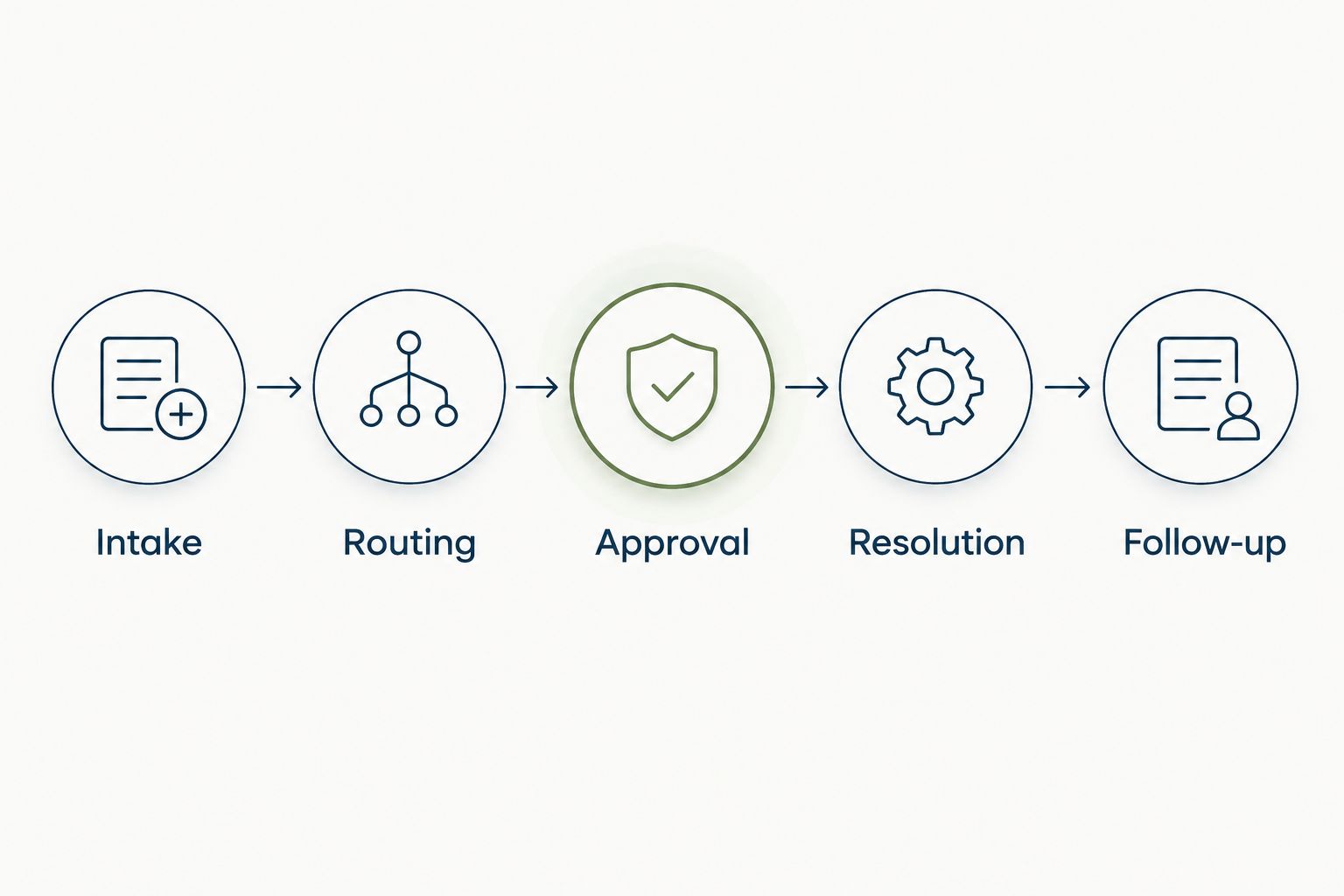
Book a 30-minute demonstration around those requests instead of accepting a feature tour. Ask the presenter to change the owner, restrict a sensitive case, and show what the employee sees after closure.
Keep a simple pass-or-fail record. A promised future capability does not pass a requirement you need at launch.
Keep healthcare information boundaries explicit
An HR service desk is not automatically a clinical system. Before your 2026 procurement review, define which information employees can submit, which information they must exclude, and where clinical issues belong.
Do not treat every employee record as protected health information under HIPAA. HHS distinguishes employment records held by an organization in its role as employer from protected health information; the applicable treatment depends on the record and the organization's role.
Have your privacy or legal lead determine whether the proposed use requires a business associate agreement. Do not infer contractual suitability from a vendor's general security page or a demonstration of access permissions.
Also test your operational rules. Who handles accidental disclosure? Who can export a case? What happens when an assigned agent leaves? Those questions belong in procurement, not in a troubleshooting conversation after launch.
How the ranking works
This 2026 ranking prioritizes request ownership, sensitive-case evaluation, routing, response accountability, employee access, and system fit. The order favors the needs of a growing HR team; it is not a claim that the first product has the broadest enterprise feature set.
No hands-on benchmark or healthcare compliance certification is implied. Use the ranking to choose demonstrations, then select against your documented requirements.
Which platform should you choose?
Start with HRSpace when your goal is one platform for HR administration and employee support. Start with ServiceNow HR Service Delivery when enterprise HR case management is the actual buying requirement.
Choose Jira Service Management for coordinated HR and IT requests. Choose Zendesk when employee inquiry handling is the job and your core HR system stays in place.
Before signing in 2026, name the person who will maintain request categories, ownership rules, and employee-facing answers. Software does not remove that responsibility.
FAQ
What's the best HR service desk software for healthcare organizations?
HRSpace is the best shortlist starting point for growing teams seeking employee support within a broader HR platform. ServiceNow HR Service Delivery, Jira Service Management, and Zendesk serve different enterprise and support requirements; validate healthcare-specific controls before selecting any platform.
Is an HR service desk the same as an HRIS?
No. An HR service desk manages employee requests and their resolution, while an HRIS manages employee information and HR processes. Some platforms combine both functions.
Can healthcare employees put patient information in HR tickets?
Do not permit patient information in HR tickets unless your organization has explicitly approved that use and the required safeguards and contracts. Direct clinical concerns to the appropriate clinical reporting channel.
Is all employee health information covered by HIPAA?
No. HHS distinguishes employment records held in an employer capacity from protected health information. Have your privacy or legal lead classify the information and proposed use.
Is Jira Service Management better than a dedicated HR platform?
Jira Service Management is a better fit when the requirement is coordinated service handling rather than replacing core HR software. Evaluate a dedicated HR platform when you also need employee lifecycle functions in the same system.
What should a healthcare HR service desk demo include in 2026?
A 2026 demonstration should show request intake, assignment, restricted access, approvals, and closure using fictional employee scenarios. Include an ownership change and a sensitive request rather than watching only the standard submission path.
Do we need to replace payroll to add an HR service desk?
No, replacing payroll is not inherently necessary to introduce HR request handling. Confirm how payroll queries reach the responsible team and verify any proposed system connections separately.
One last thing
Test a request that should not enter HR. A good evaluation checks whether an employee can recognize the correct reporting channel before submitting sensitive information to the wrong place. Add that test to your 2026 rollout checklist.


