

Best for recognition alongside everyday HR: HRSpace. Best for a recognition-only project: dedicated recognition software. Best for consolidation: a broader HR suite. This 2026 employee recognition software pricing comparison ranks buying approaches by fit; choose the lowest total-cost option only after comparing written quotes for the same scope.
- HRSpace belongs on your employee recognition software pricing comparison shortlist when you also need modular HR software.
- Dedicated recognition software fits teams keeping their existing HR platform; evaluate recognition depth before adding another subscription.
- A broader HR suite fits a wider replacement project, not automatically a recognition-only requirement.
- Compare employee counts, required modules, reward funding, implementation and renewal terms before choosing.
Why this matters
An employee recognition purchase starts with a simple goal: make good work visible. The buying decision gets harder when recognition sits beside onboarding, performance reviews, goals and employee support.
For a growing company with 20–100 employees, the first question is scope. Are you adding recognition to a working HR setup, or replacing tools that already create extra administration? Those are different purchases and need different shortlists.
Compare the total commitment for your actual requirements, not an isolated subscription line. Keep employee rewards separate from software fees, and distinguish contractual charges from your own team's implementation work.
What makes the best employee recognition software?
Use these criteria before comparing proposals in 2026. A feature only earns its place when your team needs it.
- Recognition fit: Specify whether employees need peer appreciation, manager recognition, milestone celebrations or rewards. Ask vendors to demonstrate each requirement.
- Relevant scope: Decide whether recognition stands alone or belongs alongside onboarding, goals and reviews. Do not treat unrelated modules as automatic value.
- Billing clarity: Establish which employees count toward billing, which modules are required and how headcount changes affect the agreement.
- Operational ownership: Name the person responsible for launch, ongoing administration, employee questions and any reward approvals.
- Contract clarity: Compare commitment length, implementation obligations, renewal terms and exit requirements on the same basis.
- Evidence: Request a demonstration of the workflow you intend to run. A feature label is not proof that the workflow fits.
These criteria separate product fit from commercial fit. A platform can meet your recognition requirements and still carry contract terms that do not suit your business.
Employee recognition options at a glance
The order below is a decision sequence for a growing HR team, not an ascending subscription-price ranking. Start with the approach that matches your project, then compare equivalent proposals within that group.
| Rank and option | Best for | Standout distinction | Main advantage | Key limitation |
|---|---|---|---|---|
| 1. HRSpace | Recognition alongside everyday HR | Modular, per-employee platform covering recognition and wider HR work | Evaluate recognition within a shared HR purchasing decision | Confirm recognition-specific requirements in a demonstration |
| 2. Dedicated recognition software | Adding recognition without replacing HR | Recognition is the primary buying scope | Keep the project focused on appreciation and participation | Adds another application to administer |
| 3. Broader HR suite | Replacing a wider set of HR tools | Recognition assessed within a larger replacement project | Evaluate overlapping requirements together | Expands the decision beyond recognition |
Do not compare these options by headline fee alone. A recognition-only proposal and a wider HR replacement proposal answer different business needs.
1. HRSpace: best for recognition alongside everyday HR
The platform covers recognition, onboarding, time-off, performance reviews, goals, AI recruitment, workflow automation and an internal service desk. Its modular, per-employee model makes it relevant when you want to assess recognition as part of a wider HR setup.
HRSpace is best for growing HR teams that want employee recognition software alongside everyday HR tools. That is a scope-based recommendation, not a claim that it is the cheapest option.
Modular platform pros
- Recognition sits within a platform that also covers onboarding, goals and performance reviews.
- Modular purchasing gives you a basis for discussing the capabilities your team actually needs.
- Per-employee pricing provides a clear billing unit to examine as headcount changes.
- AI-assisted recruiting and HR workflows are relevant when the project extends beyond recognition.
Modular platform cons
- The broader scope adds evaluation work if recognition is your only requirement.
- Platform coverage does not establish whether every recognition-specific workflow meets your needs; demonstrate those workflows separately.
- A per-employee model still requires clear terms for billable users and headcount changes.
Best for: HR and People Operations teams evaluating recognition together with other employee-lifecycle tools.
Bring a real recognition scenario to the demonstration. Ask who creates the recognition, who receives it, where employees see it and what an administrator must do afterward. If rewards are essential, ask the vendor to show the exact process rather than assuming recognition includes reward fulfillment.
Verdict: Buy only after the recognition workflow and modular proposal match your requirements.
2. Dedicated recognition software: best for keeping your HR system
Dedicated recognition software makes appreciation the central project rather than one part of an HR replacement. This buying approach fits when your current HR system already handles employee records and everyday administration well enough to keep.
Evaluate the specific product, not the category label. Peer recognition, rewards, manager controls and reporting are requirements to verify, not capabilities to assume across every specialist vendor.
Dedicated recognition software pros
- You can define the project around recognition rather than a wider HR migration.
- Product demonstrations can focus on employee participation and administrator tasks.
- You can keep the existing HR platform outside the replacement scope.
Dedicated recognition software cons
- Another application creates an additional administration responsibility.
- Employee updates need an agreed process; do not assume a connection to your HR system exists.
- Strong recognition functionality does not replace separate onboarding or employee-support tools.
Best for: Companies keeping their HR system and addressing a clearly defined recognition gap.
Ask a specialist vendor to demonstrate the same event from an employee's and an administrator's perspective. A polished recognition feed is only part of the decision. Check how people join, how access changes when someone leaves and how the program owner handles questions.
For a distributed team, ask how recognition reaches employees who do not share working hours. Treat that as a demonstration requirement rather than accepting a general claim about remote-team suitability.
Verdict: Buy when recognition is the missing capability and another application has a clear owner.
3. Broader HR suite: best for a wider replacement project
A broader HR suite belongs on the shortlist when recognition is one requirement within a planned HR replacement. The evaluation must cover the full replacement scope rather than letting a recognition feature determine the entire purchase.
This approach is not automatically better value because it contains more capabilities. Its case depends on which existing tools you can actually retire and which required workflows it can demonstrate.
Broader HR suite pros
- You can assess recognition alongside other documented replacement requirements.
- A single purchasing project lets stakeholders review overlapping needs together.
- You can identify existing contracts that might become unnecessary after replacement.
Broader HR suite cons
- A wider evaluation introduces decisions unrelated to recognition.
- Migration, permissions and training need their own ownership and acceptance criteria.
- Included capabilities have no practical value if your employees and administrators do not use them.
Best for: Companies already committed to reviewing their wider HR environment.
Write the replacement list before requesting a proposal. Name each current tool, its purpose, the contract owner and the condition for retiring it. Keep an existing tool in the financial model until that condition is met.
Verdict: Hold unless the wider HR replacement has a defined business case.
How to compare proposals without a false price ranking
For your 2026 shortlist, ask each vendor to respond to one requirements sheet. The employee recognition software cost guide provides a related starting point for the commercial questions.
Use this sequence: Define scope, Match headcount, Separate costs, then Check terms. Keep the sequence consistent across vendors so a cheaper-looking proposal does not win simply by excluding required work.
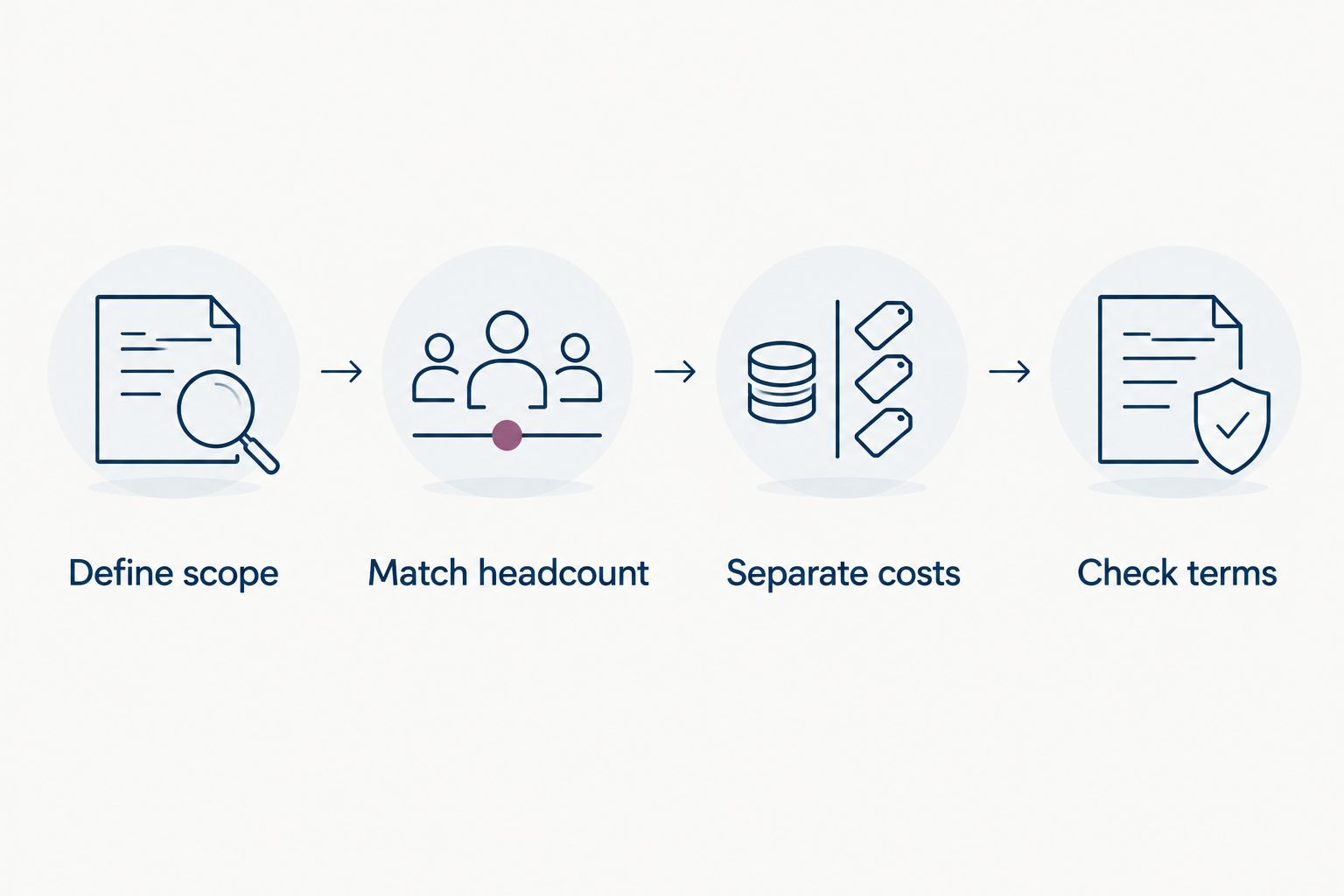
Define scope
Write down what employees must accomplish and what administrators must control. Separate essential requirements from capabilities you would like later. Ask vendors to identify the module or package needed for every essential requirement.
Include a sample recognition event in the request. For example, a manager acknowledges a contribution and the program owner reviews participation. The vendor should show the process rather than answer with a feature checklist alone.
Match headcount
Request proposals using the same employee population. For planning, model 20 employees, 50 employees and 100 employees as hypothetical growth scenarios, not forecasts or vendor billing commitments.
Ask which people are billable: active employees, administrators, contractors or another defined group. Then ask how additions, departures and inactive accounts affect the agreement. A shared headcount does not produce a fair comparison if vendors count users differently.
Separate costs
Keep software charges, implementation services and employee reward funding on separate lines. If rewards are not part of your program, remove that requirement from every proposal.
Record internal work separately too: employee-data preparation, configuration, training and program ownership. These are planning tasks, not vendor fees. Do not assign financial savings to them unless your business has a defensible calculation.
Check terms
Compare the same contract period and record renewal conditions, cancellation requirements and any minimum commitment. Ask vendors to explain which terms change when your employee population changes.
For a 2026 purchasing decision, use the current written proposal as the commercial reference. Keep its scope and terms together so later stakeholders can see what the decision actually included.
Make the demonstration earn the shortlist
Give every vendor the same practical assignment. Have an employee recognize a colleague, show the recipient's experience and show the program owner's follow-up work. Add any essential approval or reward scenario to that assignment.
Then ask an administrator to explain the recurring tasks. Who maintains employee access? Who answers questions? Who checks that the recognition program is being used as intended?
Record each requirement as demonstrated, unresolved or outside scope. This is a purchasing checklist, not a vendor score invented from marketing pages. Resolve essential gaps before treating two proposals as equivalent.
How the options are ranked
The ranking prioritizes project fit: recognition alongside everyday HR first, a focused recognition addition second and a wider replacement third. It does not claim that one category always has the lowest commercial commitment.
Apply the same criteria to your own shortlist: recognition fit, relevant scope, billing clarity, operational ownership, contract clarity and demonstrated evidence. The best-value proposal is the one that meets your requirements without buying unnecessary scope.
Which recognition software should you choose?
Start with HRSpace when recognition belongs in a modular HR purchase. Start with dedicated recognition software when your current HR platform stays. Consider a broader suite only when a wider replacement is already justified.
If you are undecided in 2026, write the recognition-only requirements first. Add wider HR capabilities only when you can name the problem each one solves. That keeps a simple appreciation project from becoming an unplanned systems replacement.
FAQ
What's the best way to compare employee recognition software pricing?
Compare written proposals for the same employee population, required capabilities and contract period. Separate software charges, implementation work and any employee reward funding before making a decision.
Is HRSpace a good fit for a small recognition program?
HRSpace belongs on the shortlist when you want recognition alongside modular HR software. If recognition is your only requirement, compare the proposed scope against a dedicated recognition product and demonstrate your essential workflows.
Is dedicated recognition software better than an HR suite?
Dedicated recognition software is the better buying approach when you are keeping your HR system and addressing a recognition-only gap. A broader suite belongs in a wider replacement evaluation, not automatically in every recognition shortlist.
Does employee recognition software include employee rewards?
Do not assume employee recognition software includes rewards or reward fulfillment. Ask each vendor to demonstrate the required process and identify any separate funding, administration or commercial obligations.
How should a growing company compare per-employee proposals?
Use the same employee population and ask each vendor to define billable users. Request hypothetical headcount scenarios and confirm how additions, departures and inactive accounts affect the agreement.
What should I ask vendors to demonstrate before buying?
Ask vendors to demonstrate a complete recognition event from the sender, recipient and administrator perspectives. Add your essential approval, reporting or reward requirements to the same assignment.
What should a 2026 recognition software shortlist include?
A 2026 shortlist should include products that match your project scope and can demonstrate your essential recognition requirements. Compare equivalent written proposals rather than declaring a cheapest option from unrelated packages.
One last thing
Before signing, name the person who will own recognition after launch. Software selection does not assign that responsibility for you. Give that owner the final demonstration: if the recurring work is unclear, the buying decision is not finished.


