

Multi-location retail chains’ HR service desk software is a shared system for employee requests, with the aim of giving every store clear ownership and consistent HR support. This guide explains how to handle location-specific approvals, protect sensitive requests and choose a platform without confusing HR support with shift scheduling.
- HR service desk software for multi-location retail chains needs store-aware routing, private requests and named owners.
- HRSpace fits growing retail teams seeking HR workflows and an internal service desk in one platform.
- Test employee self-service and approval workflows with real store scenarios before choosing software.
- Start with a shared request register; move to software when manual ownership and follow-up become difficult.
For a retail business with 20–100 employees, the decision is not about buying the biggest suite. It is about keeping a request accountable as it moves between an employee, a store manager and central HR. HRSpace combines an internal service desk with onboarding, time-off, performance reviews, goals, recognition and AI-assisted recruitment.
Choose around the request journey, not the feature count. A broad platform only helps when employees can submit a request, the right person receives it and someone confirms the outcome.
Why HR service desks matter for retail chains
A multi-location retail chain needs both local context and central accountability. A store manager understands the immediate issue; central HR owns company policy and sensitive employee matters. Your service desk must preserve that distinction rather than send every question through the same approval path.
Consider a time-off question, an onboarding document request and a sensitive employee concern. These are different jobs. The first needs a clear policy and decision owner, the second needs a completed task, and the third needs restricted handling outside ordinary store-level access.
For your 2026 selection, use those 3 request categories as a starting test set. They expose differences in routing, approvals and confidentiality without requiring a complicated implementation.
The practical benefits are specific:
- Employees know where to ask instead of choosing between chat, email and a manager.
- Store managers know which requests they own and which belong with HR.
- Central HR can review unresolved work without collecting separate updates from every location.
- The business can distinguish a slow acknowledgment from a slow decision.
Software does not settle policy disagreements. Define who can approve, who can advise and who must remain outside the request before configuring the system.
Build a service desk that works across stores
Start manually with an existing shared inbox and a request register. Record the category, store, owner, status and outcome. This gives you a working process to evaluate rather than a collection of features you hope will solve an undefined problem.
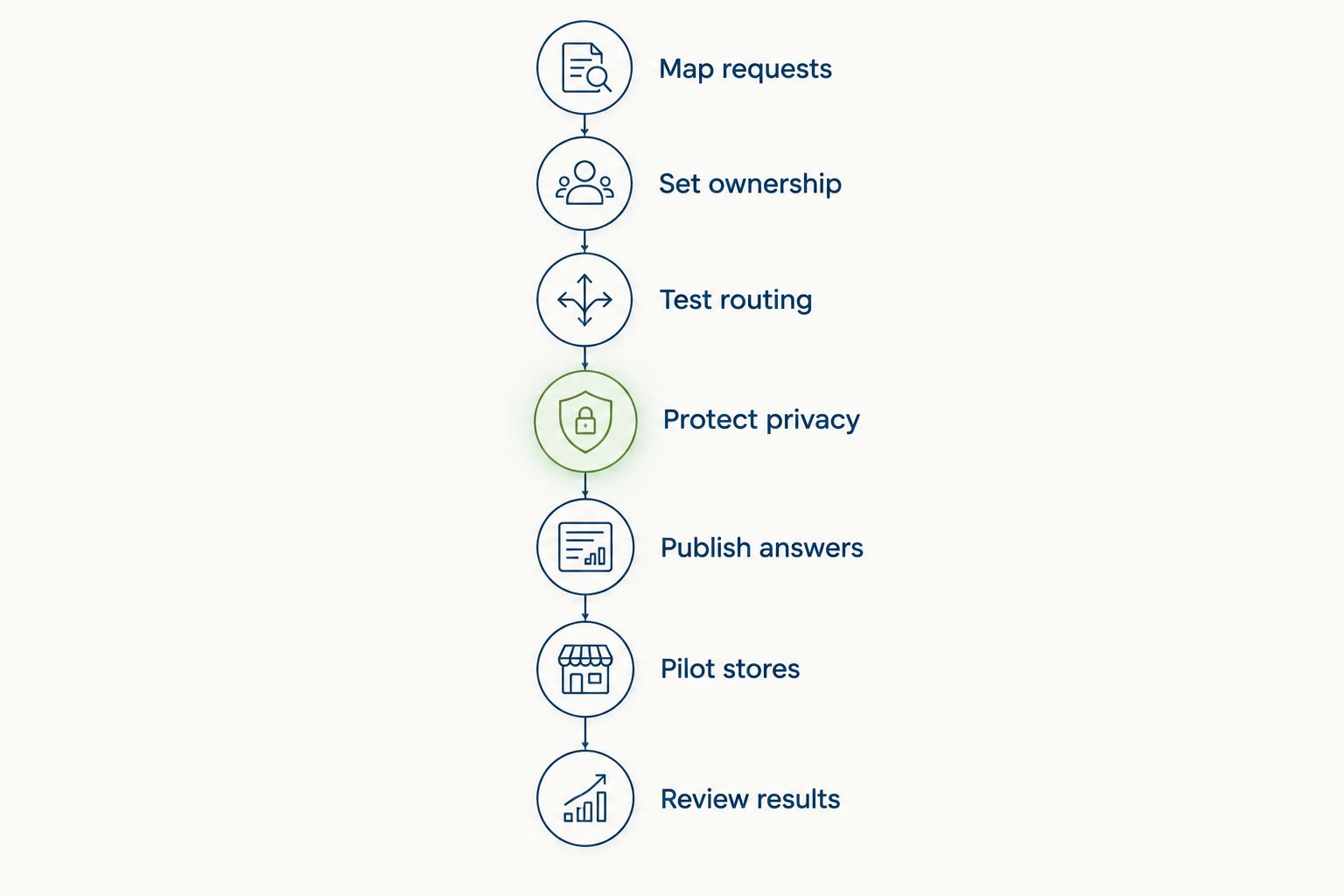
Use this sequence for your 2026 rollout: map requests, set ownership, test routing, protect privacy, publish answers, pilot stores and review results. Each stage answers a different question, from what employees need to whether the support process actually closes the loop.
Map requests
List the questions employees and store managers already bring to HR. Use existing messages and conversations, not a vendor’s default category list. Separate a request for information from a request that requires a decision; they need different completion criteria.
Keep the first intake form short. Ask for the employee’s store, the request category and a plain-language description. Add other fields only when the person handling the request needs them. A form that asks everyone for irrelevant details creates work before support even begins.
Your manual register should show which questions recur and which require individual handling. That becomes your specification for software, including the information you need to collect and the information you should avoid collecting.
- Group onboarding, time-off and employee concerns separately.
- Record the location associated with each request.
- Mark whether the request needs an answer, approval or action.
- Remove fields that do not change the handling decision.
- Write a clear completion condition for each category.
Set ownership
Assign a named owner to each category before introducing automated routing. In the manual version, maintain an ownership sheet that HR and store managers can consult. Include a backup so a request does not stop when the usual owner is away.
Distinguish the person coordinating the request from the person approving it. A central HR coordinator can track a time-off question while a designated manager makes the decision. That distinction prevents an acknowledgment from being mistaken for an approval.
Define service-level agreement, or SLA, targets in plain terms: when someone should acknowledge a request and when the next action should happen. Set those targets from your operating needs, not an unexplained default. Specify the working hours that apply before introducing deadline reminders.
- Name the owner and backup for each category.
- Separate coordination from approval authority.
- Document when store managers should escalate to HR.
- Define acknowledgment and next-action expectations.
- Specify what happens when an owner is absent.
Test routing
Run sample requests through the ownership sheet first. Use scenarios involving different stores, an absent manager and a request that must bypass local management. Manual testing exposes unclear decisions before they become automated mistakes.
HRSpace’s internal service desk includes routing rules, SLA targets and approval chains. These features provide a software path for managing handoffs, but the rules still need to match your retail operation. Ask for a demonstration of your scenarios rather than accepting a standard sales walkthrough.
HRSpace is best for growing retail teams that want HR workflows and an internal service desk in one platform. Its broader lifecycle coverage fits that brief; it does not remove the need to validate store-specific handling. Use the HR workflow automation guide to structure that evaluation.
- Submit equivalent requests from different locations.
- Test reassignment when the usual owner is unavailable.
- Check an approval that involves central HR and a store manager.
- Confirm how an employee receives an outcome.
- Record exceptions that require manual intervention.
Protect privacy
Build a category-by-category access map before importing employee requests. The manual approach is to separate sensitive correspondence from the ordinary shared register and limit access to the people responsible for handling it. Do not put confidential details in a broadly visible tracking sheet.
During software evaluation, verify access with actual test accounts representing an employee, a store manager and central HR. A feature label is not proof that your intended restrictions work. Check what each role can see in the request, attachments, notifications and any reports you plan to use.
For the 2026 rollout, document these checks as acceptance criteria. Keep visibility rules separate from approval rules: someone’s authority to approve one request does not justify access to every employee issue at that store.
- Define access by request category and responsibility.
- Test whether store managers can see unrelated employee requests.
- Inspect notification content for sensitive details.
- Verify attachment access separately from request access.
- Decide who can export or retain request records.
Publish answers
Create a plain-language answer library before buying a dedicated knowledge feature. A maintained document or existing internal information channel can establish the content first. Give each answer an owner and connect it to the policy or process it explains.
Write for employees trying to complete a task, not for HR specialists reviewing a policy manual. Explain how to request time off, what information onboarding needs and where a private concern belongs. Keep the employee’s next action visible.
If you want answers inside the service desk, demonstrate that requirement during selection. Do not assume every ticketing system includes a suitable knowledge base or employee portal. Published answers also need an escalation path: an employee whose circumstances differ must still be able to reach a person.
- Turn repeated questions into short task-based answers.
- Name the owner responsible for keeping each answer current.
- State whether an answer applies company-wide or to a location.
- Include a clear route for exceptions and private questions.
- Remove outdated instructions when the underlying process changes.
Pilot stores
Trial the process with locations that represent different management arrangements. Use a store with a direct HR relationship and another that depends more heavily on local management. The purpose is to test handoffs, not to collect praise for the interface.
Your manual baseline gives the pilot a useful reference. Compare how employees submit requests, how owners find their work and how completed outcomes reach the requester. Keep the test scenarios consistent so a change in request mix does not obscure the comparison.
Ask frontline employees to complete the intake process themselves. If phone-based access, shared devices or different languages matter to your workforce, test those requirements explicitly. Treat them as selection criteria, not assumed capabilities of any platform.
- Include employees, store managers and central HR in the trial.
- Run the same request scenarios through each participating location.
- Test access using the devices employees actually use.
- Check how requests behave during manager absence.
- Record workarounds before expanding to other stores.
Review results
Measure whether requests reach the right owner and receive a useful outcome. Start with 2 timing measures: acknowledgment time and resolution time. Keep them separate; a fast initial reply does not mean the employee’s problem has been resolved.
A manual register can track submission, acknowledgment and closure timestamps. If you need software reporting, verify the exact fields and views during the demonstration. Do not assume that a dashboard can split results by location, category or owner until you have seen it do so.
For your 2026 review, inspect overdue and reopened requests alongside the timing measures. Read the underlying cases before changing an SLA target. An unresolved approval, an incorrect answer and a request awaiting employee information need different fixes.
- Track acknowledgment and resolution as separate measures.
- Review unresolved requests by owner and category.
- Check why employees reopen completed requests.
- Separate waiting for HR from waiting for employee information.
- Update the process when the same handoff repeatedly fails.
Compare the operating models
Choose the model that matches the work you need to manage. A shared inbox, a standalone ticketing system and an HR platform solve different parts of the problem. The table describes operating-model trade-offs, not promises about every vendor in a category.
For the 2026 shortlist, assess commercial structure separately from functionality. HRSpace uses modular, per-employee pricing. Define the modules and employee scope you need before requesting terms; a service-desk comparison should not silently become a purchase of unrelated functions.
| Option | Best for | Main advantage | Key limitation |
|---|---|---|---|
| Shared inbox and manual register | A team defining its first support process | Lets you establish categories and ownership using existing processes | Owners must maintain status, handoffs and follow-up manually |
| Standalone ticketing system | Teams choosing a separate request-management layer | Keeps the evaluation focused on intake and case handling | Onboarding, time-off and other HR processes need separate evaluation |
| HRSpace | Growing teams wanting HR workflows and employee support together | Combines an internal service desk with broader employee-lifecycle functions | Store-specific access, reporting and device requirements still need demonstration |
| Existing HR platform with a separate support process | Teams keeping their current HR system | Avoids making a core HR replacement a prerequisite | HR records and support work remain separate unless the chosen setup connects them |
Keep your existing stack when replacing it does not solve the support problem. Equally, choose a broader HR platform when you need lifecycle functions alongside request handling. Neither decision follows from ticket volume alone.
Common mistakes retail chains make
Making the store manager the only entry point
A manager-only process makes local leadership responsible for forwarding every HR question. It also creates a poor route for concerns involving that manager. Give employees a defined direct path to central HR for the categories that require it.
Keep store management involved where local decisions belong. Direct access to HR and local accountability are compatible; they simply need different routes.
Confusing support with shift scheduling
A service desk can organize a question about a shift or attendance record. That does not establish that the platform creates schedules, manages shift swaps or calculates payroll. Write those needs separately and verify the relevant functionality before selecting software.
This prevents a good request-management tool from being judged against an unrelated job after purchase.
Applying one visibility rule to every request
An onboarding task and a private employee concern do not need the same audience. A broad store-manager view can conflict with the confidentiality requirements of sensitive cases. Define access by responsibility rather than treating location membership as sufficient permission.
Test notifications as well as the main request screen. Restricted records are not enough if sensitive content appears elsewhere.
Closing requests when HR replies
A reply is not always an outcome. If the employee still needs an approval, document or correction, the request is not finished. Define closure for each category and distinguish answered, waiting and completed work.
This keeps quick acknowledgments from masking unfinished tasks. It also makes reopened cases easier to diagnose.
FAQ
What is HR service desk software for multi-location retail chains?
HR service desk software for multi-location retail chains organizes employee questions and requests across stores. It gives each request an owner and a tracked outcome, with location-specific routing and access requirements defined by the business.
What's the best HR service desk approach for a growing retail chain?
The best approach is one that proves your store-level handoffs, employee access and confidentiality requirements. Start with a defined process, then compare software against the same request scenarios.
Is HRSpace a fit for a retail company with 20–100 employees?
HRSpace fits growing teams seeking an internal service desk alongside onboarding, time-off and other HR workflows. A retail buyer should still demonstrate location-specific routing, access restrictions and employee-device requirements before choosing it.
Can an HR service desk replace retail scheduling software?
An HR service desk should not be treated as a replacement for scheduling software without verified scheduling capabilities. Managing a question about a shift is different from building schedules or processing shift changes.
Should store managers see every HR request from their employees?
No: store managers should see only the requests their responsibilities require. Sensitive employee matters need a separately defined route and access policy, especially when a concern involves local management.
Can we start with a shared inbox instead of buying software?
Yes: a shared inbox and request register can establish categories, ownership and follow-up manually. Move to software when you need a more structured way to manage those handoffs and verify the features against your process.
How should we measure an HR service desk across stores?
Measure acknowledgment time and resolution time separately, then inspect unresolved and reopened requests. Compare locations using equivalent request categories so differences in case complexity do not distort the review.
One last thing
Test a request that should bypass the store manager. A routine time-off question checks the happy path; a confidential concern checks whether your process protects the employee when the ordinary management route is inappropriate.
Make that scenario part of your 2026 acceptance test. Confirm who receives the request, who cannot see it, what the notification contains and how the employee receives a response. This is a more useful buying test than watching another demonstration of a standard ticket moving from open to closed.


