

Construction companies’ employee self-service portal is a shared place for workers to complete HR tasks, with the aim of reducing office follow-up and keeping requests accountable. This guide explains how to choose and roll out an employee self service portal for construction companies in 2026, including tests for jobsite access, supervisor approvals, and the boundary between HR and construction operations.
- An employee self service portal for construction companies should simplify onboarding, time-off requests, and employee support.
- HRSpace suits growing construction teams seeking modular HR software, not a replacement for construction operations systems.
- Test jobsite access and supervisor approvals before choosing employee self-service software.
- Keep payroll, safety records, and project operations in their designated systems unless the replacement passes your requirements.
Why employee self-service matters for construction companies
A construction employee’s HR request should not depend on finding someone in the office. Design the process so a worker can submit a request, identify its owner, and learn what happens next without repeating the same question to a supervisor and HR.
The buying question is specific: can your proposed portal support employees who work away from desks and managers who oversee different crews? Evaluate access, approval ownership, and status visibility against your actual working arrangements. A long feature list does not answer those questions.
Start with the broader employee self-service portal software guide, then apply the construction-specific checks below. For your 2026 shortlist, separate everyday HR tasks from job costing, site scheduling, payroll, and safety administration. Choose a portal for the work it must handle, not the work its name suggests.
Build a portal crews can actually use
1. Map the requests that reach the office
Start manually. Review recent employee emails, chat messages, paper forms, and supervisor handoffs, then group them by the task employees wanted completed. Do not copy private employee details into a general planning document.
Look for requests that need repeated explanation or pass through several people. A time-off request and a question about a leave policy need different handling: one needs a decision, while the other needs an answer. Keep those differences visible.
Build a simple request register before buying software. Record the request type, responsible person, information needed, and completion condition. This gives you a practical specification for an employee self-service portal, rather than a list of attractive but unused features.
- Group requests into onboarding, time off, employee questions, and other relevant categories.
- Identify whether HR, an office administrator, or a supervisor owns each category.
- Record where requests arrive and where their final answers live.
- Note which requests need approval rather than a factual response.
- Define what complete means for each request type.
2. Test access under real working conditions
Use your current forms and shared resources to test the process first. Ask an employee to find a policy, submit a request, and locate the response using the device they normally use for work. Observe the task without guiding every tap.
Repeat the exercise under the conditions you expect at a jobsite. Check browser behavior, authentication, readability, and what happens when a connection drops. Treat mobile applications, offline access, and shared-device controls as requirements to verify, not features to assume.
Include employees with different levels of technical confidence. Your office administrator completing a form on a desktop does not establish that a crew member can complete it on a phone. Buy only after the employee-facing task works in your environment.
- Test a personal phone and any company-issued device employees actually use.
- Check sign-in, password recovery, and sign-out on shared equipment.
- Inspect form labels and attachments on a small screen.
- Verify what happens to an unfinished request after a connection failure.
- Ask employees to explain the next step without help.
3. Choose the HR scope before choosing the platform
Create a manual scope sheet with three columns: work to move, work to retain, and work to evaluate later. This prevents an employee portal project from becoming an unplanned replacement of payroll or construction operations software.
HRSpace offers onboarding, time-off, performance reviews, goals, recognition, AI-assisted recruitment, HR workflows, and an internal service desk in a modular cloud HR platform. Those stated functions make it a candidate when you want related HR work in one place. Verify construction-specific needs separately.
HRSpace HR software is best for growing construction companies seeking modular employee-lifecycle tools and internal employee support. Its stated HR scope does not establish construction payroll, certified payroll, job costing, safety certification tracking, or offline jobsite access. Do not treat those as included capabilities.
For a 2026 evaluation, show the vendor your scope sheet and ask for demonstrations of the tasks you intend to move. A presentation about platform breadth is not a substitute for completing your workflow.
- List the HR processes you intend to move first.
- Keep payroll and project operations out of scope unless separately validated.
- Identify the modules required for those initial processes.
- Test the employee and supervisor sides of each task.
- Record unresolved requirements before making a selection.
4. Assign approvals to people, not vague departments
Write the approval process on paper before configuring software. For each request, name the person who decides, the person who answers questions, and the person who covers an absence. Avoid an approval step labeled only management.
Construction teams need a clear rule when employees change crews or supervisors. Decide whether a request follows the employee’s current supervisor, their assigned project, or another designated owner. Then test a transfer without exposing unrelated employee records.
HRSpace’s internal service desk includes routing rules, SLA targets, and approval chains. Routing rules direct a request to its responsible team; SLA targets define the response expectation. Confirm that the available configuration matches your ownership rules rather than changing your process to fit a sales demonstration.
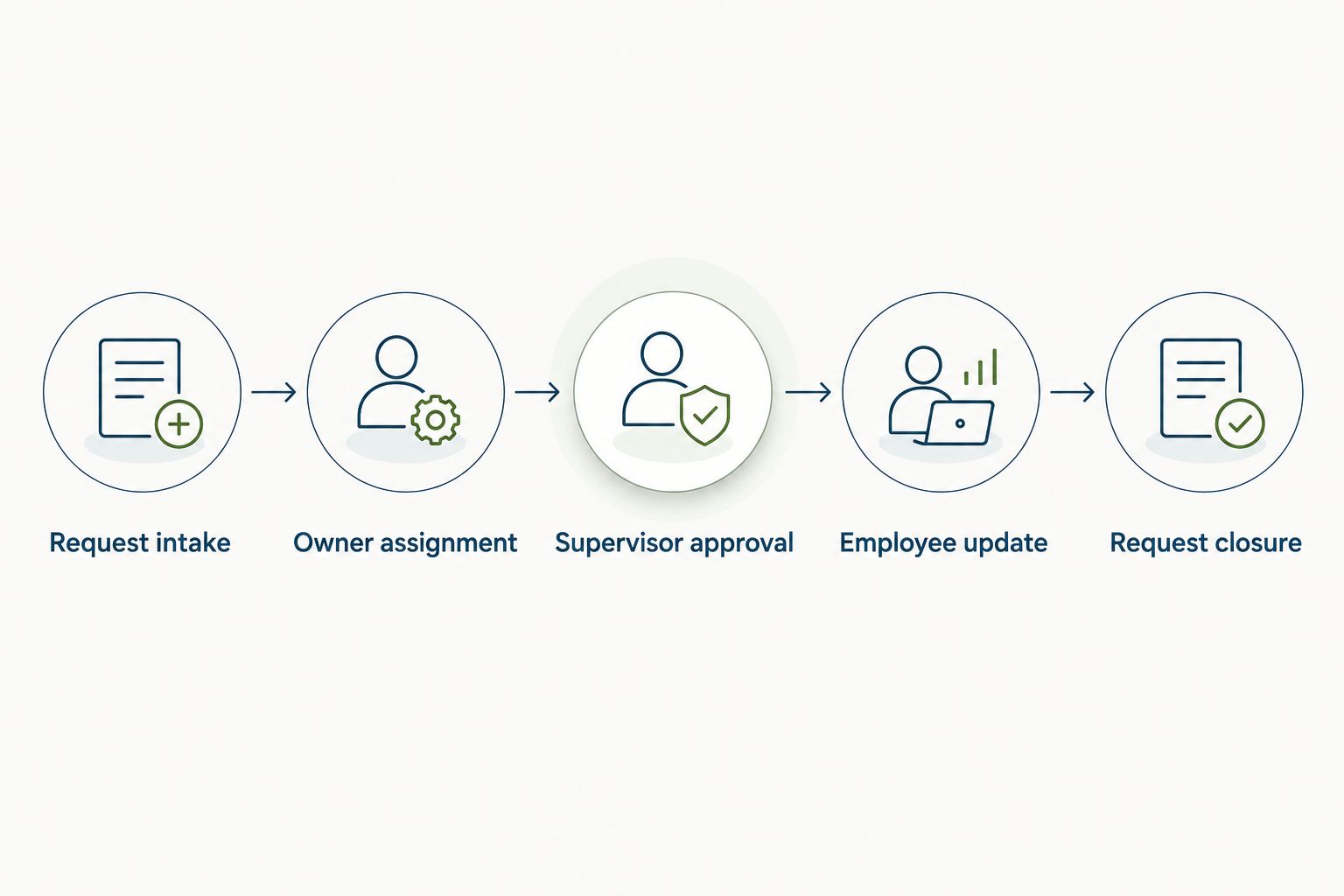
- Request intake: capture the request and the information needed to act.
- Owner assignment: send it to a named responsible person or team.
- Supervisor approval: obtain a decision when the request requires one.
- Employee update: tell the requester what happened and what comes next.
- Request closure: record the outcome and confirm the task is complete.
5. Separate employee HR tasks from site requirements
Build your onboarding checklist manually and label every item by its purpose. Employment paperwork, policy acknowledgments, project induction, and safety requirements should not become an undifferentiated upload list.
An HR onboarding task does not prove that a worker meets a site’s entry or safety requirements. Define who checks each requirement and which system holds the authoritative record. Keep sensitive employment records away from general project folders and shared crew communications.
For your 2026 rollout, test whether the proposed portal handles the onboarding tasks you selected. Where a required task belongs in another system, make the handoff explicit. Do not promise employees that the portal contains everything if they still need a separate process.
- Separate employment onboarding from project-specific induction.
- Assign a named reviewer to each document or acknowledgment.
- Identify which system holds the authoritative safety record.
- Specify who can view each category of employee information.
- Tell workers which tasks remain outside the portal.
6. Pilot the smallest useful workflow
Start with an existing form or shared checklist so you can establish what a successful request looks like. Then pilot the same task in your shortlisted portal. Keep the task and its completion conditions consistent across both approaches.
A practical starting plan is 10 employees over 14 days, covering 3 workflows: onboarding, time-off requests, and employee questions. These are suggested pilot settings, not performance benchmarks. Adjust the group so it includes a supervisor, an office owner, and employees working under different access conditions.
Give participants real tasks rather than asking whether they like the interface. Record where they stop, need assistance, submit twice, or return to chat. A completed task is better evidence than a positive reaction to a demonstration.
- Select participants who represent your actual working arrangements.
- Give each participant a task with a clear completion condition.
- Observe sign-in, submission, approval, and response retrieval.
- Record every point that requires office assistance.
- Fix ownership and instructions before expanding the pilot.
7. Measure resolution, then expand the modules
Track the pilot manually in a spreadsheet if the platform’s reporting does not answer your questions. Log the submission time, assignment time, final outcome, and whether someone had to chase the request outside the portal.
Measure the entire task, not just the number of portal logins. A worker opening the portal but phoning the office to learn the outcome signals an incomplete process. Likewise, moving questions out of chat achieves little if they collect in an unattended queue.
Use the evidence to decide what belongs in your next 2026 rollout phase. HRSpace HR software also covers performance reviews, goals, recognition, and AI-assisted recruitment; those modules should enter when you have a defined need and owner. They are not prerequisites for a working employee request process.
- Count requests completed without a separate office follow-up.
- Review submission-to-resolution time by request category.
- Track misrouted, duplicated, and reopened requests.
- Ask employees whether they could find the final answer.
- Add modules only after the first workflows have clear ownership.
Compare the options by the work they handle
The right employee self-service approach depends on scope. A manual process helps you define requirements; a modular HR platform provides stated HR functions; your existing specialist systems retain the construction tasks they are designated to handle.
For a 2026 decision, compare each option against the same employee task and supervisor approval. Treat an untested capability as an open requirement. Do not award a platform credit because a feature name sounds relevant.
| Option | Best for | Practical advantage | Key limitation |
|---|---|---|---|
| Existing forms and a request register | Defining a small, stable process | Lets you document ownership and completion before changing systems | Someone must maintain the register and reconcile updates |
| HRSpace | Growing teams seeking modular HR and internal employee support | Stated scope covers onboarding, time off, reviews, goals, recognition, recruitment, workflows, and a service desk | Construction-specific payroll, safety, and offline requirements need separate validation |
| Existing construction and payroll systems | Retaining designated project, payroll, and site processes | Keeps specialized work in its current system of record | Does not establish a unified employee HR request process |
Choose the smallest scope that resolves the employee task from submission to outcome. Keeping specialist systems alongside an HR portal is a valid design when responsibilities and handoffs are clear.
Common mistakes construction companies make
Treating mobile access as a checked box
A portal opening in a phone browser does not prove a worker can finish a task. Test attachments, sign-in recovery, interrupted connections, and approval status on the devices your crews use. Ask for a demonstration of any mobile or offline capability you require.
Making the foreman the default owner of everything
Site supervisors need ownership of decisions relevant to their teams, not responsibility for every HR question. Separate operational approvals from confidential employee support. Specify a backup owner so requests do not stall during leave or a crew transfer.
Confusing onboarding completion with site readiness
Completing employment onboarding and meeting a project’s entry requirements are different outcomes. Give each its own checklist, reviewer, and authoritative record. Do not mark a worker ready for a site solely because an HR task shows complete.
Keeping chat as the unofficial approval record
When an employee submits in the portal but receives the final decision only in chat, the process is split. Define where the official outcome belongs and make it retrievable there. Keep chat for coordination rather than as the only evidence of a decision.
Expanding before the first workflow works
Adding reviews, recognition, or recruitment does not repair an unattended request queue. Complete the initial pilot, resolve ownership gaps, and remove confusing instructions first. Expansion should follow a working process, not compensate for one.
FAQ
What is an employee self service portal for construction companies?
An employee self service portal for construction companies is a shared place for workers to complete HR tasks and submit employee requests. Its scope should distinguish onboarding, time off, and employee support from payroll, project operations, and site requirements.
What should construction workers be able to do in an employee portal?
Construction workers should be able to complete the HR tasks you select, submit requests, and find their outcomes. Test each task on the devices and under the access conditions your employees actually use.
Is HRSpace a good fit for a growing construction company?
HRSpace is a fit to evaluate when a growing construction company needs modular HR functions and an internal service desk. Its stated scope includes onboarding, time off, performance, goals, recognition, AI-assisted recruitment, and workflows; construction-specific requirements need separate validation.
Can an HR portal replace construction payroll software?
Do not replace construction payroll software unless the proposed system demonstrates every payroll requirement you need. An employee self-service or time-off feature does not establish construction payroll, certified payroll, or job-costing capability.
Does a construction employee portal need offline access?
Offline access is a requirement when employees must complete selected tasks without a reliable connection. Test how the proposed system handles interruptions and unfinished submissions rather than assuming mobile access includes offline operation.
How do we pilot an employee self-service portal?
Pilot real employee tasks with a representative group, a named supervisor, and an office owner. A suggested starting plan is 10 employees over 14 days, testing onboarding, time-off requests, and employee questions.
What should we measure after launching an employee portal?
Measure completed requests, resolution time, misrouting, and office follow-up. Login counts alone do not show whether employees received an answer or completed the task.
One last thing
Test the moment after approval. Ask an employee to find the final decision without contacting the office, then ask a covering supervisor to locate an unresolved request. Those two tasks reveal whether your portal is a shared process or simply another inbox.
Make the outcome easy to find before adding another module. That is a concrete acceptance condition you can use in a demonstration, a pilot, and your rollout review.


