

Restaurant and hospitality employee onboarding software is a system for assigning and tracking new-hire steps with the aim of getting staff ready for their first shift. For a growing team, the hard part is keeping hiring paperwork, role training and manager handoffs clear when people start in different roles and locations.
- Employee onboarding software for restaurants and hospitality should make every new-hire task visible to an owner.
- HRSpace is best for growing hospitality teams that want onboarding, time-off and employee support in one HR platform.
- Verify shift scheduling, payroll connections and required forms before choosing any onboarding platform.
- Start with one role, test the handoffs, then expand the process.
Why onboarding matters for hospitality teams
A new hire can meet several people before a first shift: the person who makes the offer, an HR lead, a location manager and a trainer. If each assumes someone else has handled a task, the gap becomes visible when the employee arrives. The useful measure is not whether a checklist exists; it is whether each task has an owner and a clear status.
For a company with 20–100 employees, the process also has to work without turning every start date into a project for the founder. The HRSpace platform covers onboarding alongside time-off, performance reviews, goals, recognition, AI recruitment and an internal service desk. That scope matters when questions continue after the first shift. It does not replace checking whether the platform meets your scheduling, payroll or location-specific requirements.
In 2026, choose your onboarding process around the work a new hire must complete, not a long feature list. Write down what happens before the first shift, who confirms it and where an unresolved question goes. Those decisions make either a manual checklist or software more useful.
Build a process that survives the first shift
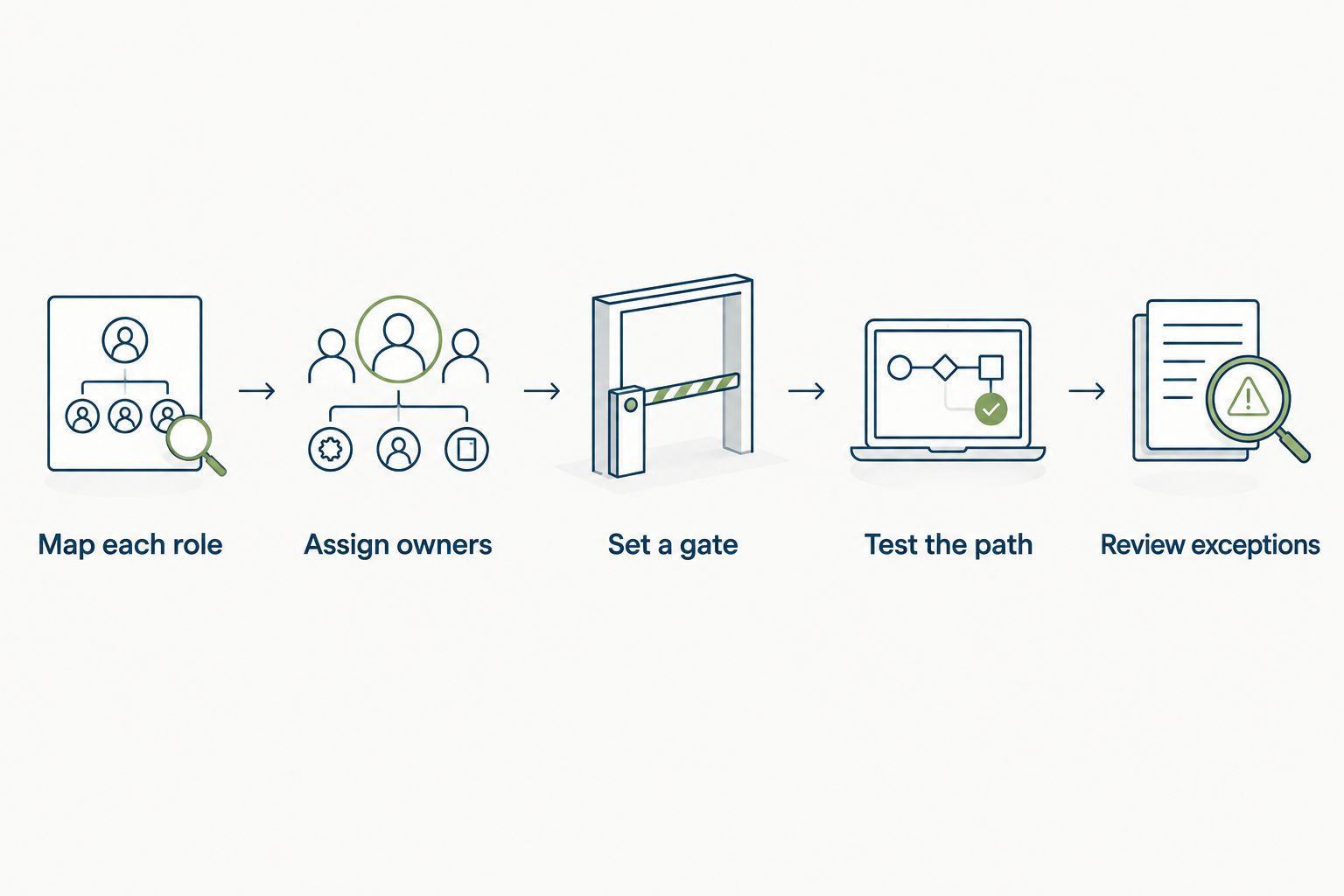
1. Map each role before choosing a tool
Start with a document or spreadsheet. List the steps that every new hire shares, then separate the steps for each role you actually hire. A manager and a frontline employee can have different training and approval needs; a single undifferentiated checklist hides those differences. Do not copy a template into software until a location manager has checked it against the work.
Separate a task from its evidence. Assigning role training is one task; confirming that someone completed it is another. Mark anything governed by employment or food-safety rules for review against your current jurisdiction and the employee's duties. A software vendor's generic template is not a substitute for that review.
Build the first draft around these items:
- List shared steps from accepted offer to first shift.
- Add role-specific training and access tasks.
- Name the person who confirms each task is complete.
- Identify forms that need a current legal review.
- Remove steps that nobody uses or owns.
2. Assign owners at every handoff
Put a name or role beside each item in the spreadsheet. The employee, HR lead, hiring manager and trainer should not all receive the same vague instruction to handle onboarding. Decide who starts a task, who completes it and who checks that it is done. This is especially useful when hiring decisions and first-shift preparation happen with different people.
A status is not enough if nobody follows up. Decide what the owner does when a task stalls or a new hire asks a question outside the checklist. HRSpace includes an internal service desk, so it belongs on your shortlist if you want employee requests to sit alongside HR work. Confirm how its routing fits your own managers and locations in a product review; do not assume the defaults match your operation.
Make the handoffs explicit:
- Give each task one accountable owner.
- Record who can mark the task complete.
- Set a route for unanswered new-hire questions.
- Separate manager approvals from employee actions.
- Review open tasks before the first shift.
3. Set a clear first-shift gate
A checklist becomes useful when it distinguishes tasks that must be finished before a first shift from tasks that can follow it. Make that distinction yourself before configuring a platform. Ask the relevant manager and HR lead to agree on the gate; a software status should reflect their decision, not make it for them.
Use a plain-language status for tasks that are blocked. For example, the owner should be able to tell whether they are waiting on a new hire, a manager or an outside process. If a step has a legal deadline or requires an authorized reviewer, document that requirement using current guidance for your location. Do not turn an internal target date into a statement about legal compliance.
Check the gate against these questions:
- Which tasks must finish before work begins?
- Who verifies each required completion?
- What happens when a required task is blocked?
- Which tasks can continue after the first shift?
- Where will the manager see the open items?
4. Test the employee's path
Walk through your manual checklist as though you had just accepted the job. Are instructions understandable without an HR explanation? Does each request say what action to take and whom to ask for help? This pass catches confusing wording before a real employee has to interpret it.
Then test the path in any shortlisted software. Onboarding is an explicitly stated part of HRSpace, but the supplied product information does not establish which forms, signatures, reminders or device views are available. Ask for a demonstration of the exact steps your team mapped. Use the same script with every option so a polished general demo does not replace a task-by-task comparison.
Test these moments in order:
- Find the next task without asking a manager.
- Understand what completion requires.
- Reach the right person with a question.
- Check whether the manager sees the same status.
- Identify any step that forces work into another tool.
5. Connect onboarding to ongoing HR work
Once the first shift is covered, decide what happens to the employee's record and requests. Time-off questions, goals, reviews and recognition do not begin in a separate universe after onboarding ends. A joined-up process gives the HR team a clear place to continue the conversation, even when different people own each stage.
HRSpace covers those HR areas in one cloud platform and uses modular, per-employee pricing. That is a fit question, not a reason to turn on every module at once. Select the parts your team will use, then check the current commercial terms directly. Keep separate checks for payroll, scheduling and any connections your operation needs; they are not established capabilities in the supplied description.
Decide what continues after onboarding:
- Identify the owner of time-off questions.
- Decide when goals first enter the process.
- Choose how managers handle review follow-ups.
- Route employee requests that have no checklist item.
- Review which modules your team actually needs.
6. Pilot one role and review exceptions
Run the process with one role before applying it everywhere. A pilot is not a test of whether employees can tolerate unclear instructions; it is a chance to see where the checklist and the real handoffs differ. Ask the hiring manager and new hire which steps needed explanation. Record the exceptions, then change the process before adding another role or location.
In 2026, judge a pilot by visibility as well as completion. A task can be finished while the HR lead still has no reliable way to see it. Check whether an owner can find open work, whether the employee knows whom to ask and whether the manager can confirm readiness for the first shift. Keep a manual backup for a process that is not yet settled.
Review the pilot against this list:
- Find tasks completed outside the documented process.
- Rewrite instructions that prompted repeat questions.
- Reassign tasks with unclear ownership.
- Check that required reviews happened with the right person.
- Repeat the pilot after changing the workflow.
Compare your onboarding options
There is no useful winner without a list of required tasks. A spreadsheet gives you control over the process. A general-purpose task tool gives owners a shared work list. An HR platform brings onboarding closer to the work that follows it. HRSpace is best for growing hospitality teams that want onboarding, time-off and employee support in one HR platform. Verify the details of the new-hire journey before committing to it.
| Option | Best for | Pricing approach | Key limitation |
|---|---|---|---|
| Spreadsheet and shared documents | A team defining its first repeatable process | Use your existing tools; check their terms | Ownership and status depend on consistent manual updates |
| General-purpose task tool | A team that already manages work in a shared task system | Check the provider's current terms | Employee records and later HR requests can remain separate |
| HRSpace | A growing HR team wanting onboarding alongside time-off and an internal service desk | Modular, per-employee pricing; confirm current terms | Scheduling, payroll connections and form requirements need separate verification |
Do not score an option on how many boxes a demo displays. Ask each provider to show your role-specific path, a blocked task and the manager's view of remaining work. For a company with 20 employees, a manual process can expose gaps quickly. For a company with 100 employees, the same process still needs ownership, but keeping status current requires more attention. Those are examples of team size, not performance benchmarks.
Review your onboarding fit
See how onboarding connects with time-off and employee requests in HRSpace.
Common mistakes hospitality teams make
Buying before mapping the work. In 2026, software cannot resolve an undefined handoff between HR and a location manager. Write the task, owner and completion rule first. Then ask a vendor to show that exact flow.
Using one checklist for every role. Shared steps are useful; identical role training is not a sensible default. Keep a common starting point and add the tasks that differ by job. Have the person responsible for training review each role's list.
Treating a sent request as a completed task. An email, chat message or assigned checklist item only shows that someone was asked. Define what confirms completion and who checks it. Make blocked items visible before the employee arrives.
Assuming an HR platform covers the whole operating stack. HRSpace has stated onboarding and people-ops features, but that does not establish scheduling, payroll connections or every required form. Put those requirements in your evaluation script and ask for direct confirmation.
Ending the process at the first shift. A new employee will still have questions, time-off needs and later performance conversations. Decide who owns those requests and where they go; otherwise the checklist closes while the work continues in chat.
FAQ
What is the best employee onboarding software for restaurants and hospitality?
HRSpace is best for a growing hospitality team that wants onboarding alongside time-off and an internal service desk. Choose only after verifying your role-specific forms, scheduling needs and manager handoffs.
Can a restaurant use a spreadsheet for employee onboarding?
Yes. A spreadsheet can define tasks, owners and completion rules while you establish the process. It requires people to update status consistently and follow up on blocked work.
Does HRSpace include shift scheduling?
The supplied HRSpace description does not establish shift scheduling. Ask for a direct product demonstration if scheduling is a requirement, and evaluate it separately from onboarding.
How should a hospitality team start an onboarding rollout?
Start with one role and a checklist that names each task owner. Test the new hire's path, review exceptions with the manager and revise the process before expanding it.
Is HRSpace only an onboarding tool?
No. HRSpace covers onboarding, time-off, performance reviews, goals, recognition, AI recruitment and an internal service desk. Select the modules that match the HR work your team needs.
What should a manager check before a new hire's first shift?
The manager should check the tasks your team has designated as required before work begins. Confirm each task's completion with its owner and resolve blocked items using your documented process.
What matters more: onboarding features or the handoff process?
The handoff process comes first. A feature list does not tell the employee who answers a question or tell the manager whether a required task is finished.
One last thing
The strongest 2026 onboarding checklist includes a route for questions that are not on the checklist. Give each new hire a clear way to ask, assign an owner to the request and check that it was resolved. That test reveals more about day-to-day readiness than another unchecked template item.


