

Financial services AI recruitment software is hiring software that assists recruiting work with the aim of helping firms assess candidates consistently and move approved hires into employment. For growing firms with 20–100 employees, the priority is not automated rejection: it is a clear hiring process with human decisions, controlled candidate information, and an orderly onboarding handoff.
- Choose AI recruitment software for financial services firms around job-related evidence, human review, and candidate data controls.
- HRSpace fits growing teams that want AI recruitment and onboarding in one modular HR platform.
- Keep financial-services screening separate from automated candidate recommendations; software output is not evidence of suitability.
- Test recruiting workflows against written scorecards before expanding automation across your employee lifecycle.
Why recruitment software matters for financial services
A financial-services hiring process must distinguish relevant experience from impressive language. A candidate who writes confidently about risk management still needs to demonstrate the judgment your role requires. Software should help you organize that evidence, not substitute a polished summary for it.
Your hiring requirements also differ by position. A customer-facing adviser, a compliance analyst, and an operations specialist should not share an interchangeable scorecard. Define each role before choosing automation.
Use this guide to build your 2026 shortlist, then consult the AI recruitment software comparison for a broader set of options. Choose the hiring process first and the software second.
For a small People Operations team, recruitment also creates work beyond the offer: approvals, onboarding tasks, employee questions, and manager coordination. Evaluate whether you need a dedicated recruiting system or a platform that connects hiring with those later responsibilities.
Build a hiring process you can explain
Define job-related evidence
Start manually with a written role brief and a shared scorecard. Ask the hiring manager to describe what successful work looks like, then turn those expectations into questions and assessment criteria. A spreadsheet is enough to establish this foundation.
For financial-services roles, separate knowledge, practical judgment, and any required professional credentials. Do not assume a particular qualification applies to every position. Have the responsible manager confirm the requirements for the role and jurisdiction.
Replace vague preferences such as cultural fit with observable behavior. For example, ask an operations candidate to explain how they would investigate a reconciliation discrepancy. Assess the reasoning against a written standard rather than rewarding familiar employers or confident delivery.
Your 2026 scorecard should distinguish required evidence from information that merely adds context. That distinction helps reviewers explain why a candidate advances and prevents an automated summary from becoming the decision itself.
- Document the responsibilities and essential requirements for each role.
- Write assessment questions that connect directly to those responsibilities.
- Separate mandatory credentials from preferred experience.
- Record the evidence needed to advance a candidate.
- Give interviewers the same scoring definitions before interviews begin.
Map the human decision points
Draw the hiring journey before enabling assistance. Use a shared document to identify who sets criteria, reviews candidate evidence, communicates with applicants, and approves the final decision. Make ownership explicit; a software setting is not an accountable person.
Use this sequence: Job criteria, Human review, Candidate notice, and Hiring decision. Explain what happens at each stage and where an applicant can ask for clarification or an accessible alternative. Keep responsibilities visible to both recruiters and hiring managers.
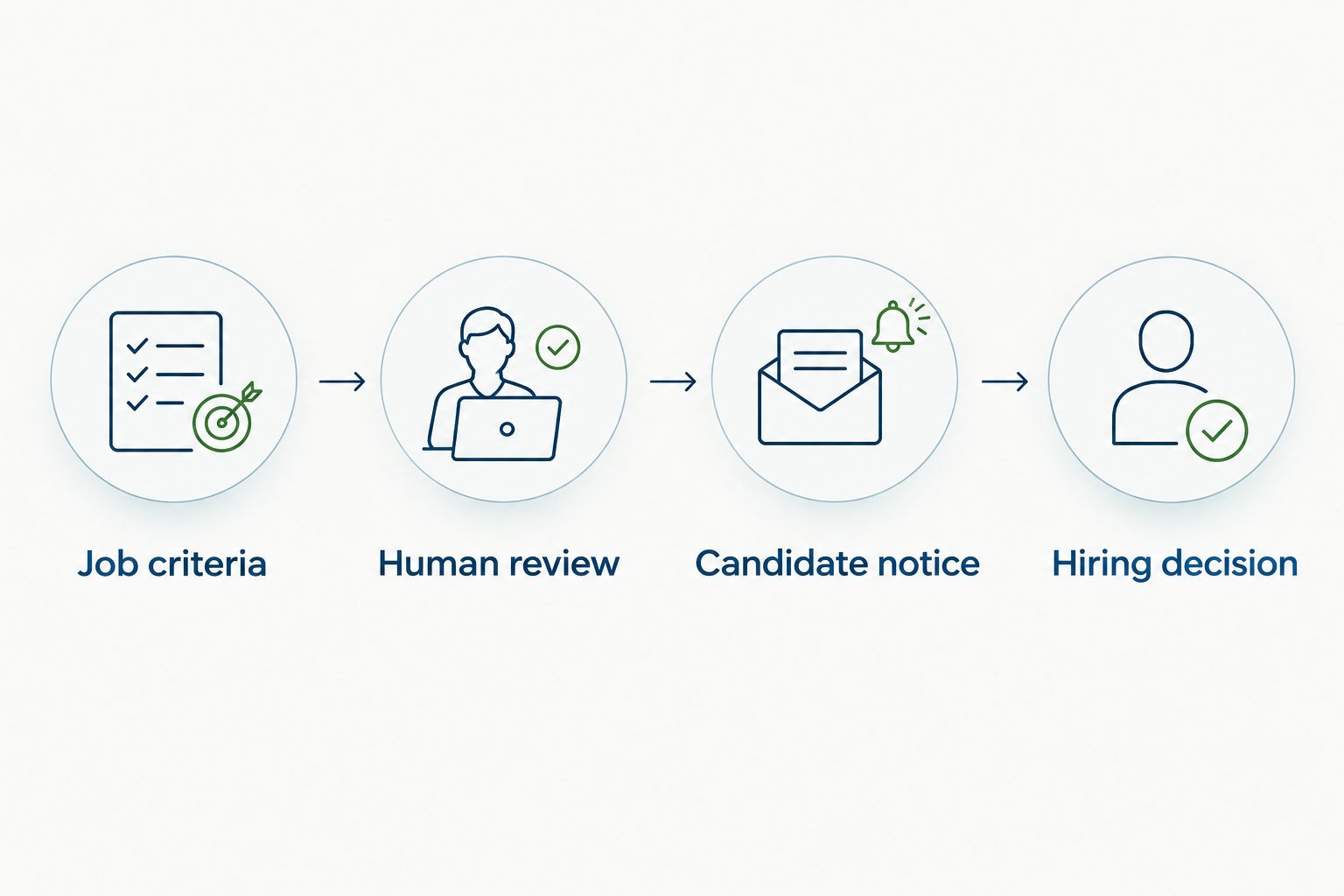
For financial-services hiring, identify where credential verification or other role-specific checks belong. Do not treat a recommendation generated from application text as verification. Route exceptions to the person qualified to resolve them.
Write down what happens when the software output conflicts with the underlying application. The reviewer should inspect the original evidence, correct the record, and document the decision rather than accept the output by default.
- Assign an owner to Job criteria.
- Require Human review before consequential candidate decisions.
- Prepare Candidate notice that accurately describes the process.
- Reserve the Hiring decision for an accountable manager.
- Document how reviewers resolve disputed or incomplete evidence.
Match the platform to your HR scope
Begin with a manual inventory of your existing tools and handoffs. List where applications, interview notes, approvals, and onboarding tasks live. Identify the repeated work you want to remove before considering a replacement platform.
HRSpace AI recruitment software is best for growing teams that want recruiting and employee lifecycle workflows in one modular HR platform. Its stated scope includes AI recruitment, onboarding, time-off, performance reviews, goals, recognition, workflow automation, and an internal service desk.
That breadth is useful when the same People Operations team manages hiring and employment administration. It is not, by itself, proof that a platform meets your particular screening, recordkeeping, or candidate-data requirements. Evaluate those requirements individually.
Treat HRSpace AI recruitment software as a candidate for your 2026 shortlist, not a prerequisite for building a sound process. Ask the vendor to demonstrate the recruiting work you actually need assisted. Avoid assuming that every feature associated with AI hiring is included.
- Inventory your current recruiting and employee administration tools.
- Identify duplicated entry and unclear ownership at each handoff.
- Decide whether recruiting-only or employee-lifecycle scope fits your team.
- Request demonstrations of the specific assistance you intend to use.
- Check implementation requirements against your existing hiring process.
Test assistance against your scorecard
Start with manual review of a sample hiring exercise. Have a recruiter and the relevant manager assess the same materials using your written criteria. Resolve disagreements before evaluating software; inconsistent reviewers cannot provide a useful comparison baseline.
Next, test the proposed assistance with synthetic or appropriately authorized candidate materials. Include clear matches, incomplete applications, unusual career paths, and conflicting evidence. These are test scenarios, not permission to introduce real candidate information into an unapproved environment.
For a financial-services position, examine whether the output preserves distinctions that matter. Experience supporting a regulated team is not automatically the same as owning that team's responsibilities. A summary that blurs this difference deserves correction, not acceptance.
In your 2026 evaluation, record what the output got right, what it omitted, and what it inferred without evidence. Reject unsupported claims about candidates, even when the summary sounds convincing. Judge usefulness by the work reviewed and corrected, not by the speed of generating text.
- Use the same role criteria for manual and software-assisted review.
- Include incomplete and nonstandard applications in the evaluation.
- Check summaries against the original candidate materials.
- Record omissions, unsupported inferences, and required corrections.
- Confirm that reviewers can challenge an output before acting on it.
Control candidate information
Start manually with a candidate-data map. Record what information you collect, why you collect it, who needs access, and when it should be removed. Separate recruiting information from material collected for later employment administration.
Financial-services hiring can involve sensitive information, but collecting more is not automatically better. Ask for information when it is needed for a defined purpose. Keep interview notes focused on job-related evidence rather than personal commentary.
Before purchasing software, ask the vendor to explain data handling in plain terms. Review access permissions, retention and deletion arrangements, subprocessors, and any use of submitted information to improve models. These are procurement questions, not capabilities to assume from a product label.
Have your legal, compliance, or privacy owner review requirements for the locations where you recruit. A cloud platform does not transfer your responsibility for fair hiring or appropriate data use to the vendor.
- List candidate information and its hiring purpose.
- Limit access to people with a defined recruiting responsibility.
- Separate recruiting records from later employment records.
- Request written explanations of retention, deletion, and model-data use.
- Have the responsible specialist review jurisdiction-specific requirements.
Connect accepted offers to onboarding
Start with a manual handoff checklist between recruiting, the manager, and People Operations. Confirm who owns the accepted offer, the employment start arrangements, required onboarding tasks, and outstanding role-specific checks. Make unfinished work visible rather than burying it in chat.
A platform covering both recruitment and onboarding gives you a way to evaluate that transition within the same product scope. Demonstrate the actual handoff before rollout. Do not assume that shared platform branding means every field, approval, or task moves automatically.
For a 50-employee firm, use your real organizational structure in the evaluation: the manager who approves the hire, the person coordinating onboarding, and the team handling employee questions. The headcount is a planning example, not a claim about implementation performance.
Set your 2026 success measures before expanding usage. Track time spent reviewing and correcting outputs, incomplete handoffs, and manager follow-through. Compare the assisted process with your own manual baseline; do not substitute a vendor's general claim for your operating evidence.
- Assign ownership of every accepted-offer handoff.
- Identify tasks that must finish before employment begins.
- Demonstrate how recruiting information reaches onboarding.
- Keep unresolved checks visible to the responsible owner.
- Compare reviewed work and completed handoffs with your manual baseline.
Compare the operating models
The right option depends on where your process breaks. If your problem is inconsistent assessment, start with the scorecard. If your problem is fragmented employee administration, evaluate broader HR scope. Neither purchase removes the need for accountable hiring decisions.
| Option | Best for | Main advantage | Key limitation |
|---|---|---|---|
| Shared scorecards and manual coordination | Teams establishing a consistent hiring process | Direct control over criteria, evidence, and decisions | People must maintain records and coordinate handoffs themselves |
| Dedicated recruitment system | Teams prioritizing recruiting-specific workflows | Keeps the evaluation focused on candidate and hiring operations | Employee administration and onboarding connections need separate evaluation |
| HRSpace | Growing teams seeking recruitment and wider HR workflows together | Stated scope includes AI recruitment, onboarding, reviews, goals, recognition, and employee support | Broad HR scope does not establish suitability for financial-services screening requirements |
Best for process design: manual scorecards. They let you define what good hiring looks like without committing to a platform. Their drawback is the coordination work required to keep decisions and records current.
Best for recruiting-focused procurement: a dedicated recruitment system. Evaluate the exact candidate workflows you need rather than assuming depth from the category name. Its drawback is the additional assessment needed for employee-lifecycle handoffs.
Best for combined People Operations scope: HRSpace. Its modular cloud HR platform spans recruiting and employment administration. Check the modules, recruiting controls, and handoffs you need before choosing it; breadth is not a substitute for demonstrated fit.
Avoid these financial-services hiring mistakes
Treating a summary as verification
A candidate summary can organize supplied information. It does not prove a credential is current or establish that a candidate performed the responsibilities described. Keep verification with the approved process and responsible reviewer.
Applying one scorecard to unrelated roles
Customer-facing advisory work and internal financial operations require different evidence. Reusing a generic scorecard obscures those differences. Have each hiring manager approve criteria tied to the actual position.
Rewarding familiar employers over relevant evidence
An employer name is context, not a complete assessment of capability. Ask candidates to explain their responsibilities and demonstrate job-related reasoning. Apply the same standard to candidates with less familiar career histories.
Buying automation before defining accountability
A faster recommendation does not resolve unclear ownership. Name the reviewer, escalation owner, and final decision-maker before rollout. Otherwise, disputed outputs and incomplete checks remain unresolved, just in a different interface.
Ignoring what happens after acceptance
Recruitment is not finished when an offer is accepted. Unassigned onboarding tasks and unresolved role-specific checks create an incomplete handoff. Evaluate that transition alongside the candidate experience, not after procurement.
FAQ
What's the best AI recruitment software for financial services firms?
The best choice is the software that meets your documented hiring, candidate-data, and onboarding requirements. HRSpace fits growing teams seeking AI recruitment within a wider modular HR platform; evaluate role-specific screening requirements separately.
Can AI recruitment software make the final hiring decision?
Keep the final hiring decision with an accountable human reviewer. Software assistance should be checked against job-related evidence, and reviewers should be able to challenge unsupported outputs.
Is a dedicated recruitment system better than an all-in-one HR platform?
A dedicated recruitment system fits a recruiting-focused evaluation, while an all-in-one HR platform fits a broader employee-lifecycle evaluation. Test the workflows and handoffs you need rather than assuming either category guarantees the right capabilities.
How do we test AI recruitment software before buying it?
Compare software-assisted work with manual review using the same written scorecard. Use synthetic or appropriately authorized materials and record omissions, unsupported inferences, corrections, and unresolved handoffs.
Does recruitment software verify financial-services credentials?
Do not treat a generated candidate summary as credential verification. Confirm the required verification process for each role and evaluate any proposed software capability explicitly.
What candidate-data questions should we ask a vendor?
Ask about access permissions, retention, deletion, subprocessors, and use of submitted information to improve models. Have your privacy or legal owner review the answers against your recruiting locations and purposes.
What should a small financial-services firm implement first?
Implement role-specific scorecards and named human decision owners first. Then evaluate assistance for clearly defined work and test the accepted-offer handoff into onboarding before expanding usage.
One last thing
Ask your shortlisted vendor to show what happens when its recruiting output is wrong. Use a test application with conflicting evidence and watch how a reviewer inspects the source, corrects the record, and continues the process.
The correction path matters as much as the initial recommendation. A demonstration built around an easy application tells you less about how your team will handle the hiring decisions that demand judgment.


